Chain Web 2.10.465
Released 22 September 2026
Version requirements can be found in this Jira: (RTC-63356)
Requires Integration Platform 3.1.1
Reliable processing of POS unit changes and POS configuration activation (RTC-62498)
Changes to POS units and activation of POS configurations are processed to completion in a single pass, also when configurations are activated for a large number of POS units and processing takes several minutes. Each change is applied once, so POS master data and the generated configuration files stay consistent, without an update being repeated or left unprocessed.
Order picking reliability verified (RTC-62629)
Order picking has been fully verified end-to-end, confirming that orders can be picked, delivered, and completed without interruption. This verification was carried out following underlying technical improvements to how picking orders are processed, ensuring no orders are lost, delayed, or left incomplete during fulfillment. The fix is applied automatically, so no configuration or user action is required.
Reliable export of picking orders created from customer orders (RTC-62497)
When a customer order is registered or updated in Chain Web, the resulting picking order is exported to the store and connected systems reliably. The export message is now sent in a way that works with the AMQP-based Service Bus connection, so picking orders reach the store as expected instead of being silently dropped. No configuration or user action is required.
Reliable export of picking order status changes (RTC-62628)
When picking orders are created, delivered or completed, the scheduled picking order job exports these changes to the store and connected systems reliably. The export messages are now sent in a way that works with the AMQP-based Service Bus connection, so status changes reach the receiving systems as expected instead of being silently dropped. No configuration or user action is required.
Loyalty and marketing jobs run exactly once (RTC-63477)
Scheduled loyalty campaigns, bonus voucher calculations and newsletter exports each complete a single time for every request they receive. Members get their campaign messages, vouchers and newsletters once, without duplicates, and scheduled runs finish instead of stalling. This keeps loyalty and marketing communication accurate and predictable for both the retailer and the member.
Reliable delivery of campaigns and member updates to the marketing solution (RTC-62648)
Campaign distributions and member updates sent to the marketing solution run to completion in a single pass, even when a large batch takes a long time to process. Each batch is handled once, which keeps campaign sending predictable and member data consistent between the loyalty solution and the marketing solution.
Reliable processing of campaign updates (RTC-62634)
Campaign updates sent from the back office are processed once from start to finish, even when a large update takes a long time to complete. Stores receive the resulting campaign data reliably, without repeated processing of the same update.
Reliable publishing of campaign changes (RTC-62630)
Campaign changes registered in Chain Web are published to the stores and connected systems reliably. The campaign messages are now sent in a way that works with the AMQP-based Service Bus connection, so campaigns reach the stores as expected instead of failing silently when they are sent. No configuration or user action is required.
SAFT receipt export (RTC-62500)
The SAFT receipt export runs to completion in a single pass, even when the export covers a long date range and takes a long time to produce. Each export request is
handled once, so the audit file is produced reliably, without the export restarting from the beginning or ending without a delivered file.
BackOffice batch generation (RTC-62500)
Event-triggered generation of customer, store, store group and picking order batches reads the incoming export message correctly regardless of the format it was published
in, and acknowledges each message once. Batches are generated as expected, without messages being reprocessed or left unhandled. Deployment requires Integration Platform 3.1.1.
Fix deprecated NuGet packages in ImportDBToBackoffice build (RTC-61737)
The Import DB to BackOffice job (cashier, retail customer and ARTS customer imports) runs on the Integration Platform 3.x libraries. Discontinued third-party components were replaced; the imports themselves are unchanged. Internal change, no customer impact.
Required: Integration Platform 3.1.1 and ImportDBToBackoffice 1.4.3
Chain Web 2.10.464
Released 23 June 2026
Version requirements can be found in this Jira: (RTC-60703)
Fix: Audit information in customer orders (RTC-60697)
The audit information (Last modified) in customer order details is displayed correctly.
Chain Web 2.10.463
Released 18 May 2026
Version requirements can be found in this Jira: (RTC-59229)
POS Configuration - parameter update improvements (RTC-59157)
POS parameters in POS configuration views can be updated correctly.
Chain Web 2.10.462
Released 12 May 2026
Version requirements can be found in this Jira: (RTC-59054)
POS Replication Setup (RTC-58994)
Toggling the “Active” checkbox for a POS replication subscriber in Chain Web persists the new state and shows a success notification, instead of failing with an error.
Query optimization in Lindbak Retail DB (RTC-58531)
Added 3 new indexes improving performance in ChainWeb.
Chain Web 2.10.461
Released 6 May 2026
Version requirements can be found in this Jira: (RTC-58123) and (RTC-58889)
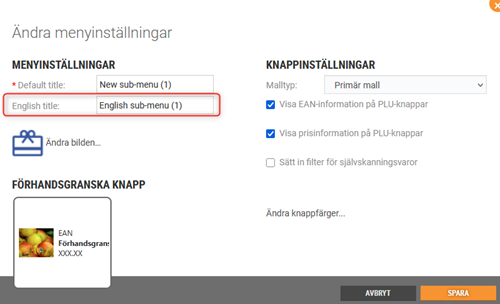
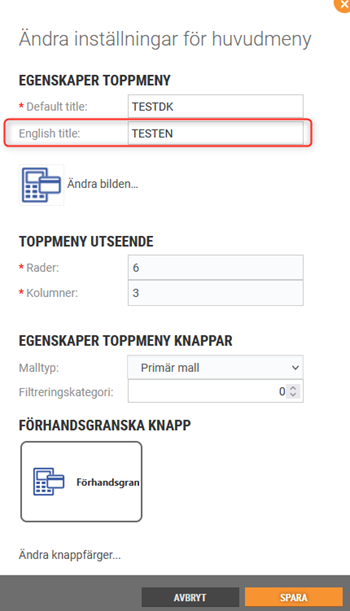
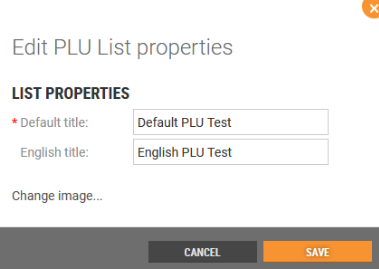
English title for PLU categories
It was not previously possible to configure an English title for PLU List categories in POS Configuration.
Users can now add an English category title when editing PLU List menus in Chain Web in POS Configuration, which will be displayed to customers who have selected English as their language.
New parameter to determine the status on the created Service order
The action code numbers configured in the new POS Configuration parameter “ActionCodeServiceOrder” determine if the created Service Order has status Active or Done.
POS Configuration
New parameter:
ActionCodeServiceOrder - default value: blank.
The action code numbers configured in this parameter determine if the created Service Order has status Active or Done.
Improvements
POS Configuration - English text for PLU Lists (RTP-48465)
'English title' text and input field are directly under 'Default title' text and input field, not right under * sign.
POS Configuration - PLU Board buttons (RTC-46598)
It is no longer possible to create a sublevel on PLU-buttons connected to the item.
This was not a feature that was working, so it was only confusing for the person setting it up.
Employee tag in sale header (RTP-46742)
POS Configuration includes the “LoyaltyHeaderInSaleView” parameter with the customerGroupB2C field. This allows the Employee tag to appear in the sale header through configuration, making customer group management easier.
Support for order line structured notes (RTC-54597)
Added the ability to view and edit structured notes on individual order lines in the Dispatch Order details view in Chain Web. Structured notes display a non-editable key (name) alongside an editable value field (max 512 characters).
Customer order with linked structured notes cannot be regenerated (RTC-56625)
Fixed an issue where regenerating a customer order that contained structured notes would fail. Structured notes are now preserved on the regenerated order lines.
Gift cards and Credit notes report (RTC-57328)
The store filter in the 8501_GiftcardsAndCreditnotes report shows data for the selected redeemed store. This ensures the report reflects gift cards and credit notes redeemed in the chosen store, making store-level reconciliation and analysis more accurate.
Export invoice journal - remaining amount on partial lines (RTC-57705)
The partial lines for VAT groups in VismaGlobal and VismaBusiness invoice exports display the remaining amount instead of total amount.
The invoice type-dependent fields in VismaBusiness invoice exports display correct values.
Remove items from an order (RTC-55717)
Users with the “SupportDispatchOrders” permission can remove individual items from a dispatch order regardless of the picking order status. This includes orders beyond the "ToBePicked" or "Picking" stages, giving authorized users full flexibility to correct orders at any point.
Dispatch orders - Error handling failed Klarna refund (RTC-57449)
When a Klarna refund on a Dispatch order cannot be processed (e.g., the payment service rejects the refund request), the order stays in its original state with all amounts and item details unchanged. Delivery lines, return/refund lines, and order head totals are fully preserved, preventing mismatches between order totals and item-level refund information. This ensures order data remains consistent and accurate for store staff when a Klarna payment operation fails.
Create pre-order dispatch order (RTC-57319)
Shoppers place orders for items that are not yet in stock, securing them in advance of arrival. Pre-ordered items stay in a dedicated holding area and skip the normal fulfillment flow until inventory is confirmed. Once stock is available, the order moves to the fulfillment warehouse and ships to the customer without any extra steps on their part.
OrderSubmitter (BackOfficeIntegrationSubscriber) failing on empty orders (RTC-57662)
OrderSubmitter no longer throws an exception when processing customer orders where all lines have been deleted. Empty orders are now skipped with a warning, and the job completes normally alongside any valid orders in the batch.
Remove AutoMapper from on-prem repositories owned by a team (RTC-57665)
Removed a third-party object-mapping library from POSLogProcessingWorker and BackOffice. All integrations, contracts, and flows behave identically. No upgrade steps required.