Chain Web 2.10.393
Released 24 June 2026
Version requirements can be found in this Jira: (RTC-60031)
Export invoice journal - remaining amount on lines (RTP-48432)
The total lines in VismaGlobal and VismaBusiness invoice exports display the remaining amount instead of original total amount.
The partial lines for VAT groups in VismaGlobal and VismaBusiness invoice exports display the remaining amount instead of total amount.
Chain Web 2.10.464
Released 23 June 2026
Version requirements can be found in this Jira: (RTC-60703)
Fix: Audit information in customer orders (RTC-60697)
The audit information (Last modified) in customer order details is displayed correctly.
Chain Web 2.10.470
Released 18 June 2026
Version requirements can be found in this Jira: (RTC-60150)
Store data sync from POS Master
A new periodic job "PosMasterStoresToStaging" in the BackOfficeImport package. It syncs store data from the POS Master database to Retail. The job detects changes using IdentityTime tracking across stores, contacts, and store groups, then maps the data to the StoreService contract and writes it to staging tables for processing by the existing store import pipeline.
Prerequisites:
Chain Classic must be the master for stores.
Store and StoreGroup SSIS packages must be disabled - this job replaces them
Key behaviors:
Full initial sync on first run, incremental sync on subsequent runs.
Maps store fields (name, store numbers, address, contact info, open/close dates).
Embeds Team, Profile, and Region group assignments in store events.
Links related stores.
Falls back to Profile StoreGroup country code when contact country is empty.
Deactivates stores no longer assigned to any store group.
Completes with no effect when nothing has changed.
Picking order export
Picking order exports include short-pick information, customer details, and order status. Each order line contains both the quantity originally ordered and the current quantity, making it possible to identify reduced quantities during the picking process.
Exports also include customer address and contact information, such as name, customer number, mobile number, email address, postal address, and country code. Delivery address and delivery contact information continue to be included separately.
Order status is included in the export, making it easier to track the current state of an order and support customer communication and fulfilment processes.
If customer address or contact information is not available, the export is still generated with the available data.
New parameter ItemGroupRequirementConfig
New parameter called “ItemGroupRequirementConfig” has been implemented.
Thanks to it given Item groups will be allowed to be sold in given time window. If Item group is not set, it can be sold all the time.
POS Configuration
ItemGroupRequirementConfig parameter (default value: blank)
Restricts the sale of items in specific item groups to a set time window.

Improvements
Customer remarks are limited to 1000 characters (RTP-46329)
The customer remarks field in BackOffice Customer Management accepts a maximum of 1000 characters. The edit form stops input at the limit and validates the length when the customer is saved, so the limit is visible to the user while editing.
Customer updates received from integrations, such as POS or member systems, are processed even when the remarks text exceeds the limit. The text is shortened to the first 1000 characters and the rest of the customer data is saved. This ensures customer updates from external systems are applied reliably instead of being rejected.
Reliable member updates during busy periods (RTC-59126)
Member changes from Lindbak Loyalty flow through to downstream systems smoothly, even when the loyalty database is under heavy concurrent load. The integration handles brief database contention automatically and delivers pending member updates on the same cycle whenever possible, keeping member data fresh and consistent across the platform.
Automatic release of pre-orders once stock arrives (RTC-57324)
Pre-orders placed by customers stay in a holding location until inventory is confirmed at the central warehouse. As soon as stock is available for every item in the order, the order is released to the central warehouse for picking and fulfillment without manual handling.
CustomerPublisher fails for business customers with no address (RTC-58440)
Fixed CustomerPublisher failing on business customers with null or incomplete address data, preventing those customers from syncing to BackOffice.
Chain Web 2.10.392
Released 26 May 2026
Version requirements can be found in this Jira: (RTC-55316)
Customer order - Return OrderVariant in GetCustomerOrders3 (RTC-54857)
The order variant is now stored at the order level in the database for customer orders. The GetCustomerOrders3 method in both Chain Web Backoffice and POS Services has been enhanced to include the order variant in the response, ensuring this information is available for POS systems.
Customer order - Return OrderVariant in GetCustomerOrders3 (RTC-40332)
The order variant is now stored at the order level in the database for customer orders. The GetCustomerOrders3 method in both ChainWeb Backoffice and POS Services has been enhanced to include the order variant in the response, ensuring this information is available for POS systems.
Backofficeintegrationsubscriber - Notificationsubscriberjob (RTC-55352)
The management of SignalR hub connections in the NotificationSubscriber, KitchenNotification, and FullTextReindexingNotification jobs has been refactored. Notification handling and SignalR communications are now more efficient and reliable, resulting in better overall performance and reduced risk of resource leaks. This update provides users and administrators with more stable, responsive, and consistent notification delivery.
BackOfficeIntegrationSubscriber - Notificationsubscriberjob (RTP-44056)
The management of SignalR hub connections in the NotificationSubscriber, KitchenNotification, and FullTextReindexingNotification jobs has been refactored. Notification handling and SignalR communications are now more efficient and reliable, resulting in better overall performance and reduced risk of resource leaks. This update provides users and administrators with more stable, responsive, and consistent notification delivery.
OrderSubmitter (BackOfficeIntegrationSubscriber) failing on empty orders (RTP-49104)
OrderSubmitter no longer throws an exception when processing customer orders where all lines have been deleted. Empty orders are now skipped with a warning, and the job completes normally alongside any valid orders in the batch.
POS Replication Setup (RTC-52787)
The Activation log is correctly stored and displayed, also the 'Activate Subscribers' button is enabled, after each operation - activation performed on Subscribers.
Improved availability of invoice logos through caching (RTC-54462)
Store logos are now correctly displayed on invoice PDFs.
Fix: Documents in stores with no logo (RTC-58714)
PDF documents are rendered correctly for stores with no logo set.
Chain Web 2.10.452
Released 26 May 2026
Version requirements can be found in this Jira: (RTC-58935)
Fix: Documents in stores with no logo (RTC-58714)
PDF documents are rendered correctly for stores with no logo set.
Chain Web 2.10.463
Released 18 May 2026
Version requirements can be found in this Jira: (RTC-59229)
POS Configuration - parameter update improvements (RTC-59157)
POS parameters in POS configuration views can be updated correctly.
Chain Web 2.10.462
Released 12 May 2026
Version requirements can be found in this Jira: (RTC-59054)
POS Replication Setup (RTC-58994)
Toggling the “Active” checkbox for a POS replication subscriber in Chain Web persists the new state and shows a success notification, instead of failing with an error.
Query optimization in Lindbak Retail DB (RTC-58531)
Added 3 new indexes improving performance in ChainWeb.
Chain Web 2.10.461
Released 6 May 2026
Version requirements can be found in this Jira: (RTC-58123) and (RTC-58889)
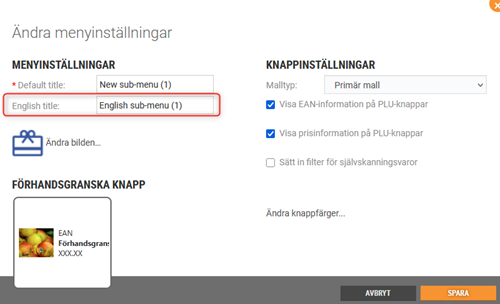
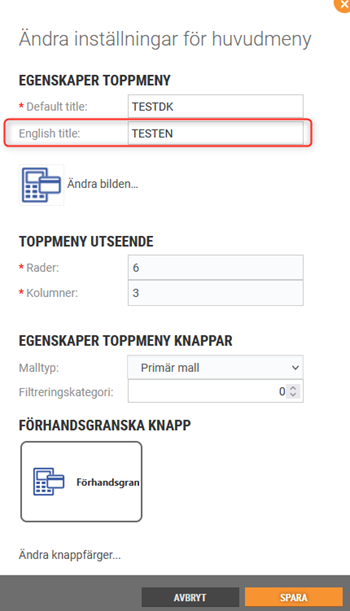
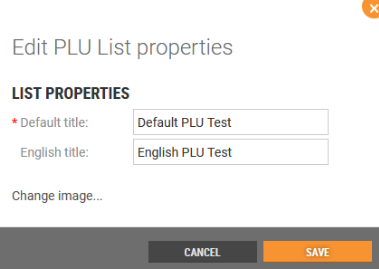
English title for PLU categories
It was not previously possible to configure an English title for PLU List categories in POS Configuration.
Users can now add an English category title when editing PLU List menus in Chain Web in POS Configuration, which will be displayed to customers who have selected English as their language.
New parameter to determine the status on the created Service order
The action code numbers configured in the new POS Configuration parameter “ActionCodeServiceOrder” determine if the created Service Order has status Active or Done.
POS Configuration
New parameter:
ActionCodeServiceOrder - default value: blank.
The action code numbers configured in this parameter determine if the created Service Order has status Active or Done.
Improvements
POS Configuration - English text for PLU Lists (RTP-48465)
'English title' text and input field are directly under 'Default title' text and input field, not right under * sign.
POS Configuration - PLU Board buttons (RTC-46598)
It is no longer possible to create a sublevel on PLU-buttons connected to the item.
This was not a feature that was working, so it was only confusing for the person setting it up.
Employee tag in sale header (RTP-46742)
POS Configuration includes the “LoyaltyHeaderInSaleView” parameter with the customerGroupB2C field. This allows the Employee tag to appear in the sale header through configuration, making customer group management easier.
Support for order line structured notes (RTC-54597)
Added the ability to view and edit structured notes on individual order lines in the Dispatch Order details view in Chain Web. Structured notes display a non-editable key (name) alongside an editable value field (max 512 characters).
Customer order with linked structured notes cannot be regenerated (RTC-56625)
Fixed an issue where regenerating a customer order that contained structured notes would fail. Structured notes are now preserved on the regenerated order lines.
Gift cards and Credit notes report (RTC-57328)
The store filter in the 8501_GiftcardsAndCreditnotes report shows data for the selected redeemed store. This ensures the report reflects gift cards and credit notes redeemed in the chosen store, making store-level reconciliation and analysis more accurate.
Export invoice journal - remaining amount on partial lines (RTC-57705)
The partial lines for VAT groups in VismaGlobal and VismaBusiness invoice exports display the remaining amount instead of total amount.
The invoice type-dependent fields in VismaBusiness invoice exports display correct values.
Remove items from an order (RTC-55717)
Users with the “SupportDispatchOrders” permission can remove individual items from a dispatch order regardless of the picking order status. This includes orders beyond the "ToBePicked" or "Picking" stages, giving authorized users full flexibility to correct orders at any point.
Dispatch orders - Error handling failed Klarna refund (RTC-57449)
When a Klarna refund on a Dispatch order cannot be processed (e.g., the payment service rejects the refund request), the order stays in its original state with all amounts and item details unchanged. Delivery lines, return/refund lines, and order head totals are fully preserved, preventing mismatches between order totals and item-level refund information. This ensures order data remains consistent and accurate for store staff when a Klarna payment operation fails.
Create pre-order dispatch order (RTC-57319)
Shoppers place orders for items that are not yet in stock, securing them in advance of arrival. Pre-ordered items stay in a dedicated holding area and skip the normal fulfillment flow until inventory is confirmed. Once stock is available, the order moves to the fulfillment warehouse and ships to the customer without any extra steps on their part.
OrderSubmitter (BackOfficeIntegrationSubscriber) failing on empty orders (RTC-57662)
OrderSubmitter no longer throws an exception when processing customer orders where all lines have been deleted. Empty orders are now skipped with a warning, and the job completes normally alongside any valid orders in the batch.
Remove AutoMapper from on-prem repositories owned by a team (RTC-57665)
Removed a third-party object-mapping library from POSLogProcessingWorker and BackOffice. All integrations, contracts, and flows behave identically. No upgrade steps required.
Chain Web 2.10.451
Released 22 April 2026
Version requirements can be found in this Jira: (RTC-58347)
Support for order line structured notes (RTC-54597)
Added the ability to view and edit structured notes on individual order lines in the Dispatch Order details view. Chain Web. Structured notes display a non-editable key (name) alongside an editable value field (max 512 characters).
Picking order export (RTC-54601)
The PickingOrder export file (JSON) includes the field StructuredNotes.
The field contains additional information related to the order. The value is transferred from POSLog to the database and included in the exported PickingOrder file.
The Swagger documentation for all PickingOrder export contracts describes the StructuredNotes field, making it clear how the field appears in the export format.
Chain Web 2.10.411
Released 10 April 2026
Version requirements can be found in this Jira: (RTC-58208)
Backofficeintegrationsubscriber - Notificationsubscriberjob (RTP-44056)
The management of SignalR hub connections in the NotificationSubscriber, KitchenNotification, and FullTextReindexingNotification jobs has been refactored. Notification handling and SignalR communications are now more efficient and reliable, resulting in better overall performance and reduced risk of resource leaks. This update provides users and administrators with more stable, responsive, and consistent notification delivery.
Chain Web 2.10.450
Released 16 March 2026
Version requirements can be found in this Jira: (RTC-57077)
Updated Klarna API connection for Kustom partner support (RTP-46000)
The Klarna payment integration has been updated to support Klarna’s new Kustom partner API connection. A new parameter “KlarnaKustomPartnerId” has been added and related configuration updates have been made in POS, POS Services, POS Master database, and Chain Web Backoffice.
These improvements ensure the POS continues to connect correctly with Klarna and process Klarna payments without interruption.
Get customer orders through relay (RTC-52752)
A new method ‘GetCustomerOrdersByCustomerNumber’ allows retrieving all customer orders for a given customer number, regardless of which store the order was placed in. Results are sorted by date (newest first) and include only active customer orders (deleted/cancelled orders are excluded and all offers are skipped as well). Each order includes: Store Number, Order Id, Order Number, External Order Number, Order Source, Project, Amount, Sales Channel, Status, Delivery Address, Pickup details, and more.
Large result sets can be paged using offset and limit parameters. Limit supports values from 1 to 1000. When no paging is specified, all matching orders are returned.
The Customer Order service can now be exposed over Azure Relay for secure remote access. Enable via the BackOffice.CustomerOrder.EnableRelayEndpoint configuration setting - by default disabled (<add key="BackOffice.CustomerOrder.EnableRelayEndpoint" value="false" />).
Relay credentials (namespace, SAS key) are preserved during AppServer upgrades.
Web order is locked after failed attempt to do an item return (RTC-55934)
Previously, if a payment failed while processing an item return or refund on a web order, the order became locked and inaccessible.
Now, payment failures are handled gracefully — the order remains accessible, and the return or refund can be retried once the payment is assigned to the order.
Picking order export (RTC-54601)
The PickingOrder export file (JSON) includes the field StructuredNotes.
The field contains additional information related to the order. The value is transferred from POSLog to the database and included in the exported PickingOrder file.
The Swagger documentation for all PickingOrder export contracts describes the StructuredNotes field, making it clear how the field appears in the export format.
Carrier name display in delivery method selection (RTC-50084)
When selecting delivery methods to offer in the webshop, the list shows both the carrier name and the delivery method name. This gives a clearer overview of each option and makes it easier to choose the correct delivery methods for the webshop.
Set Payment to OK from Order view (RTC-55716)
Authorized users (Admin role) can set an order’s payment status to OK directly from the order view.
The “Set as paid” button marks all active order lines as fully paid, helping resolve payment issues quickly and complete the order workflow. Deleted and non-sale order lines remain excluded from the payment check.
Block access to "Create store" view through link (RTC-54517)
Access to the "New store" view in Chain Web is now fully restricted based on the user's store level and the DisableNewStoreButton system parameter. Only users with HQ-level access and DisableNewStoreButton set to False can open the view - regardless of how they navigate to it. Users who do not meet these conditions are automatically redirected to the Stores grid.
POS Configuration - Configuration of mandatory Line notes for selected POS functions (RTP-45742)
POS Chain Web configuration includes parameters to control if a line note is required for selected POS functions:
Manual Return – AddLineNoteToManualReturn
Manual Deposit Refund - AddLineNoteToManualDepositRefund
Manual Line Discount – AddLineNoteToManualLineDiscount
Each parameter is set independently. All parameters are deactivated by default for new installations.
Chain Web 2.10.441
Released 18 February 2026
Version requirements can be found in this Jira: (RTC-55619) and (RTC-56708)
Support passing query parameters customer number and store number in creation of the order (RTC-51985)
Added support for passing customer number and store number as query parameters when opening link to new customer order view. Common customers will not be supported for now.
Example:
/CustomerOrder/customerorder/neworder?customernumber=0000001097&storenumber=222
Fetch reporting parameters from service for existing subscriptions (RTC-53803)
New stores can now be added to existing report subscriptions.
Newly created stores are available for selection without recreating the subscription.
Set items as picked on picking order line (RTC-55712)
Authorized administrators or support employees with Support Dispatch Orders permission can set the picking status of a customer order line to Picked. This action is available on the picking order line and is intended for orders that are stuck in an incorrect picking status and cannot be corrected by other means.
Order message update for Norwegian returns (RTC-55581)
Norwegian dispatch email templates present correct and consistent information by removing incorrect return details and the “Vanlige spørsmål” button/link. This ensures customers do not receive misleading return information in order-related emails and reduces confusion around returns.
The change applies to the following templates:
Order confirmation,
Order sent,
Pay & Collect dispatched,
Split order,
Split order picked
Order dispatch emails – Finnish return information (RTC-54991)
Order dispatch emails for Finland present correct and consistent return information. Incorrect return details are removed, and the link behind “täällä” leads to the correct return information without changing the visible text. This helps customers understand the return process and reduces confusion when reading order-related emails.
This applies to the following email templates:
Order sent
Pay & Collect dispatched
Split order picked
Improved handling of anonymized orders in invoicing (RTC-54631)
Invoices and receipts linked to anonymized orders now work correctly. Customer data is handled safely during invoicing, crediting, and customer updates, preventing errors and ensuring proper invoice and PDF generation.
Improved availability of invoice logos through caching (RTC-54462)
Store logos are now correctly displayed on invoice PDFs.
Stocktaking - Model matrix changes are now visible immediately after saving (RTC-55493)
Previously, when editing counted quantities for multiple sizes in the model matrix, only the selected row would update in the grid. Other sizes required a page refresh (F5) to show the changes. Now all affected rows update automatically after saving.
Fetch data from new created receipt, when correcting the original one (RTC-55223)
When a credit sale is corrected, the system now ensures that the database reflects the actual recalculated prices from the new receipt, rather than carrying over potentially outdated data from the original transaction.
Export net cost with picking order line (RTC-45651)
Per unit net cost of articles on picking order line is exported with ‘PickingOrderExport’ blob type, as well as other picking order derived export types.
Fix: Merge error when two the same cashier numbers in import (RTC-55351)
Cashiers are imported on users without merging errors. When we get the pair cashierNumber, storeId for more than 1 user, we set it on the later imported user.
POS Configuration - New function in ButtonConfig to check voucher balance (RTP-39417)
It is possible to configure a button with the new function Check Voucher Balance in ButtonConfig.
Thanks to it access to checking voucher balance feature will be available after clicking a button.
POS Configuration - PayTerminalType options (RTP-45153)
"AeroNexo" has been added as an option to configure in parameters using PayTerminalType as parameter type.
Thanks to it a new bank terminal integration will be possible to use in POS.
POS Configuration - Repair and FAQ configuration parameters (RTP-45103)
For a complaint flow functionality, we have POS Chain Web includes two configuration settings: CreateServiceOrderBaseUrl and ProductCatalogBaseUrl.
CreateServiceOrderBaseUrl defines the URL used to create service orders.
ProductCatalogBaseUrl defines the URL used to retrieve product information.
Chain Web 2.10.423
Released 4 March 2026
Version requirements can be found in this Jira: (RTC-57060)
Web order is locked after failed attempt to do an item return (RTC-55934)
Previously, if a payment failed while processing an item return or refund on a web order, the order became locked and inaccessible.
Now, payment failures are handled gracefully — the order remains accessible, and the return or refund can be retried once the payment is assigned to the order.
Chain Web 2.10.422
Released 2 February 2026
Version requirements can be found in this Jira: (RTC-56173)
POS Configuration - PayTerminalType options (RTP-45153)
"AeroNexo" has been added as an option to configure in parameters using PayTerminalType as parameter type.
Thanks to it a new bank terminal integration will be possible to use in POS.