EG POS v. 4.1099.2647.1
Released 25 November 2026
Customer group selection as a drop-down
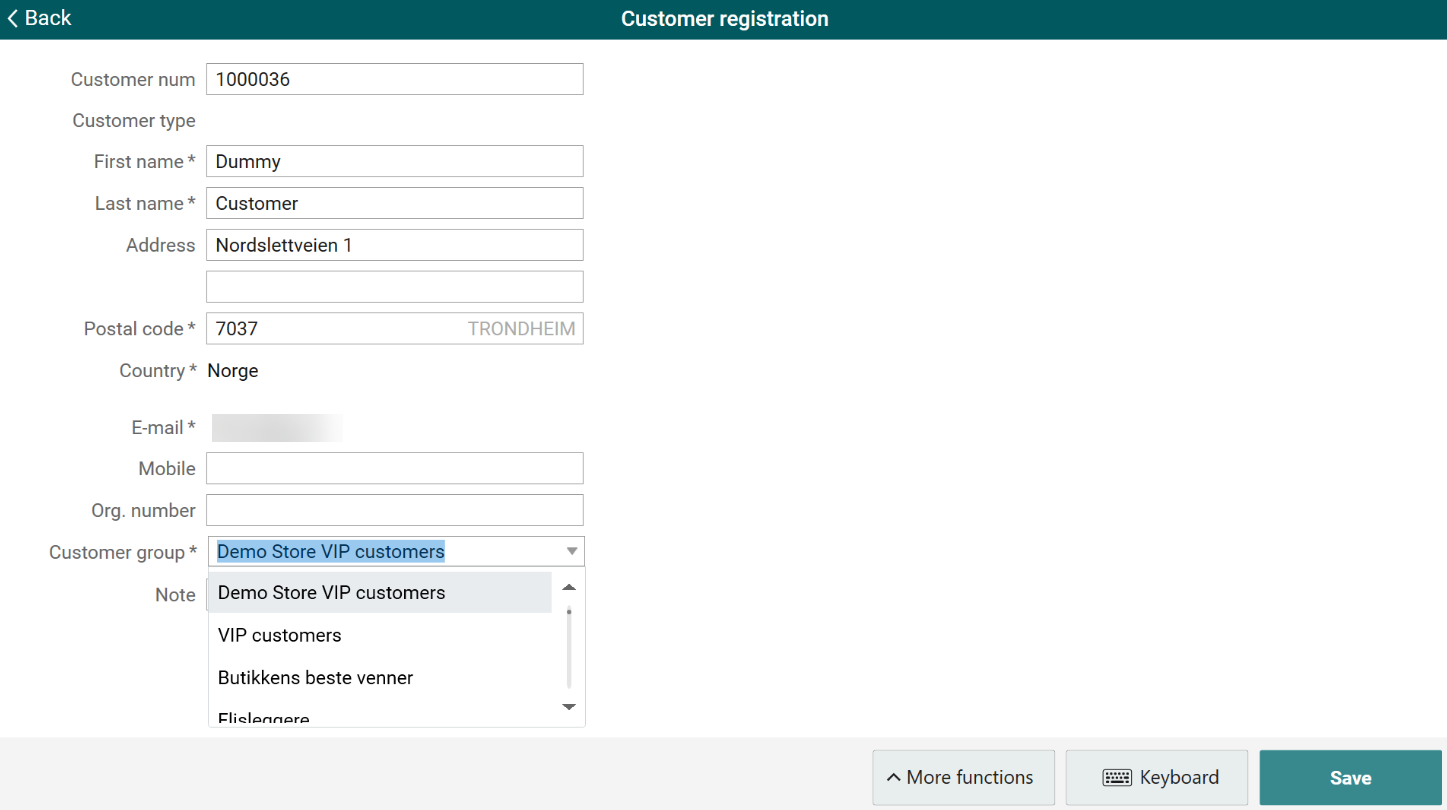
A new Drop-down option is available for the Customer group field in the Customer registration view. When it is used, the customer group is selected from a scrollable dropdown list, which makes it easier to find the desired group when there are many customer groups. The list is scrollable, can be navigated with the arrow buttons and can be filtered by typing part of the group name. Long group names are trimmed in the list, while the selected group is shown in full in the field with a smaller font. Other field types configured for the Customer group field work as before.
POS Configuration
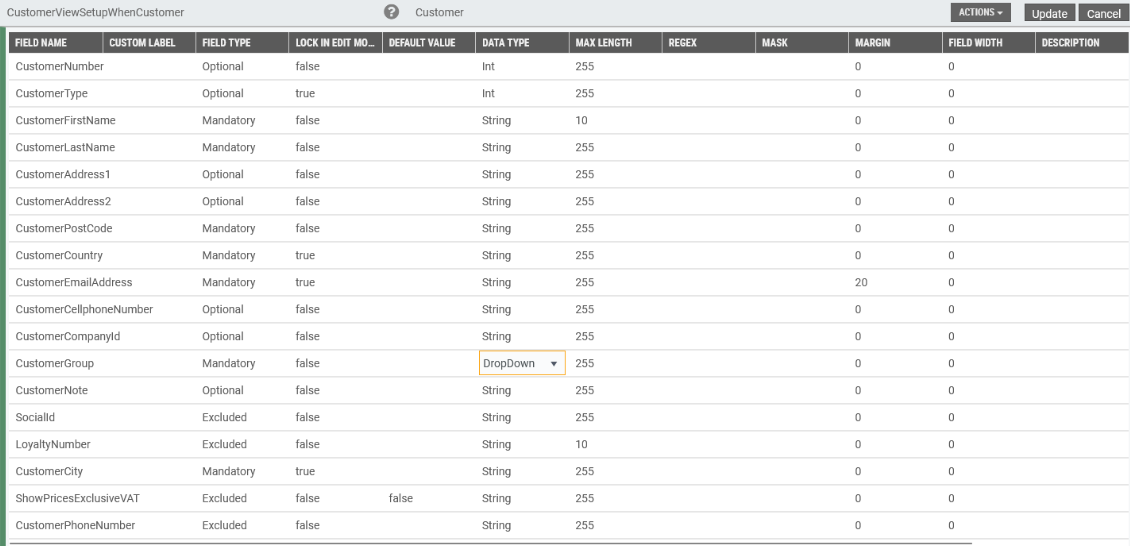
CustomerViewSetupWhenCustomer (existing parameter)
The Customer group field in this parameter can now be configured with the ‘DropDown’ type, in addition to the types that were already available (for example ComboBox, Int, String, Date or Time). Fields configured with any other type behave as before.
Conditional Eat-in/Takeaway popup
Previously, with the takeaway prompt setting enabled (ShowTakeAwayWhenEnteringTenderView), the cashier was asked to choose between eat-in and takeaway on every sale, even when no item on the receipt was affected by the choice.
The prompt is now shown when entering the payment view only if the receipt contains at least one active item with an alternative VAT rate and takeaway is not already selected, so sales without affected items go straight to payment.
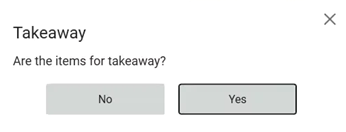
Also, the text on the popup was changed, to make it more clear what POS is asking for:
Mix 107 - Buy for X amount and get a discount on selected items
Mix 107 is now imported into the POS Master database and used by POS. A Promotion can require a minimum spend calculated only on the items selected in the offer, and reward the customer with a percentage or an amount discount on the whole receipt. Non-selected items on the receipt are excluded from the spend condition. Several tiered offers can be created under one promotion (for example spend 1000 for 10%, 1500 for 15%, 2000 for 20%); each tier becomes its own discount group and only the best one is given. Mix 107 is not combined with other subtotal mixes. A new option, "Calculation based on promotion price", controls whether the threshold and the discount are calculated on the promotion price of the selected items or on their regular price; with the regular price the mix competes with campaign prices so the customer gets the best price.
Required dependencies:
POS Master: 3.0.0.286 version or higher!
Chain Promotion: 2026-08.1 version (user interface and export)
Temporary storage for items returned to HQ
When a complaint is registered with the Return to HQ option and the item is sent for internal repair, the cashier is now asked to connect the item to a temporary storage (blue crate) before the payment is processed. The cashier can scan the label of an existing blue crate or enter its storage ID, or create a new crate. A scanned crate is checked before it is accepted: it must exist, be active, belong to the current store and be an internal repair storage. If the storage is not valid, the cashier sees a message explaining why and can try again. Cashier can click X in the popup to skip adding temporary storage.
When several items are returned on the same receipt, the crate is selected only once. All items are placed in the same storage, and each item gets its own service order. The service order contains the Storage Id, and the Storage Id is still recorded on the receipt as before. After payment, the cashier is told which storage to place the item in.
The new flow is enabled by the “AskForLabelPrintOnServiceOrders” parameter. When the parameter is not enabled, the complaint flow works as before, with the Storage ID requested after payment.
Support for decimals in bundle content
A bundle in Item Management can now have a decimal content quantity, for example 3.2 kg of a weighed item. The quantity (up to 3 decimals) is imported by POS Import, stored in POS Master and shown and saved by POS without rounding, so the receipt and the sales log keep the exact weight. The bundle price condition now uses the unit of the content item (kilogram for a weighed item), so the bundle price is given at the till when the bundle is scanned or when the weighed item reaches the bundle quantity. A weight below the bundle quantity is sold at the normal price.
The new POS Master, POS Import and POS versions must be installed together. A cash register on an older POS rounds the decimal quantity down to a whole number without a warning.
Decimal quantities of items sold by piece are not supported.
Required: POS Master v. 3.0.0.286 or higher!
Store and store group local item values in POS and the POSLog
Local item values from Item Management (for example special group, bonus, highlighted text and assortment code) that are set on a store, a price zone or a profile are now used by POS for that store and written to the POSLog of the sale. Each value is taken from the most specific level that has it: store, then price zone, then profile. Values that are not set locally come from the item.
Required dependencies: POS Master v. 3.0.0.286 or higher!
Item name in time restriction popup
Previously, the popup shown when an item from a time-restricted item group was scanned did not say which item caused the restriction.
Users can now see the name of the scanned item in the popup, together with the information that its item group can only be sold during the allowed hours, in all supported languages.
Required POS Configuration
ItemGroupRequirementConfig parameter should be set. It allows to customize time restriction per item group.
Trumf loyalty ID capture from Aera payment terminal
POS registers the Trumf loyalty ID on the receipt when a customer pays with a BankAxept card linked to Trumf on an Aera payment terminal. The receipt carries the Trumf loyalty ID, making the sale available for Trumf bonus processing.
Improvements POS
Baxi pay terminal – transaction data clearance (RTP-53666)
When a transaction is completed and the receipt is printed, all transaction variables are cleared. This prevents amounts from being reused incorrectly in subsequent transactions or receipts.
Relevant existing parameter in POS Configuration:
'PayTerminalType' = 'BaxiDotNet'
Password dialogue for refunds and reversals in Verifone Vim (RTP-55334)
When processing a refund or reversal through Verifone Vim, EG POS displays the password dialogue to the cashier. This allows the cashier to identify themselves before completing the transaction.
Relevant existing parameter in POS Configuration:
'PayTerminalType' = 'Vim'
Coupon provider routing (RTP-60421)
Previously, brand campaign coupons could not be validated or redeemed when used together with loyalty coupons, so stores had to apply manual discounts.
The application now sends each coupon to the correct provider, so brand campaign and loyalty coupons can be used in the same transaction and are redeemed as expected.
Credit note receipt cancellation (RTP-50148)
Previously, a receipt containing a credit note issued by another store could not be cancelled, and the register displayed an error that left the receipt stuck until the cashier signed out.
This has been corrected so that receipts with credit notes from other stores can now be cancelled normally.
Credit note removal from receipt (RTP-53093)
Previously, once a credit note had been added to a receipt, the cashier could neither remove it nor cancel the receipt, because both actions failed with an error and the register remained blocked.
This has been corrected so that a credit note can now be removed from a receipt, or the whole receipt can be cancelled, without the cashier getting stuck.
Mandatory Customer group in customer registration (RTP-60493)
A new customer can no longer be saved when the mandatory Customer group field is left empty. The field is now highlighted and the registration stays open until a customer group is selected, like with any other mandatory field.
Scale integration certificate for Sweden (RTP-47754)
EG POS uses the DLL version covered by the existing scale integration certificate ID "0402-MTm054" in Sweden. This allows stores in Sweden to use the latest EG POS versions with integrated scales while meeting the local certification requirements. Other countries use a newer DLL version, as scale integration certification is not currently required there
Offline credit note redemption (RTP-54277)
Previously, when credit notes were forced to work offline, a credit note handled by the cloud gift card service could still be used as a payment, which allowed the same credit note to be redeemed multiple times.
This has been corrected so that such credit notes are now refused as a payment while offline, and credit notes handled locally continue to work as before.
Customer view: member sign-up buttons no longer hidden behind the keyboard (RTP-55729)
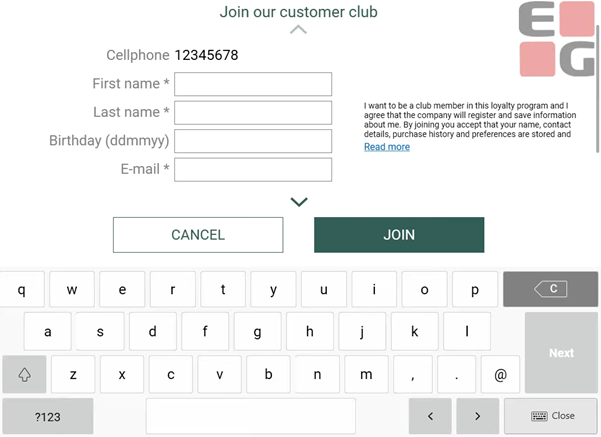
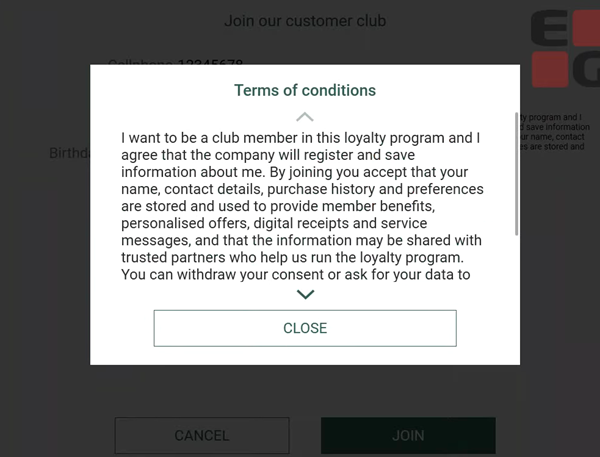
When a customer signs up for the member club on the customer screen, the Cancel and Join buttons now stay visible above the on-screen keyboard after the member terms ("Read more") are closed. The keyboard now also hides each time the member terms are opened, so the customer can always close the terms without having to hide the keyboard manually.
Missing deposit refund item (RTP-53661)
Previously, using the manual deposit refund function in stores where the deposit item or its price was not set up caused an unexpected application error.
This has been corrected so that the cashier now sees a clear message that the item or price for the deposit refund does not exist, and the sale can continue as normal.
Item search by price range uses decimal separator from POS configuration (RTP-55825)
When searching for items by price range, prices entered in the search field are now read using the decimal separator set in the DecimalSeparator parameter in the POS configuration.
For example, with DecimalSeparator set to Dot, entering "300.00 350.00" searches for items priced between 300 and 350, regardless of the regional settings of the terminal. If DecimalSeparator is left on Default, the decimal separator of the configured Culture is used.
Previously, the decimal separator was taken from the Windows regional settings of the terminal, so the same search could give different results depending on Windows and might not match how prices are displayed in the Item list.
Improved display of menu items, bundles and extras (RTP-55845)
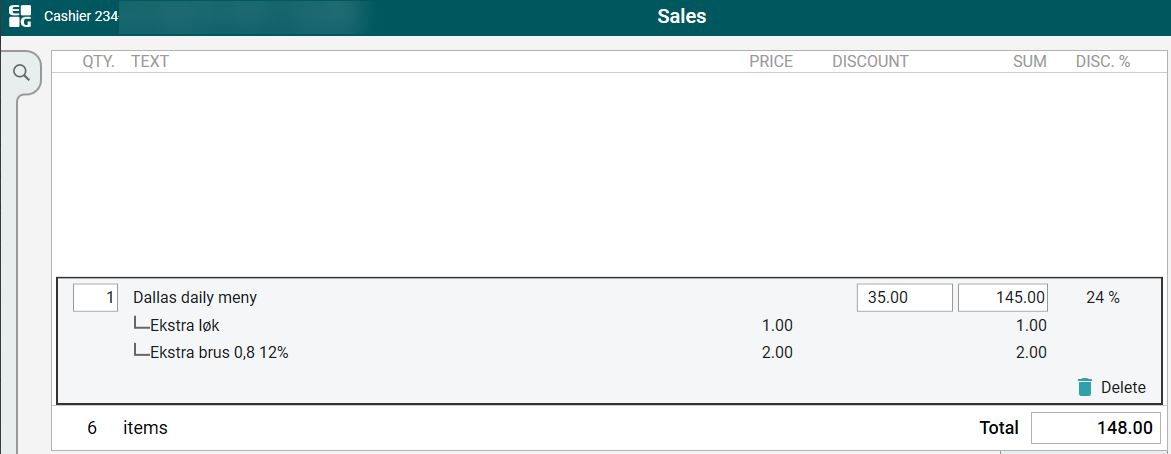
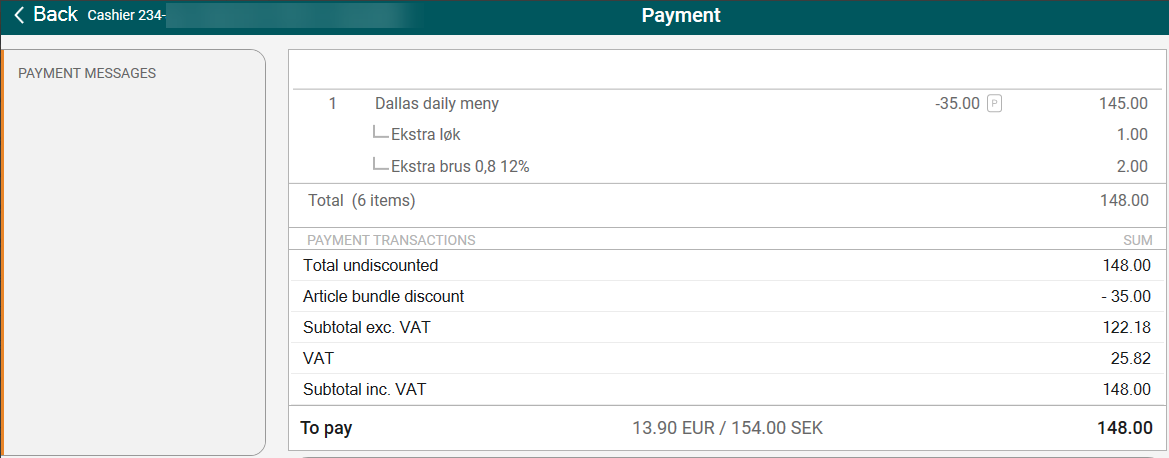
When “ShowHeaderOnlyForPredefinedBundlesInSale” is enabled and “ShowItemLinesInPayment” is on, the payment view now lists each predefined bundle and menu item with its name and amount, with its extras shown below it. In the sales grid, every extra added to a menu item is now displayed in its own row, aligned with the menu item row, regardless of how many extras were selected. Extras added after editing a menu, or after another article was sold, are now shown under the correct menu in both the sales grid and the payment view.
Previously, the payment view showed only the extras without the menu item or bundle they belonged to, the sales grid showed only the last extra of a menu, and extras added after editing a menu could be attached to the wrong article.
Vipps payments in Swedish stores (RTP-60066)
As Vipps does not yet support SEK in its multi-currency solution, EG POS automatically converts the payment amount from SEK to NOK before sending it to Vipps. This allows Norwegian customers to use Vipps as a payment method when shopping in Sweden.
The customer's phone number follows the existing validation logic, with or without a country code. The printed receipt shows the NOK currency code and the exchange rate on the tender line.
Recipe item ingredients in POSLog after editing (RTP-55826)
When a recipe item is edited and an ingredient that was previously removed is included again, the ingredient is now correctly written to the POSLog as a regular ingredient with its quantity and weights. Only the ingredients that are removed in the end are marked as removed.
Previously, an ingredient that had been removed and then included again could still appear in the POSLog as removed, with quantity and weights set to 0.
No unnecessary pricing lookups when returning items without a customer (RTP-53322)
When items are returned on a receipt that has no customer attached, POS no longer requests customer-specific pricing information (CostPlus and customer price rules) from BackOffice. As a result, the error entries that were previously written to the log during such returns no longer appear. The return itself is completed as before.
Lottery prize age check (RTP-59278)
Previously, when two lottery prizes were paid out one after the other, the age check was skipped for the second payout and the prize was added right away.
This has been corrected so that the cashier is now asked to verify the customer's age according to the prize's ID requirement in every lottery prize payout, including consecutive ones.
Pickup code included in customer orders (RTP-53513)
The pickup code is now correctly passed on with customer orders created from the receipt, also when the order line has no picking store assigned. This ensures the pickup code is available in the customer order and can be used when the order is picked and handed over to the customer.
PLU board button response (RTP-55262)
Previously, buttons on the PLU board could ignore touches or react with a delay after the board was opened, so cashiers sometimes had to press several times to open a folder or register an item.
This has been corrected so that PLU board buttons are active immediately after the board opens and respond to a single touch.
Discarded receipt no longer shown in the list of receipts on hold (RTP-55722)
When a receipt that was put on hold is fetched, then discarded and deleted, it is removed from the list of receipts on hold. The deleted receipt is not shown in the Put on hold/fetch view, so it can no longer be selected and the "Not possible to get receipt" error does not appear.
Previously, a deleted receipt could still be shown in the list of receipts on hold, and selecting it resulted in the "Not possible to get receipt" error.
Empty receipt after Sign-off (RTP-53005)
Previously, parking a receipt and then signing off immediately caused an empty receipt to be saved and shown again at the cashier's next logon on any till, often leading to unnecessary receipts on hold.
This has been corrected so that empty receipts are no longer kept at sign-off, and only receipts with actual content are restored at the next logon.
Failed on hold at SCO no longer returns the terminal to the Welcome screen (RTP-53270)
When a ShopAndGo self-checkout times out due to inactivity, the receipt is automatically put on hold. If this fails because the connection to StoreCentral is slow or unavailable, the POS now retries once and saves the receipt on hold locally. The receipt is then moved to StoreCentral automatically later. If the receipt cannot be put on hold, the terminal stays in the assistance-needed state instead of returning to the Welcome screen, so the next customer's items are no longer added to the previous customer's receipt. The retry is not done when payments have already been registered on the receipt.
Scanner input handling in hybrid self-service mode (RTP-54696)
In hybrid self-service mode in EG POS, running on the customer screen, scanner input is ignored during payment and until the receipt is fully completed. Cashier cards remain accepted. This prevents customers from starting the next receipt too early and avoids false "assistance needed" messages being sent to surveillance.
SCO Arrival Flight Header (RTP-59561)
Previously, the flight header on the self-checkout and customer screen showed "Dest:" with the local airport for arriving flights instead of the airport the flight came from.
This has been corrected so that arriving flights now show "From:" with the origin airport, while departing flights continue to show "Dest:", matching the cashier screen.
Parked receipt pop-up text (RTP-55696)
Previously, the message shown when retrieving a customer's parked receipt named ShopExpress as the source, even when the receipt had been parked in Mobile POS.
The message has been corrected so that it no longer mentions any source system and is the same for receipts parked in ShopExpress and in Mobile POS, in all supported languages.
Duplicate return prevention (RTP-54110)
Previously, an original receipt could be refunded in full more than once, including from different stores, because it still showed the full quantity as available to return after a completed refund.
This has been corrected so that once a return is completed, the returned quantity is no longer available on the original receipt in any store, and further returns of the same items are not accepted.
Paying service orders with open price items (RTP-54482)
Service orders containing open price items can now be added to the receipt and paid in EG POS. The price of each item is taken from the service order, and the receipt total matches the amount due on the service order.
Previously, a customer-related message could appear and prevent the payment from being completed.
Surveillance messages during input popups (RTP-55757)
Previously, when an input dialog such as quantity entry was open on a register, incoming messages like age control requests from self-checkouts were discarded and never shown on the surveillance register.
This has been corrected so that these messages are now delivered and displayed, even when an input dialog is open.
Manual signature handling when SignoTec is cancelled (RTP-54984)
When the cashier cancels the signature dialogue on the configured SignoTec signature pad, POS displays a message explaining that the signature is cancelled and must be collected manually. POS prints a store copy of the receipt together with the original sales receipt, allowing the customer to sign the store copy.
Stocktaking negative quantity entry (RTP-59072)
Previously, during stocktaking, changing the quantity of an item line to a negative value was not possible and the quantity stayed unchanged.
This has been corrected so that negative quantities can now be entered on item lines in the stocktaking transaction.
Unmanned mode logging (RTP-53742)
Previously, the application log did not contain enough detail about store mode changes, which made it difficult to find out why unmanned mode was not working as expected in some stores.
The log now records the store mode before and after a manual change, whether a receipt was started in unmanned mode, and what happened when the scheduled opening hours began or ended.
Web order pick list (RTP-53520)
Previously, printing the pick list for a web order showed the freight line, when it's not something to be picked by the cashier.
This has been corrected so that the printed pick list now shows all items on the web order, but freight line is not printed.
Weborder delivery cancellation (RTP-36320)
Previously, cancelling the delivery information dialogue while adding an item to a weborder caused the item to be added to the order, even though the delivery details had not been completed.
This has been corrected so that the item is now added only after the delivery details are completed, and cancelling the dialogue no longer adds it to the order.
Improvements POS Server
CreateBalance works with an API key that allows any store (RTP-54228)
When BalanceExtended CreateBalance was called with an API key that allows any store, the service used the balance configuration of store 0 instead of the store sent in the request. With the default balance transaction type Cashier the call then failed with "Current BalanceTransactionType is set to Cashier. Operator parameter is required."
CreateBalance now uses the store from the request, so the balance is created with that store's balance transaction type (for example Workstation). The configuration is still chosen with the cash register of the API key, not the cash register in the request.
Coopay payment status check (RTP-55790)
Coopay payments complete in POS API and POS WCF when the customer approves in the Coopay app. The payment start values (approval request ID, timestamp, idempotency key and card issuer) are kept on the receipt. Every payment status check uses them, and an approved payment ends with a card tender that references the Coopay transaction ID. Repeated status checks after completion keep the stored transaction ID and do not save the receipt again.
REMOVAL OF UNUSED FUNCTIONS, PARAMTERS AND SETTINGS
Removal of unused Customer, Member and Receipt identification parameters
The ‘ClearSsnWhenFinishingReceipt’, ‘DisplayECouponMemberCardStatusOnScan’, ‘MaxCustomerDigits’, ‘MemberNumPrintText’, ‘PrefixMemberNum’, ‘StockInfoSorting’, ‘TenderMessageToCashierLine5’ and ‘SalespersonRole’ settings are removed from POS Configuration. The POS applies the standard behavior for each of these settings.
Removal of unused member parameter
The ‘MemberPersonalCodeGenderParser’ setting is removed from POS Configuration. POS does not derive a member's gender from the personal identity code, and the gender stays ‘Unknown’.
Removal of unused sale line and item behavior parameters
The ‘SellItemBasedOnSerialNumber’ and ‘CreateClickAndCollectOrdersAsStoreOrders’ settings are removed from POS Configuration. All installations use the default values for these settings.
Removal of unused Forced signature function
The ‘BANK_FORCED_SIGNATURE’ function is obsolete and has no effect. The default button configuration does not include the Forced Signature buttons.
A button configured with this function performs no action in POS and should be removed from the configuration. The ‘BANK_FORCED_OFFLINE’ function is unchanged.
Removal of unused Gift card parameters
The ‘ReturnToGiftCardType’, ‘GiftCardNumberOfSecurityCodeDigits’ and ‘RequirementIdForGiftCardSale’ settings are removed from POS Configuration. These settings are not part of current gift card sale and refund handling.
Removal of unused function for refund to gift card
The payment choice menu shows the Gift card option only when the receipt total is positive. On a receipt with a negative total, the menu offers Cash, Cheque, Bank and Credit Note, so a refund is paid out with one of these methods.
The POS functions ‘SALE_GIFTCARD_AUTOGENERATE’ and ‘SALE_VENSAFE’ are not part of POS Configuration. The POS function ‘REFUND_TO_GIFTCARD’ is obsolete and has no effect. The ‘ReturnToGiftCardType’ setting is not part of POS Configuration.
Removal of unused currency limit parameter
The ‘MaximumCurrencyAmount’ setting is removed from POS Configuration. POS does not apply a per-currency maximum to cash payments or cashback in foreign currencies.
Removal of unused Customer and Credit account parameters
The ‘CreditOption_ShowOnNoCustomer’, ‘CreditNoteValidationType’, ‘CreditSubCustomerSelectionRequired’, ‘CustomerAccountPaymentsRequireExclusiveReceipts’, ‘CustomerIDStringFormatter’, ‘CustomerMemberIdSuffix’ and ‘CustomerOrderMissingItemPlu’ settings are removed from POS Configuration.
All installations use the default values for these settings, and POS always applies the default behavior.
Removal of unused peripheral and hardware parameters
The ‘AdvantecPortNumber’, ‘PriceCheckerIdleTimeoutInSeconds’ and ‘PlayerCardLookup’ settings are removed from POS Configuration. The Advantec signalling device uses port 0, the price checker returns to its start screen after 30 seconds of inactivity, and the Register Player Card popup in Shop&Go does not offer phone number entry.
Changes in tem stock information
Item stock information is always fetched from Back Office (with the removal of the ExternalItemStockInfoUrl and ExternalItemStockInfoADEnabled POS Configuration parameters).
Changes in Supply orders
The POS does not propose or send supplier orders when an item's stock is low or empty (with the removal of the OrderProposalWhenStockEmpty and ProposeOrderWhenInStockLowerThan POS Configuration parameters).
The Create supplier order function (CREATE_SUPPLIER_ORDER) is not available in the POS (with the removal of the ‘PosServicesSupplyOrderUrl’ POS Configuration parameter).
Removal of unused PLU and Ingredients menu layout parameters
The ‘IngredientsDefaultColumnsCount’, ‘IngredientsDefaultRowsCount’, ‘IngredientsDisplayIconWhenRemoved’ and ‘PluPadAutoOpen’ settings are removed from POS Configuration. All installations use the default values for these settings. The ingredients menu shows 4 columns and 8 rows and marks removed ingredients with an icon, and the PLU pad opens only when the cashier selects it.
Removal of unused Shop & Go configuration parameters
POS Configuration does not include the ‘ManualPrint’, ‘ShopAndGoGuiITABMessages’ and ‘SnGUnknownMemberOptions’ parameters. Shop&Go uses the standard translated texts for the ITAB conveyor-belt self-checkout messages, and receipt printing follows the existing Shop&Go print settings.
Removal of unused Payment terminal message and miscellaneous configuration parameters
POS Configuration does not include the ‘BankMsgInRegwin’, ‘CustomerCardPrefix’, 'Services and ‘ShowLocalStoreNumInPosManager’ parameters. During card payments, messages from the payment terminal show in the status area or as a popup on the payment screen.
Removal of Sagem auto payment parameter
The ‘SagemAutoPayment’ setting is removed from POS Configuration. Sagem card terminals always use automatic payment, so the terminal starts payment as soon as the card is swiped.
Removal of unused quantity check and card name parameters
The ‘EnableQtyCheck’ and ‘CardNameMapping’ settings are removed from POS Configuration. POS goes to payment without a quantity confirmation prompt and always shows the total quantity and item count on the receipt, the customer screen and the Shop&Go receipt. Card tenders are not renamed by a configured mapping.
Removal of unused Returns, Deposits and Credit reference configuration parameters
POS Configuration does not include the ‘DialogForCustomerNameOnReturn’, ‘ShowReferenceDialogOnCreditPayment’, ‘ShowReferenceFieldsOnAccountDeposit’ and ‘MaxReturnAmountInReceipt’ parameters. POS does not ask for a customer name when a receipt contains returned items and does not limit the return amount on a receipt. A reference dialog is shown during credit payments, and the account deposit screen shows only the amount field.
Removal of unused Lindbak coupon type parameter (RTP-59215)
The ‘LindbakCouponType’ parameter is deprecated in POS Configuration and has no function. Lindbak coupons are controlled by the ‘LindbakCouponUrl’ parameter.
Removal of sealed bag registration
The sealed bag registration dialog is not available in POS, and POS does not ask for sealed bag numbers or check destination countries before completing a sale with liquid items. The function ‘REGISTER_SEALED_BAGS’ is not available.
The function is not available for use in Button configuration. A button configured with this function performs no action in POS and should be removed from the configuration.
POS Configuration does not include the ‘SealedBagNumberRegEx’ and ‘SealedBagRequiredCountries’ parameters.
The Shop and Go items sealing page, controlled by ‘SealedBagRequiredQuantity’, is not affected.
Removal of ID document scanning
ID document scanning is not available in POS. The ID document scan dialog and its related dialogs (registration form, awaiting scan and non-readable ID) are not available, and POS does not accept scanned or manually entered passports and ID cards. POS does not ask the EU citizen question, does not show an ID document row in the receipt header, does not require an ID scan before a sale starts, does not save scanned ID images, and does not write ID document data to the POSLog. Age control for restricted items is confirmed by the cashier or by entering the customer's birthdate. The function OPEN_ID_DOCUMENT_SCAN is not available.
The function is not available for use in Button configuration. A button configured with this function performs no action in POS and should be removed from the configuration.
POS Configuration does not include the ‘IdScannerName’, ‘IdDocumentScanningEnabled’, ‘IdDocumentManualInputEnabledAndRequired’, ‘IdDocumentAutoDisplayScanDialog’, ‘IdDocumentAlwaysTriggerEuCitizenQuestion’, ‘IdDocumentMaxScanRetries’, ‘IdDocumentScannerResolution’, ‘IdDocumentScannerSoundEnabled’, ‘IdDocumentScannerSoundDuration’, ‘IdDocumentScannedImageFolder’, ‘IdDocumentExpirationExceedance’, ‘IdDocumentCountryCodePrefix’, ‘IdDocumentUseGenericReceiptHeader’, ‘IdDocumentOnlyUseGenericReceiptHeader’, ‘IdCardAllowList and EUCountries parameters’.
Boarding pass scanning and the RFID scanner are not affected.
Removal of limit control and Retter stock control
Limit control and the Retter stock control integration are not available in POS. POS does not check restricted-item limits during a sale or at receipt end, does not run the limit control clean-up and offline retry jobs, and does not send stock updates to the Retter stock control service. The limit groups dialog and the limit exceeded dialog are not available. The function ‘OPEN_TUR_LIMIT_CONTROL’ is not available.
The function is not available for use in Button configuration. A button configured with this function performs no action in POS and should be removed from the configuration.
POS Configuration does not include the ‘EnableLimitControl’, ‘IgnoreLimitsOlderThanHours’, ‘IgnoreLimitControlLocksOlderThanMinutes’, ‘LimitControlCleanupCronSchedule’, ‘OfflineLimitControlSendRetryCronSchedule’, ‘LimitControlPosService’, ‘LimitGroupCodesLiquidCheck’, ‘LimitStockControlCompanyCode’, LimitStockControlRegionCode, ‘StockControlGatewayUrl’ and ‘StockControlGatewayRouteName’ parameters. The ‘POS.OfflineLimitControl’ permission is not part of POS security permissions.
The stock availability check in the sale, controlled by ‘StockControlEnabled’ and ‘StockApiGatewayUrl’, is not affected.
Changes in Sale line and Item behavior
Claims and ordinary sale items can be combined on one receipt (with the removal of the AllowClaimsInOrdinarySale POS Configuration parameter).
An additional sale is allowed when returning a service article (with the removal of the AdditionalSaleWhenReturningServiceArticleAllowed POS Configuration parameter).
The item text can be changed for item group PLU items (with the removal of the AllowChangeOfItemtextForItemGroupPlu POS Configuration parameter).
Tax refunds can be paid out as cash or credit/debit (with the removal of the AllowedTenderTypesForTaxRefund POS Configuration parameter).
Selecting a filter in the item group browser searches all items automatically (with the removal of the AutoSearchAllOnItemGroupFilterSelect POS Configuration parameter).
The deposit sale percentage is 10 without override (with the removal of the DepositSalePercent and DepositSaleOverrideAllowed POS Configuration parameters).
New receipts show prices including VAT (with the removal of the ShowPrintAndEditPricesExclusiveVAT POS Configuration parameter).
In training mode, external sale lines are rejected (with the removal of the TrainingModeExternalSaleProviders POS Configuration parameter).
Click-and-collect orders reserved through the POS API are registered as web orders (with the removal of the CreateClickAndCollectOrdersAsStoreOrders POS Configuration parameter).
The total weight is not calculated when a customer order is fetched from Back Office (with the removal of the CalculateTotalWeightWhenFetchingCustomerOrderFromBackoffice POS Configuration parameter).
The BreakageInfoMessage and CreateLineItemDateItemAsOffsetForTransactionTypeDockingArea parameters are also removed from POS Configuration.
Changes in Credit notes, Customer order, Gift card and Bonus check functionality
Credit notes are always validated online (with the removal of the CreditNoteValidationType POS Configuration parameter).
A credit tender to a parent customer always requires selecting a sub-customer (with the removal of the CreditSubCustomerSelectionRequired POS Configuration parameter).
Customer order items that are not found are rejected (with the removal of the CustomerOrderMissingItemPlu POS Configuration parameter).
The cashier always enters the amount of an online bonus check to use (with the removal of the LoyaltyPartialUseOfOnlineBonusChecks POS Configuration parameter).
Gift card sales have no requirement check (with the removal of the RequirementIdForGiftCardSale POS Configuration parameter).
Gift card payments do not use a digit-suffix security code (with the removal of the GiftCardNumberOfSecurityCodeDigits POS Configuration parameter).
Removal of unused hardware and peripheral configuration parameters
POS Configuration does not include the ‘ReinitializePeripheralDevicesOnDocking’ and ‘BackOfficeProjectServiceTimeout’ parameters. POS does not reset connected peripheral devices when the PC resumes from sleep or is docked or undocked, and waits up to 60 seconds for a response from the back-office project and customer price lookup service.
Removal of unused Logging parameters
The ‘LogToFile’, ‘ValidatePosLog’ and ‘ValidatePosLogDebug’ settings are removed from POS Configuration. The POS always writes log files, and POSLog validation is a troubleshooting option set in the local configuration of a single register.
Deprecation warning for label item mode
POS shows an information message once per session, the first time the ‘PRINT_LABELS_START_LABEL_ITEM_MODE’ function is used. The message states that the function is planned for removal in a future version and asks users of the function to contact EG. The function runs normally after the message is closed.
Removal of unused customer order functions
The following functions are not available: ‘ORDER_DISCOUNT_LABEL_PRINT’ and ‘UPDATE_CUSTOMER_ORDER_STOCKED_QUANTITY’.
The functions are not available for use in button configuration. A button configured with either function performs no action in POS and should be removed from the configuration.
Removal of unused member and customer functions
The following functions are not available: ‘APPLY_FOR_MEMBER_CARD’ and ‘REGISTER_CUSTOMER_CARD_PREFIX’.
The functions are not available for use in Button Configuration. A button configured with either function performs no action in POS and should be removed from the configuration.
Removal of unused miscellaneous functions
The following functions are not available: ‘CALCULATE_TOTAL_WEIGHT_FOR_ALL_ITEMS’, ‘CHANGE_QUANTITY_BASED_ON_ANOTHER_UNIT’, ‘REGISTER_PHONE_NUMBER’ and ‘REGISTER_TEMP_CUSTCARD’.
The functions are not available for use in Button Configuration. A button configured with any of them performs no action in POS and should be removed from the configuration.
Removal of legacy PLU Pad
The legacy PLU pad is not available in POS. The following functions are not available: ‘MENU_PAD_PARAMS’ and ‘TOGGLE_SHOW_SEARCH_VIEW_PLU_PAD’.
The functions are not available for use in Button Configuration. A button configured with either function performs no action in POS and should be removed from the configuration.
The ‘PluPadAutoOpen’, ‘DisplayReminder’ and ‘MemberCardHolderConfirmationDefaultButton’ settings are removed from POS Configuration.
Fixed Reason code groups
POS uses fixed standard reason code groups for transactions, line actions, line discounts, receipt cancellation, article service, cash drawer opening, paid-in, paid-out and customer order item deletion. The corresponding parameters are not available in POS Configuration: ‘ReasonTransactionCode’, ‘ReasonActionCode’, ‘ReasonActionDiscountLineCode’, ‘ReasonCancelCode’, ‘ReasonCodeArticleService’, ‘ReasonDrawerCode’, ‘ReasonPayedInCode’, ‘ReasonPayedOutCode’ and ‘ReasonCodeOrderItemDeletion’.
Removal of unused Payment terminal parameters
The ‘ForcedOfflineMessage’, ‘AutoAmountOnBank’, ‘BankNotAllowedIfPrinterNotOk’, ‘ForceRetryOnTimeout’ and ‘GEMoneyBankGrantedCreditForCustomer’ settings are removed from POS Configuration.
The POS sends the amount to pay to the payment terminal, and card payment is available regardless of printer status.
Removal of unused SmartShop Self-Service parameters
The ‘SmartShopArticleSynchronizingEnabled’, ‘SmartShopArticleSynchronizerJobCronSchedule’, ‘SmartShopArticles’, ‘SmartShopServerIpAdress’ and ‘SmartShopServerPort’ settings are removed from POS Configuration, together with the SmartShop article synchronization and the SmartShop PIN status function.
Removal of unused Loyalty and Bonus parameters
The ‘ValidateBonusPaymentBySMS’, ‘GenerateLoyaltyNumberFromBackofficeWhenCreatingCustomer’ and ‘LoyaltyPartialUseOfOnlineBonusChecks’ settings are removed from POS Configuration.
Removal of unused MobilePay terminal parameters
The ‘MobilePayBulkRef’, ‘MobilePayCardIssuerId’, ‘MobilePayLocationId’, ‘MobilePayMerchantId’, ‘MobilePayPaymentServiceUrl’, ‘MobilePayPollingIntervalInMilliseconds’ and ‘MobilePayPosUnitComPort’ settings are removed from POS Configuration. These settings belong to the direct MobilePay terminal integration. VipsMobilePay payments are handled through Payment Service.
Removal of unused ChainTypeId configuration parameter
POS Configuration does not include the ‘ChainTypeId’ parameter. Digital coupon requests are sent with an empty chain identifier.
Removal of unused miscellaneous configuration parameters
POS Configuration does not include the ‘AutoEANSaleOnNumericSearch’, ‘MaxNoteLength’, ‘FatalExceptionAction’ and ‘ScreenSelection’ parameters. Free-text note fields accept up to 1000 characters, and POS closes the application after an unrecoverable error. The main POS window opens on the primary screen.
Removal of unused customer search and Customer screen configuration parameters
POS Configuration does not include the ‘ExternalCustomerSearchOnlyCompleteTerms’, MaxExternalCustomerSearchResults’, ‘MemberCardCustomerLookupRegEx’, ‘HideCustomerInSalesGrid’, ‘ShowMemberNumberInBasketOnCustomerScreen’ and ‘CustomerViewShowPleaseWaitWhenBusy’ parameters.
External customer search matches complete terms only and shows up to 20 customers before asking the cashier to refine the search. The customer appears as a line in the sale, and the customer-facing display shows a "please wait" message while the till is busy. Scanned member card barcodes are not used to look up a customer number.
Removal of unused PrinterName configuration parameter
POS Configuration does not include the ‘PrinterName’ parameter. The parameter is not read by any POS function, and receipt printing is configured per printer through PrinterConfig.
Removal of unused Zaci signature customer ID configuration parameter
POS Configuration does not include the ‘UseZaciCustIdDialogWhenSignature’ parameter. When a customer signature is required on a Zaci card terminal receipt, POS does not prompt the cashier for the customer's ID number.
Removal of unused BrightPoint configuration parameters
POS Configuration does not include the ‘BrightpointConnectionString’ and ‘BrightpointCacheDirectory’ parameters. BrightPoint phone card sales use the standard BrightPoint connection and cache directory.
Removal of unused AllowMultipleAssociationsPerMember configuration parameter
POS Configuration does not include the ‘AllowMultipleAssociationsPerMember’ parameter. A loyalty member can be linked to more than one association at the same time.
Removal of unused ‘FinishSaleWhenCashIncrementEqualsSubtotal’ configuration parameter
POS Configuration does not include the ‘FinishSaleWhenCashIncrementEqualsSubtotal’ parameter. When a cashier enters cash that reaches or exceeds the amount owed, the sale finishes automatically without a separate confirm step.
Removal of unused PLU List configuration parameters
POS Configuration does not include the ‘IsShowScreenKeyboardForPlu’, ‘PluListNameToOpenOnStartup’, ‘PluListNumberOfTabs’ and ‘PluListPageToOpenOnStartup’ parameters. PLU lists show four tabs and use the on-screen keyboard for search, and no PLU list opens automatically when the POS starts.
Removal of unused embedded browser configuration parameters
POS Configuration does not include the ‘EmbeddedPosBrowserSize’ and ‘EmbeddedPosBrowserUrl’ parameters. The sale screen does not reserve space for an embedded browser, and an Open URL button opens the address set on the button.
Removal of unused Balance period and E-Bike configuration parameters
POS Configuration does not include the ‘BalancePeriod’ and ‘EbikeItemGroups’ parameters. The balance period of a cash balance is set by the balance transaction type, and bike insurance registrations are not marked as electric bike insurance.
Removal of unused Finance tender and Settlement configuration parameters
POS Configuration does not include the ‘EmployeeSaleBasedOnCostPriceTotalLimit’, ‘FinanceTenderType’, ‘GEMoneyBankGrantedCreditForCustomer’, ‘SettlementConfirmAmountLimit’ and ‘UsePOSForSettlementOnly’ parameters. Employee discounts based on cost price apply regardless of the receipt subtotal, and a settlement amount above 10 000 000 per currency cannot be saved. After a cash balance, the POS returns to the sale screen. GE Money Bank is not available as a finance tender.
Removal of unused E-Archive configuration parameters
POS Configuration does not include the ‘EArchiveTexts’ and ‘LegalInvoiceNumberPrefi’x parameters. Finished receipts are saved to the POSLog without e-archive information.
Removal of unused Invoice and Internal transfer configuration parameters
POS Configuration does not include the ‘InternalTransferToCustomerBalanceProvider’, I’nvoiceDueDays’, ‘InvoiceFeeIdentifier’ and’InvoiceIdFormat’ parameters. A credit sale with a printed invoice has a due date 14 days after the sale, with no invoice fee line and no generated invoice ID. Internal transfers to a customer are always validated against the customer's balance in Back Office.
Removal of unused POSLog transformation and Tax mapping configuration parameters
POS Configuration does not include the ‘MappingForExternalTaxGroupID’, ‘MappingOfFlightTypeToLineItemTypeCode’ and ‘TransformPosLog parameters’. These settings had no effect on POSLog or tax handling.
Removal of unused Cashier dialog and Audit configuration parameters
POS Configuration does not include the ‘AlertItemsDialog’, ‘AuditShoppingChannel’, ‘EnableTemporaryDialogHelpText’, ‘ForceBalanceOnLogin’, ‘OnHold_EnterReferenceCode’, ‘SaleStatDateSelectionPossible’, ‘Scanner2OnlyActiveInPaymentView’, ‘ShowIgnoreOptionWhenStartingAudit’, ‘ShowRequiredBirthDate’ and ‘UseTheFirstLinkOnEnter’ parameters.
Items that require disclosure are listed when the cashier enters the payment screen, a reference text is requested when a receipt is put on hold, and the hourly sales statistics ask for a date. When an age-restricted item is on the receipt, the sale screen shows the required age and the latest qualifying birth date. When no cashier is logged in and the sale screen is shown, pressing Enter runs the first function button in the information area. The customer scanner is active on both the sale and payment screens, login does not force a till balance, and the audit confirmation dialog has no Ignore option. Items scanned during an audit use the shopping channel "Audit".