Released 12 May 2026
Label printing - Label type (RTC-53878)
A new “Price sign A5-2” label type has been added. This label format allows two products to be displayed on a single A5 half-page and prints as mirrored copies on A4 sheets in portrait orientation.
It aligns with existing label conventions, supporting dual-language display, standard currency formatting, and promotional styling such as yellow backgrounds for sales purposes and red pricing for promotions or member offers. The label includes key product details like item name, sales code, price, price per unit, and QR code. Mix offers and change tracking are supported, and labels can still be printed manually or via the label list, with guidance shown when selected in the print dialog.
Label export - Electronic Shelf labels (RTC-59005)
A reliability issue has been fixed where shelf label re-export would consistently time out during the export job on tenants where no item lists were queued for export — which is the normal operating state for some chains. As a result, labels for items and prices queued for re-printing were not being updated.
The export job now completes correctly regardless of whether item lists are part of the export queue.
Import validation messages (RTC-26842)
When uploading a Group hierarchy Excel file in Registers → Item Hierarchy, validation errors now include the exact row number and a clear description of what went wrong. Previously, invalid files returned a generic error with no indication of where the problem was.
Ordered labels - Automatic opening of print view (RTC-58094)
A new URL parameter ?autoprint=True is supported on the ordered label printing page. When navigated to directly (e.g. from an external system opening a browser tab), the browser print dialog fires automatically without any confirmation modal or user interaction required.
Promotions & Campaign tags (RTC-58237)
Fixed a bug where items removed from a copied promotion could still appear as active promotion items downstream, causing incorrect campaign tags to be sent to electronic shelf labels.
When a promotion is copied and items are removed from the copy before it is activated, the removal events could arrive for articles that had never been part of the new promotion. In this situation the system was incorrectly registering those articles as active promotion participants instead of ignoring the removal. The result was that Pricer received a campaign tag for articles that were not part of the promotion at all.
This is now fixed: a removal instruction for an article that is not part of a promotion group is treated as a no-op, and no active promotion entry is created.
Fix for: Unable to edit item when it has invalid supplier sales end date (RTC-58783)
Fixed an issue where imported items with supplier sales end dates set to year 9999 could not be saved due to the user interface date limit.
Added validation in user interface (also in import) to ensure the supplier sales end date and also consumer sales end date does not exceed 2099-12-31.
Improved user experience by displaying clear validation errors when invalid data is entered during save.
Fix for: Validation error issue for net and gross quantity fields in ingredient grid (RTC-58422)
The input in gross and net quantities in ingredient grid processing has been aligned with locale rules so that decimal values are interpreted, formatted, and validated correctly based on the user’s locale.
Fraction and decimal conversions now behave as expected, eliminating false validation errors and ensuring a smooth and consistent data entry experience.
Fix: Local item creation (RTC-58341)
Items created by users with only the “Manage Local Items” permission are automatically marked as local items. This ensures users can immediately view and edit the items they create, aligning behavior with their permissions and enabling proper local Item Management.
Fix for: Complaints section improvement (RTC-58954)
Item Complaints section is not duplicated. All related fields are inside one section.
Item translations (RTC-58454)
Norwegian translation for Auto replenishment field in Item details has been updated.
Released 6 May 2026
Recommended actions per item (RTC-53958)
A Complaints section was added to Item details, allowing recommended actions to be configured per item and profile. Users can define a single recommended action per profile, including service code, action code, and service location. These settings can be managed, edited, deleted, copied between profiles. In item details page only top 3 recommended actions are shown, rest and managing actions is accessible by 'Manage service' button, which opens a new view.
Import and export recommended actions (RTC-53959)
Recommended complaint actions can be managed via Excel by exporting and importing values per store group (profile). The export includes service code, action code, location code, technician, and FAQ flag, and the same structure is supported for import. Only existing values can be used, and validations ensure correct relationships and required data, with invalid entries skipped and reported as warnings.
Batch and Serial No. for complaints (RTC-57134)
"Requires Batch Number for Complaints” and “Requires Serial Number for Complaints” are displayed in the Complaints section on the item details page. When a user checks or unchecks either flag and saves the item, the value is persisted and displayed correctly. These flags exist only at the item level. They can be set when creating a new item and when editing an existing item. Both flags are included in the JSON blob export and can also be imported. Both flags are included in the Excel export and can be updated via Excel import.
Label printing - Shelf label small (RTC-48000)
A new label type, Shelf label small, has been introduced and added to the label type register. The label has dimensions of 37.125 × 40 mm, portrait orientation, 4 mm margins, and A4 printing layout. It supports the standard font and displays item name, sales code, pricing details, price per unit, club price text, QR code, and shelf location.
Pricing behavior is consistent with existing shelf labels: yellow background for items with sales purpose (not on promotion), red pricing for promotions and member promotions (with club price text), and black pricing for ordinary prices. Currency formatting follows existing conventions, including whole-number and decimal handling. The label supports two languages where applicable, mix offers via the existing OfferLabelPrice component, and clips overflowing text. Labels are only generated when a shelf location exists, with one label per shelf location when multiple locations are present.
Change tracking is included, aligned with Shelf label 4, and visual elements such as yellow and red rectangles are rendered exactly per specification.
Improved search with “Contains” matching (RTC-57784)
All search and filter fields across the Item Management user interface have been updated from "starts with" to "contains" matching, allowing users to find dropdown values and grid entries by typing any part of a name or code. Search remains case-insensitive, the "contains" search behavior is applied consistently across all areas of Item Management, and dropdown search remains responsive with up to 3,000 entries.
Fix for: trim spaces in bold txt for weight declaration (RTC-58231)
This release introduces consistent whitespace normalization for item weight declaration attributes by trimming leading and trailing spaces from WeightDeclaration and BoldTextInWeightDeclaration values across all ingestion paths, including imports and direct API writes. The change applies uniformly to ItemSimple, ItemPlanningAttributes, and StoreLocalAttributes, ensuring that values are stored and returned in a clean, predictable format.
Electronic Shelf labels and Scale labels (RTC-58588)
When using "Trigger Export" on an Item List in Item Management, label data for the items on the list was not being re-exported along with the items — this affected both electronic shelf labels (ESL) and scale label data. Users had to fall back to re-exporting items one by one to get their labels refreshed, which is impractical for large lists. This has now been fixed: triggering re-export on an Item List will re-export the items together with all associated electronic shelf labels and scale label data.
Item suppliers - Item Excel import/export (RTC-58472)
The sub-supplier item number is available as a selectable column in the Excel export and import for items. User can include "Sub-supplier item no." when configuring Excel export, and populate or update it on import — both for common-level exports (returning the primary sub-supplier's item number) and for store group exports (returning separate sub-columns per price zone or profile). This makes it practical to manage sub-supplier item numbers in bulk via Excel, without needing to update each item manually through the interface.
Released 22 April 2026
Store Routines - Active items in store (RTC-58353)
The Store Routines grid shows all items by default, including those NOT in the active assortment. Previously, inactive items were hidden when the grid first loaded, making difficult to find and review prices for items outside your current assortment. Inactive items still appear grayed out for visual clarity, and you can still filter by active or inactive assortment using the column filter.
Price Permissions - Manage prices at assigned level only (RTC-56248)
A new permission "Manage prices at store group level" was introduced to restrict access to prices based on the user’s assigned level. Users with this permission can only view, create, edit, import, and export prices (only with export permissions) within their assigned profile or price zone, and store group selections are automatically filtered accordingly.
This ensures that profile-level users cannot access future store-level prices or promotions, while still supporting overlapping roles where users may have additional access at store level. Adding these permissions at store level will not grant the rights they confer.
System parameters (RTC-57637)
System parameter "EnableCampaignvalidation" has been added to the system.
Item search - Fix for: Unable to select new items from ingredients grid (RTC-58369)
It is possible to select the items, when the user use the item search.
Fix for: Empty body in request in SearchIndexing job (RTC-48816)
A guard in Promotions Elasticsearch indexing is added to skip empty requests when a model has no linked items.
Released 14 April 2026
Excel import/export of allergens (RTC-54596)
The import/export process handles all allergens that exist and are active in the allergen register, using a standardized Excel structure with sub‑columns for each allergen (hidden code and visible name in the user’s preferred content language). Main column headers include clear user instructions explaining the meaning of allergen status codes (0 = Undefined, 1 = Does not contain, 2 = Might contain, 3 = Contains).
During import, the system validates both the existence of the allergen and that the provided value is a valid status code (0–3). Failures return the unified error message “Invalid allergen value.” Empty values result in no changes, while null values are treated as incorrect and block import.
The "Allergens (0 = undefined, 1 = does not contain, 2 = might contain, 3 = contains)" option has also been added to the Food section’s Export to Excel view.
Excel import/export of nutrition (RTC-54595)
Users can import/export nutrition values provided they already exist and are active in the nutrition register.
The import process includes validation to ensure only registered nutrition types are used and that all provided values are numeric; otherwise, the system returns the unified error message “Invalid nutrition value.”
Each nutrition includes a hidden code column and a visible name column in the user’s preferred content language, with imported values represented in grams. Invalid, empty, or null entries prevent changes from being applied.
The “Nutritional contents per 100g” option has been added to the Food section’s Export to Excel view.
Item search endpoint - Fix: Search Endpoint Now Returns Newly Created Items Without Store‑Level Values (RTC-56019)
The Search endpoint fix made the search filter nullable-aware: when filtering IsAvailableInStore = False, also match documents where the field is absent in Elasticsearch.
Store routines - Item and GTIN details (RTC-54702)
“View item” option is available under the More options menu. Selecting this opens the item details page in a new browser tab, allowing users to retain their current view.
A “View GTIN” button/option has been added to the store routines grid. Clicking “View GTIN” opens the Manage GTIN view for the selected item in a new browser tab, enabling quick review and management without disrupting the current workflow.
Store routines - Items in assortment (RTC-55346)
There is an "Active Assortment" column in the store routines grid. It displays items that have effective price and are actively carried by the selected store. Items that are not in the active assortment are greyed out.
Price Management (RTC-58013)
Fixed a bug where updating a scheduled future price — after using the "delete all future prices" operation as part of a standard price import — could leave the current active price with an incorrect end date, creating a gap in price coverage. During this gap, the item had no valid price, which could cause point-of-sale systems to reject sales or use outdated price data.
The bug was intermittent: it only affected items where the future price date had shifted between two consecutive imports (for example, moved from 1 April to 8 April), and it did not always trigger, making it difficult to detect.
The fix ensures that when a future price is deleted and replaced by a new one, the active price's end date is always correctly updated to reflect the new future price's start date, maintaining continuous price coverage.
Import supplier on item - Fix: Missing supplier identifier validation (RTC-57178)
When a supplier identifier is missing in Excel import, the row now returns a validation error and is not imported. In addition, supplier and sub-supplier name fields are now treated as identifiers, so files containing supplier name together with values such as lead days correctly update the item.
Item Search - EAN20 support (RTC-54805)
When EAN20 conversion is enabled, users can now search for items using 20-code GTINs that include weight or price information and still find the item based on its base EAN. The same logic also applies when creating items, so it is no longer possible to create a new item with a GTIN that matches the 20-code form of an existing item. This behavior is supported in item search, free-text search, and all relevant grids.
Store prices - Delete prices from the user interface (RTC-58045)
It is now possible to delete an active store price directly from the price details view. When deleting an active price, user must provide a date and time from which the price should no longer be valid. The system pre-fills this field with tomorrow's date as a starting point.
The following safeguards prevent accidental or conflicting changes:
User cannot delete a price that has already expired.
The end date must be in the future — it cannot be set to today or earlier.
If another price is already scheduled to take effect before user chose end date, the deletion will be blocked
Store Price calculation - Fix for: Store/Store group not displayed in Price details page (RTC-57633)
Store/Store Group is displayed on the price details page user interface when navigating from the ValidFrom URL and the Details URL.
Recommended actions - Service location import (RTC-58056)
Added support to import profiles from Inventory for Service Locations through the ServiceLocationHandler. This enhancement ensures that service location profiles are correctly retrieved and mapped during the import process.
Store Assortment - Fix: Filtering in edit assortment view (RTC-57203)
In the Edit Active Assortment per store view, users can use the first-column checkbox to filter items that are in the store assortment, not in the store assortment, or to show all items. This makes it possible to quickly switch between included, excluded, and full item lists directly in the grid.
Item Search - Fix: Area number filtering (RTC-56595)
Item search applies area number filtering directly in the search request, so results are filtered correctly before the top results are returned. This ensures matching items are no longer skipped because of filtering after the result limit is applied.
Swagger documentation (RTC-58047)
Updated Swagger example files for ItemService Gateway contracts to include all fields defined in the contract classes, ensuring complete and accurate payload documentation. Fixed missing attributes such as ‘itemPlannings’, ‘storeLocalAttributes’, and multiple store override fields. Added a safeguard to ensure Swagger examples are updated whenever contract changes are introduced.
System framework update - Update to Angular 21 (RTC-54848)
Item management has been updated to framework version Angular 21.
Departments - Delayed price deletion setup (RTC-56481)
Departments can be configured with delayed price deletion per profile directly in user interface. Users can enable the setting, define delay days for selected profiles, and manage values individually or apply the same delay across all profiles. Departments with configured delay values can also be identified in the department list, making it easier to manage and review this setup.
Fix for: Creating/update of Item Segmentation fails (RTC-58223)
Fixed a crash in Item Segmentation when creating or editing with ‘filterGroupId’=new, caused by improper handling of non-numeric values in ‘tryParseToNumber’. Added a null guard using isNumber(parsed) to correctly route invalid values and ensure isNew is set as expected. Updated @lrs/ngx-cloud-chain across IM, UM, and Segmentation to prevent similar issues.
Default VAT code per Item group (RTC-43714)
Item groups support a default VAT code per system country.
The VAT code is selected from the existing VAT register, ensuring consistency with configured VAT values. Each country can have its own default VAT, and it is possible to define VAT for selected countries only.
If a country is no longer part of the system countries, the related default VAT is removed from the item group.
Inactive system countries remain visible together with their country information for reference.
The item group view includes a column named “DEFAULT VAT CODE” where these values are managed and fields are optional.
Manual label printing - Fix for: Print label button not visible in item details (RTC-58080)
“Print Labels” button was not visible on the item details page due to a missing permission initialization. Users with the appropriate permission can access and use the manual label printing functionality.
Sales Amount - Fix: Decimal Separator (RTC-53667)
Decimal separator is accepted based on the user’s region. For users in Norway or Sweden, a comma (,) is used, while other regions use a dot (.) as the decimal separator.
Schedule the mass update file for future date (RTC-57388)
While importing mass update for future date user can select the date and time from the date picker to schedule the Import.
Active substance - Age group (RTC-57078)
Support Age Group field across Excel and JSON integrations. The Age Group field has been added to the Sales section under Active Substance in the Excel export, with a dedicated column that describes the available options and exports values as codes (1 = Adults, 2 = Children). Excel import supports updating the Age Group field, allowing only values 1 and 2; an empty cell leaves the existing value unchanged, while importing null removes the value.
Age Group can only be set when an Active Substance exists for the item—otherwise, a validation error (“Age group cannot be set without an active substance”) is returned.
The JSON Item.Changes contract has been extended to include the ageGroup field, with accepted import values Adults, Children or null to remove the value.
Validation errors are triggered for missing Active Substance when setting Age Group.
Background Processing (RTC-58311)
Fixed a bug where shelf label updates could be permanently skipped after item or price changes, resulting in outdated labels in stores. The issue was confirmed in production. Under rare conditions, the same type of problem could also affect search results and data exports to POS, though this was not observed in practice. The issue was introduced with a recent performance optimization and has now been fully resolved.
Released 26 March 2026
Active substance - Age group (RTC-56530)
The item configuration user interface has been enhanced with a “Age Group” field in the SALES section. This dropdown appears only when an “Active Substance” is selected, becoming visible immediately below the Active Substance field. It offers two optional values — ‘Adults’ and ‘Children’, and can remain unselected if not needed.
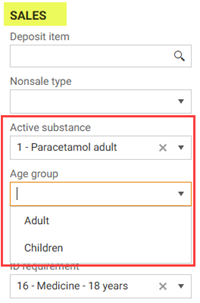
When the Active Substance is removed, the Age Group value is automatically cleared and the field is hidden again.
For existing items that already contain an Active Substance, the Age Group field is displayed by default with an empty value until manually set by the user.
Hide item attributes in Item details and export Excel (RTC-52749)
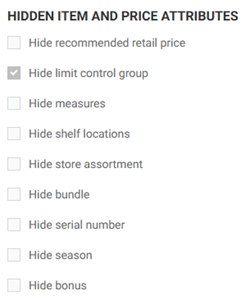
Item attributes that are not fully used can be hidden from users. In System Parameters, certain sections displayed in Item Management can be hidden by checking or unchecking the item attributes listed below. When a field is hidden, it is not visible anywhere in the UI, including item details and Excel export views.
Recommended retail price
Limit Control Group
Measures
Shelf locations
Store assortment
Bundle
Serial Number
Season
Bonus (flag on the item level)
Application language (RTC-55335)
The Danish and Finnish translations of the Item Management app include text suggested by the customer to improve understanding of the translated text and its context.
Label printing grid (RTC-56124)
Columns "Store Number" and "Store Name" are automatically hidden for user with access to only one store.
Label printing view (RTC-57015)
In label Printing view, users can sort and search labels only by label types that are valid and usable within the system. The grid displays and allows sorting exclusively for label types that are used in the Label Type Register.
As a result, the label type list in the filter dropdown shows only label types that are actually configured for use in the current system.
FastLane for emergency stop sale - GET API FastLane changes (RTC-57836)
FastLane polling API endpoint in Item Service that allows POS Servers to fetch priority item and price updates in near real-time. GET /api/gateway/X/fastLane endpoint is available under the Gateway API, where X represents blob types: items, itemprice, storelocalattributes, and storegrouplocalattributes. The endpoint accepts a required fromVersion query parameter, which uses the RowVersion on the FastLane table for filtering, and an optional limit (max 500). If no updates exist since fromVersion, it returns an empty array with HTTP 200.
Version added to fast lane entities (RTC-57845)
Item, ItemPrice, StoreGroupLocalAttributes, StoreLocalAttributes blob types (export) have the 'Version' field, that is the RowVersion from database.
Fix for: Delete price modal (RTC-57089)
Delete price modal follows application's visual design, the same as other confirmation dialogs. If the last remaining price is being deleted, usual delete confirmation modal is shown instead of blocking dialog.
Active Assortment - Fix: Store dropdown missing for profile-level prices (RTC-57136)
The store selection dropdown in Manage Active Assortment correctly displays stores which are a part of 'higher level' store group when an item has only a profile-level (or price zone level) price.
Price control (RTC-57813)
A bug has been fixed in Price control where batch-approving multiple price suggestions for the same article and store could silently create duplicate prices when the suggestions had past validity dates. This corrupted the pricing timeline for the affected article, leading to unpredictable prices, mostly on labels.
The system now correctly handles this situation: when multiple past-dated suggestions would result in the same effective price date, only the most recent suggestion is approved and any redundant older suggestions are automatically removed. In addition, the background process that generates price suggestions has been improved to prevent duplicate past-dated suggestions from building up in the first place.
Released 18 March 2026
Item import - Bold text for weigh declaration (RTC-54010)
Bold text in the weight declaration can be managed via JSON or Excel import. It is a comma-separated list of terms that appears in the UI under the “Product Information” section and can be export to both JSON and excel. In item detail value is read-only and cannot be edited via the UI. The field is also included in post_api_gateway_Items_batch as part of the batch import.
Price Import - Delayed price deletion (RTC-56480)
Price imports support a delayed deletion option. When a price is imported with this status, the system extends the price’s ValidTo date by a configurable number of days defined per department and profile, allowing stores time to sell remaining stock before the price expires. Number of days of delay for stores and price zones is taken from their 'parent' profile. If no delay is configured, the price uses the provided date (or current date) without extension, and existing price statuses continue to work as before.
Supplier and sub-supplier on store (RTC-56745)
Supplier and sub-supplier can be managed per store both in the UI and via import. Users can add, edit, and remove supplier and sub-supplier assignments at store level, with support for JSON import/export using the store local attributes format. Store group selection is split into Profile, Price Zone and Store with filtered dropdowns.
Fix for: Filtering in Price control when changing store (RTC-57135)
Grid filtering options stay unchanged when the store or level changes.
Fix for: Price control missing filter data when no price suggestions (RTC-56527)
Improved the user experience for the Price Suggestion view by adjusting the visibility of the filter panel and adding a clear empty‑state message when no price suggestions are available.
Recommended actions - Service location and Action registers from Inventory (RTC-53960)
Service location and Service action registers are imported from inventory and saved in item service based on the published contract. Both registers support localized text for the name. They are not visible in Item management user interface.
Released 13 March 2026
Recipe items - Price update (RTC-56564)
The system automatically updates the wholesale price of a recipe item whenever changes impact the net price of its default ingredient.
This includes scenarios where the quantities on the base ingredient are modified, resulting in a recalculated net price, as well as when a user sets an alternative item as active, causing the default ingredient's net price to change.
Item export (RTC-57446)
A performance issue has been resolved in the export job that export data to other systems. In certain scenarios, particularly when no bulk item export had been triggered, the export job could time out while processing store-level item data, potentially causing delays or failures in getting updated item information to stores. This has been fixed and the export job now completes reliably under all conditions.
Released 11 March 2026
Store prices - Delete prices in user interface (RTC-48359)
Store prices support deleting both active and future prices directly from the user interface. Delete button is added to the store prices view, opening a modal with a date picker to control the deletion behavior. Deleting an active price sets its valid-to date to the next day by default but it is possible to choose another day and hour, while deleting a future price performs a soft delete.
Store Price Calculations - Store prices (RTC-53969)
StorePriceConverterHandler has been developed to handle the updating of new fields on store prices. When the BackgroundWorkers job is triggered, the new fields in store prices are updated in batches without triggering store price export or causing heavy database load. The StorePriceConverter table is updated with the latest processed StorePrice ID, and a new row is added to track the job execution status.
Store price calculations - Edit future prices (RTC-55295)
Editing future prices is possible in new user interface (accessible through hyperlink 'Details' next to the price). Prices modified in this view update exclusively the new data in Price.StorePrice table, and edit mode can be enabled using the Edit button within the planned price view. In edit mode, values are calculated using the most recent data such as VAT and currency rates corresponding to date of the valid from date of the planned price.
Store price calculations - Create new prices (RTC-54008)
Creating new prices is possible in new user interface (accessible through button on the bottom in the Store Prices grid). In the top section, there is store group selection, supplier currency selection and valid from selection. In the price element there is wholesale price, cost price section (supplier discount, net wholesale price, freight and net price), sales price (margin, retail price and vat). When user changes relevant things in the user interface (e.g. changes the date of the price, currency, or store), they are recalculated and correct values are fetched.
Store price calculations - user interface for prices (RTC-55290)
New user interface was added for displaying and managing store prices in Item Management, using only the new price fields and excluding prices that have not yet been migrated. The new view is accessible via a separate button.
It is visible only to users with the “Access to system tasks and information” permission, and opens after selecting a row. The price calculation rule dropdown is hidden, and a new translation for “Supplier currency” was added.
Sales code in item search (RTC-53641)
Item Search now allow users to search items using a sales code in addition to existing search parameters.
Store routines - Default columns (RTC-55345)
The columns visible in the store routines grid are displayed in the following order by default: GTIN, item text, supplier item number, supplier name, brand name, quantity in package, item area name, item group number, item group name, item subgroup name, store group level, store group code, promotion, promotion price, wholesale price, profile price, retail price, gross profit, gross profit%
Sorting and filtering in Item list (RTC-56078)
Item subgroup (number and name ) and sub-supplier (number and name) columns are visible in the Item list -> item. It is possible to filter the grid by these columns .
Food items - Ingredients (RTC-56148)
A “Remove” option has been added to the three‑dot menu in the Manage Ingredients → Alternative Items tab.
When selected, the alternative item is removed from the list, unlinked from its associated default ingredient, and its Item details page is automatically updated with the entire Convenience section cleared.
The Remove action is disabled for any active alternative item, preventing their deletion.
Food items - Item hyperlinks (RTC-56150)
GTIN values in the Ingredients, Recipe Items, and Menus grids are clickable links that take the user directly to the Item Details page for the corresponding item, making it faster to browse and verify data without manual searching. In the Menus grid, the Item Name column also works as a hyperlink. For Alternative Items, the existing link in the ItemText column has been corrected to properly navigate to the Item Details page as well. As part of these changes, breadcrumbs have been updated across all affected pages, and a bug has been fixed where navigating to Item Details via the GTIN hyperlink did not correctly maintain the breadcrumb structure.
Excel import / export of ingredient (RTC-53571)
The system supports enhanced Excel import capabilities for ingredient management, allowing users to import all ingredient types - including regular and base/default ingredients - mark items as ingredients, and update existing ingredient records.
During import, comprehensive validation ensures data integrity: each Ingredient Info entry must include mandatory values such as Quantity per Unit and Number of Units, and the item must have an active store price.
Ingredient numbers are automatically generated when missing, or used to update existing ingredients when provided. Additional safeguards prevent referencing ingredient numbers from items that are not valid alternatives of the current item. Alternative item rules have also been strengthened: an item can only be marked as an alternative if it contains exactly one default YieldsIngredient with net = 1 and gross = 1; otherwise, the import fails.
Price control - Keep margin suggestions (RTC-53896)
Keep margin suggestion is deleted when active price from which the suggestion was created becomes outdated or has passed its validity.
Correct breadcrumb navigation (RTC-55343)
When users open an item via a hyperlink from any grid (e.g., Store Routines, Item List), the breadcrumb now navigates back to that same grid, not the generic item grid. Instead of always showing “Items”, breadcrumbs now display the appropriate label e.g., Item, Item Segmentation, Item lists, Label Printing, Label lists, Store Assortment, Price Control, Store routines, Store prices, or any custom list name.
Shelf label printing layout (RTC-54852)
For specific shelf label types, there is a default and not changeable layout for printing labels from all views. Shelf label 4, Shelf label 4 streamer, A4 price sign are always printed in Landscape layout, while A5 price sign in Portrait layout. In printing window, the option to change layout is not visible. For other label types, options are available. Additionally yellow background for labels for items with sales purpose is always visible and printed no matter if 'Background graphics' checkbox is selected or not.
Planned import for Excel files (RTC-53891)
It is possible to create a planned mass update for a future date. When creating a mass update, future date can be set in order to schedule an import. If no data is set, a usual mass update is performed with immediate import.
Store group local values Import and Export (RTC-54247)
Store group local attributes can be exported/imported for both Profile and Price Zone in a format with sub-columns, and this applies to all values that are supported in Store Group Local Attributes. Based on the permissions, we will show only the sub-columns for profiles that the user has access to via the "View Store Local Attributes" permission. This is a "breaking" change for users who have the "Use Assortment Code per Profile" setting enabled. In the user interface, Values per Store Group is allowed to be checked/enabled along with Values per Store or Export Store Prices; however, Export Store Prices and Values per Store cannot be selected together.
Item details - Import items (RTC-53892)
The Imports tab is visible in Item details. This table displays imports that contain a given item. The data displayed includes the import ID, file name, planned import date, and status. Clicking on the name will take the user to import details.
Item Import of EAN 20 barcodes (RTC-57291)
When importing items identified by EAN 20 barcodes, a crash could occur during batch import processing, causing the entire import to fail with an unexpected error. This happened when an item could only be found through EAN 20 barcode conversion rather than a direct barcode match. The issue is now resolved - items identified via EAN 20 barcodes are handled correctly during batch import, and the import completes as expected.
Item Import (RTC-57303)
Fixed an issue where reimporting an existing article with a changed VAT code caused the import to fail with an error, leaving the article unchanged. This occurred during both Excel imports and approval-based imports. The import will now complete successfully when a different VAT code is specified for an article that already has one assigned.
Price import - Override status (RTC-47445)
When a price with Override status is imported, prices on lower levels, such as store or store group level, no longer apply. Active store-level prices stop overriding the price zone price by ending at the start date of the imported price. Future store-level prices are removed.
If the imported Override price starts in the future, an active store-level price remains valid until the imported price becomes active. This ensures the correct price applies at each point in time and prevents outdated store-level prices from overriding centrally managed prices.
Import suppliers and sub-suppliers per store group (RTC-48925)
Supplier, sub-supplier, and their respective item numbers can be imported per store group, allowing the main supplier to remain the default while defining actual supplier relationships at store group level. Fields are mapped to the new data structure and supported across JSON and Excel imports, including automatic placeholder creation if a sub-supplier does not exist. The legacy [ItemSuppliers] structure is now obsolete, exports use the new fields, and imports also allow removing supplier (only per store group) or sub-supplier assignments by sending null for entire structure (JSON) or null external numbers (Excel).
Store Prices - Valid to date in import (RTC-53226)
Price imports support an end date for each price. This applies to Excel, JSON, and RIGAL imports. System checks that prices for the same item and store group do not overlap in time. If an imported price overlaps with another price, the affected row is marked with a validation error and is not imported. If a price has an end date in the past, it is ignored and warning is displayed in import.
Export items from Item list (RTC-55080)
A button is added in the bottom panel of the Item list, and when clicked, it exports all the data about items in the same way how it is possible to export from the item grid. Data are exported for all the items inside the created Item list.
Export/Import Consumer Unit item linked to Trade Unit item (RTC-54532)
Users can now link a Consumer Unit (CU) item to a Trade Unit (TU) item directly through Excel import, as well as specify the Qty in Package (equivalent to “Quantity in Supplier Package” in the user interface) for each linked CU.
Excel export has been extended to include CU item identifiers - CU SKU, Product ID, Item Number, and GTIN
User can link the CU item to TU item using at least one of its item identifiers. If the item with given identifiers doesn't exist, it will be automatically created.
Supplier/sub-supplier per store group (RTC-56735)
The search functionality in item supplier management uses a contains search pattern, allowing users to find store groups using any part of the name.
Fix for: Duplicated rows in import items view (RTC-56071)
Single, valid price entry is returned per timestamp. As a result, the “Import details” view now consistently displays one row per import item.
ItemService - Update Item/price via FastLane (RTC-57381)
FastLane option is added to item and price imports to allow urgent updates to reach cash registers much faster. When this option is used, updates are sent through a priority path while still going through the normal process as well, ensuring critical changes are delivered quickly without affecting standard imports. FastLane works only for existing items, and attempts to use it for new items return an error, while imports without FastLane continue to behave as before.
Item service - New ItemService endpoint to fetch item identifiers based on the sales code (RTC-55657)
A new API endpoint that fetches item identifiers based on a Sales code.
Method: GET
Path: /v1/items/by-sales-code
Query Parameter: salesCode (required)
Request:
Query Parameters
salesCode (string, required) — The sales code to resolve
Headers
Authorization: Bearer <token>
Accept: application/JSON
Successful Response (HTTP 200)
Returns one or more matching item identifier records.
Response fields per item:
DKU (string)
productId (string | number depending on your domain - example uses string)
useItemIdentifiersOnlyForIdentification (boolean)
GTIN (string)
externalItemNo (string)
Item import - Food items (RTC-54128)
A isDeleted property has been introduced for JSON imports to enable controlled ingredient removal within the YieldsIngredients section.
Ingredient Number is mandatory when performing delete operations, and the system will prevent deletion of default ingredients by returning the error message.
Delete ingredient column has been added to Excel imports, allowing users to delete ingredients directly through the spreadsheet interface while following the same validation rules.
Items on Promotions - Promotion data in elastic export (RTC-56100)
All relevant promotion-related data are exported properly to Elasticsearch.
Items and prices via API - Detailed error message (RTC-56929)
When invalid JSON file (type mismatch or incorrect file structure) or incorrect identity header is sent, error response contains a clear message with details regarding the specific issue.
Item hierarchy - Fix: Nullable object error (RTC-57374)
When opening views with item groups, fields on item details with item groups and subgroups, there is no server error.
Fix for: Base ingredient dropdown in Convenience grid displays multiple duplicate default ingredients (RTC-56703)
Base Ingredient dropdown displays default base ingredients with no duplicate entries when creating an item as an alternative item.
Label printing - Fix: Store local values on labels (RTC-56744)
When label is generated and possible to print from Label printing, if Store local values exist for particular store group, they are used for label generation.
Suppliers - Fix: Missing suppliers on copied item (RTC-57186)
When copying an existing item, the created item has correct suppliers ad sub-suppliers set - common and on store groups (and copied from the source item).
Item search - Fix: Preferred language of user is not always applied (RTC-55314)
Users with different preferred languages can now always search for items in their own language, and search results will match their personal language settings instead of another user’s.
Fix: Empty grid in price control retail price is zero (RTC-56909)
Price suggestion queries now handle cases where retail price is zero without failing. When a zero retail price appears, the calculation safely skips division instead of throwing an error, so the grid returns results normally and price updates are no longer missed.
Fix: The Column adder in the ingredient grid shifts out of view when the grid is scrolled down (RTC-54246)
The Column Adder, Add Ingredient section and grid header section are now fixed at the top of the interface, ensuring they remain visible at all times. The remaining portion of the grid is now scrollable.
Fix for: Do not create storeGroupLocalAttributes when upserting suppliers on common level (RTC-57082)
Group local attributes are not created when the supplier is added to the common level via user interface.
Export to elastic - Fix: Support for 429 errors (RTC-55849)
The export process to Elastic handles 429 "Too Many Requests" errors automatically. When large exports run, the system retries based on the guidance returned from Elastic. This prevents failed exports caused by temporary overloads and ensures that all data is sent successfully.
Released 28 January 2026
Automatic update of recipe wholesale price (RTC-53107)
Recipe item prices now update automatically when an ingredient’s price changes, when the recipe’s composition is modified, or when any factor affecting the recipe’s net price calculation changes.
Updates are applied only in store groups where all included ingredients are available and where an active price for the recipe item already exists.
The calculated recipe net price is used as the wholesale price in the store currency; the sales price remains unchanged. Price updates run across all applicable stores, respecting store-level pricing.
A new default LIP job has been added to perform these updates automatically, with logic to avoid creating a new price if it matches the existing one.
Planning workflows are streamlined: when a user creates a planned price for an ingredient, a planned recipe price is created automatically; if an ingredient’s net price changes and a planned recipe price exists, the planned wholesale price is updated accordingly.
At all times - including for future-dated prices - the recipe-level wholesale price equals the sum of the net prices of its ingredients.
System parameters - Hide attributes (RTC-49268)
A new system parameter was added under a dedicated section called “Hidden item and price attributes,” allowing configuration at system level. Using checkboxes, retailers can hide sections such as Recommended Retail Price, Limit Control Group, Measures, Shelf Locations, Store Assortment, Bundle, Serial Number, Season, and the Bonus flag on item level. Functionality to hide the fields will be added in upcoming stories.
Store group local attributes (RTC-55744)
Store group local attributes section was added to the “Export” view. This blob type can be manually triggered to be exported, and both the last export section and the export history tab are visible and correctly refreshed.
Item supplier setup per store group (RTC-53427)
Item suppliers are defined per store group, including the common store group. Each item has one supplier per store group, ensuring a clear and consistent supplier setup. Supplier and sub-supplier information is imported only on the common store group. Supplier setup does not use a main supplier flag. Export format stays the same, so no visible changes appear for customers.
Store routines - Fix: Store picker improvements (RTC-55342)
Users with access to only one store are automatically taken to the “Store Routines” view with that store preselected, and the store picker is no longer shown. The selected store is remembered when refreshing the page or navigating between views, and the picker remains hidden as long as a store is already selected, while the selected store is still displayed above the grid. In addition, the store picker modal can no longer be confirmed without a selected store, preventing the grid from disappearing.
Fix: Approving price suggestion creates price with null wholesale price (RTC-55332)
Approving price suggestions created from prices with different wholesale supplier and retail price currency always creates a price with correct currency, The wholesale price in supplier currency is copied from the existing profile or store price, depending on the suggestion level.
Released 14 January 2026
Store prices - Price calculation (RTC-53966)
All price calculation fields are updated when store prices are created or modified. The implemented logic sets values for both new and existing fields. These fields are updated when prices are created or modified via UI and import, and when price suggestions are approved.
Fix: Notifications when import of campaign flag (RTC-55708)
When importing RIGAL file with campaign flag in field 5 ( K,M,A), user is notified only once that there is error in the row or in some rows in the imported file.
Fix: Nullable object must have a value exception (RTC-55376)
User with scoped permissions or limited store access can go through Item Management accordingly to his permissions without any errors. All store and store group dropdowns are now properly filtered according to user permissions, and grid filtering behaves as expected.
Released 13 January 2026
Package code column in Items overview (RTC-54534)
A new Package code column has been introduced to the Items grid.
This column reflects the package information from Item Details → Package section and supports two values: TU and CU. By default, the Package code column is not visible in the grid and must be manually enabled through the “+” (column selector).
When the column is first added, it automatically applies a default filter of CU, displaying only CU‑packaged items.
Users can clear the selected value to remove the filter, allowing both TU and CU items to be displayed simultaneously.
Item area (RTC-52884)
Item area number is a column possible to be visible and filtered on in Items overview. Item area number and name can be exported to Excel.
Attributes per store group - Label creation (RTC-54055)
When exporting labels, field values are determined using a hierarchy. If a value exists at the store group level, it is used. If not, the system follows this priority order: Store / Price Zone / Profile / Item.
The yellow background associated with a sales purpose is applied based on the same hierarchy. A label displays the yellow background when a sales purpose value is defined at any applicable level (store, price zone, profile, or item).
Profile price filter (RTC-47358)
The Net price column now displays ingredient prices based on the selected profile, along with the correct currency.
The previous column filter has been replaced with a Profile drop-down, with the first profile in the list selected by default. Profiles shown are filtered by the user’s “View prices” permission, ensuring only authorized profiles are visible.
Ingredient prices are sourced from the most recent store price within the selected profile. If an ingredient does not have a price for the chosen profile, its ‘Net Price’ field remains blank. Currency is displayed next to each price.
Profile price filter in Edit recipe grid (RTC-53766)
Net prices for individual ingredients and totals are now displayed in the currency of the selected profile, with the currency clearly shown next to each value.
In Edit Recipe, the previous “Net Price” column filter has been replaced with a Profile drop-down, which defaults to the first available profile and lists only profiles for which the user has “View prices” permission.
Prices are sourced from the most recent store price matching the selected profile.
If any ingredient lacks a price for the chosen profile, the ‘Total net price’ field will remain blank; similarly, if prices span multiple currencies, totals will not be displayed.
Item export - Export labels for item (RTC-31537)
When triggering export of item from item grid user interface, active exportable labels are exported. GenericExport job takes care of export of all other blobs, where LabelExport processes labels.
Filtering in export view (RTC-31540)
In Export view, user is able to apply filter on start date, end date and number of elements columns to provide flexible filtering. Currency sales rate and currency cost rate are grouped under a single entry as "Currency".
Fix: Default ingredient quantities shouldn't be editable (RTC-54635)
When using the Edit button in the Ingredients grid, Manage Ingredients grid, or Item details, users can now only modify the name of default ingredients. The net and gross quantity fields have been removed from the edit modal for default ingredients.
Fix: Incorrect recipe item displayed on Edit recipe page (RTC-55262)
Instead of first recipe item in the grid, the “Edit recipe page” now correctly displays the details of the recipe item selected by the user.
Fix: Content is not refreshed after changing language (RTC-53504)
After changing content language, the application is automatically refreshed to be visible in selected language.
Fix for: Country of store is updated when country is changed in profile (RTC-54966)
When a country is changed on a profile in Store service and store is Imported to Item management the country code on the private store group for store is updated to the changed country.
Released 17 December 2025
Store routines grid (RTC-48812)
The Store routines grid shows the effective price for each item in a store. The grid shows one row per item and presents the price that the store actually uses. The grid also shows if the price comes from a profile or the store, and if the price is a promotion price or a member price. The grid opens for one selected store. The store dropdown shows only stores the user can view by 'View Prices' permission. The last chosen store is stored for each user. Area access controls which items appear in the list. Promotion price column shows only offers that are promotion price.
The grid shows these columns by default: GTIN, item name, store group level, store group number, ordinary price, promotion price, member only, item group.
Hidden columns include: item number, net price, promotion start, promotion end, all optional columns from the store price grid (except external model number), margin, and profile price.
ValidTo date on store prices in elastic search (RTC-53131)
Elastic Search uses the ValidFrom and ValidTo dates to identify which price is active for each item and store. Export includes the effective price at the time the job runs. A store price replaces a profile price while it is active. When the store price ends, SearchIndexing job exports the profile price again if it exists.
Store price calculation (RTC-53950)
Store price is extended with new price calculation fields: WholesalePriceInSupplierCurrency, WholesalePrice, SupplierDiscountAmount, FreightAmount, NetPrice, MarginAmount, RetailPriceExVat, VatAmount, RetailPrice, RecRetailPrice. They are not yet visible or usable by the user.
Hyperlink to active base item (RTC-54039)
In Convenience section, for non-active base items, INGREDIENTS section is now replaced with an ACTIVE BASE ITEM section.
This section includes a hyperlink that redirects users to the active base item’s Item details page. The hyperlink displays the active base item’s name, localized according to the user’s preferred content language.
Item saving through bulk updates (RTC-54993)
Saving items using bulk updates correctly stores all related data.
Export of assortment code to 3rd party (RTC-54279)
Assortment code, when set on item, is exported in item.gatewaychanges blob in separate field 'assortmentcode'. When set on profile or price zone, it is exported in both item plannings section as well in item.storegrouplocaloverride.export blob. Removing assortment code from an item/ store group triggers export of according blobs with value null in field.
Import Procurement rule code (RTC-46494)
Value from field 73 in RIGAL file is mapped to procurement rule code and set on item in import.
Mark item as an ingredient via JSON import (RTC-53937)
Using import user can:
Mark item as an ingredient - in IngredientInfo: Quantity per unit and Number of units must be provided, first YieldsIngredients must be base ingredient (netQuantity = 1, grossQuantity = 1)
Add alternative item - first YieldsIngredients must be base ingredient (ingredienNo must be provided)
Add regular ingredients to ingredient items
Not yet an ingredient items - first YieldIngredients must be base ingredient, the remaining will be imported as regular ingredients
Ingredient items - all YieldIngredients will be imported as regular ingredients
Ingredient numbers are auto generated if missing, while provided numbers update existing ingredients. Any YieldsIngredient referencing multiple items must be valid alternatives; otherwise, an error is thrown.
For new ingredient entries with both net and gross quantities equal to 1, the first occurrence is treated as the default, and a warning is displayed if multiple such entries exist.
Fix: Cannot print label from label lists (RTC-52942)
It is possible to print all label types from label lists.
Fix: Return link in the breadcrumb (RTC-54119)
Return link is added in the breadcrumb to return from Store price details page to Item details page or to store price grid view.
Fix: Add label to label list, ecological flag (RTC-53484)
Swedish translation for adding labels to label list has been corrected. As well as translations for the name of the 'ecological' column in item grid.
Released 9 December 2025
Item hierarchy - Bonus flag per profile (RTC-47469)
Bonus flag is added to the item group. This value is per profile. Selecting the entire flag enables the bonus flag on all profiles. The user can select the profiles on which the flag should be set or not. The item group view displays the first 5 profiles for which the flag is enabled, with a notification informing user if there are more. The user can manage bonus only for profiles to which they have access based on their permissions. The display of active profiles is also based on user access, which means that a flag in an item group will be marked or not depending on whether the user has access to profiles managed by another user.
The quick edit panel has also been removed from the group item register.
Item Management - New language support (RTC-53330)
The Item Management application includes Danish and Finnish language support. Users can operate all Item Management features in Danish or Finnish by selecting their language in “Edit user profile”.
Scale labels - Fix: Shelf life declaration store level not working (RTC-53142)
When store local values of shelf life and best before flag are used, values from common level are overwritten. Therefore, changes in common level values are not triggering label generation, and only store level values are visible. When not both of the values are store local, then the missing value falls back to the common level.
Label printing - Labels with promotion (RTC-53036)
For item with sales steering and promotion price, the promotion/campaign prices are displayed in red text/red price, overriding the yellow background until the promotion period has ended. This applies to the following label types: Price Sign A4, Price Sign A5, Shelf Label 4 Streamer, and Shelf Label 4.
Update active base item for ingredient (RTC-50823)
In Manage ingredients (Alternative items tab) users can set a base item as active either during addition (via a new "Set as active" checkbox in the Add panel) or from the row options menu ("Set as active" option in three-dot button). When a new base item is activated, the previous active item is automatically marked as inactive.
Additionally, a confirmation modal has been introduced to approve changes when switching active base items (it provides info on how many ingredients and recipes will be affected by the change).
Extended "Manage base ingredient quantities" permission (RTC-53572)
User without "Manage base ingredient quantities" permission additionally: cannot add alternative items - “Add panel” in "Alternative items” tab (on Manage ingredients page) is hidden for the user.
Logging in integrations (RTC-54294)
Improved the performance summary for all kinds of integration jobs that execute in the background, so that it's easier for us to investigate any performance issues.
Import/Export - LotteryId item attributes (RTC-52683)
LotteryId can be exported to Excel. It is also possible to import this value by JSON and Excel file. The value needs to be unique and max 3 characters long. If these conditions are not met, the user will be notified via a message in the import view.
Import and map units of measure (RTC-46708)
When importing RIGAL file with code 1-15 in field 14, the code is mapped to a correct unit of measure and set on item. If unit does not yet exist in Item Management, it will be created. The same goes for importing code 1-15 in field 92, where the code will be mapped to correct unit price unit (unit price factor value must be present in the file or on the item already).
RIGAL import - Support import on price zones (RTC-48450)
The system supports importing RIGAL files with prices on price zone level from third-party systems. The import reads the value in field 54 and maps it to the external store group number. When the same value exists for both price zone and store in field 54, the price zone value applies. When the file includes an assortment code in field 47, the import handles the assortment code based on the system parameter assortment per profile. When the parameter is disabled, the assortment code imports on common level. When the parameter is enabled, the assortment code imports on the item on profile. The import places the assortment code on the profile when the profile is present in the file, in the file name, or specified in the import. When the file includes a price zone or store, the assortment code imports on the parent profile of the store group.
RIGAL import - Fix: Campaign flags omitted in manual import (RTC-54372)
When importing file, with rows where flag on field no. 5 is K, M or A, these rows are omitted.
Fix: Validation import when importing item with unit price (RTC-50517)
The Excel import accepts items when the file includes both Unit Price Unit and Unit Price Factor, or when both fields are missing. A validation error appears only when one of the fields is missing while the other contains a value.
Fix: Item having profile and price zone with same reference file export fails (RTC-54293)
File can be correctly exported to excel when the item has assortment code and both profile and price zone share the same reference.