Released 16 September
Customer order number in order despatch advice and goods receipt (RTC-60990)
The customerOrderNo number flows from the OrderDespatchAdvice import into the Goods Receipt export and is exposed on the REST API. A new "Customer order no." column has been added to the Delivery lines grid on the delivery details screen (both order and package views) and on the manual delivery lines screen, showing the reference when it was provided on import and left blank when it wasn't.
Support multicountry for assortment codes (RTC-57345)
Assortment code names in the Procurement module are now displayed in the user's preferred content language. When a localized name is available for the user's language, it is shown; otherwise the default assortment code name is used as a fallback. This applies to the Registers – Store Assortment view.
Increased quantity precision in Procurement (up to 4 decimals) (RTC-54496)
Purchase order, despatch advice, order confirmation and goods receipt quantities now support up to 4 decimal places. This applies consistently when entering quantities in the UI, when importing documents, and when exporting them (including the Purchase Order Export and Goods Receipt Export), so precise quantities are preserved end-to-end with no rounding or truncation. Quantities must be between 0,0001 and 9999999999,9999; values outside this range, or with more than 4 decimals, are rejected with a clear validation message.
Additional new fields added to Purchase order export (RTC-61217)
The Procurement.PurchaseOrder.Export now includes additional fields for each purchase order line: net wholesale price, net wholesale price (supplier currency), total, total (supplier currency), assortment code, and created by.
These values match the logic already used in the Procurement user interface. Assortment code will be null when the item does not belong to any store assortment for that store.
Submitted values now saved for order lines added to submitted orders (RTC-54591)
Order lines added to an order that is already submitted, confirmed, partially confirmed or rejected were saved without submitted values, so an imported order confirmation could never match them and the line could not be confirmed. The submitted values are now recorded right away — through the user interface, ODA import and purchase order import.
StorageId support in Goods receipt import and export (RTC-61471)
The Procurement module reads the StorageId from the imported GoodsReceipt (from InStore Cloud), persists it on the related OrderDespatchAdviceLine, and forwards it on the exported GoodsReceipt to Inventory - linking the storage created and labelled in InStore to the goods receipt so it reaches InventoryService.
StorageId allows up to 50 characters. When the value is absent, import and export behave exactly as today.
Add service order ID to order despatch advice import, “package per store” API response and goods receipt export (RTC-61485)
Procurement now reads the ServiceOrderId from the imported OrderDespatchAdvice and persists it on the related OrderDespatchAdviceLine. The GET /api/gateway/Packages/packagesPerStore/{storeNo} response includes the persisted ServiceOrderId per line. The field is a nullable, optional string with a maximum length of 50 characters; when it is absent, import, the packagesPerStore response, and export behave exactly as before, remaining backwards compatible.
Incomplete records excluded from data exports (RTC-37907)
Purchase orders, goods receipts, ordered quantities, and store assortments that reference incomplete placeholder items, stores, or suppliers are no longer exported, and are automatically included in the exports once the underlying data is complete.
Pending receival value in Goods receipt import and export (RTC-60917)
The Goods Receipt import and export now carry the "Pending receival" indicator, allowing a pending receival selected in the InStore app to flow through Procurement to the Inventory service.
Corrected import of article orders and Goods receipts from the Instore App (RTC-62799)
Article orders and docking area goods receipts sent from the Instore app are again imported into Procurement without errors.
Merger jobs are executed only once (RTC-62504)
Merger jobs registered separately from StagingMerger are not executed by StagingMerger. No merge handler is invoked more than once.
Additionally fixes for imports from Item Service - Supplier import does not fail and Item Changes import performance has been improved.
Procurement Module Upgraded to LIP4 and .NET 8 (RTC-42182)
The procurement integration service has been migrated to LIP4 and .NET 8, improving stability and long-term supportability with no change to existing functionality. For failed import executions (e.g. validation errors), the job will complete with success, but logs containing related flatBatchJsonId.
System - New framework for user interface (RTC-54714)
Procurement service is upgraded to framework version Angular 21.
System (RTC-58271)
Procurement module is migrated to .NET 10.
System (RTC-60262)
Updated deprecated NuGet packages.
Fix: Order confirmation import no longer saves partial data when staging validation fails (RTC-54478)
When a validation error occurs during an order confirmation import, no data for that confirmation is saved to the database — the purchase order and its lines remain unchanged. This fix is scoped per confirmation.
Fix - Order import price resolution supports GTIN and ExternalItemNo (RTC-61101)
ODA and Purchase Order imports resolve temporary net price and wholesale price using SKU, GTIN, or ExternalItemNo,with priority given to SKU, then GTIN, then ExternalItemNo.
Fix: Export Purchase orders to Excel fails for view-only Store role users (RTC-60744)
Fixed an issue where users with a Store Role having only "View Purchase Orders" permission received a server error when exporting a Purchase Order to Excel. Export to Excel is now correctly guarded by the View permission and the "Export to PDF" option is shown when View permission is granted.
Corrected file type on exported Procurement data (RTC-62113)
Purchase order, goods receipt, ordered quantity and store assortment exports are again published with their original file type, so receiving systems can process them without any changes to their integration.
Released 17 June 2026
Purchase order email template now supports multiple chains with dynamic tags (RTC-58920)
The purchase order email template now includes dynamic tags for store number, store name, and profile name. This enables the template to support purchase orders from multiple chains in a single generic template. Suppliers can now identify which store has sent the purchase order and know the correct delivery destination.
Procurement Purchase order export - TemporaryNetprice field (RTC-59563)
The ‘TemporaryNetprice’ field is now correctly exported for purchase order line items during the summit and confirm workflows.
Fix: Export of orders submitted by 'Submit multiple orders' (RTC-60080)
Purchase orders submitted via the bulk submit flow are now correctly exported to JSON, matching the behavior of single order submission.
Released 1 June 2026
Temporary net price for order line - order proposal and integrations (RTC-52440)
Temporary net price is applied to order lines created by jobs in integration platform:
Order proposal generator,
Order import from Excel file,
Imports of PurchaseOrder, OrderDespatchAdvice, GoodsReceipt contracts,
Item ordering and Receive goods in InStore App on-premise (POSLog integration).
This is consistent with the behavior already available in the user interface.
If import from external system defines wholesale price (and optionally discount) in file, temporary net price is not applied.
Temporary Net Price date range correction (RTC-58887)
Temporary net prices now remain active through the complete end date until midnight.
When creating order lines or manual delivery lines through the user interface, or importing files via third party, the system now correctly applies temporary net prices through 23:59:59 of the specified end date.
Purchase order submission with assortment code permission (RTC-54424)
Users with the permission "Allow order lines with incorrect assortment code" can submit, resubmit, and confirm purchase orders where one of the ordered items does not belong to store assortment.
Validation messages are not shown during submission from multiple orders, notifications after Excel import, or order proposal notifications. The validation message remains visible in the order line view, so users can still review assortment code issues when needed.
Purchase order confirmation without assortment code validation (RTC-58186)
Purchase orders can be confirmed even when assortment codes are missing. This ensures that confirmation is not blocked and allows orders to be completed while still showing assortment code information in the order lines for reference.
Purchase order submission validation (RTC-48986)
When user is not allowed to submit purchase order due to incorrect assortment code or incorrect supplier for an item, validation error that appears in user interface does not throw backend exception, is not stored in backend logs and does not trigger unnecessary alerts.
Email template name update (RTC-36777)
Name of Distribution Template (displayed in Message Distribution Management) sent after submitting purchase order in Procurement Management has been changed from 'Order confirmation' to 'Purchase order'. The dynamic tag of purchaseOrderNumber is now visible on the list of available dynamic tags in the Purchase order template, making it understandable to user that dynamic tag can be used.
Those changes are visible in Message Distribution Management after first e-mail sent from Procurement Management after release.
Store and Team Defined in Excel import of procurement order lines (RTC-52520)
Excel import of procurement order lines supports defining the store or team directly in the Excel file. This allows order lines to be assigned to the correct store without selecting stores or teams in the user interface during the import process.
When Store level is set to Store, the option Store defined in file is available. The Excel file includes a Store number column to identify the store for each row.
When Store level is set to Team, the option Team defined in file is available. The Excel file includes a Team code column to identify the team for each row.
Each row in the Excel file determines the store where the order line is created. Rows are skipped when the store number or team code does not exist, or when a team has no connected stores.
This option is available to users who have permission to create order lines for multiple stores.
Purchase order exported Excel contains two new columns “Store Number” and “Team Number” which will always be exported as empty.
Excel import of Order lines with incorrect assortment code (RTC-53575)
A checkbox 'Allow order lines with incorrect assortment code' in the import window lets users to import order lines with incorrect assortment code.
Access to this option depends on user permissions. When “Allow order lines with incorrect assortment code” common level permission is granted, the option is available during import. Without permission, assortment codes are always validated, and only valid order lines are included.
Store price validity in ItemPrice import (RTC-51234)
Store prices include a 'ValidTo' value in the ItemPrice import and table. Price lookups use both ValidFrom and ValidTo, ensuring that each price is applied only within its defined time period. This provides more accurate pricing by clearly defining when a store price starts and ends.
Active price is applied in:
Purchase orders and manual delivery in the user interface
Excel import for purchase orders
JSON import for purchase orders, order dispatch advice, goods receipt, and order confirmation
Order proposal generation
Assortment code validation & Excel import improvements (RTC-58243)
Assortment code validation now correctly ignores soft-deleted assortment codes on the following pages:
Viewing order lines in grid in user interface
Create order line
Submit purchase order
Bulk submit purchase orders
Excel import of purchase orders
Excel order import for store users with access to a single store now resolves the correct store automatically.
Import order confirmation Swagger documentation (RTC-54599)
The Swagger documentation for import order confirmation includes clear validation rules for each field. This helps ensure that requests follow the correct format.
The primary example shows only required fields, making it easier to understand the minimum data needed to send a valid request.
Procurement API request parameters validation (RTC-49654)
The Procurement Service API validates required parameters in all GET requests. When both SKU and mainGTIN parameters are missing from a request, the API returns a 422-validation error with an appropriate error message indicating which item identifier parameters are required.
Fix: order status after receiving partially confirmed order (RTC-57507)
When goods receipt is finished for all order lines in 'Partially confirmed' purchase order, order status is properly changed to 'Done'.
Fix: Internal transfer (RTC-56718)
When creating a new internal transfer purchase order, only those suppliers who have the same GLN as any store in the database are visible in the supplier drop-down menu.
Fix: Supplier discount for order and manual delivery lines (RTC-56235)
Order lines and manual delivery lines can be saved even when a supplier discount is not defined for the item. In these cases, the discount field displays 0%.
Norwegian translation update (RTC-58450)
The Norwegian translation for the Purchase Order "Order type" drop-down has been updated. The Replenishment value is now correctly displayed as Etterfylling in the Norwegian (nb) locale.
Column type warnings (RTC-53682)
Improved column type specifications in the Procurement module's EF Core model configuration to eliminate warnings in Application event logs.
Fix: permission "Allow order lines with incorrect assortment code" is scoped to assortment code validation only (RTC-58571)
The "Allow order lines with incorrect assortment code" permission now applies specifically to the assortment code validation on order line creation in the Purchase Order view. When a user has this permission, the assortment code check is skipped, while all other item validations - including supplier item validation - continue to be enforced. As before, validations are skipped for Internal Transfer orders and Manual Deliveries.
Released 9 March 2026
Submit many Purchase orders at once (RTC-53704)
It is possible to submit multiple purchase orders in a single action. The grid that allows submitting multiple orders at once can be opened by clicking the View orders button in the notification shown after creating an order proposal or importing an Excel file with purchase orders, or by clicking the Submit multiple orders button on the main Procurement page. The grid contains the same columns as the main Procurement page and also includes a default filter on status Draft, checkboxes for each row and select all / unselect all (applies to filtered results), a Warning column, visibility limited to stores the user has permission to access.
The breadcrumb reflects how the page is opened:
From Order Proposal notification: Purchase orders affected by Order Proposal.
From Excel import notification: the file name appears in the breadcrumb.
From the main page: Submit multiple orders text appears in the breadcrumb.
All order statuses are visible in the grid for submitting multiple orders. If an order is not in Draft, Edited, or Cancelled status, the warning “Order is already submitted” appears. If the order is Canceled, the warning “Order is cancelled” appears.
When selecting orders and clicking Submit, a confirmation modal shows:
the number of orders that can be submitted,
the number of orders that cannot be submitted.
Warnings are refreshed to reflect the current order status.
After submit, if the page opens from a notification, the user stays on the same page and the grid refreshes. Submitted orders are not visible due to the default “Draft” filter. If the page opens from the main Procurement page, the user is redirected back to the main grid. Clicking an order number opens the order in the same tab. A toolbar notification is shown when the orders have been submitted.
Possible warning messages:
Order contains items that do not belong to the store assortment.
Some of the items cannot be ordered.
Order is already submitted.
Order is cancelled.
Supplier does not use EDI.
Order cannot be delivered to the placeholder store.
Order cannot be delivered by the placeholder supplier.
Order needs to contain at least one active order line.
One of the ordered items is a placeholder.
One of the ordered items is not delivered by the supplier to the store.
One of the ordered items is inactive.
Purchase order confirmation status in the user interface (RTC-48603)
Order lines include an order line status column that shows confirmed, partially confirmed, rejected, or is empty. An empty cell represents order lines without order confirmation. When a purchase order is partially confirmed, the order lines page supports the same actions as a confirmed order, including edit order and receive goods. Goods receipt is possible for partially confirmed orders in the same way as for confirmed orders. When a purchase order is rejected, the order lines page behaves similarly to a completed order, but the Reopen button is hidden and a Cancel order button is available.
All numeric columns for order lines are right aligned. A Supplier order line note column appears next to Order line note, and supplier notes are always marked as updated when present. Supplier notes are also visible in the expanded order line view, below the order line note.
Order lines show differences between submitted values and confirmed values. When quantity, wholesale price, wholesale price in supplier currency, delivery date or discount differs from the submitted value, the updated cell shows a dirty flag. The submitted value appears with strikethrough and is visible after hovering over the confirmed value.
The history section shows only created and last changed, based on audit data. Detailed history moves to a History tab, which displays the full order history in a grid, including confirmation, partial confirmation, and rejection events.
Confirmed and partially confirmed purchase orders share the same columns in th grid. Order despatch advice import is available for confirmed and partially confirmed orders, and is not available for rejected orders.
The purchase orders GET API returns confirmed and partially confirmed orders. Rejected orders are excluded from the response.
Supplier selection when creating a purchase order (RTC-52651)
When creating a purchase order, the list of available suppliers depends on the selected store. The supplier dropdown displays only suppliers that are assigned on item to the chosen store, belong to the store’s group (profile or team), or are available for all stores. That means order can be created only for suppliers who are assigned to deliver at least one item to selected store.
In the modal, the user completes the form step by step. In the first step, the user selects the order type (Replenishment, Preorder, or Internal Transfer) and the store. Once a store is selected, the supplier dropdown and the delivery date field become visible. If the store selection is changed, the previously selected supplier is automatically cleared.
Temporary net price for order line (RTC-51905)
A temporary net price field is available on the purchase order line. The field appears between wholesale price and discount. The system pre-fills the temporary net price when a valid value exists (imported from Promotion Management) and when the value is lower than the wholesale price.
The discount is calculated to match the difference between Wholesale price (from Ordinary price) and Temporary net price (from Promotion): 'Wholesale price' - 'Discount'*'WholesalePrice' = 'Temporary net price'.
When the wholesale price or temporary net price changes, the discount percentage updates automatically. The temporary net price field is hidden when no value was found. Temporary net price is stored in store currency. The value in supplier currency is calculated by dividing by the currency rate. All values are rounded to two decimals. Additional columns for temporary net price and temporary net price in supplier currency are available in the purchase order grid and are hidden by default. Temporary net price values are included in purchase order exports at order line level.
Temporary net price for delivery line (RTC-51903)
A temporary net price field is available on the manual delivery line. The field appears between wholesale price and discount. It follows the same price search and display rules as purchase order lines.
Temporary net price rounds to two decimals after discount change (RTC-56323)
When the discount percent changes, the Temporary net price recalculates and rounds to a maximum of two decimals.
This applies to both the order line details view and the delivery line details view.
Import of temporary net prices (RTC-51904)
A temporary net price created in the Promotion module is imported to the Procurement module and saved in the database. The import is skipped when no matching item id is found. If related store is not found, a placeholder is created. If related store group is not found, the new one is created using the provided reference number and empty name.
Purchase Orders sent to supplier with PDF (RTC-55879)
Purchase orders generate a PDF when you submit them. The PDF is sent to the supplier to ensure the order is received and processed correctly.
Purchase order confirmation (RTC-48602)
There is possibility to import a confirmation of the purchase order using Procurement.OrderConfirmation.Import. This allows to verify whether the vendor has accepted quantity, price, discount and delivery date of purchase order. After the confirmation is sent, the system automatically updates order lines and order statuses:
if confirmed quantity, price, discount and delivery date are the same as submitted or not provided, the order line status will be set to confirmed,
if there are any differences, the order line status will be set to partially confirmed,
if confirmed quantity is equal to 0, status will be set to rejected.
The entire order is marked as confirmed only if all of the order lines are confirmed (there are no discrepancies between the submitted and the confirmed values). When some lines are confirmed and some partially confirmed and/or some rejected then the status of purchase order is partially confirmed. If all lines rejected, the entire order is also rejected.
Purchase order confirmation notification (RTC-53195)
User who submitted the purchase order and when an order confirmation is imported, user receives a notification in the application.
The notification is sent to the user registered as Created By in the latest order history entry where the status changes to Submitted. This ensures that the correct person is informed when their order moves forward in the process.
Wholesale price and discount in purchase order and order despatch advice imports (RTC-53135)
Wholesale price and discount are optional in purchase order and order despatch advice imports.
When an import includes a wholesale price and discount, these values are used for both the purchase order line and the order despatch advice line. A value of 0 is valid.
When an import does not include a wholesale price or discount, the system looks up the wholesale price and discount from the database. Price hierarchy: store, team, profile. If no price or discount is found, the value is set to 0.
For existing purchase order lines, the wholesale price and discount are updated only when values are defined in the imported file. If no value is defined in the import, the existing values remain unchanged.
Item Import logging and audit information (RTC-53257)
The ItemMerger job produces clearer log entries. This supports easier audit and troubleshooting when items merge.
The Item.Item table includes audit fields that show when an item is imported through ItemMerger.
CreatedDate stores the date of import, and CreatedBy - defaults to 'EG Retail' if item is created by the job
Modified fields update when the item changes.
Procurement API - Extension of Packages request with note (RTC-54552)
Get PackagesPerStore request response is extended with orderLineNote on each orderLines object. Value comes from corresponding order despatch advice line note.
Item text in preferred content language (RTC-52199)
Based on language set in Preferred content language on user, we display item text as localized item text in this language.
If the user has language for which we don't have localized item text, we show default item text.
Views in Procurement module, where we show item texts:
Purchase orders
Deliveries
Goods receipt
Items in purchase orders
Fix: order confirmation status (RTC-56434)
When confirming a purchase order through the user interface, purchase order and order lines receive the correct status based on their submitted and confirmed quantities.
Purchase orders with status 'Partially confirmed' can be set to done.
Total ordered quantity value in order lines grid is now right-aligned, consistent with value in each row.
Released 20 October 2025
System - Order confirmation (RTC-48601)
There are tables in the database for storing order confirmation data in the future. Each order line has fields for submitted delivery date, quantity, discount, and wholesale price. These fields are updated when an order is submitted or resubmitted, either through the UI or via third-party import. The 'status' field is removed from order confirmation lines in contracts. Purchase order statuses are extended by 'partially confirmed' status. Order lines have updated statuses: confirmed, partially confirmed, rejected and not confirmed. New flag on order line: HasDiscrepancies (default is false).
System - Fix: import price with Valid To date (RTC-38509)
ItemServiceMerger job is not aborted when importing price from Item Service with Valid To date. Such price is properly saved in database.
Released 30 July 2025
System - Import localized values of item text (RTC-50686)
When importing item from Item Service, the names of the item in different languages are stored in the database.
System - Import stock from Inventory (RTC-51839)
Deserialization error is not thrown even if a JSON file exported from Inventory contains additional data, which is not synchronized with contracts package version in Procurement. StockImport job in ProcurementServiceIntegration package has 'Completed' status.
Released 16 June 2025
External item number (RTC-49644)
External item number (externalItemNo) is exported with other item identifiers in purchase order and goods receipt blob export.
Released 28th of May 2025
Purchase order - Invalid item (RTC-45395)
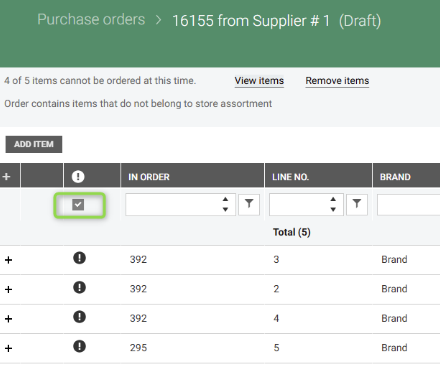
Orders that contain blocked items have a “warning” at the top of the page. Message present two action buttons: "View items” filters the grid for rows with validation warning and ”Remove items” triggers remove items modal. Then it's possible to remove all items for which ordering is blocked. Button for submit is not visible if there are blocked items in purchase order. The column with exclamation notification is added to easily find invalid items.
View orders affected by order proposal (RTC-39552)
Notification after completed order proposal generation, contains a button 'View orders'. It opens a new page, which shows purchase orders that were affected by this job. History of orders affected by each proposal is saved in database.
Released 9th of April 2025
Cancel purchase order (RTC-47464)
It's possible to set Draft, Submitted or Edited purchase order to Cancelled by importing all order lines with status 'Deleted' or by importing purchase order with status 'Cancelled'. As the result in the first case user can see cancelled order with no lines in user interface and in the second case lines are visible, only status of order is 'Cancelled'.
Documentation in the Swagger is updated.
Fix: order despatch advice confirms submitted order (RTC-47981)
Import of order despatch advice does not fail anymore when order has status 'Submitted'. Status of such order is changed to 'Confirmed' as result of this import.
Do not generate order proposal for deleted store assortment (RTC-46413)
Order proposal is not generated for store assortment that was deleted from register. Existing draft order proposal lines that use such store assortment links are deleted in next order proposal generation.
Released 17th of March 2025
System - Import currency cost rate only (RTC-48051)
Sales rate of currency is not imported. Cost rate is properly imported when it has same identifier as sales rate.
Released 6th of March 2025
Order lines loading performance (RTC-44843)
Added database indexes to improve performance of loading order lines grid. Fixed bug related to assortment codes, which caused slow loading of purchase order details and total values for order lines.
Supplier identifier (RTC-44554)
Get packages per store and get purchase orders per store endpoints are extended by supplier identifier. Examples in the Swagger documentation are extended by supplier context.
Performance of grid loading (RTC-44842)
Added database indexes to optimize fetching order lines in 'Items in purchase orders' grid.
Migration to .NET 8 (RTC-42415)
Procurement Service module is migrated to .NET 8.