Chain Promotion 2026 -10.1
Released 21 October 2026
Franchise Store price control for Promotions
Franchise stores can now review a centrally created promotion and choose to approve or reject it before it goes live at their till. This brings promotions in line with a legal requirement already in place for standard prices at franchise stations.
This price control step only kicks in when two conditions are both met: the system parameter enabling price control for promotions is turned on, and the store is flagged as a franchise store. If either condition isn't met, promotions continue to activate automatically exactly as before. When a promotion is created on a profile that includes a mix of franchise and non-franchise stores, only the franchise stores will require approval — the rest activate as usual. This also only applies to promotions created centrally for a group of stores (profile-level); promotions created locally
by a single store manager never need approval.
Whenever a profile-level promotion is approved, or a new offer or item is added to an already-approved promotion, the system creates a "Pending" price control entry for every franchise store involved. For offers like buy-and-get deals, one entry covers the whole offer per store. For item-specific pricing offers, a separate entry is created for each item per store, since each one can be approved or rejected on its own. Simply editing something that's already approved, rejected, or still pending won't create new entries or require re-approval — changes just flow through.
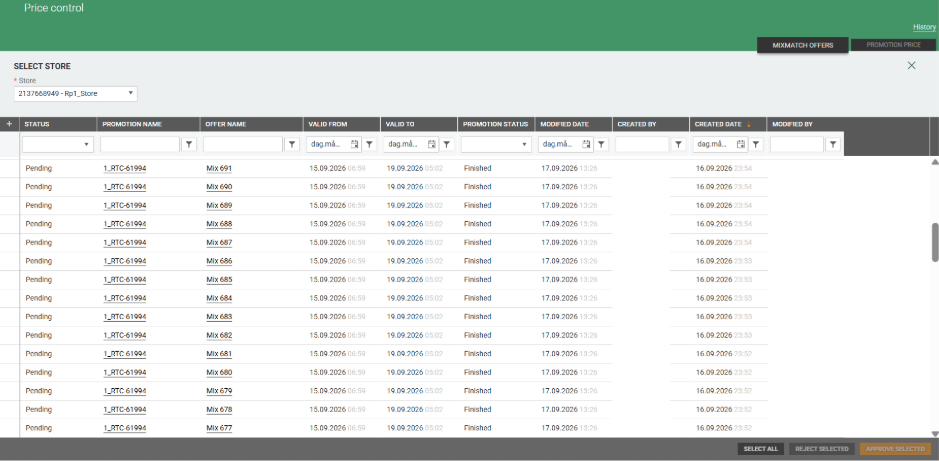
To manage this, a new Price Control page has been added to Promotion. It has two tabs,
"Mixmatch offers" - for offer-level approvals:
"Promotion price" - for item-level approvals:
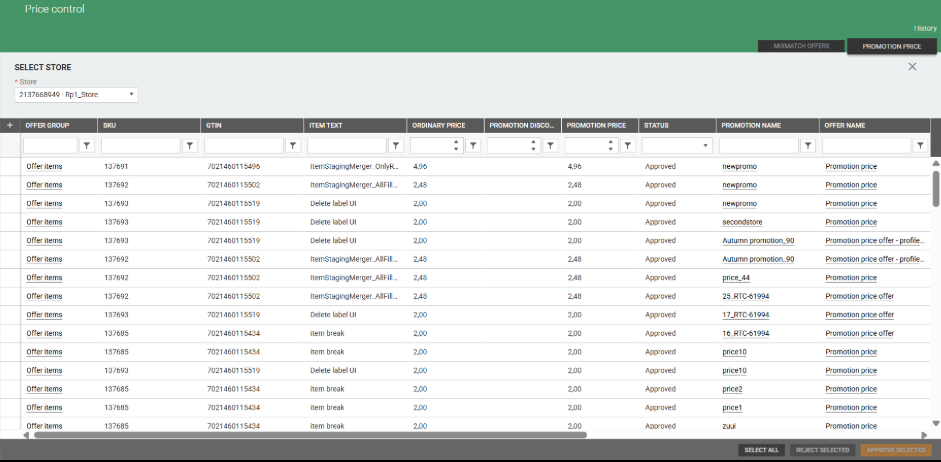
A franchise store user first picks their store, then sees a grid of pending or rejected offers/items with all the relevant promotion and pricing details. Rows can be selected one at a time or all together (even across filtered results) and approved or rejected in bulk.
Before confirming, a summary pop-up shows how many rows will actually be affected and how many will be skipped — for example, an already-approved row can't be rejected, so it's simply skipped rather than causing an error.
Once approved, a record becomes final and can no longer be rejected, though a rejected record can still be approved later if the store changes its mind. A “History” view is also available for each tab and store, showing who approved or rejected what and when, most recent first. Access to this page and its actions is restricted to users with a new scoped permission for managing price control at their franchise stores.
If an offer or its items are later deleted, their price control entries are removed too, so they no longer show up for the franchise store.
Price control export
Promotion Service now exports approved price control to blob storage, so other modules can tell which offers and items a franchise store has approved. Pending and rejected price control is not exported. Deleted price control is exported with ‘isDeleted’ flag set, so approval can be revoked in other modules. The promotion export now also lists the stores that require price control approval.
Price calculation setup for Promotion prices
In Promotion Management, the "Price calculation setup" register controls how promotion prices are calculated.
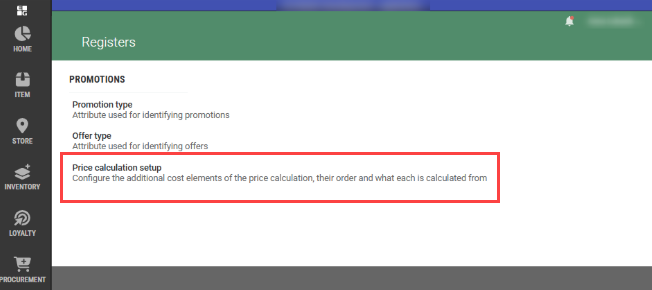
Each chain sets this up separately from the price calculation in Item Management.
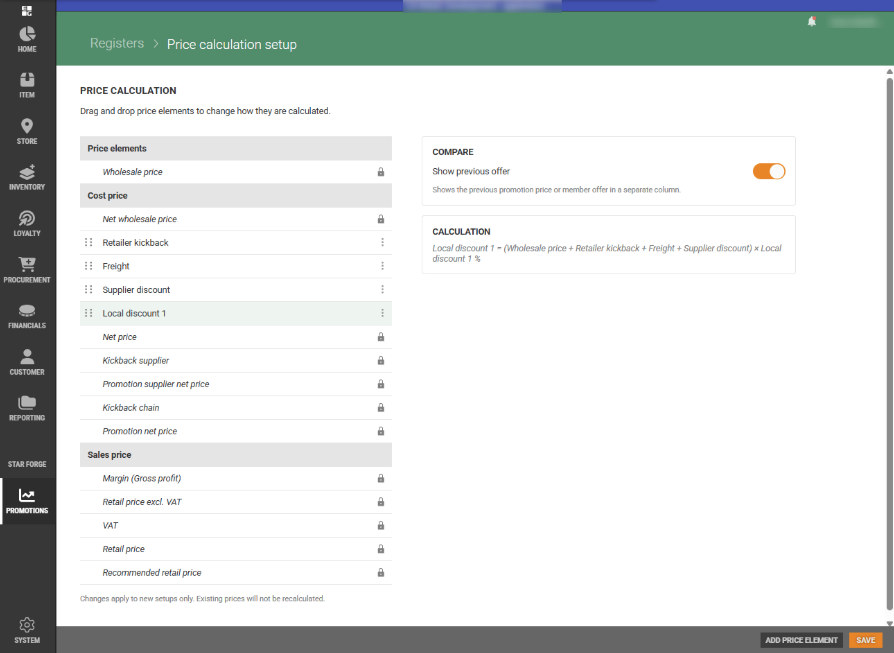
In the cost price section, you add cost elements through "Add price element". The available elements are ‘Supplier discount’, ‘Retailer kickback’, ‘Local discount 1’, ‘Local discount 2’, ‘Calculated breakage’ and ‘Freight’, and each one can be added only once. You drag elements to change their order above Net price. The row menu has Edit, where you choose which of the elements above it an element is calculated from, and Remove, which puts the element back in the "Add price element" list. Wholesale price is always at the top, and the fixed price elements and the whole sales price section can't be edited, moved or removed.
Clicking a row opens a panel on the right that explains how that element is calculated, including any elements left out of its calculation. By default, Supplier discount and Freight are active.
Unified offer details view for promotions created from an Item list
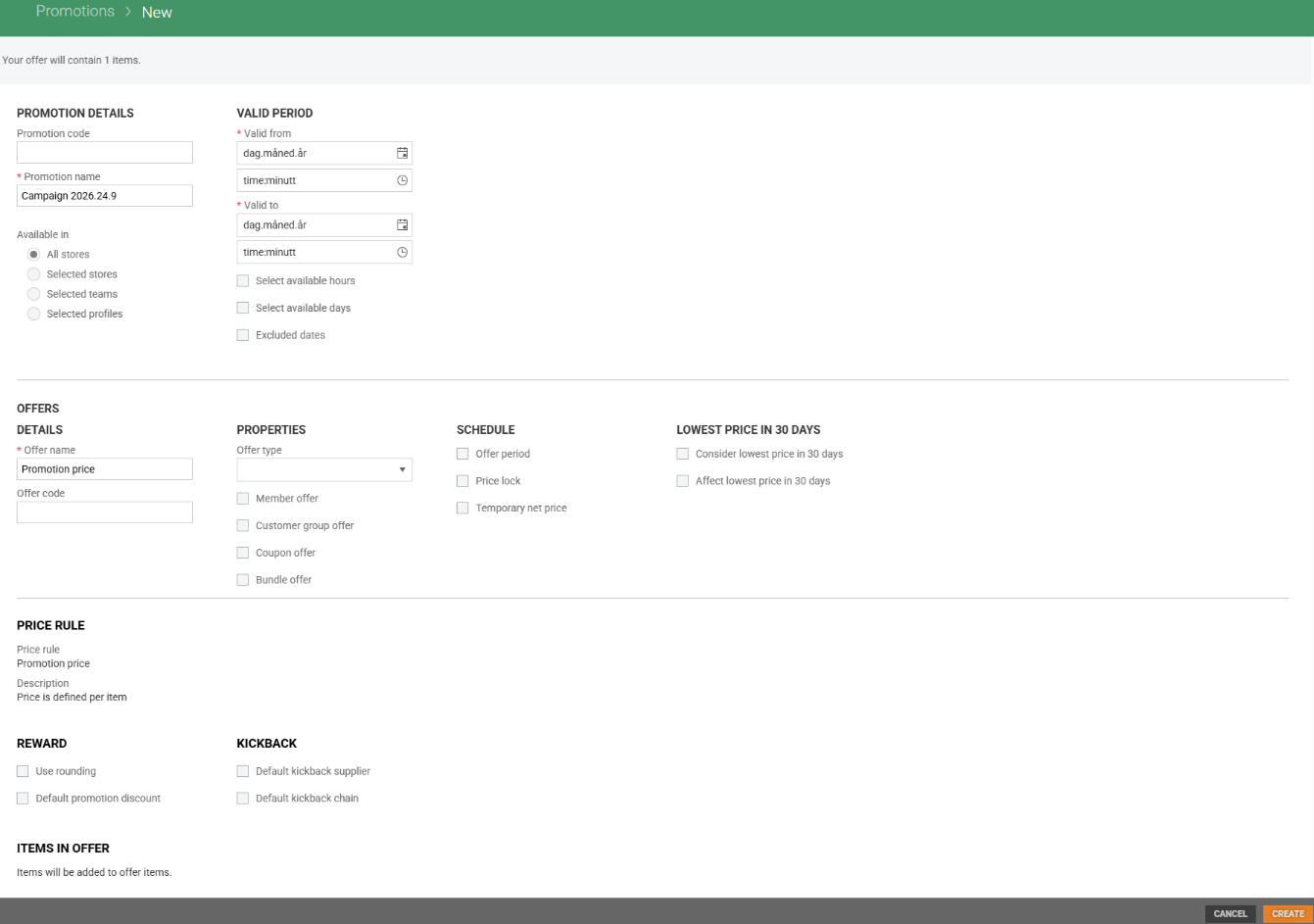
Unified the offer details design when creating a promotion from an item list or single-item promotion, so it now shows the same properties and schedule checkboxes (price lock, temporary net price, offer schedule, etc.) as the regular offer details page.
Improvements
Eligible (LP30) flag on Item prices (RTC-61055)
The Eligible (LP30) flag on item prices is imported from Item Service into Promotion Management, so it is available when creating promotion price offers.
Promotion timing follows the Store's own country (RTC-62296)
Promotion start and end times are now calculated using the time zone of the stores the promotion applies to, so campaigns go live on their configured date regardless of which country the stores are in.
Import of teams and profiles from the Store Service (RTC-60440)
Teams and profiles in the promotion module, including their name, country and active status, are imported from the Store Service as a separate data feed, and stores are connected to them automatically when stores are imported.
Kickback and supplier net cost when importing items through API (RTC-62131)
When items are imported through the API into a promotion offer along with a supplier net cost, the kickback amount is calculated correctly to match it. Kickback amounts can also be imported on their own and are saved and shown correctly.
Finnish and Danish language support in Promotion Management (RTC-61998)
Users who set their platform language to Finnish or Danish can now use the Promotion Management application in that language, matching the existing support for Norwegian and Swedish.
Offer items re-export after main GTIN change (RTC-63651)
When an item's main GTIN changes through item import, its offer items in active and planned promotions are exported again with the new main GTIN.
Editing Promotion price offers (RTC-64034)
Promotion price offers can be opened, edited and saved, including offers without a price lock.
Merger jobs report warnings on internal failures (RTC-63566)
The Promotion merger jobs (staging, item, item price, Excel price lock and Excel temporary net price) now end with the status "Completed with warnings" when an internal failure occurs, such as a timeout or a missing entity, while validation errors on contract fields still end as "Completed".
Released 23 September 2026
Price rules - Mix 107: Buy for X amount and get discount on selected items (RTC-58267)
A new mix type, Mix 107 ("Buy for X amount and get discount on selected items"), has been added to the Promotion module, available both as a price rule and as an offer.
Mix 107 description: Buy for a minimum amount based on selected items, and get a % or amount discount on the whole receipt. Only the selected items count towards the spending condition - non-selected items on the receipt are excluded. It can be chosen whether the condition is calculated based on the promotion price or the regular price of the selected items.
Fields to define in this mix type are:
Conditions: Min. receipt amount, Calculation based on promotion price (checkbox)
Reward: Subtotal discount
Mix 107 supports item selection via item list, item segmentation, or item group list, and all condition and reward fields are editable in both offer and price rule views. Mix details are exported to JSON file.
New Store routines view for setting Promotion prices (RTC-55127)
The Promotion module now includes a dedicated view for setting up a promotion price for a single item at a specific store. For now the view is accessed via a link that includes the store number and item SKU. It shows the item's current active price and lets the user enter an offer validity period, choose whether it is a member offer, and fill in the full price breakdown — kickbacks, promotion net price, and promotion price. On Save, an approved promotion with the corresponding promotion price offer is created automatically, and the user is taken to the promotions list.
The price entry uses exactly the same fields, validations, and calculations as the standard "Manage Items" offer view, so prices are set up consistently regardless of where the user is working.
Access follows the user's store-level permissions. A user without permission for the selected store cannot enter the view at all. A user who has permission but for whom no active price can be found for the given item and store sees the message "Could not retrieve price information for the selected item and store."
Create Promotion prices directly from Store routines (RTC-58054)
Store Routines in Item Management now offers a "Promotion price" option in the Prices dropdown, which opens a window where a promotion price can be created for the selected item and store without leaving the page. The promotion is created as an approved promotion and becomes active immediately or planned, depending on the valid-from date entered.
The option is only shown to users with "Approve promotion and manage approved promotions" or "Manage all promotions at assigned level only". For a store where the user has only "View promotions", the window opens read-only, and where the user has no promotion access at all, the form is locked and an access message is shown. The "Member offer" option is enabled only for stores where the user holds "Manage member offers".
Promotion visibility in Store routines (RTC-54699)
The Store Routines grid now shows whether each item is part of a promotion through four filterable columns — Promotion (any promotion type), Promotion Price, Member Offer, and Mixes. When an item is part of a promotion, a "View promotions" option appears in the row's menu; selecting it opens the "Items in promotions" grid in the Promotion module in a new browser tab, automatically filtered by the item's SKU — a new column added to the "Items in promotions" grid.
Mix 10/13/39: Support 'Discount on discount' option (RTC-61166)
Mix type 10/13/39 (Buy N or more items and get a discount per piece) now supports a 'Discount on discount' option in the Conditions section of mix details.
This lets the customer use the offer on already discounted items. The setting is included in Promotion Export and Import, and in the offers API (PUT/GET) for mix 10/13/39. Existing price rules default to 'Editable in offer' and existing offers default to discountOnDiscount = false, keeping current behavior unchanged.
Promotion access restriction to assigned level (RTC-57516)
"Access promotion module" permission is now required for user to access promotions from the menu. It is required by existing 'View promotions' and new permission "Manage all promotions at assigned level only"
If the 'Manage all promotions at assigned level only' user permission is set on a given store group level (Profile, Team, or Store), the user will only be able to manage promotions at that specific assigned level. They will no longer have access to manage stores under the corresponding team or profile, which was previously permitted (e.g. user with permission to manage all promotions on profile level won't be able to see and manage promotions in stores belonging to that profile).
The functional access provided by 'Manage all promotions at assigned level only' is the same as that of existing manage Promotions permissions, with the restriction that actions are limited strictly to the assigned store group level only.
Lowest price in 30 days settings on promotion offers (RTC-61056)
Each promotion price offer can now be set individually to take the lowest price in the last 30 days into account and to count towards it. Two new system parameters on the System parameters page define the default for newly created offers.
In the store routines dialog for promotion prices, checkboxes "Consider lowest price in 30 days" and "Affect lowest price in 30 days" appear next to "Member offer". This means the choice can be made at the moment the promotion price is created, instead of having to edit the offer afterwards.
When an offer or a whole promotion is copied, the settings are carried over from the original rather than reset to the current system parameter default.
LP30 flags now available in Offer API, Import and Export for Promotion price (RTC-61089)
Exposed the two LP30 offer-level flags (Consider LP30, Affect LP30) in the API and import contracts, adding them to the offer PUT and GET API contracts as well as the Promotion JSON import and export. When a flag is not provided, the system parameter default applies, same defaulting as on the UI, depending on the system parameter. These flags only apply to offers using the promotion price rule type; if provided for any other offer type, they have no effect and are silently ignored, with no error returned.
Import and API for offers with mix 107 (RTC-58268)
Offer with mix type 107 'BuyForXAmountAndGetDiscountOnSelectedItems' is marked as supported in the Swagger documentation and can be created and updated via third party import and API, with the mix details fields MinReceiptAmount, Discount and CalculationBasedOnPromotionPrice. The exported item file now includes the discount and minimum receipt amount for mix 107 items, and the discount for mix 33 items.
Improved performance when adding items to Promotion offers (RTC-57005)
Adding items to offers in the promotion module is now faster and more reliable, particularly for large offers that apply across all stores.
Promotion data exported correctly to other modules (RTC-62258)
Promotions, offer items and temporary net prices are exported from the Promotion module in correct data format. They are again processed correctly by receiving modules such as Procurement.
Correct processing of imported data (RTC-62505)
Imported data is now processed only once by the background import jobs, so the same import is never handled twice.
Promotion Module Upgraded to LIP4 and .NET 8 (RTC-42181)
The promotion integration service has been migrated to LIP4 and .NET 8, improving stability and long-term supportability with no change to existing functionality. Merge jobs no longer report a "completed with warnings" status; any validation failures are now recorded against the affected batch instead.
System - New framework for user interface (RTC-54712)
Promotion management is upgraded to framework versions Angular 21.
System - Migration to .NET 10 (RTC-58270)
Promotion module is migrated to .NET 10.
System (RTC-60263)
Updated deprecated NuGet packages.
API for offers linked to an item (RTC-55413)
A new API endpoint has been added to the Promotion service that returns all active offers linked to a specific item for a given store. Previously, existing endpoint returned only offers with mix type "promotion price", and this new endpoint now covers all mix types.
The endpoint accepts a store number and item SKU as input and returns offer details including promotion number, offer number, offer code, name, mix details, validity dates (promotion and offer), promotion price, reservedForMembers and promotion status. Items that appear only as a condition item in an offer group are also included in the response.
Active offers for a specific item in a given store can be retrieved using GET /promotions/stores/{StoreNumber}/items/{ItemSku}/offers
ItemPriceMerger - retry handling for missing items (RTC-61084)
When an item price event references an item not yet present in the Promotion DB, the ItemPriceMerger job now retries it up to 10 times without raising a warning (logging "item not found" as information and keeping the flat batch json for retry); only after the 10th failed attempt does the job complete with warnings and mark the record as failed.
New system parameter for Franchise price control (RTC-61993)
A new system parameter has been added to Promotion, allowing franchise stores to approve or reject centrally created promotions before they become active in POS. This release only adds the setting — turning it on or off does not yet change any behavior; promotions continue to work exactly as before.
Franchise store flag Import for Promotion (RTC-61484)
Promotion now imports each store's franchise status as part of the store data import.
Swagger documentation for Franchise store price control (Promotion.PriceControl.Export)(RTC-61054)
The data format that will carry franchise stores' promotion approvals to POS and Item Service has been defined.
Fix: Promotion – Price rule mix type selection & icon visibility (RTC-61487)
In the “Create new price rule” view, a selected mix type can now be unselected, returning to the no-selection state and clearing any related fields that had appeared.
Icons that were missing after the Angular migration due to deprecated Kendo font icons are now visible again: the X icon to clear a mix type in price rule details, the X icon to clear a selected price rule when creating a new offer, the clear filter icon in the promotions list, and the icon next to "Edit price in offer" in the read-only temporary net price modal.
Fix: 'OfferGroupItemPriceUpdater' nightly job completing with warnings (RTC-59197)
The nightly 'OfferGroupItemPriceUpdater' job is now resilient to situations where a promotion is soft deleted, but its items remain. TheGetItemsForRecalculation function excludes soft-deleted promotions from the recalculation result set, and the processor silently skips any promotion that is not found — continuing to process all remaining active promotions without interruption. Active promotion prices continue to be recalculated correctly as before.
Fix: Promotion type validation error when creating or editing promotions (RTC-48977)
When the system parameter "Is promotion type required" is enabled, creating or editing a promotion without selecting a promotion type now displays a proper validation message ("Promotion cannot be saved. You need to select a Promotion type.") instead of a generic server-side error banner.
Fix: X button on price rule while creating new promotion (RTC-61061)
Fixed an issue where the X (remove) button on a price rule had no effect while creating a new promotion, preventing users from removing a price rule added by mistake. The X button now correctly removes the price rule and is hidden when only one offer remains in the promotion.
Fix: Duplicate enum values in Promotion contract schemas (RTC-61902)
In the Promotion Service API documentation (Swagger) every enum now lists each allowed value exactly once.
Fix: Save + Next now moves to the next line in the prices panel (RTC-60957)
In the Promotion module's Manage Items view, clicking "Save + Next" (or using the Shift+Enter shortcut) in the prices panel saves the change and moves the selection to the next line in the grid. If the last line is reached, or the offer contains a single item, the selection stays on the same line after Save + Next.
Fix: Imported offers now retain all details (RTC-61952)
When importing promotions, all discount and offer setup details (including percentage-based discounts and grouped/nested discount configurations) are now saved correctly and appear as expected. Imported offers are complete and can be exported without issues.
Fix: Temporary Net Price ValidTo export now aligns with Promotion ValidTo (RTC-62047)
The Temporary Net Price export now sets the ValidTo field to 23:59:59, matching the Promotion export's end-of-day time. No changes were made to validity logic within Promotion — only the export mapping was updated.
Released 8 June 2026
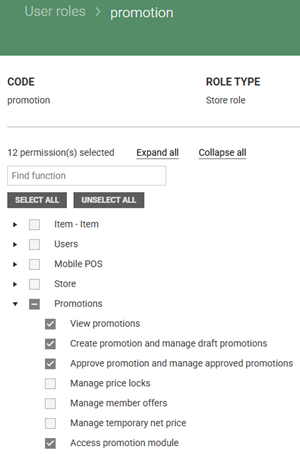
Access permission for Promotion module (RTC-59939)
A new permission called "Access promotion module" has been added to the system as preparation for enhanced promotion access controls. This permission establishes the foundation for future functionality that will provide more granular control over who can access promotion features within the management system.
The permission appears in User Management under the Promotion permission group at the Store scope level. Currently, this permission does not affect any existing functionality or user access to promotion features. All current promotion module access and menu visibility remains unchanged regardless of whether users have this new permission assigned.
System administrators should assign this permission to roles that currently have "View promotions" access to ensure continuity when the associated access control functionality is activated in a future release. A database update script will be ran to automatically grant this permission to existing roles with promotion viewing rights.
Mix 42 - remove price panel and Promotion supplier net price (RTC-50865)
The price panel has been removed for items in Mix 42 to prevent changes to kickback settings. Validation has been enhanced to prevent kickbacks and promotion supplier net price from being set during item import when the offer is in Mix 42.
Side panel visibility for offer groups (RTC-42536)
Offer groups using Item group list selection hide the kickback side panel completely, including the toggle arrow (previously side panel was shown, but nothing could be edited there).
Promotion change description validation enhancement (RTC-48910)
The system now consistently requires a description of changes for all edits to active and planned promotions. This ensures proper documentation and tracking of all modifications made to promotion offers throughout their lifecycle.
Released 26 May 2026
Automatic External ID generation for Promotions and offers (RTC-48634)
Two new system parameters, “ExternalPromotionNoGenerationRange” and “ExternalOfferNoGenerationRange”, have been introduced to enable automatic generation of External Promotion IDs and External Offer IDs for promotions and offers created in the user interface.
System parameters store the number ranges and display them as read-only.
This parameter can be set only by SQL script.
When creating a promotion or an offer in the user interface, an external ID is assigned automatically. Copies of promotions and offers also receive a new external ID.
Import and API requests containing External IDs within the configured range will be blocked — the import job will complete with warnings, and the API will return HTTP 400.
Adding fixed price items via API (RTC-51474)
Adding items to promotion price offers through the API excludes items with a fixed price. Each excluded item returns a response that explains why the item is not included, along with a total count of excluded items. This helps identify which items do not meet the pricing rules for promotion price offers.
For other offer types, items with a fixed price are included. Whether fixed price items are accepted depends on the system setting that controls validation of fixed prices when adding items to an offer ("Skip fixed price validation when adding items to the offer" parameter).
OfferGroupProcessor retry logic (RTC-59118)
The OfferGroupProcessor has been enhanced with improved retry logic to reduce false monitoring alarms when items are temporarily unavailable in the promotion database. The system now distinguishes between temporary data synchronization issues and genuine data problems that require immediate attention.
When processing promotion offers, if items are not immediately found in the promotion database, the system now attempts to process those items up to three times before generating warning alerts. During the first two retry attempts, the system logs informational messages and completes processing with a "Completed" status without triggering LIPAPI Warning Job alarms. Only when the maximum of three attempts is reached does the system log the issue as an exception and complete processing with a "Completed with Warnings" status, which triggers the monitoring alerts.
Improved temporary net price status display (RTC-58886)
Temporary net price status display now accurately shows items as active throughout the entire validity period. When a temporary net price has a validity end date, the item remains shown as "Active" for the complete day until midnight.
The enhanced status accuracy also applies to Excel exports from the temporary net prices view. When exporting pricing data, the status column correctly shows "Active" for items throughout their entire validity period.
Fix: Temporary net price export after removing value from offer group item (RTC-58885)
When a temporary net price is removed from a promotion offer group item, the item is exported to with the correct pricing information.
Promotion offers grid permission management (RTC-51931)
The Promotion offers grid now properly enforces manage promotions permissions. Users with only 'View promotions' permission can no longer access the 'Manage offer' page by clicking the offer name—the offer name is now displayed as read-only text for these users. Additionally, the offer details page is now protected against direct URL access, ensuring that users can only access offers they have permission to manage. Users with store-specific access can only interact with offers in promotions where their accessible stores overlap with the promotion's stores.
Promotion - Default discount stays on promotion price offers (RTC-44167)
The default discount on a promotion price offer now stays in place even when the offer is saved multiple times.
Promotion API - offer items upsert performance (RTC-56155)
The issue regarding the timeout in UpsertOfferItems is fixed.
Released 20 April 2026
Customer card option in mix 42 – Additional payback on selected items (RTC-57182)
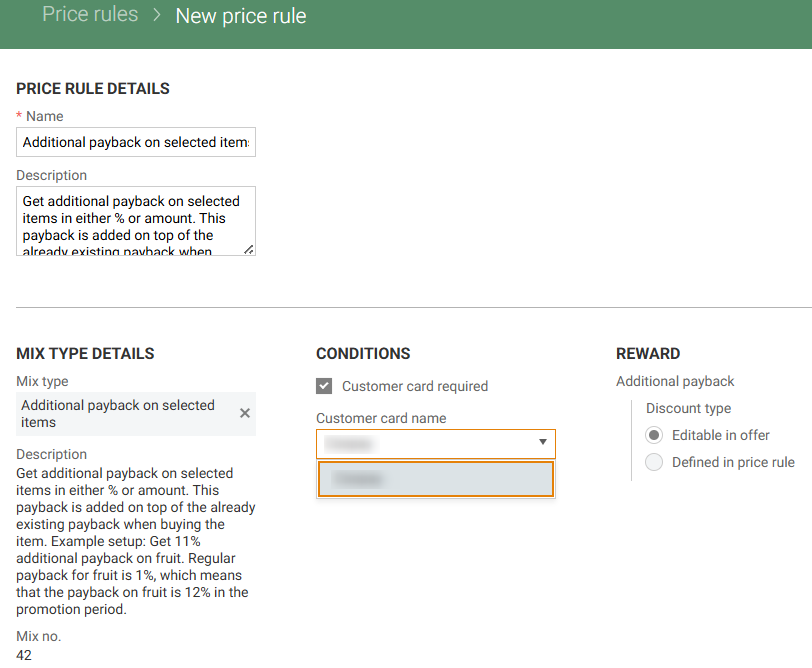
It is possible to create a price rule for mix 42 without selecting a customer card.
A checkbox Customer card required in the price rule controls whether a customer card must be selected. When selected, the customer card list is shown. When not selected, the offer applies without a customer card.
In Offer details, the text Customer card not required is shown when no customer card is used. This ensures clear information about how the offer works.
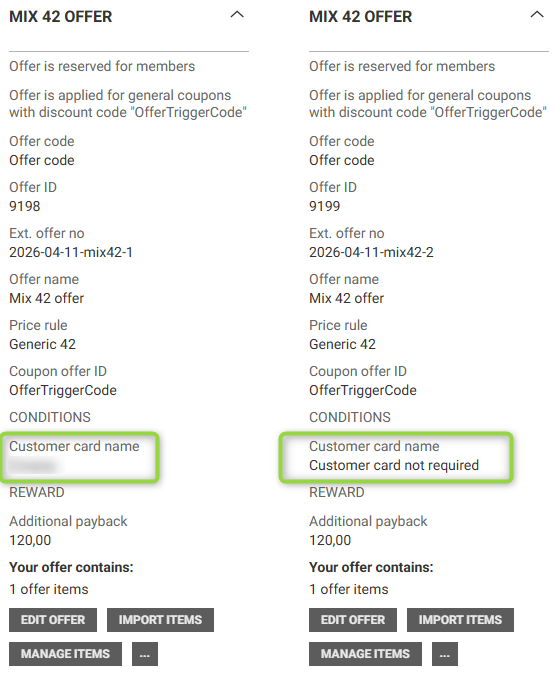
Promotion import and API support offers without a customer card. Export includes an empty customerCardName as null, ensuring consistent data handling.
Mix 42 is named Additional payback on selected items in the user interface and API documentation.
Temporary Net Price in Offer Group (RTC-57332)
Stopping a promotion that includes offers with temporary net prices displays a warning message. This explains that temporary net prices remain active until their end date and must be removed from the offer details if they should no longer apply.
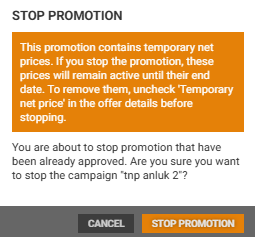
Removing an item from the selection, reprocessing the offer group, or importing items from Excel does not affect temporary net prices for the remaining items. These prices stay visible and unchanged in both the “Items with temporary net price” view and the “Manage items” view.
Items with Temporary Net Price – 'Status' new column in Export (RTC-57508)
The Excel export for items with temporary net price includes a ‘Status’ column.
Filtering supports Status, helping users quickly find relevant items.
Status is based on valid from and valid to dates:
Planned: valid from and valid to dates are in the future, and the temporary net price is manual or the promotion is approved.
Active: valid from date is today or in the past, and valid to date is today or in the future, and the temporary net price is manual or the promotion is approved.
Finished: valid from and valid to dates are in the past, and the temporary net price is manual or the promotion is approved.
Skip fixed price validation when adding items to the offer (RTC-57029)
A system parameter controls whether items with a fixed price can be included in offers. It is disabled by default (items with a fixed price are not added too offers).
When the parameter is enabled, items with a fixed price are added to offers without validation. This supports use cases where fixed price items need to be part of promotions.
When the parameter is disabled, items with a fixed price are not added to offers. This ensures that fixed price rules are enforced.
This behavior is supported when adding items to the offer via the user interface, third-party import and Excel file.
Item text in preferred content language (RTC-53967)
Based on language set in Preferred content language on user, show item text in user preferred language in item search
when adding item to one item offer group
when adding/editing manual price lock
when adding/editing manual temporary net price
Store price validity in ItemPrice import (RTC-51233)
Store prices include a 'ValidTo' value in the ItemPrice import and table. Price lookups use both ValidFrom and ValidTo, ensuring that each price is applied only within its defined time period. This provides more accurate pricing by clearly defining when a store price starts and ends.
Show sales from correct promotion in report (RTC-56881)
Sales data in 'Promotion report' view are always filtered by promotion validity dates, to ensure sales for old promotions with same identifier are not shown (such promotions came to POS and Reporting from system replaced by Promotion module).
The "Bestsellers" and "Sales per item" sections in 'Promotion report' view refresh properly when the time range changes and displays data based on the selected period. When the selected period has no sales, the "Sales per item" section show no data. This ensures the information always reflects the chosen time range and avoids showing irrelevant items.
Ordinary net price fix in temporary net prices
All 'Temporary Net Pric'e views use the term “Ordinary net price” instead of “Active net price”.
Kickback validation message (RTC-52950)
Setting a kickback for an item requires the ordinary net price to be greater than 0. If the ordinary net price is 0, the system displays the message: “Cannot set kickback for an item with ordinary net price equal to 0”, helping prevent invalid pricing configurations.
Calculation in promotion - contract (RTC-57379)
Offer items contracts in promotions are extended with additional pricing and discount details. Swagger documentation only, no implementation.
The following fields are available:
wholesalePriceAmount
supplierDiscount
retailerKickback
localDiscount1
localDiscount2
calculatedBreakage
freight
kickback.
These fields are displayed in:
Creating and updating offer items via API
Import of promotion offer items via 3rd party
Export of promotion offer items.
Promotion recalculation job stability (RTC-55402)
The nightly OfferGroupItemPriceUpdater job completes successfully for tenants with large item volumes. Improved performance ensures all items are processed without timeouts, supporting accurate and complete promotion pricing.
Released 23 March 2026
Promotion offer - Updating price on active promotion (RTC-54401)
Fixed an issue where promotion net price and promotion supplier net price were not always calculated correctly when the ordinary net price was updated. The correction ensures that promotion prices are now consistently calculated based on the correct kickback values during backend processing.
The issue was related to backend jobs (OfferGroupItemPriceUpdater / OfferGroupProcessor).
Temporary Net price status and export conditions (RTC-56127)
The 'Items with temporary net price' grid show a “Status” column. The column appears between Manual and Promotion name and is the first column in the scrollable section. By default, 'Active' status filter is applied.
The Status shows the state of the price:
For prices linked to a promotion, the status follows the promotion status: Draft, Submitted, Planned, Active, or Finished.
For manual prices, the status follows the validity period of the price: Planned, Active, or Finished, based on the Valid From and Valid To dates.
Prices linked to a promotion do not display the three-dot menu in the grid and “Edit temporary net price” dialog does not have the three-dot menu.
Export of Temporary Net Price includes prices linked to promotions only when the related promotion is approved (Planned, Active, or Finished). This ensures that only approved promotional prices are exported.
Temporary Net price is removed when an item is removed from a Promotion (RTC-56060)
When an item is removed from a promotion, the related temporary net price is also removed and is not visible in the main grid.
This applies when an item is removed from the item list, item segmentation, through JSON import or through the API. The “Clear selection” action also removes the item and its temporary net price correctly.
When an item is removed because of a price lock, the temporary net price connected to that item is not visible in the Items with temporary net price grid.
'Active net price' column in 'Items with temporary net price' grid (RTC-52692)
The grid for items with temporary net price displays the active net price for both manual and non-manual prices in a separate column. This gives a clear overview of which price is currently valid for the selected period and store.
When creating or editing a temporary net price, the active net price is automatically shown when item, store, or date values change. When multiple stores/teams/profiles are selected in 'New Temporary net price' modal, shows first selected store/team/profile active net price in the modal.
Excel import and export for items with temporary net price (RTC-52195)
The Excel export from Manage Items (using the "Export to Excel" button in the toolbar) includes a Temporary net price column. The column is placed between "Supplier model number" and "Kickback supplier %". The field is empty when no value is set. Temporary net price is validated using the same rules as in the user interface.
If a temporary net price is imported without the "Temporary net price" checkbox in the offer details selected, the system selects the checkbox automatically and sets default validity dates based on the system parameter and based on the promotion’s valid from and valid to dates.
Kickback chain value (RTC-55839)
The kickback chain field accepts value equals to 100% in the price panel, kickback mass update, offer details default kickback, API, Excel import and JSON import.
Promotion API (RTC-55976)
Upsert Offer Items API response now includes 4 additional fields: ItemsInBodyCount, InsertedItemsCount, DeletedItemsCount, and ActiveItemsCount, making it easier to verify that the correct number of items were saved.
DeletedItemsCount, and ActiveItemsCount refer to items linked to an offer via item list at the moment. Items with error due to missing price or price lock are counted as Active as it is still part of selection. Once we add a new set of items, items that had a price lock or no price are also counted as Deleted (removed from item selection).
Additionally, these counts along with OfferGroupId and ErrorCount are now logged in Azure Application Insights for each request, enabling faster investigation of any future discrepancies.
Fix: Promotion – Excel Import of manual Temporary Net prices (RTC-56603)
Excel import of manual temporary net prices allows prices with past dates. The only date validation rule is that ValidTo has to be later than ValidFrom. This aligns the validation rules between the Excel import and the user interface.
When creating or editing a net price in the user interface, the system checks for another price with the same item, store or store group, and date range. If such a price exists, a validation message appears to prevent duplicate active prices.
Released 4 February 2026
Export and import of temporary net prices (RTC-51661)
The Items with temporary net price view supports export and import of temporary net prices using Excel. You can export the list to Excel using Export to Excel. Manual and non-manual created TNPs are exported.
The file includes SKU, GTIN, Item no., Item text, Model no., External model no., Color text, Size text, Brand text, Temporary net price, Valid from, Valid to, Manual, Store level, Store group code, Store group name, Promotion name, offer name, Offer group name columns.
Manual temporary net prices follow the same filtering rules as in the grid, so the exported data matches.
There is Import Excel file button in the “Items with Temporary net price” view. 'Manage temporary net price' permission in required to see it. You can add or update manual temporary net prices by importing an Excel file using Import. After uploading the file 'ExcelItemTemporaryNetPriceMerger' job is triggered. This job is scheduled for every 2 minutes by default. The file may have the following columns (the same as in the exported file): SKU, GTIN, Item no., Item text, Model no., External model no., Color text, Size text, Brand text, Temporary net price, Valid from, Valid to, Manual, Store level, Store group code, Store group name, Promotion name, Offer name, Offer group name. Item id ( 'SKU', 'GTIN' or 'Item no.'), 'Valid from', 'Valid to', 'Temporary net price'. 'Manual', 'Store level' and 'Store group code' are mandatory.
Items, stores, or store groups that are missing, not allowed, or not valid are skipped.
Each uploaded file is validated before processing. Item identifiers must be provided and follow length limits. If validation fails, the import stops and shows an error. When processing finishes, you receive a notification in the user interface.
'Edit price in offer' link in edit temporary net price modal for not manual temporary net prices (RTC-52693)
Items with a temporary net price that comes from an offer show an Edit price in offer link in edit temporary net price modal for not manual temporary net prices
Selecting the link opens manage items view for correct offer group, with grid filtered by SKU of correct item.
System parameter for temporary net price start date (RTC-52694)
A system parameter in the Promotion module defines how many days before the promotion start date the temporary net price period begins. A value of 0 means the default temporary net price period starts on the same date as the promotion. When adding a Temporary Net Price schedule to an offer, 'valid from' is calculated as 'promotion valid from' minus the system parameter value. 'Valid to' matches 'promotion valid to'. The default applies only when creating a new schedule. Existing schedules keep their dates when edited. Users can manually change both dates.
Import & API Promotion - Import of offers with mix 104 (RTC-48374)
Offer with mix type 104 'BuyFromGroupAAndGetDiscountOnGroupB' is marked as supported in the Swagger documentation and can be imported via third party and API.
Promotion API - offer items upsert performance (RTC-54576)
The issue regarding the timeout in UpsertOfferItems is fixed.
Fix: temporary net price valid from date (RTC-55520)
When promotion starts on midnight in European time zone, temporary net price 'Valid from' date on offer is correctly prefilled from promotion start date, with system parameter applied. Issue is also fixed for 'Valid to' date that equals promotion end date by default.
Released 12 January 2026
Temporary net prices in offers (RTC-51659)
The offer view includes an option to set a temporary net price. A checkbox controls this.
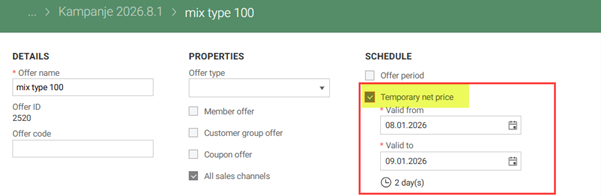
When the checkbox is selected, two date input fields appear: ‘Valid from’ and ‘Valid to’. These dates are prefilled with the promotion’s validity period and can be changed.
Valid from must be earlier than Valid to.
The offer card in the promotion details page shows the net price validity dates when they are set.
Promotion export in extended to include ‘Net price valid from’ and ‘Net price valid, to fields on the Offer level.
'Submit' and 'Approve' and 'Submit and approve' promotion modal shows Temporary net price valid from and valid to dates.
Items with temporary net price grid (RTC-51658)
There is a “Items with temporary net price” section under the price menu available for user with "Manage temporary net price” permission on store level. By default, only active prices with "valid to" equal to today or later are shown.

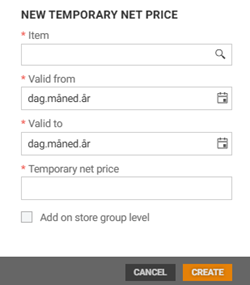
There is a New temporary net price button in the toolbar that opens a modal for adding new manual temporary net prices. Records can be edited or deleted.
Temporary net price for offer group items (RTC-52069)
A temporary net price can be set for items in an offer. The value is entered in the “Offer group item side panel”, below the promotion net price. The input is visible only when the temporary net price option is enabled on the offer and valid dates are defined.
When a value is saved, a temporary net price is created or updated for the offer item. The price uses the offer’s valid from and to dates and follows the store or store group scope defined on the offer and promotion. The field accepts values from 0 to 999,999,999.99. Clearing the value removes the related temporary net price.
The temporary net price is available only for offer groups on item level and for users with permission to manage temporary net prices. The price is also shown as a column in the Manage Items view grid and included in exports together with the ordinary net price.
If the temporary net price schedule on offer is disabled while prices exist, a warning is shown. Removing the schedule from an offer deletes all temporary net prices for its items.
Export temporary net prices (RTC-51660)
Temporary net price is exported to a Promotion.TemporaryNetPrice.Export blob with file format as in the Swagger documentation.
System parameter for the margin value range (RTC-49271)
In the System parameters menu, there are inputs that allow user to specify the minimum and maximum margin % value.
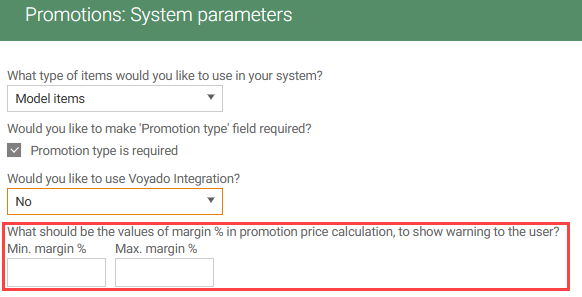
If the user enters a value outside this range in the side panel in "Manage items" view, the value will still be saved, but the user will see an orange warning message saying that it is outside the defined range.
Handling of items with fixed price in Promotion price offers (RTC-48920)
Items that have a fixed price, cannot be added to promotion price offer. In manage items view of offer, message in the top panel above grid informs the user how many items are not added due to fixed price and offers a link to view more information. These items do not appear in the manage items grid view. They are export to POS and 3rd party with Deleted status, in the same way as items with a price lock (meaning that item should not be included in offer).
Import customer group code on offer (RTC-29011)
Promotion import is extended with CustomerGroupCode field on Offer level. Exception is thrown when imported code does not match customer groups in database (from MemberInfoService).
Kickbacks and promotion supplier net price (RTC-54366)
Following fields:
ImportedKickbackSupplierPercentDecimal
ImportedKickbackChainPercentDecimal
ImportedKickbackSupplierAmount
ImportedKickbackChainAmount
ImportedPromotionSupplierNetPrice
Are now updated not only through imports, but also when user edit corresponding value in user interface (price panel or kickback update for multiple items). Value represents the last value entered by the user. Those fields in user interface are renamed from 'Imported...' to 'User...'. PromotionOfferItem export contract does not change.
'Sales Channel' Field in Promotion Offer Item export (RTC-53804)
The Promotion.PromotionOfferItem.Export object includes the field 'salesChannels'. This field uses the same value as Promotion.Promotion.Export → offers-salesChannels. The field is marked as deprecated (for POS Import use).
Excel export Item text in preferred content language (RTC-51864)
Exported excel of offer items and price locked items contains item name in user's preferred content language.
Fix: Delete offers (RTC-53840)
When one or more offers are deleted from an active promotion (by import), the remaining offers in the same promotion still have items.
Promotion offers grid - Fix: Copy incomplete offer
It's not possible to copy incomplete offer to not draft promotion from 'Promotion offers grid'.
Fix: margin validation (RTC-54652)
When 'Min/Max. margin %' system parameter is not set (default setup), price panel appears correctly. It's possible to enter or edit promotion price. When the user have only one item in the offer, the price panel is visible as before.
Promotion API (RTC-49599)
Added Azure logging for Promotion API in order to have more insight into 'upsert items to the offer' requests.