Released 16 June 2026
Change the profile assigned to a price zone (RTC-55944)
You can change the profile of a price zone directly in the user interface. This option is available only for teams defined as price zones.
Changing the profile requires that the price zone contains no stores, including inactive ones. This ensures that pricing structures remain consistent and prevents unintended impact on connected stores.
Users need permission to edit price zones to perform this action.
Team code maximum value - validation (RTC-52523)
When creating a team, the team code is now validated against the "Maximum team code value" system parameter. If the parameter is set, the code must not exceed the configured limit. The rule applies only when creating a team that is not marked as price zone. Price zone code can be higher than that limit. Validation error is shown to user when creating a new team.
If "Maximum team code value" system parameter is not set, all values are allowed for both Teams and Price zones as before.
Teams without country now visible in store details (RTC-27282)
The Teams drop-down in store details now includes teams that have no country assigned, in addition to teams from the store's own country.
Team code maximum value - System parameter (RTC-52516)
The "Stores: System parameters" page includes a setting that controls the maximum value allowed for code of a team that is not a price zone.
A checkbox defines if the limit applies. When selected, a numeric field appears where the maximum value is required. The value accepts integers within the range 1 to 999 999 999.
Access to this setting requires the "Manage system parameters" permission in the Common level under the Store section.
Migration to LIP4 and .NET 8 (RTC-42180)
StoreServiceIntegration has been successfully migrated to LIP4 and .NET 8. Version 2.0.0 is now available with a new testing framework and seamless deployment between LIP3 and LIP4 packages. All existing configuration values are preserved, and merger jobs now provide better error visibility through the FlatBatch table.
Store Certified Organic flag (RTC-57299)
The 'IsCertifiedOrganic' flag on the store entity in Store Service allows stores participating in organic program to be marked accordingly (e.g. Debio organic certification). Users can manage this via the "Certified organic" checkbox on the Store details page, placed below the "Visible online" checkbox.
The flag is supported in JSON and Excel import/export and is included in the Store Service API response.
Swagger Documentation for Store and Postal code API (RTC-48792)
The Swagger documentation for the Store and Postal Code API describes each field with clear comments. This helps users understand how to use the API correctly.
The Store Service API includes example requests and responses in Swagger, making it easier to test and implement integrations.
Postal code export documentation(RTC-48792)
Postal code exports include field-level descriptions, supporting accurate data mapping and consistent data transfer to third-party systems.
Store export documentation in Swagger (RTC-57780)
Swagger shows proper Store blob name for stores export, and the description explains that store export are planned to use the Store.Store.Export blob type in the future.
Fix: Store selection for stock lookup (RTC-58307)
It is now possible to add stores to stock lookup by clicking individual checkboxes in the grid. Inactive stores remain visible but cannot be selected, and users with view-only permissions will continue to see locked checkboxes.
Released 25 March 2026
Store Registers (RTC-52785)
The register list supports only one default register at a time. When a user selects another register as default, the previous default loses its default status. The upgrade script keeps a single default register in each store.
The edit modal for register uses correct translations.
Store Details (RTC-52785)
The store details view prefills dropdown fields with values from the default register when a new store is created.
The fields store class, information text type, and location type are prefilled when the view opens.
The fields address type and staff member type are prefilled when a new address or staff member is added.
Visible online (RTC-52439)
'Visible online' checkbox is located in the store details section. Value is set to true by default and can be used by 3rd party webshops to hide store when it is not available online. This field can be imported via Excel file or third party. It is exported in Store export and API response.
Validation of store register inputs (RTC-57148)
Creating and editing a register follow the same validation rules in both the frontend and backend. This ensures consistent data and prevents mismatches between systems.
The information text field accepts up to 500 characters, allowing more detailed descriptions.
View store, team or profile permissions (RTC-51940)
In Store Management, all fields and checkboxes are read-only for users who have permission to view stores, teams, or profiles but do not have permission to edit stores, teams or profile through the common or store role.
The Manage opening hours button remains available based on its own permission and is not affected by this behavior.
Register values in Store Import, Export, and API (RTC-50140)
Store data includes values for Additional Addresses, Staff Members, Location Type, and Store Class in all import and export channels.
Excel and JSON import accept these values for each store. When an imported value does not exist in the register, the system creates a new register entry using the code as the name.
These register values appear in:
3rd-party store export and import (JSON)
Stores Gateway API response
Excel export of stores
Excel import of stores
Excel import - Fix: Decimal separators and rounding (RTC-53501)
It’s possible to import latitude, longitude, store area, and total area fields using either a comma or a dot as a decimal separator. If more digits are provided after the separator, the number is rounded according to the defined precision.
Fix: Additional address position and required address type (RTC-53727)
The additional addresses are next to each other in the grid. Additional address type is required when adding new additional address.
Fix: Information text register (RTC-53724)
When creating or editing an information text in the register, text is required. The input field for text is larger by default so longer texts are easier to read and edit. Information text is shown in a separate column in the grid.
On the store details page, the information text is shown as read-only and reflects the text defined on the register.
In the third party import of store, if an information text exists in the database and matches the code provided in the imported file, the text is assigned to the store. Information text is optional, but when it is used, a code is required. If an information text type does not exist in the register, it is created during import. Code is taken from the imported JSON file, name and information text follows the code when no provided.
Typo on the store details page for the 'possible' word is fixed.
Released 3 November 2025
Store register assignment to Store (RTC-50132)
It is possible to add, edit, or remove register field values directly in the store setup. The store setup includes the following register types and values:
Store class – dropdown field in the Store details view
Location type – dropdown field in the Store details view
A new “Staff members section” allows defining up to three staff entries. Each entry includes:
Staff member type (from register)
Staff member name (input field)
Both fields display together, one below the other, and new staff members can be added using the Add new staff member option.
A new “Additional addresses section” supports up to three address entries. Each entry includes:
Address type (from register)
Address1 and Address2 input field
Postal code
City input field
Country display
Register entities can only be deactivated if they are not assigned to any store. This ensures that active registers remain linked to store configurations in use.
'Information text' in Store details view (RTC-50137)
A new section in the store details view makes it possible to manage information text. Users can select an information text type and enter a text. The text input only shows after a type is selected.
Information text is included in store export, import from third-party systems, and Excel files. Import creates a new information text type if it does not exist in the database.
Store API is extended to include information text type and text.
Permission for stores, teams and profiles on store role (RTC-49602)
If user has permission to manage stores on:
Store level - can manage only those stores.
Team level - can manage only the stores within this teams.
Profile level - can manage only the stores within this profile.
If user has permission to manage teams on:
Store level - no teams are visible.
Team level - can manage only this team.
Profile level - can manage only the teams within this profile.
If user has permission manage profile on:
Store level - no profiles are visible.
Teams level - no profiles are visible.
Profile level - can manage only this profile.
If user has permission on all stores level, all records are visible in stores, teams or profiles tabs depending on the permission.
The old permissions to manage store/teams/profile/region on common level remain but they are renamed to view/manage 'all' stores / teams / profiles / regions. Roles on common level have the highest priority - if a user has such a role, they can still access and manage all relevant data.
Store registers (RTC-50126)
There is 'Store registers' page in menu. With new permission 'Manage registers', new entities can be added, can be edited, can be deactivated.
List of registers:
Staff member type
Address type
Information text type
Store class
Location type
Each register has columns: Code, Name, Inactive, Default, Created date, Created by, Modified date, Modified by.
Export - Company (RTC-51599)
Export job includes the company export. File format is documented in Swagger.
Company field which was used in store export is marked as deprecated. Id of company is exported as CompanyId.
System - Service package upgrade (RTC-43993)
Upgraded package in service. Swagger shows EG logo.
System - Fix: ExternalStoreGroupNo (RTC-50317)
There is ExternalStoreGroupNo field for PriceZone/Profile/Region/TeamIdentifier in JSON file in store export.
Released 4 August 2025
Store details - GPS coordinates, store area, total area (RTC-34309)
Four inputs are added in 'Store details' section between 'Marketing name' and 'Central warehouse':
'Store area' (possible values: from 0.0001 to 999999, 4 decimals),
'Total area' (from 0.0001 to 999999, 4 decimals),
'Latitude' (from -90 to 90, 6 decimals),
'Longitude' (from -180 to 180, 6 decimals).
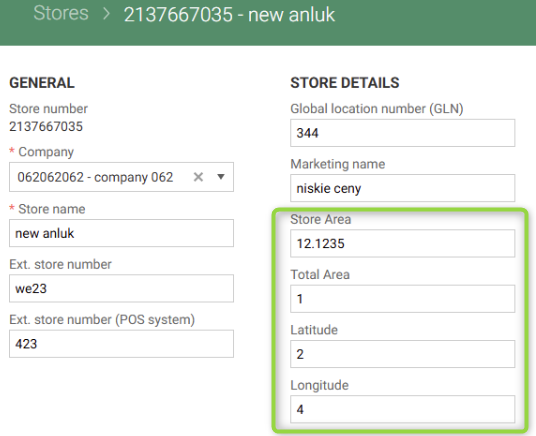
Values can be edited and are stored in the database.
Permissions (RTC-49601)
'View and manage Stores/Teams/Profiles*
Section 'Store' with following permissions is 'added to store level role:
Store
View Stores
Manage Stores
Teams
View Teams
Manage Teams
Profiles
View Profiles
Manage Profiles
Permission is not yet used.
Permission to view is required to have permission to manage any of store groups
GPS coordinates and area fields added to store data (RTC-50176)
The fields “Latitude”, “Longitude”, “Store area”, and “Total area” are included in store import and store export. These fields are also part of the Get Stores response in the API. This makes it possible to manage location and size details for stores through import, export, and API.
Import and export GPS coordinates and area in Excel (RTC-50139)
The fields “Longitude”, “Store area”(m²), and “Total area”(m²)can be imported and exported using Excel. To remove these values from the user interface and database, set them to NULL in the Excel file.
Permission to Manage opening hours at store level (RTC-50134)
A store-level permission controls access to view and edit opening hours in store details. This applies only to stores linked to the user's role by store, profile, or team. Access to the store details page also requires a separate permission.
Existing common-level permissions still allow users to manage opening hours for all stores and registers, ensuring full backwards compatibility.
Released 5 May 2025
Store - Duty free flag (RTC-47505)
There is editable checkbox in Store Management in 'store details' section named 'duty free'. This flag is exported with true or false value. Export contract is extended and changes are visible in the Swagger documentation.
Export of store groups (RTC-49125)
Store groups are now exported as Store.Store.Export blob type. Store group is exported on creation and edit of store group. Swagger shows correct examples for each store group type (Profile, Team, PriceZone, Region).
‘Store' export is extended with 'TeamIdentifiers', 'PriceZoneIdentifier', 'ProfileIdentifier', 'RegionIdentifier'. It also still contains obsolete 'Profile', 'Teams', 'Region'.
Export - Identifiers of relates stores (RTC-47471)
In Store export, externalPosNo and globalLocationNo of relatedStores are exported properly.
System - New contract Store.StoreGroup.Export and changes for Store.Store.Export (RTC-47563)
New contract of store group export is visible in the Swagger documentation. In contract of store export 'profile', 'region' and 'teams' fields are marked as deprecated, but are still exported. 'ProfileIdentifier', 'regionIdentifier', 'teamIdentifier' and 'priceZoneIdentifier' are added instead.
Fix bugs related to store opening hours (RTC-28995)
Navigation works properly when editing store value and leaving through breadcrumbs without saving. Also when editing 'Use opening hours schedule' setting on store and leaving to 'Manage opening hours' with discarding changes in modal. Additionally, exception is not thrown when user without permission to see opening hours is viewing store details page.
Released 4th of March 2025
Validation for profile code (RTC-41941)
Profiles can have code up to 10 digits. User can enter a 10-digit or shorter profile code in the user interface when creating a profile and when importing a store via Excel or third party.
In the Swagger in the 'Import business rules' -> 'Store group lookup' section there is information on how many maximum characters storeGroupNo can have. For profile it is 10 characters, for region and team it is 50. The information about the maximum number of characters is removed from Schema.
Opening hours (RTC-29576)
User cannot edit opening hours section when store is inactive. When hours schedule has an active store assigned, it cannot be deactivated. Inactive schedule is activated after activating an inactive store with that schedule assigned.
L15 Temperature compensation (RTC-45869)
The L15 temperature compensation flag is added to store configuration. It it also included in API, store import and store export contracts.
Fix: format of company code in store export (RTC-47398)
In export of Store to JSON, company code ('prefix') is exported as string, as defined in contract.
Identifier of postal codes in export (RTC-46870)
Export of postal codes is extended with unique identifier for each code.
Security of error handling (RTC-44700)
Less information is shown in logs of failed request in browser (when importing incorrect Excel file).
Contract - identifier of postal codes in export (RTC-46867)
Contract of postal codes export is extended with unique identifier for each code.