EG POS v. 4.161.10
Released 1 October 2026
AeraNexo pay terminal reconciliation (RTP-53869)
Reconciliation and closure for the AeraNexo pay terminal solution are managed centrally by Aera. The POS parameter 'PayTerminalReportWithClosure' (default 'True') supports reconciliation without triggering a new closure. If configured, when reconciliation is triggered automatically or manually from the POS, the system prints only a copy of the latest closure instead of starting a new closure.
Relevant existing parameter in POS Configuration:
'PayTerminalType' = 'AeraNexo'
'PayTerminalReportWithClosure' = 'False'
Purchase complete message for self-service sales (RTP-52862)
Self-service sales that start in manned mode and finish in unmanned mode send a “Purchase complete” message to the unmanned mode endpoint only when an actual Member ID is available. This prevents messages with an invalid “NULL” Member ID from being rejected by the receiving system.
EG POS v. 4.161.9
Released 24 September 2026
Cashback handling on AeraNexo pay terminals (RTP-53870)
AeraNexo pay terminal transactions with cashback specifies the cashback amount separately on sales receipts and reconciliation reports, restoring previous behavior.
Relevant existing parameter in POS Configuration:
'PayTerminalType' = 'AeraNexo'
Automatic closing of the "Fetching coupons" popup (RTP-52593)
When a member ID is received from the AeraNexo payment terminal during payment, the member's available coupons are fetched automatically. The “Fetching coupons” popup closes automatically when the coupons are fetched, allowing the payment process to continue without interrupting the user.
Relevant existing parameter in POS Configuration:
'PayTerminalType' = 'AeraNexo'
Customer search fix when switching search types quickly (RTP-53319)
Fixed an issue where quickly switching from item search to customer search, before the item search results had finished loading, could cause the customer search to return no results. Search type switching is now handled more reliably, ensuring the correct results are always displayed for the selected search type.
Self-service - Pay terminal transaction handling (RTP-52628)
POS prevents a second pay terminal transaction from starting while the card authorization of the first transaction is still in progress. This ensures completed payment terminal transactions are recorded as FINISHED instead of remaining in STARTED state.
EG POS v. 4.161.8
Released 11 September 2026
Aborting AeraNexo pay terminal transactions (RTP-53395)
A cashier can abort an ongoing transaction also in the state where the AeraNexo pay terminal waits for the customer to enter their PIN. This allows the transaction to be cancelled as expected, without waiting for the terminal to time out.
Relevant existing parameter in POS Configuration:
'PayTerminalType' = 'AeraNexo'
AeraNexo pay terminal payment attempts (RTP-52655)
When a CardAcquisition is aborted by the cashier in POS or by the customer on the payment terminal, a new payment attempt must be triggered manually. This prevents the terminal from entering an unnecessary Busy state and provides a smoother payment process.
Relevant existing parameter in POS Configuration:
'PayTerminalType' = 'AeraNexo'
Out of Order self-service lock (RTP-53053)
Previously, a self-checkout lane that had been manually set to Out of Order could unlock itself and become available again if a regular item was scanned instead of a cashier card, even though no cashier had released the lock.
This has been corrected so the lane now remains in Out of Order until a cashier scans their card, and can no longer reset itself automatically.
EG POS v. 4.161.7
Released 1 September 2026
Handling SafePay cash changer internal errors (RTP-45514)
Internal I/O errors in the Safepay cash changer, such as errors with the coin or note units, do not cause EG POS to become unresponsive. If Safepay does not respond, the cashier can disconnect it from the cash changer menu. This keeps EG POS available for other payment types while Safepay is unavailable.
After the Safepay issue is resolved, EG POS can reconnect to the cash changer through the menu or by restarting the application.
Relevant existing parameter in POS Configuration:
“CashChangerType” = 'SafePay'
Refusal of customer's chosen items (RTP-39998)
Items that are refused when a customer selects them on the customer screen are registered as warning log entries when the refusal is expected, for example when an item is blocked, too many identical medicine items are selected, or the cash drawer is open. This prevents expected refusals from being treated as POS errors.
Deposit refund line price protection (RTP-52344)
Deposit refund lines keep the price determined by the article's EAN and are not affected by the price-change function.
This prevents the refund amount from being edited on the receipt, regardless of user permissions or manager override.
Removed unnecessary info icon from customer/member header (RTP-49263)
The 'i' icon has been removed from the customer and member headers during sales in cashier view, simplifying the header display.
For customer header it was doing nothing when clicked, so it never should be displayed there.
For member header it was doing the same thing as the 'Details' button, possible to set up in the “ShowMemberButtonsInLoyaltyHeader” parameter.
In both cases the 'i' icon was not needed, having no purpose.
The gift-card details button and balance view remain unchanged and continue to work as before.
Resumed on-hold receipts now stay closed and cannot be fetched again (RTP-52120)
An on-hold receipt that has been resumed and paid is marked as completed and does not reappear when searching on-hold receipts. This prevents the same items from being added to a new sale when the same loyalty reference or hold code is scanned again shortly after payment.
Item selection in the online return list (RTP-52643)
Clicking a row or pressing the space bar in the online return item list marks the
selected item for return. When no row is selected — for example while the list
refreshes after an item is marked, or after a row is deselected — the action is
ignored and the return continues without interruption.
Self-service POS checkout completion (RTP-52661)
The self-service POS displays the Welcome or Goodbye page only when the payment terminal transaction is complete and the receipt has status FINISHED. This ensures the POS is ready before the next customer starts a purchase.
If the payment is complete but the receipt does not reach FINISHED, the signal light turns on and a surveillance message asks staff for assistance. The customer is also asked to wait for assistance. Staff can finish the receipt while the customer is still present by adding a 0 + Cash tender.
Additional logging helps identify why a receipt does not reach FINISHED, supporting further improvements.
Weight entry handles a repeated item lookup key press (RTP-52296)
Pressing the item lookup key (F10 / PLU) again while the weight-entry popup is open has no effect. The sale completes normally once the weight is confirmed.
EG POS v. 4.161.6
Released 13 August 2026
Vipps refunds via AeraV2, with per-store MerchantID mapping
Card refunds for selected card issuers can now be routed to the Aera V2 (Aera UC) endpoint instead of the existing Glt/Aera V1 path, used for Vipps refunds. Routing is per card issuer; other issuers keep using the existing Glt path.
AeraV2 refunds use a per-store MerchantID, mapped from the store's existing service identifier through a configurable list. This supports stores needing a separate MerchantID for Vipps alongside their existing identifier for other payment methods. When a store's identifier is not in the mapping, the refund proceeds with the identifier from POS and a warning is logged.
POS Services Configuration
POS Services Configuration (no config in EG POS):
<add key="AeraV2_Enabled" value="False" />
<add key="AeraV2_CardIssuerIds" value="" />
<add key="AeraV2_BaseUrl" value="" />
<add key="AeraV2_AuthBaseUrl" value="" />
<add key="AeraV2_Username" value="" />
<add key="AeraV2_Password" value="" />
<add key="AeraV2_ApiKey" value="" />
<add key="AeraV2_TimeoutInSeconds" value="30" />
<add key="AeraV2_MerchantIdMap" value="" />
AeraV2_Enabled: Master switch. 'False' (default) keeps all refunds on the existing Glt path.
AeraV2_CardIssuerIds: Comma separated card issuer IDs and / or low - high ranges to route to AeraV2. Example: 33 for Vipps.
AeraV2_BaseUrl, AeraV2_AuthBaseUrl, AeraV2_Username, AeraV2_Password, AeraV2_ApiKey: AeraV2 connection and auth details.
AeraV2_TimeoutInSeconds: Request timeout, default 30 seconds.
AeraV2_MerchantIdMap: Comma separated oldServiceId:newServiceId pairs. Example: 123:S234,234:S345. Set to Disabled once every issuer holds new ServiceIDs directly, to pass values through without logging a mapping miss.
Improvements POS
IgnoreCouponCommitErrors with AeraNexo terminals (RTP-50929)
Previously, when paying with AeraNexo terminals, a duplicate coupon commit error could cause the receipt to get stuck in an unfinished state even though the IgnoreCouponCommitErrors setting was enabled.
This has been corrected so that coupon errors are properly ignored and the receipt is completed as expected.
Age approval after a cancelled Coopay payment (RTP-51096)
If a customer's age is confirmed through the Coopay app and the payment is changed to another payment method, such as a bank card, the surveillance screen displays the Yes and No buttons for the age approval request. This allows the cashier to approve or reject the request and continue the sale without requiring a manual workaround.
Company Card reference information (RTP-50445)
When a configured Company Card is used in the pay terminal and prompts for a reference number and reference text, the entered values are stored and printed only on the current receipt. This ensures that the reference information is linked to the correct transaction and does not appear on other receipts.
Relevant existing parameters in POS Configuration:
"UseCompanyCard” (default 'False') - when activated, configured card type will trigger input dialogue for ref.number / -text.
“CompanyCardIssuer” (default empty) - card issuer number that will trigger input dialogue for ref.number / -text.
Card payments now wait for member lookup to finish before sending the amount to pay (RTP-50813)
Looking up a member right as payment started could send the wrong (undiscounted) amount to the card terminal, followed by an unexpected cash refund. POS now waits for the member lookup to finish first, so the correct discounted amount is always charged.
Manual return member price (RTP-51227)
Previously, if a member card was scanned after a returned item had already been added to the receipt, the return kept the item's normal price instead of the member discounted price.
This has been corrected so that the member price is now applied consistently to returns, regardless of whether the member card is scanned before or after the item.
Offline member registration in Self-service (RTP-49993)
Scanning a loyalty member QR code in Self-service (SCO) registers the member on the receipt when the POS operates offline and offline member registration is enabled. If member validation is unavailable, the POS continues the registration process using offline handling, ensuring that member benefits such as bonus earnings and member discounts are applied to the transaction.
PLU List categories translations (RTP-50417)
All PLU List categories and labels are being displayed correctly with proper translations when opened via the sales view button.
Thanks to it there is no problem with using POS in different languages.
PLU List - Translation for Vensafe (RTP-50413)
Vensafe2 board title in PLU List is being correctly displayed as "Articles from automat" in English.
Thanks to it when customer is using POS in a different language, everything is understandable.
Gate receipt on manned register (RTP-50217)
Previously, the gate receipt was not printed on manned cash registers after completing a sale, even when the feature was enabled in the configuration.
This has been corrected so that the gate receipt is now printed automatically when the customer selects a digital receipt option, consistent with the expected behavior.
Fetching unfinished receipt (RTP-47992)
Self-service is no longer becoming unresponsive, as fetching unfinished receipt is now being skipped while in this view even with “NotifyOfUnfinishedReceipt” parameter set to True.
Receipt cleanup error handling (RTP-48365)
Previously, if the system found a single corrupted receipt while cleaning up and sending receipts, the whole process could stop, delaying all other receipts waiting to be sent.
This has been corrected so that a corrupted receipt no longer blocks the process, and remaining receipts continue to be sent as expected.
Receipt completion after voided items (RTP-49924)
Previously, when the last item on a receipt was voided during a self-service session with a coupon discount, the system could fail to finalize the receipt after a successful card payment, leaving the register stuck in an unresponsive loop.
This has been corrected so that receipts with payments now settle and close correctly regardless of whether the last item line was removed or voided before payment.
Scanner active during unknown EAN error dialog (RTP-48769)
Previously, when a cashier scanned an unknown barcode, the scanner remained active while the error dialog was displayed, allowing additional scans to be registered before the error was acknowledged.
This has been corrected so that the scanner is now properly disabled when the error dialog appears and re-enabled once the cashier dismisses it.
Printed receipts and the Chain Web receipt journal no longer show a blank discount reason label (RTP-50408)
When a campaign or member price discount had no reason text assigned, receipts and Chain Web's receipt journal showed a "Rabattårsak:" label with nothing after it. This blank label is now hidden on both the printed receipt and the receipt journal, while discount reasons that do have text still display as before. Customers and cashiers no longer see a confusing empty line on the receipt.
EG POS v. 4.161.4
Released 17 June 2026
Payment recovery for AeraNexo pay terminal (RTP-50271)
If the connection between POS and AIC service is interrupted during a payment, the POS reconnects and retrieves the transaction result from the AeraNexo pay terminal. This ensures the correct payment status is confirmed in the POS, reducing the risk of unclear outcomes or duplicate charges.
Relevant exiting parameters in POS Configuration:
'PayTerminalType' = 'AeraNexo'
EG POS v. 4.161.3
Released 15 June 2026
Improvements POS
Baxi.Net pay terminal transaction cancellation (RTP-48519)
A transaction started on a Baxi.Net pay terminal can be cancelled directly on the terminal, both before and after the customer presents the card. The POS can send the amount again to restart the transaction, supporting a flexible and uninterrupted payment flow.
Baxi.Net pay terminal transaction handling (RTP-48589)
Transactions processed through Baxi.Net pay terminals complete with a correctly finished receipt when the payment is successful. This ensures a smooth checkout flow and removes delays or unclear behavior in the POS.
Convenience Menu item selection limit (RTP-49337)
Previously, when a menu group was configured with an "X of 1" requirement, it was possible to select more items than allowed (e.g. 3 of 1), and the visual layout had a large gap between rows when only 2 rows were displayed. Additionally, extras could become detached from a bundle after editing, and were not displayed correctly when ‘ShowHeaderOnlyForPredefinedBundlesInSale’ was enabled.
This has been corrected so that item selection is now properly capped at the required maximum, the two-row layout displays consistently, extras remain attached to their bundle after editing, and extras are correctly shown regardless of the header setting.
Menu items without recipe items (RTP-49576)
Previously, menu items without recipe items were displayed as bundles, preventing users from opening the menu view to edit their selections or see the correct edit options.
This has been corrected so that menu items without recipe items are now handled properly, allowing users to edit their choices as expected.
Line-item discount applies reliably immediately after a loyalty scan (RTP-48644)
Applying a percentage line-item discount immediately after scanning a loyalty QR code now works correctly, even when a coupon background fetch is still in progress. Cashiers no longer need to retry the discount in this scenario.
Line notes for manual line discounts (RTP-49751)
When the Add line note to manual line discount setting is enabled, cashiers enter a line note only for discounts they enter manually. Preconfigured line discounts, such as percentage-based discounts with a reason code or price guarantee discounts, are applied without prompting for a line note. This creates a smoother checkout process while still capturing additional information for manually entered discounts.
Assisted random control for items with quantity above 1 (RTP-49545)
During assisted random control, items with unit of measure "piece" and a quantity above 1 on a single item line are counted correctly as each item is controlled. This applies whether items are confirmed using the OK button or selected from the PLU list.
The Confirm button is available when all items are controlled, allowing the receipt to be completed and preventing staff from getting stuck during the control process.
Log output when adding member to receipt (RTP-40067)
Adding a member to a receipt limits log entries during coupon retrieval by excluding duplicate and unnecessary information. This removes entries such as “PaymentServiceUrl” and credentials, making the log easier to read and helping important information stand out. During payments, entries regarding “PaymentServiceUrl” are logged when relevant, but not for tenders where it is not, such as for Cash and Coupon tenders.
Improvement POS Server
Ecom bong journal routing (RTP-49688)
Previously, after upgrading the multi-store E-handel WCF, all Ecom bongs were incorrectly routed to the same Journal database instead of each store's dedicated one.
This has been corrected so that each store's Ecom bongs are now sent to the correct Journal database.
EG POS v. 4.161.2
Released 27 May 2026
Confirm quantity if it exceeds max qty for campaign or member price
If a cashier or Shop and Go customer tries to add more of an item than allowed at the campaign or member price, the POS now asks for confirmation before continuing. The dialog appears only once per item per receipt.
If a weight item is already above the limit on the first weighing, a warning is shown instead.
Improvements POS
Automatic loyalty identification via payment card in AeraNexo pay terminal (RTP-48424)
The AeraNexo pay terminal supports lookup of the cardholder’s loyalty ID. When configured in the POS, the payment process retrieves the loyalty ID linked to the payment card. The member is automatically added to the receipt, ensuring that any applicable member discounts are applied. A single tap of the payment card completes both payment and member identification, reducing manual steps at checkout.
Relevant exiting parameters in POS Configuration:
'PayTerminalType' = 'AeraNexo'
'UseBonusCardFromPayTerminal' (default 'False') - when activated, EG POS will look for / handle ID received from terminal.
Loyalty ID handling for AeraNexo pay terminal (RTP-48897)
When the AeraNexo pay terminal returns multiple loyalty IDs, based on customers payment card, the POS uses the “ExternalLoyaltyNumber” to identify the member. The member is then linked to the transaction and shown on the receipt, ensuring the correct loyalty information is applied.
Relevant exiting parameters in POS Configuration:
'PayTerminalType' = 'AeraNexo'
'UseBonusCardFromPayTerminal' (default 'False') - when activated, EG POS will look for / handle ID received from terminal
AeraNexo pay terminal reconciliation timing (RTP-48355)
A short delay is applied when a ConnectionRecovery occurs just before a reconciliation with the AeraNexo pay terminal. This ensures the terminal is ready, helping the reconciliation process run correctly without starting too early.
Relevant exiting parameters in POS Configuration:
'PayTerminalType' = 'AeraNexo'
AeraNexo pay terminal status message during POS startup (RTP-47451)
A message appears at startup and when the cashier signs on if the AeraNexo pay terminal is offline during the POS restart. The message informs that the pay terminal is not ready, helping the user understand that payments cannot be processed until the terminal is available.
Relevant exiting parameters in POS Configuration:
'PayTerminalType' = 'AeraNexo'
Baxi.Net pay terminal connection handling via ethernet (RTP-44142)
Baxi.Net pay terminals connected to POS via ethernet automatically attempt to reconnect if the connection is lost before or during a transaction.
If the connection drops, the cashier restarts the payment by pressing the Bank button in the POS. This may require more than one attempt to complete the transaction.
In rare cases, the terminal requires a restart to restore the network connection. A message in the POS informs when this may be needed. After restarting the terminal, pressing the Bank button should complete the transaction. The POS connection to the terminal is restored without requiring a POS restart.
Relevant exiting parameters in POS Configuration:
'PayTerminalType' = 'BaxiDotNet'
Handling of missing card number (PAN) from Baxi.Agent pay terminal (RTP-48968)
Transactions from Baxi.Agent payment terminals continue even when the card number (PAN) is not included in the card data. The POS handles this automatically without errors, ensuring a stable and uninterrupted payment flow.
Relevant exiting parameters in POS Configuration:
'BaxiAgentInUse' = 'True'
'PayTerminalType' = 'BaxiDotNet'
Handling of interrupted transactions from Baxi.Agent payment terminal (RTP-47311)
Transactions that stop unexpectedly in the Baxi.Agent payment terminal continue to be handled safely by the POS. The POS prevents errors or system freezes, supporting a stable checkout flow even when interruptions occur.
Relevant exiting parameters in POS Configuration:
'BaxiAgentInUse' = 'True'
'PayTerminalType' = 'BaxiDotNet'
Logic to activate / deactivate monitors compatible with Windows 11 (RTP-47199)
The method used by the EG POS to wake up monitors has been altered to make it compatible with Windows 11. Where the previous method simulated pressing a key on the keyboard, which in Windows 11 does not work, the new method uses a proper Windows system call to request the display(s) to turn on. This secure the functionality still works after upgrading the OS.
Relevant exiting parameters in POS Configuration:
'ActivateMonitorTime'
'DeactivateMonitorTime'
'MonitorTimeoutDay'
'MonitorTimeoutNight'
PLU lists display correctly on main screen (RTP-48905)
PLU lists open with content on the main screen, ensuring items are visible and ready for selection. This supports correct item handling and aligns the view with what is shown on the customer screen.
Promotion barcode discount not applied (RTP-48516)
Previously, scanning certain promotion barcodes caused the discount to be silently skipped — the barcode was misrouted to the wrong coupon handler, no discount was applied, and an incorrect price was shown at checkout.
This has been corrected so that promotion barcodes are now handled by the correct service and discounts are applied as expected.
Improved stability of the customer screen and PLU list rendering (RTP-45775)
The customer screen and PLU list now run more reliably and are less likely to freeze the POS during use.
This means cashiers can keep working without unexpected interruptions or restarts.
POS crash on out of memory (RTP-48524)
Previously, the application could run out of memory during normal use — such as completing a card payment — causing EG POS to crash and requiring a manual restart.
This has been corrected by fixing memory leaks in the dialog handling so that the application now completes transactions without unexpected shutdowns.
Returns of customer orders with campaign discounts now refund the original purchase price (RTP-48377)
When returning items from a customer order that was sold with a campaign discount, the POS used the item's current price instead of the price the customer originally paid, producing an incorrect refund amount. Returns now correctly use the original purchase price, so refunds match what the customer paid at the time of sale and cashiers no longer need to verify or manually adjust the refund amount.
Return validation for price-adjusted items (RTP-47647)
Previously, attempting to return items that had received a partial price-adjustment refund was incorrectly blocked by the system, even when the return was valid.
This has been corrected so that the return validation now accurately evaluates each item individually, allowing legitimate returns to proceed as expected.
Required: POS Services 7.98.132.0
Vensafe ticket printing across unmanned and manned modes (RTP-44012)
Purchases of Vensafe items that start while the POS is in unmanned mode and finish after it returns to manned mode print a Vensafe ticket on the connected printer. The ticket is used to collect the items from the Vensafe machine.
EG POS v. 4.161.1
Released 4 May 2026
Scanning items in Convenience Menu Sales
Items can be scanned in Convenience Menu Sales now. Items scanned within the Convenience Menu are automatically selected when not previously chosen, while scanning an already-selected regular item correctly prompts a dialog offering to add it outside the menu.
Scanning an item not belonging to the menu also triggers the appropriate dialog for adding it as a standalone sale. For recipe items, scanning an unselected one auto-selects it, whereas scanning an already-selected recipe item displays a dialog indicating it cannot be added again.
Additionally, the maximum item limit is handled correctly, when the limit is reached, scanning another menu item prompts a dialog to add it outside the menu instead.
Finally, items added outside the menu during a convenience sale are retained on the transaction once the menu selection is completed.
Convenience Menu Sales waste transactions
It was not previously possible to register waste (breakage) transactions for Convenience Menu Sales items and their ingredients.
Users can now process waste transactions for these items, ensuring that correct stock reduction data is sent to the Inventory system.
Logs - scanning unknown items
The ‘ItemWithThisEanNotFound’ exception has been extended to include two additional data fields:
EAN - The specific barcode associated with the failed lookup.
EntryMethod - The method used to enter the EAN (Manual or Scanner).
This enhancement provides clearer diagnostics and enables more precise analysis of lookup failures.
Examples:
Manual entry of unknown EAN:
Error in the application. / ReceiptExceptionEnum.ItemWithThisEanNotFound | Manual | 1250Scanner entry of unknown EAN:
Error in the application. / ReceiptExceptionEnum.ItemWithThisEanNotFound | Scanner | 57610274503361159502
Images on the tandem items
Images of the Main EANs are now displayed on the tandem items connected to them.
This makes product identification straightforward and efficient for both cashiers and customers.
PLU List language in self-service
It was not previously possible to display PLU List category names in the language selected by the customer on self-checkout.
Users can now see category names in their chosen language (e.g. English) when browsing the PLU List in self-service mode.
PLU List language by culture
It was not previously possible to display PLU List category names based on the culture/language configured for the POS.
Users can now see category names shown according to the POS culture setting when browsing the PLU List in cashier and customer view.
Pre-approval of Coopay payment
Customers can approve a Coopay payment in the member app before reaching the payment step. When the member QR code is scanned in the sales view, the app shows a request to approve the ongoing purchase. The customer can accept, decline, or ignore the request.
In self-service:
If accepted, payment completes automatically when entering the payment page, reducing wait time.
If declined, the customer selects a payment method manually.
If ignored, payment starts on the payment page and requires confirmation in the app.
In cashier mode:
If accepted, payment completes automatically when the cashier opens the payment view, speeding up checkout.
If declined, the cashier selects the payment method using the standard payment options.
If ignored, payment starts in the payment view and requires confirmation in the app.
POS Configuration: No configuration in EG POS.
Surveillance POS – Improved control when clicking more frequent control
Selecting More frequent control in Surveillance POS opens a confirmation dialog with the options Cancel or Enable/Disable.
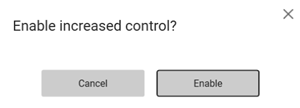
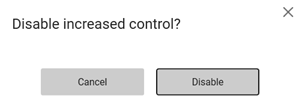
The setting changes only after confirmation. This prevents accidental activation or deactivation and ensures the change is intentional.
Reason entry for deposit refund
With the line note parameter activated, the system prompts the cashier to enter a reason during a deposit refund. This supports clear documentation of the deposit refund.
POS Configuration
AddLineNoteToManualDepositRefund - default value False.
Value should be set to True if line note is required.
Manual line discount function
The Manual Line Discount function includes a line note dialog when the line note parameter is enabled. Selecting Manual Line Discount opens a dialog where the cashier enters a discount by percentage, amount, or new price. After confirming the discount, a dialog appears to enter a note.
The cashier enters a required note and confirms the dialog. The note is saved as a line note on the discounted item to support clear documentation of manual line discounts.
If the cashier cancels the discount dialog, the discount operation stops and no discount is applied to the item. The line note dialog does not appear.
POS Configuration
AddLineNoteToManualLineDiscount - default value False.
Value should be set to True if line note is required.
Manual return line note
Manual Return includes a line note dialog when the line note parameter is enabled. After selecting a reason code for the return, a dialog prompts the cashier to enter a note describing the reason for the manual return. The note is required to continue the return process and is printed on the receipt together with the returned item.
If the cashier cancels the dialog, the return operation stops and the item is not added to the receipt.
POS Configuration
AddLineNoteToManualReturn - default value False.
Value should be set to True if line note is required.
Complaint flow for item returns
Users can now initiate a complaint directly from the Finished Receipt View or POS Receipt Journal, select the affected item, choose a service type, reason code, and action code to complete the complaint registration.
Automatic Walley refund on return
It was not previously possible to have the original Walley payment method
pre-selected automatically when processing an online return.
Users can now navigate to the tender view during a Walley-paid return and have
Walley automatically set as the default refund method, streamlining the return process.
Improvements POS
Automatic reconciliation of payment terminal (AeraNexo) (RTP-46936)
The automatic reconciliation of AeraNexo payment terminals runs based on the PayTerminalReportTime parameter, even when no cashier is logged in to EG POS. The POS connects to the terminal to complete the reconciliation, ensuring it is performed as scheduled without requiring user interaction.
Relevant exiting parameters in POS Configuration:
'PayTerminalType' = 'AeraNexo'
'PayTerminalReportTime' <> 'Disabled' (format HH:MM)
Reconciliation report header per currency ** for AeraNexo pay terminal (RTP-48343)
The reconciliation report printed from the AeraNexo pay terminal shows one header line per currency. Each header includes the currency name and the columns for Quantity, Cashback, and Amount. This structure matches the layout used by the AeviXPay terminal, which makes the report easy to read and recognize across terminals.
Reconciliation report (AeraNexo terminal) (RTP-47895)
Reconciliation report for AeraNexo pay terminal, as printed on the receipt printer, has equal layout as previous pay terminal solution AeviXPay. The Debit amount is listed on the report in a separate column, as it is calculated as the Cashback amount subtracted from the Grand total amount.
Check Communication in Bank admin menu (AeraNexo terminal) (RTP-47223)
Running the “Check communication” function in the Bank Admin Menu verifies both the AeraNexo payment terminal and its connection to Host. This helps identify connection issues when e.g. a payment transaction does not succeed, making it easier to find and resolve the cause.
Pay terminal reconnection handling (AeraNexo terminal) (RTP-47201)
When EG POS loses connection to the AeraNexo payment terminal, a payment attempt detects the connection issue and performs a login to the terminal before continuing. This reduces the risk of failed transactions after events such as terminal restarts.
Card Issuer values in POSLog (AeraNexo terminal) (RTP-47142)
Numeric Card Issuer values received from AeraNexo payment terminals during transactions are stored unchanged in the POSLog.XML file. This ensures accurate tracking of card issuer information for each payment.
Logging of aborted payment transactions (AeraNexo terminal) (RTP-46896)
When a cashier aborts a started payment transaction on an AeraNexo payment terminal, the action is logged as Information. This reflects that the operation is a valid and expected part of the payment flow, helping keep error logs focused on actual issues.
Handling of mixed positive and negative amounts on receipts (RTP-47352)
Receipts that start with a negative item line, such as a deposit refund or returned item, complete correctly with Credit/Debit payment when the total amount is positive.
This ensures consistent handling of payments, regardless of the order or combination of positive and negative item lines, and provides accurate payment processing for all receipt scenarios.
Handling of late error messages in pay terminal transactions (RTP-46447)
Error messages received after a payment is reported as successful are ignored during the transaction process. This ensures the receipt completes correctly and allows customers in self-service to finish their purchase without interruption.
Handling of electronic gift cards via pay terminal (RTP-47387)
Electronic gift cards that are charged/loaded through a physical pay terminal remain on the receipt and cannot be removed. This ensures that any amount loaded onto a gift card is always accounted for. If the customer cannot complete the payment, the same gift card has to be used as payment within the same receipt for the amount that was charged.
Age verification reset on Coopay cancel (RTP-45279)
Previously, cancelling a Coopay payment in self-checkout would reset the age verification for age-restricted items, even if the age had been approved through a different method — causing the customer to go through age control a second time in the same sale.
This has been corrected so that the age verification is only reset when the approval was originally performed as part of a Coopay payment flow.
Coupon is redeemed only when discount conditions are met (RTP-46575)
Previously, a Reitan Loyalty coupon could be redeemed during payment even when the item linked to the coupon discount was not included in the sale. This could cause the coupon to be used without the customer receiving the intended discount.
This has now been improved. The POS now checks that the required item is included in the sale before redeeming the coupon. If the condition is not met, the coupon is cancelled and remains available for future use, ensuring coupons are only redeemed when the customer receives the discount.
TenderName for iCoupon and Reitan loyalty coupons (RTP-46229)
Coupons from iCoupon and Reitan Loyalty include TenderName in the POSLog.
This ensures all coupon types contain consistent payment information and supports accurate and complete transaction records.
Adding member to customer order with redeemed coupon (RTP-46705)
An AppWide error no longer occurs when adding member to customer order with redeemed coupon.
Thanks to it cashier is not confused and it's possible to pay for a customer order with added member without any errors.
Discount on item line (RTP-46395)
In certain scenarios, a single item line could end up with two separate member price discounts applied instead of one. While the total discount amount was correct, the duplicate discount entries in the transaction log were incorrect and did not match the expected behavior.
The issue has been fixed so that only a single member price discount is applied per item line.
Fuel Integration - registering drive-off (RTP-46527)
Previously, registering a drive-off after first viewing a fuel filling in Sales View incorrectly activated Breakage mode on the POS terminal.
This has been corrected so that registering a drive-off no longer triggers Breakage mode in this scenario.
Epsilon fuel voucher printing (RTP-47638)
Previously, purchasing a fuel voucher caused the system to print a car wash voucher instead of the correct fuel voucher receipt.
This has been corrected so that the proper fuel voucher is now printed when a fuel voucher is sold.
Fuel pre-payment configuration (RTP-47490)
Previously, the pre-payment option for fuel was not configurable and was always enabled.
This has been corrected so that pre-payment availability now depends on the forecourt provider setup — it is enabled for Tokheim and disabled for Fusion.
Item search performance fix (RTP-48249)
Previously, searching for items in POS caused a significant delay (up to 20 seconds) when the database contained duplicate price entries for an item, resulting in a constraint error in the background.
This has been corrected so that item searches now return results at normal speed without errors, regardless of duplicate price data in the database.
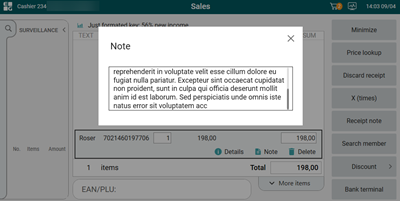
Line note keyboard overlap (RTP-43702)
Previously, when entering a long text in the line note dialog, the on-screen keyboard pushed the dialog buttons out of view, making them inaccessible.
This has been corrected so that the line note dialog is now scrollable, keeping all buttons accessible while the keyboard is displayed.
Campaign item netcost in POSLog (RTP-47070)
Previously, when a campaign price matched the normal price, the system incorrectly used the normal netcost in the POSLog instead of the campaign netcost.
This has been corrected so that the campaign netcost is now always used in the POSLog when an item is sold on a campaign, regardless of whether the store uses the “Lowest Price Last 30 Days” feature.
Parameter for PDF Generation in POSLog (RTP-38135)
The system creates a PDF for every transaction and embeds it in the POSLog XML. This ensures all transactions include a complete and accessible document representation for integrations.
Configuration: “GeneratePDFforAllPOSLogs” = True.
Lottery prize payout without supervisor prompt (RTP-46281)
When a lottery prize is registered as paid out with Norsk Tipping, the process continues without requiring supervisor permission in POS. This ensures the transaction completes smoothly and avoids interruptions during payout.
Reminder SMS sent before order pickup (RTP-46688)
Customers with a Reserve in Store order were receiving a pickup reminder SMS before their order had actually been picked, causing them to arrive at the store before it was ready.
The issue has been fixed so that the reminder SMS is only sent once the picking status is set to "Completed".
Click & Collect order confirmation missing price (RTP-44400)
Previously, Click & Collect order confirmations could not be printed when an order contained items missing a Normal price in EG POS, causing the order to get stuck and repeatedly prompt for printing.
This has been corrected so that order confirmations now can be generated successfully even when Normal price data is absent, provided the IncludeCustomerOrderInPriceCalculation setting is enabled.
Click & Collect order cancellation (RTP-47899)
Previously, cancelling a Click & Collect order in EG POS could fail with an error when the order contained coupons missing ID-tag and ‘IsCommitted’ check is applied, forcing store staff to cancel the order manually in Chain Web instead.
This has been corrected so that Click & Collect orders with coupons can be cancelled directly in EG POS without errors.
Fix orders not possible to pick (RTP-46759)
Stores were unable to complete order picking for certain dispatch orders due to an exception in POS WCF, causing the system to fail when a receipt contained articles that matched more than one element during calculation. While a previous fix (RTP-45577)addressed the root cause going forward, orders that had already broken (primarily since January 24) remained unresolvable.
This fix restores the ability to process those affected receipts, ensuring stores can complete order picking and customers are properly notified when their orders are ready for pickup in store.
Scanning 20-code without price (RTP-46336)
When scanning an item with a 20-code EAN that has no price configured, the system catches the exception and displays a message indicating that the price is not set for this EAN.
Thanks to it cashier gets clear information why item cannot be added.
Credit note receipt ID format for redemption (RTP-47742)
The “Receipt ID” column shows the full receipt number (Store number – Cashier number – Sequence number) for both issued and redeemed credit notes. This makes it easier to recognize, track, and check credit notes across transactions.
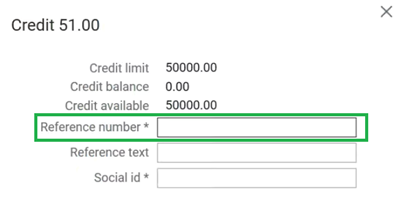
Credit payment dialog (RTP-44382)
Customer with ‘forcerefnum’ flag in database triggers reference number field to be required in credit payment dialog now.
Thanks to it cashier cannot press Enter until all required information is filled.
Customer orders and payment calculation (RTP-45566)
Customer orders keep the correct total amount when you open the payment window. The discount is calculated once and is not deducted again during payment.
This ensures that the total amount stays consistent throughout the sales process and matches the expected order value on the receipt. Regular cash sales continue to work as expected.
Fix EG POS user interface hang caused by processing expired picking orders from all stores (RTP-47547)
The POS terminal was blocking its user interface thread for extended periods during idle cleanup of expired picking orders.
A missing store number filter caused each terminal to process and delete expired orders for all stores in the chain instead of only its own, resulting in hundreds of sequential database calls.
The fix restores the local store filter, so cleanup only runs for orders belonging to the terminal's own store.
Dispatch orders - delivery suggestions (RTP-47513)
Previously, when creating a Web Order in POS with items out of stock locally, the ordering store was missing from the list of fulfilment candidates sent to the dispatch service, preventing it from being selected for PAC.CW orders.
This has been corrected so that the ordering store is now correctly included in the delivery candidates list and appears as a selectable fulfilment option.
Dispatch order delivery method (RTP-47678)
Previously, orders could lose their delivery method after being processed by a second workstation, making it impossible to pick and fulfill those orders in the InStore App.
This has been corrected so that the delivery method is now preserved correctly throughout the order lifecycle.
Expired dispatch order blocking cashier (RTP-47650)
Previously, when a delivered web order was automatically removed from the prepaid order view due to expiration, it was incorrectly retrieved into the sale window as an active receipt, blocking the cashier from logging out or voiding the transaction.
This has been corrected so that expired and already-delivered web orders are no longer loaded into the sale window, allowing cashiers to proceed normally.
Vensafe ticket printing for multiple items (RTP-46675)
Receipts with several Vensafe items print all related Vensafe tickets after payment is completed and the transaction is finalized. This ensures each paid item can be collected using the correct ticket.
Weborder item search by SKU/item number (RTP-43033)
Previously, adding a second or subsequent item to a Weborder from POS using a SKU/Item number in the search field caused an error, preventing the item from being added.
This has been corrected so that both SKU/Item numbers and GTINs are now accepted, and the system correctly maps the identifier to the required format when communicating with the dispatch service.
Online return handling for cross-store receipts (RTP-43565)
Improved the online return process to correctly resolve the cashier information when performing a return in a different store than the one where the original sale was made.
Previously, the system would attempt to look up the original receipt's cashier number in the returning store's user directory, which could result in an exception if that cashier did not exist locally.
The cashier performing the return is now correctly identified, ensuring smooth cross-store online returns including receipts with click & collect orders combined with regular sales items.
Adding items from PLU Lists (RTP-46763)
Previously, it was impossible to add items with a quantity of 1 from the PLU List in Self-service - now this is possible again.
Previously, the action button displayed "Change" when adding a new item from the PLU List in Self-service - now it correctly shows "Add", as "Change" should only appear when modifying the quantity of an already added item.
Customer screen PLU Lists (RTP-48465)
English titles of PLU Lists are being handled also on customer screen.
Thanks to it PLU Lists will adjust depending on the culture set in POS.
eSale Products are added to the receipt one by one (RTP-40002)
eSale products, such as products validated by MBXP, are added to the receipt one item at a time. The quantity dialogue does not appear on the customer screen when adding these products. In self-service mode, the quantity dialogue remains available for now, but may be removed later.
Each item is registered individually on the receipt. This reduces the risk of adding large quantities by mistake and helps prevent long processing times when the POS registers many validated eSale products.
Member QR code recognition in Self-service POS (RTP-47037)
Self-service (SCO) mode now correctly recognizes member QR codes ([loyaltysystem]-member:<barcode>), allowing members to be registered to the sale seamlessly. The SCO mode now handles the [loyaltysystem]-member: identifier in the same way as Cashier/Manned mode -registering the member, fetching coupons from the loyalty backend, and displaying bonus information consistently across all POS modes.
Fetching receipts from on-hold (RTP-45932)
Previously, selecting an on-hold receipt could incorrectly trigger a print of the last finished receipt, causing an error when the receipt had ONHOLD status.
Receipts from on-hold can now be fetched correctly, even after previously searching for the last finished receipts on the same cash register.
Search member's receipt (RTP-26113)
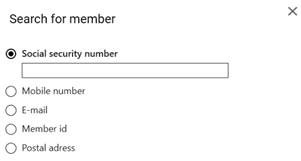
The dialog displayed when searching for member receipts (SEARCH_RECEIPTS_BY_MEMBER_AND_ARTICLE) now uses the same layout and search options as the member identification dialog (SEARCH_MEMBER_BY_IDENTIFICATOR), allowing members to be looked up by Social security number, Mobile number, E-mail, Member id, or Postal address.
Store receipts printing (RTP-47211)
Store sample receipts are being printed out now when choosing "No receipt" option in "Choose printer" dialog while return in POS with SEK as Main currency.
Thanks to it there is no difference in receipt printing depending on currency set.
Receipt gets stuck in POS when coupon redemption fails (RTP-47591)
Coupon redemptions could be silently lost when the coupon service timed out, even with offline retry enabled. Timed-out redemptions are now queued for retry, ensuring no coupon usage is lost.
Reference text character limit (RTP-47389)
Previously, the POS allowed entering very long reference text, but the receipt would only print part of it, making it unclear what was actually stored.
Both the Reference number and Text fields are now limited to 45 characters at the input stage, ensuring what is entered matches what is printed on the receipt.
Receipt selection popup stability (RTP-46069)
The receipt selection popup remains visible and active during the checkout flow. If the popup loses focus, it returns to the front to ensure the selection can be completed. This prevents the process from stopping while waiting for input and reduces the risk of receipts not being fully saved.
Additional logging tracks when the popup opens, closes, and loses focus. This helps identify situations where the popup does not behave as expected and supports faster troubleshooting.
Employee discount flag on promotions (RTP-46368)
Previously, when a promotion was linked to a customer group marked as employees, the employee flag on the discount in the POS log was not set correctly, preventing the extra receipt required for employee sales from being printed.
This has been corrected so that the employee flag is now properly set to 'True' for discounts when the customer belongs to an employee group, and the additional receipt is printed as expected.
Title bar store number display (RTP-47074)
Previously, when the 'ReceiptNumber' option was active in the “InformationInTitleBar” parameter, the title bar showed the store number including the company prefix instead of the local store number.
This has been corrected so that the title bar now displays only the local store number, without the company prefix.
WebdokService offline error handling (RTP-38669)
Error handling in POS when webdok service does not respond has been implemented, a timeout (based on OnlineTimeout parameter) has been added.
Thanks to it POS doesn't look as if it's frozen.
Webdok error handling (RTP-45327)
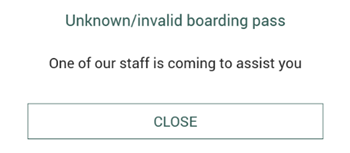
When invalid/unknown boarding pass was scanned or Webdok returned an error, a message in POS is displayed with 'Close' button available.
Thanks to it customer can re-try scanning the boarding pass by closing the dialog.
Scanner events (RTP-46493)
POS no longer freezes when scanning while switching focus to other application.
Thanks to it POS doesn't have to be restarted so often.
Scanning already used deposit refund tickets in POS (RTP-42981)
Scanning a deposit refund ticket that is already used registers as an informational log entry. This shows that the situation is valid and helps avoid treating it as an error in the POS system.
Scheduled restart or shutdown of POS (RTP-40367)
A scheduled restart or shutdown of the POS, such as during night time, registers as an informational log entry. This indicates that the activity is expected and prevents it from being treated as an error in the POS system.
Closed loop VAT code accuracy (RTP-47908)
Previously, when items were configured with dual VAT rates (e.g. eat-in vs. eat-out), the system sent the incorrect VAT rate and tax code to the payment terminal for closed loop transactions.
This has been corrected so that the actual VAT rate is now used when communicating with the terminal, ensuring the correct tax information is reported to backend systems.
Logs improvement (RTP-45860)
When the same member was registered in two concurrent sales before either transaction was finalized, the coupon discount could be applied twice. In such cases — where IgnoreCouponCommitErrors is enabled — the system previously logged a full exception with stack trace.
The log entry has been improved so that already-committed coupons are now reported as a clear, readable warning message instead of an unhandled exception.
Logs improvement (RTP-45470)
When scanning an unknown EAN using the “Ask Price (TOGGLE_LOOKUP_ITEM_MODE)” function, the system previously logged an unhandled exception with a full stack trace.
The log entry has been improved - instead of an exception, a clear and concise warning message is now logged, including the unrecognized EAN number (e.g., OnSearchItem failed, item not found for EAN: 1111222).
Cashier login performance (RTP-42984)
Recent cashier logins are not shown. This avoids unnecessary requests, reduces delays, and keeps the log clear by preventing unnecessary error entries.
Cleanup job stalled when encountering a malformed receipt (RTP-44265)
The POS cleanup job could get stuck in an infinite loop when it encountered a receipt with a malformed or undeserializable XML document. This caused all subsequent receipts to pile up in the local POS database and stop being sent, requiring manual intervention by support to unblock the queue. Error handling has been added so that the cleanup job now skips any receipt that fails deserialization and continues processing the remaining ones, restoring normal receipt flow automatically.
Cloud service URL validation (RTP-47756)
Previously, a missing or empty cloud service URL configuration caused the application to generate a high volume of unhandled errors, making it difficult to diagnose the root cause.
The validation has been improved so that the system now detects missing URLs early, logs a clear message identifying which service is affected, and avoids unnecessary errors.
Improvements POS Server
Gift card capture on multiple partial deliveries (RTP-47035)
Previously, when an order was partially paid with a gift card and delivered in three or more separate partial deliveries, the payment capture failed on the third delivery due to already-paid order lines not being correctly accounted for during the Klarna payment update.
This has been corrected so that gift card and Klarna payments are handled correctly across all partial deliveries.
Gift card capture on partial delivery (RTP-45854)
Previously, when an order was paid with a gift card and Klarna and then partially delivered, the payment job attempted to capture the full gift card amount regardless of the delivered lines, causing the job to fail.
This has been corrected so that the gift card capture amount is correctly calculated based on the delivered lines only, allowing partial deliveries to complete successfully.
Cart discount total calculation (RTP-47997)
Previously, when a campaign price was higher than or equal to the lowest price recorded in the last 30 days, the cart discount totals section incorrectly showed a discount amount instead of zero.
This has been corrected so that the total discount in the cart response is now set to zero in this scenario, ensuring accurate discount reporting.
Cart data loss in orders across machines in POS WCF (RTP-47231)
When a user starts an order on one machine and resumes it on another, POS WCF was not persisting the POSLog between sessions. This caused items added in the first session to be lost when GetCart was called on resume, as it fetched the unpersisted POSLog state.
The fix aligns POS WCF with POS API, where PersistPOSLog was already enabled, ensuring cart data is reliably saved and restored across machines.
Return receipt now correctly registered in Voyado after post-membership registration (RTP-44188)
Earlier, when a customer made a purchase and later post-registered their membership, a subsequent return of that item were not sent to Voyado. This was because the return receipt did not carry the loyalty number linked via the post-registration. As a result, the bonus points from the original purchase were never reversed, leading to an incorrect bonus balance for the customer.
This has now been fixed. The POS and POSAPI retain the loyalty number from the post-registered receipt and include it in the return receipt, ensuring the return is correctly registered in Voyado and the customer's bonus balance is updated accurately.
New POS Configuration parameter:
“AllowPostRegisteredReturn” - When Enabled, returning items via a post-registered receipt by reference back to the original sale receipt. When disabled, returns from post-registered receipts are not supported.
Required:
Retail DB version: 2.10.0.117
Returning orders with "Group" discounts (RTP-45792)
Before, when resuming a partially captured order that had a "Group" subtotal discount applied, the discount was dropped from the new receipt on ‘BeginCartEditing’, causing a payment amount mismatch and blocking further captures or returns.
Now, "Group" subtotal discounts are now correctly preserved when resuming a partial cart, allowing the order to complete normally.
Improved exception logging for Bridge loyalty provider communication (RTP-46879)
When errors occurred during communication with the Bridge loyalty provider, the POS was discarding parts of the exception information in its logs, making it difficult to diagnose issues in production environments. The logging has been updated to preserve the full exception context, improving the ability to troubleshoot failures. This change has no impact on end users.
Prevent multiple post-registrations on the same receipt (RTP-44192)
Previously, it was possible to post-register a membership multiple times for the same receipt in POS or POS API. Even though Voyado only processed the first registration, repeated attempts could create confusion and inconsistencies.
Now, validation check ensures that membership post-registration can only be performed once per receipt. Any additional attempts to post-register the same receipt will be blocked, helping maintain consistency between POS and Voyado.
Updated Klarna API connection for Kustom partner support (RTP-46000)
The Klarna payment integration has been updated to support Klarna’s new Kustom partner API connection. A new parameter ““KlarnaKustomPartnerId has been added and related configuration updates have been made in POS, POS Services, POS Master database, and Chain Web Backoffice.
These improvements ensure the POS continues to connect correctly with Klarna and process Klarna payments without interruption.