EG POS v. 4.157.9
Released 13 May 2026
Loyalty ID handling for AeraNexo pay terminal (RTP-48897)
When the AeraNexo pay terminal returns multiple loyalty IDs, based on customers payment card, the POS uses the “ExternalLoyaltyNumber” to identify the member. The member is then linked to the transaction and shown on the receipt, ensuring the correct loyalty information is applied.
Relevant exiting parameters in POS Configuration:
'PayTerminalType' = 'AeraNexo'
'UseBonusCardFromPayTerminal' (default 'False') - when activated, EG POS will look for / handle ID received from terminal
AeraNexo pay terminal reconciliation timing (RTP-48355)
A short delay is applied when a ConnectionRecovery occurs just before a reconciliation with the AeraNexo pay terminal. This ensures the terminal is ready, helping the reconciliation process run correctly without starting too early.
Relevant exiting parameters in POS Configuration:
'PayTerminalType' = 'AeraNexo'
AeraNexo pay terminal status message during POS startup (RTP-47451)
A message appears at startup and when the cashier signs on if the AeraNexo pay terminal is offline during the POS restart. The message informs that the pay terminal is not ready, helping the user understand that payments cannot be processed until the terminal is available.
Relevant exiting parameters in POS Configuration:
'PayTerminalType' = 'AeraNexo'
PLU lists display correctly on main screen (RTP-48905)
PLU lists open with content on the main screen, ensuring items are visible and ready for selection. This supports correct item handling and aligns the view with what is shown on the customer screen.
EG POS v. 4.157.8
Released 8 May 2026
Automatic Walley refund on return
It was not previously possible to have the original Walley payment method
pre-selected automatically when processing an online return.
Users can now navigate to the tender view during a Walley-paid return and have
Walley automatically set as the default refund method, streamlining the return process.
Improvements POS
Automatic loyalty identification via payment card in AeraNexo pay terminal (RTP-48424)
The AeraNexo pay terminal supports lookup of the cardholder’s loyalty ID. When configured in the POS, the payment process retrieves the loyalty ID linked to the payment card. The member is automatically added to the receipt, ensuring that any applicable member discounts are applied. A single tap of the payment card completes both payment and member identification, reducing manual steps at checkout.
Relevant exiting parameters in POS Configuration:
'PayTerminalType' = 'AeraNexo'
'UseBonusCardFromPayTerminal' (default 'False') - when activated, EG POS will look for / handle ID received from terminal.
Reconciliation report header per currency ** for AeraNexo pay terminal (RTP-48343)
The reconciliation report printed from the AeraNexo pay terminal shows one header line per currency. Each header includes the currency name and the columns for Quantity, Cashback, and Amount. This structure matches the layout used by the AeviXPay terminal, which makes the report easy to read and recognize across terminals.
Relevant exiting parameters in POS Configuration:
'PayTerminalType' = 'AeraNexo'
Handling of late error messages in pay terminal transactions (RTP-46447)
Error messages received after a payment is reported as successful are ignored during the transaction process. This ensures the receipt completes correctly and allows customers in self-service to finish their purchase without interruption.
Return validation for Price-adjusted items (RTP-47647)
Previously, attempting to return items that had received a partial price-adjustment refund was incorrectly blocked by the system, even when the return was valid.
This has been corrected so that the return validation now accurately evaluates each item individually, allowing legitimate returns to proceed as expected.
Required:
POS Services 7.98.132.0.
EG POS from Fix Version/s field or higher.
Handling of electronic gift cards via pay terminal (RTP-47387)
Electronic gift cards that are charged/loaded through a physical pay terminal remain on the receipt and cannot be removed. This ensures that any amount loaded onto a gift card is always accounted for. If the customer cannot complete the payment, the same gift card has to be used as payment within the same receipt for the amount that was charged.
Age verification reset on Coopay cancel (RTP-45279)
Previously, cancelling a Coopay payment in self-checkout would reset the age verification for age-restricted items, even if the age had been approved through a different method — causing the customer to go through age control a second time in the same sale.
This has been corrected so that the age verification is only reset when the approval was originally performed as part of a Coopay payment flow.
Improved stability of the customer screen and PLU list rendering (RTP-45775)
The customer screen and PLU list now run more reliably and are less likely to freeze the POS during use.
This means cashiers can keep working without unexpected interruptions or restarts.
Credit note receipt ID format for redemption (RTP-47742)
The “Receipt ID” column shows the full receipt number (Store number – Cashier number – Sequence number) for both issued and redeemed credit notes. This makes it easier to recognize, track, and check credit notes across transactions.
Click & Collect order cancellation (RTP-47899)
Previously, cancelling a Click & Collect order in EG POS could fail with an error when the order contained coupons missing ID-tag and ‘IsCommitted’ check is applied, forcing store staff to cancel the order manually in Chain Web instead.
This has been corrected so that Click & Collect orders with coupons can be cancelled directly in EG POS without errors.
Vensafe ticket printing for multiple items (RTP-46675)
Receipts with several Vensafe items print all related Vensafe tickets after payment is completed and the transaction is finalized. This ensures each paid item can be collected using the correct ticket.
EG POS v. 4.157.7
Released 21 April 2026
Improvements POS
Reconciliation report (AeraNexo terminal) (RTP-47895)
Reconciliation report for AeraNexo pay terminal, as printed on the receipt printer, has equal layout as previous pay terminal solution AeviXPay. The Debit amount is listed on the report in a separate coulmn, as it is calculated as the Cashback amount subtracted from the Grand total amount.
Relevant exiting parameters in POS Configuration:
'PayTerminalType' = 'AeraNexo'
Handling of mixed positive and negative amounts on receipts (RTP-47352)
Receipts that start with a negative item line, such as a deposit refund or returned item, complete correctly with Credit/Debit payment when the total amount is positive.
This ensures consistent handling of payments, regardless of the order or combination of positive and negative item lines, and provides accurate payment processing for all receipt scenarios.
Relevant exiting parameters in POS Configuration:
'PayTerminalType' = 'AeraNexo'
Scanning already used deposit refund tickets in POS (RTP-42981)
Scanning a deposit refund ticket that is already used registers as an informational log entry. This shows that the situation is valid and helps avoid treating it as an error in the POS system.
Receipt gets stuck in POS when coupon redemption fails (RTP-47591)
Coupon redemptions could be silently lost when the coupon service timed out, even with offline retry enabled. Timed-out redemptions are now queued for retry, ensuring no coupon usage is lost.
Improvements POS Server
Cart discount total calculation (RTP-47997)
Previously, when a campaign price was higher than or equal to the lowest price recorded in the last 30 days, the cart discount totals section incorrectly showed a discount amount instead of zero.
This has been corrected so that the total discount in the cart response is now set to zero in this scenario, ensuring accurate discount reporting.
Gift card capture on partial delivery (RTP-45854)
Previously, when an order was paid with a gift card and Klarna and then partially delivered, the payment job attempted to capture the full gift card amount regardless of the delivered lines, causing the job to fail.
This has been corrected so that the gift card capture amount is correctly calculated based on the delivered lines only, allowing partial deliveries to complete successfully.
EG POS v. 4.157.6
Released 27 March 2026
Automatic reconciliation of payment terminal (AeraNexo) (RTP-46936)
The automatic reconciliation of AeraNexo payment terminals runs based on the PayTerminalReportTime parameter, even when no cashier is logged in to EG POS. The POS connects to the terminal to complete the reconciliation, ensuring it is performed as scheduled without requiring user interaction.
Relevant exiting parameters in POS Configuration:
'PayTerminalType' = 'AeraNexo'
'PayTerminalReportTime' <> 'Disabled' (format HH:MM)
Check Communication in Bank Admin Menu (AeraNexo terminal) (RTP-47223)
Running the “Check communication” function in the Bank Admin Menu verifies both the AeraNexo payment terminal and its connection to Host. This helps identify connection issues when e.g. a payment transaction does not succeed, making it easier to find and resolve the cause.
Relevant exiting parameters in POS Configuration:
'PayTerminalType' = 'AeraNexo'
Pay terminal reconnection handling (AeraNexo terminal) (RTP-47201)
When EG POS loses connection to the AeraNexo payment terminal, a payment attempt detects the connection issue and performs a login to the terminal before continuing. This reduces the risk of failed transactions after events such as terminal restarts.
Relevant exiting parameters in POS Configuration:
'PayTerminalType' = 'AeraNexo'
Logging of aborted payment transactions (AeraNexo terminal) (RTP-46896)
When a cashier aborts a started payment transaction on an AeraNexo payment terminal, the action is logged as Information. This reflects that the operation is a valid and expected part of the payment flow, helping keep error logs focused on actual issues.
Relevant exiting parameters in POS Configuration:
'PayTerminalType' = 'AeraNexo'
Card Issuer values in POSLog (AeraNexo terminal) (RTP-47142)
Numeric Card Issuer values received from AeraNexo payment terminals during transactions are stored unchanged in the Poslog.xml file. This ensures accurate tracking of card issuer information for each payment.
Relevant exiting parameters in POS Configuration:
'PayTerminalType' = 'AeraNexo'
Campaign item netcost in POSLog (RTP-47070)
Previously, when a campaign price matched the normal price, the system incorrectly used the normal netcost in the POSLog instead of the campaign netcost.
This has been corrected so that the campaign netcost is now always used in the POSLog when an item is sold on a campaign, regardless of whether the store uses the “Lowest Price Last 30 Days” feature.
Lottery prize payout without supervisor prompt (RTP-46281)
When a lottery prize is registered as paid out with Norsk Tipping, the process continues without requiring supervisor permission in POS. This ensures the transaction completes smoothly and avoids interruptions during payout.
Cloud Credit note information (RTP-46552)
Cloud credit notes show the Receipt ID instead of the credit note number. The transactions also displays the cashier number and source fields. This ensures the credit note contains the correct reference and complete transaction information for customers.
Missing translation on receipt (RTP-46898)
Improvements related to missing Finnish and Estonian translations for the receipt.
Logs improvement (RTP-45860)
When the same member was registered in two concurrent sales before either transaction was finalized, the coupon discount could be applied twice. In such cases — where IgnoreCouponCommitErrors is enabled — the system previously logged a full exception with stack trace.
The log entry has been improved so that already-committed coupons are now reported as a clear, readable warning message instead of an unhandled exception.
Logs improvement (RTP-45470)
When scanning an unknown EAN using the “Ask Price (TOGGLE_LOOKUP_ITEM_MODE)” function, the system previously logged an unhandled exception with a full stack trace.
The log entry has been improved - instead of an exception, a clear and concise warning message is now logged, including the unrecognized EAN number (e.g., OnSearchItem failed, item not found for EAN: 1111222).
Cashier login performance (RTP-42984)
Recent cashier logins are not shown. This avoids unnecessary requests, reduces delays, and keeps the log clear by preventing unnecessary error entries.
Cleanup job stalled when encountering a malformed receipt (RTP-44265)
The POS cleanup job could get stuck in an infinite loop when it encountered a receipt with a malformed or undeserializable XML document. This caused all subsequent receipts to pile up in the local POS database and stop being sent, requiring manual intervention by support to unblock the queue. Error handling has been added so that the cleanup job now skips any receipt that fails deserialization and continues processing the remaining ones, restoring normal receipt flow automatically.
EG POS v. 4.157.5
Released 10 March 2026
Improvements POS
Clearer payment messages in EG POS (AeraNexo terminal) (RTP-46345)
EG POS cancels a reconciliation attempt if the payment terminal refuses the request. This keeps the POS available for a new reconciliation attempt or for other operations.
The existing parameter 'BankReceiveTimeOutInSeconds' applies to the AeraNexo payment terminal integration. This aligns the timeout handling with other supported payment terminal solutions and provides consistent behavior when waiting for responses from the terminal.
The integration handles situations where the AeraNexo WebSocket connection drops between terminal login and the first payment attempt. Improved communication between the POS and the terminal helps ensure a stable payment flow.
Relevant exiting parameters in POS Configuration:
'PayTerminalType' = 'AeraNexo'
'BankReceiveTimeoutInSeconds' (default 120) - the number of seconds before POS will cancel an operation in case the terminal never responds.
Coupon redemption via retry shows complete information (RTP-43197)
When a coupon is redeemed after a temporary connection issue with the coupon service, the system registers the coupon with complete information in Coupon Management.
The fields “Redeemed by” and “Receipt ID” display the correct member and receipt details, even when the coupon is committed through the automatic retry process.
This ensures accurate documentation of who redeems the coupon and links the coupon to the correct receipt. It supports correct follow-up, reporting, and audit of coupon usage.
eSale Products are added to the receipt one by one (RTP-40002)
eSale products, such as products validated by MBXP, are added to the receipt one item at a time. The quantity dialogue does not appear on the customer screen when adding these products. In self-service mode, the quantity dialogue remains available for now, but may be removed later.
Each item is registered individually on the receipt. This reduces the risk of adding large quantities by mistake and helps prevent long processing times when the POS registers many validated eSale products.
Scanning 20-code without price (RTP-46336)
When scanning an item with a 20-code EAN that has no price configured, the system catches the exception and displays a message indicating that the price is not set for this EAN.
Thanks to it cashier gets clear information why item cannot be added.
Electronic gift cards (eSale) – MBXP (RTP-44720)
Electronic gift cards (eSale) validated by MBXP are added automatically as a tender line when moving from the Sale page to the Payment page in self-service mode.
The tender line cannot be deleted after it is added. MBXP does not support cancellation of redeemed gift cards, which means the redeemed amount must remain on the receipt.
Click & Collect orders - customer info (RTP-46372)
The option to overwrite dummy customer data has been disabled.
This prevents customer information from being accidentally modified, which could lead to data inconsistencies and information being sent to the wrong people.
Member search and add to sale – Sweden and Estonia (RTP-45419)
Searching for members in Sweden and Estonia works without errors. Member details display correctly, and the member can be added to the sale. This supports a smooth checkout process and ensures purchases link to the correct member account.
LRS Log improvement for partial payments (RTP-43064)
The LRS log handles partially paid transactions correctly. This provides a more accurate log overview and supports easier system monitoring and troubleshooting.
Improvement POS Server
REST API for ShopExpress (RTP-46559)
POS WCF REST API now starts normally as expected. Thanks to it Shop Express can be used by the customers.
EG POS v. 4.157.4
Released 23 February 2026
Coopay QR registration notification in EG POS
When a customer scans the member app QR code in EG POS, and has activated Coopay as payment method, the system may send a confirmation notification to the customer’s app (configurable). The notification assures the customer that the QR code is registered for the transaction. The POS screen does not display this confirmation, but log files in both POS and POS Services show that the notification is sent to GiantLeap.
Configuration
POS Configuration:
New parameter:
'CoopayMemberNotificationEnabled' (default 'False') - when activated, a notification is sent to GiantLeap when Coop member app QR is scanned AND is activated for payment.
POS Services Configuration:
New entries needed:
<add key="CoopayAppMiddleware_Url" value="" />
<add key="CoopayAppMiddleware_Username" value="" />
<add key="CoopayAppMiddleware_Password" value="" />
Improvements POS
Clearer payment messages in EG POS (AeraNexo terminal) (RTP-45456)
Payment messages from the AeraNexo pay terminal, shown in EG POS, use clearer and more user-friendly language in Norwegian. Technical terms such as “Host” are replaced with text that is easier to understand.
This makes the payment process easier to follow and helps users understand what happens during the transaction.
Relevant existing parameter in POS Configuration:
'PayTerminalType' = 'AeraNex
Mobile payments with automatic member discount (RTP-35499)
When a customer enters their phone number during mobile payment (Swish, Vipps, Walley), member discount, if any, is added to the receipt and the reduced total is sent to the payment provider. The customer is charged the correct discounted amount, and the receipt completes without creating a cash payout for the discount.
Deposit refund (PANT) calculation on receipts with coupon discounts (RTP-44808)
When a coupon discount applies to items that include a deposit refund (PANT), the receipt calculates the deposit refund based on the full item quantity. The deposit refund amount reflects the total deposit value for all applicable items, coupon discounts do not affect this calculation, and all deposit refund lines are visible on the receipt. The sum of the printed lines matches the subtotal and provides correct receipt information.
Display of multiple gift gards in sales and payment views (RTP-44087)
Scanned gift cards appear in the order they are scanned in the Sales screen. Each gift card shows its details and can be removed directly from the Sales screen.
During payment, gift cards appear in the same order for confirmation. The system applies gift cards in sequence until the full cart amount is covered. If the remaining amount is not covered, another payment method is available.
Epsilon offline payments (RTP-44595)
Epsilon issues with offline payments have been resolved: Epsilon is no longer called ‘Epsilot’ in dialogs with Swedish language. Moreover, messages in payment view when Epsilon is offline and the amount to pay back are correct now.
Clear Message for scanning an already registered Gift card (RTP-44404)
When a gift card is scanned more than once in the same sale, the POS [SCO] shows a clear message that the gift card is already added.
The system checks internally if the gift card is already registered in the sale. This avoids an incorrect “insufficient funds” message and gives the customer a clear explanation.
If the existing gift card line is voided, the same gift card can be scanned again.
Improved logging for gift card transactions (RTP-44401)
The POS provides more detailed logging for successful gift card transactions. This makes it easier to follow each step of the gift card process and supports troubleshooting if questions arise later.
The log connects the gift card scan, authorization, and capture. It includes the gift card ID and the related amounts, giving a clear overview of the full transaction flow from scan to completed payment.
Improved Logging for printer problems (RTP-40048)
The system logs printer issues such as “out of paper” as warning or information messages instead of exceptions. The log clearly states the reason why the printer is not working.
This reduces unnecessary exception entries in the POS log and makes it easier to read and identify real errors across stores.
Item's lowest price feature issues (RTP-45305)
TotalDiscountAmount field on cart and line levels from POSWCF does reflect LowestPrice now also when item quantity is more than 1.
Thanks to it lowest price from last 30 days is correct.
Store can not do order picking (RTP-45577)
The logic for setting order lines discount when editing active customer orders has been improved.
Thank to it picking orders is possible and not causing any problems.
Duplicate receipts in Receipt Journal (RTP-45663)
Before, unfinished receipt was being sent twice to Receipt Journal - once on logout and again on the subsequent login when fetching unfinished receipts. Now, an unfinished receipt is sent on login only if it has not been previously sent.
Additionally, before the change, fetched unfinished receipt was no longer being marked as DELETED, which allowed the same unfinished receipt to be loaded repeatedly. This has been corrected to ensure proper receipt handling - unfinished receipt can be fetched only once.
Missing approval buttons in Surveillance screen (RTP-45213)
Approval buttons in Surveillance screen are available and can be used to confirm or decline customer's age. Thanks to it, cashier doesn't have to go to the cash register to approve what customer is doing.
Missing translations (RTP-45183)
Fixed missing Finnish and Estonian translations for the Login screen and System details screen.
Improvements POS Server
Stable API Key Loading in POS WCF (RTP-45791)
The POS WCF service reliably loads the API key during startup.
This ensures that REST API calls work as expected after a service restart.
Crediting invoices in Chain Web (RTP-46038)
Fix the issue in POS WCF / API that prevents customers from creating a credit invoice in Chain Web when the original receipt includes a coupon tender with a zero amount. Thanks to it creating invoices is not causing an error and they can be smoothly created.
EG POS v. 4.157.3
Released 9 February 2026
Integration with AeraNexo pay terminal solution from Aera
EG POS supports the AeraNexo pay terminal solution from Aera. The solution works with pay terminals such as Ingenico RX-5000 and allows the terminal to connect to the POS using Ethernet, WiFi, or USB.
The terminal connection is configured directly on the terminal and works together with the Aera Integration Component (AIC), which runs as a separate service and handles communication between the POS and the terminal.
When using a USB connection, the POS shares its network connection with the terminal. This allows the terminal to communicate correctly through the AIC service and ensures stable payment processing.
Configuration of the terminal communication follows Aera’s own documentation.
POS Configuration
Affected exiting parameter:
'PayTerminalType' must be set to 'AeraNexo'
Convenience Menu sales
Extras for Convenience Menu sales item are being displayed inside of the menu while adding the item to the receipt.
Thanks to it it's obvious that extras were added as a part of a menu.
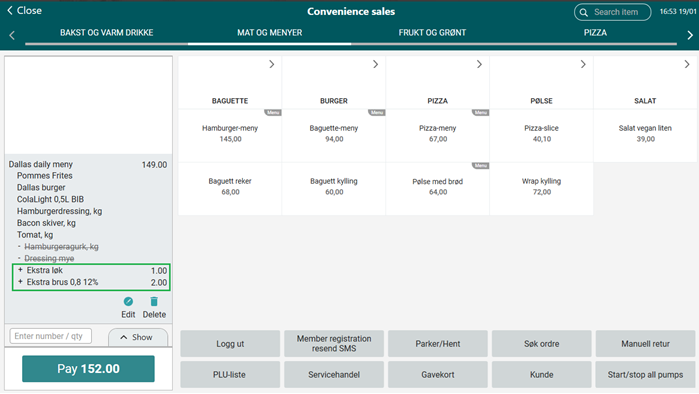
Convenience Menu Sales - handling of Extras
Handling of extras that can have ingredients removed has been added. Moreover, only the optional ingredients that were selected to be removed are being displayed after adding the menu sales item now.
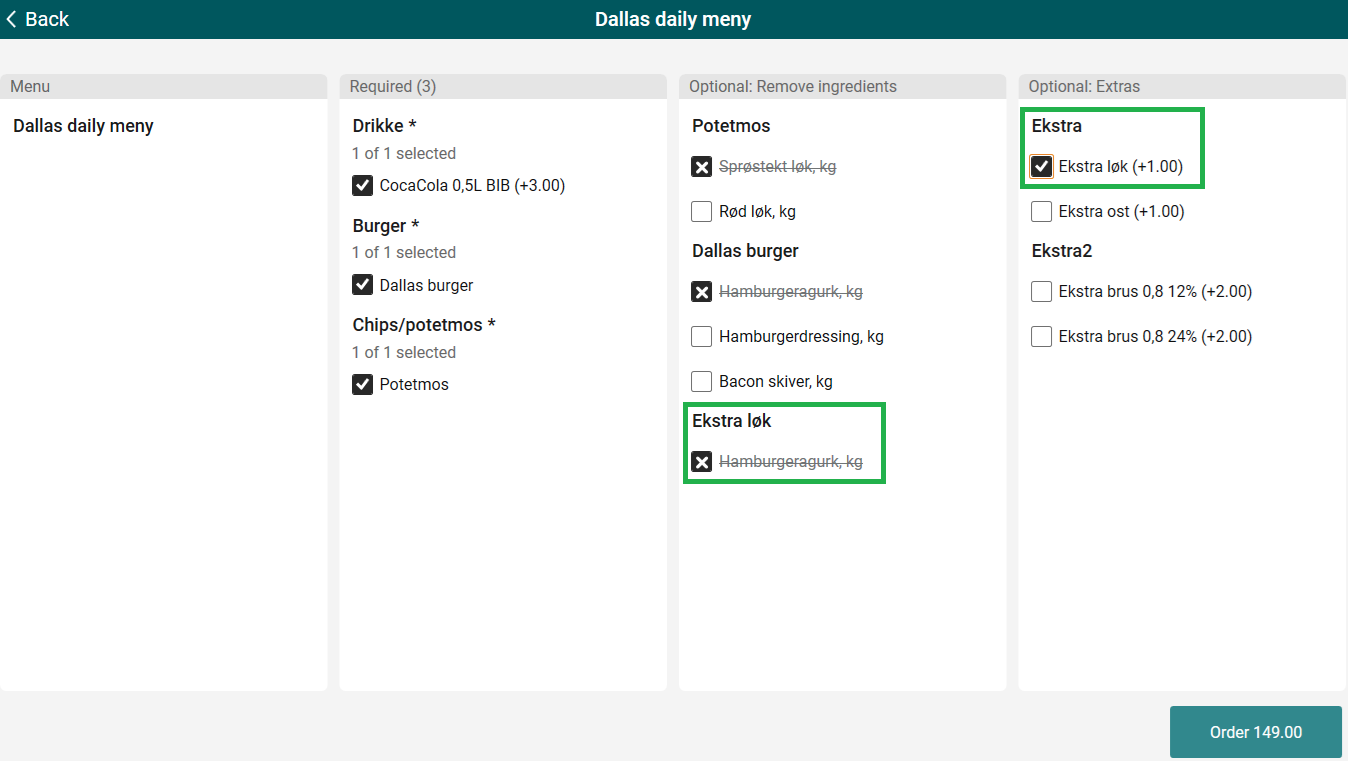
Configurable valid days for deposit refund lottery tickets
Deposit refund tickets support different validity periods based on ticket type. Ordinary deposit refund tickets (barcode prefix 980) and deposit refund lottery tickets (barcode prefix 982) can use separate settings for how many days the receipt stays valid. A configuration key, DaysToKeepPantoReceiptInSystem, defines the number of valid days for deposit refund lottery tickets, making it possible to manage lottery refunds independently from ordinary deposit refunds.
POS Configuration
Existing parameters:
DepositRefundTomraConfig - add new valid Key 'DaysToKeepPantoReceiptInSystem' with chosen value to validate deposit refund lottery tickets independently.

Improvements POS
Delete selected ICoupon handling (RTP-44971)
The Delete selected function removes an ICoupon fully from the receipt. After deletion, the coupon is no longer treated as active or selected and can be searched for, selected, and added again without issues. This ensures that ICoupons behave consistently when they are removed from a receipt and allows normal reuse during the same transaction.
Loyalty coupon handling during full control audit - AppWide error (RTP-44672)
Loyalty coupons are handled automatically during the loyalty process and are not added again when preparing receipts for full control audit. This prevents duplicate coupon processing and avoids errors caused by exceeding the allowed number of eCoupons, ensuring stable and reliable audit handling.
Loyalty coupons not redeeming (RTP-45135)
Coupons from the Loyalty integration work correctly in EG POS during sales. The sale completes successfully after payment, and the coupon is redeemed as expected.
Creating a new customer in POS (RTP-44292)
When creating a new customer in POS, the ‘ShowPricesExclusiveVAT’ field is set by default based on the value configured in the “CustomerViewSetupWhenCustomer” parameter.
This ensures that the customer is created in accordance with the predefined configuration requirements.
Fuel Integration - Adding drive-off to active receipt (RTP-43963)
Active receipt is no longer being deleted after adding a drive-off.
Thanks to it cashier can proceed with the sale, without the need to re-add everything.
Fuel Panel improvements (RTP-44963)
Improvements for Fuel Panel have been implemented:
"Not available" text on pump tiles is being hidden when Tokheim fuel configuration is used. Fusion fuel configuration still has this text displayed.
Pump status is being refreshed in the pump dialog, making the status of the pump clear for the cashier.
Full HD resolution - Convenience mode (RTP-44633)
Fixes to Full HD resolution have been implemented: text on buttons is correctly adjusted to the button's length. Text is wrapped to the second line only when text is actually long enough.
Thanks to it texts is displayed in one line when there is enough space and it's easier for cashier to use Full HD Convenience mode.
Different logos on printed receipts (RTP-39188)
A completed transaction prints two receipts: a normal receipt and a voucher receipt. Each receipt shows its own logo. The normal receipt shows the Printer logo, and the voucher receipt shows the Voucher Logo for Epsilon. This makes it easy to see the difference between the two receipts.
Gift card number printed and shown in POS (RTP-43924)
For gift card sales and redemption in manned POS, receipts and dialogs show the printable gift card ID. The printable ID is the number printed on the physical card and used in customer-facing views.
This avoids exposing the secret gift card code and gives the teller a clear reference that matches the card provided by the customer.
Online return of discounted item (RTP-42143)
Discounted return items reflect the actual paid price on online return receipts.
Customers receive a refund for the exact amount paid at purchase, rather than the item’s current or regular price.
Online return of web orders (RTP-43192)
Exception in POS no longer occurs while doing online return of web orders.
Thanks to it no misleading information is shown.
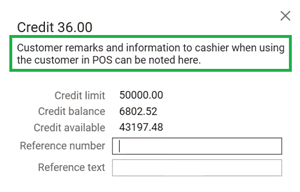
Customer information - remarks (RTP-45075)
Remarks are shown when paying with invoice for a customer order.
Thanks to it cashier is not missing an important information.
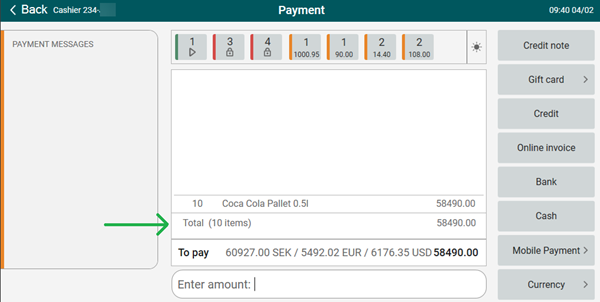
Payment view - item count (RTP-44889)
Value is being shown correctly in payment mode now: text (XX items) has been moved from the bottom row to the total row.
Stable behavior when opening PLU-board (RTP-38755)
EG POS improves handling of the PLU-board to prevent the POS from becoming unresponsive.
Earlier, clicking the PLU-board could cause the POS to stop responding, blocking all input and requiring support or a restart. The PLU-board now opens and closes correctly, ensuring the POS remains responsive and usable during normal operation.
Price check not allowed dialog (RTP-45351)
Norwegian translations for “PriceCheckNotAllowed “dialog have been added back.
Thanks to it message is easy to understand.
Item prices fields (RTP-45162)
Search item (ItemInfoBoxConfig parameter) and Item information (ItemInfoFullscreenConfig parameter) views contain all item prices fields possible to configure now - NormalPrice, CampaignPrice, PredefinedCampaignPrice and MemberPrice.
Receipts' sequence numbers (RTP-44306)
Receipts with sequence number '-1' are no longer created when delivering prepaid web orders from POS.
Thanks to it the printed receipt doesn't create confusion about the order and the Receipt Journal reflects the delivery of the items to the customer.
Number of reconnection attempts in Surveillance screen (RTP-45107)
After Internet connection is lost in Surveillance screen every 5min POS has 3 attempts to re-connect. If the 3rd attempt fails, it's logged as an Error (first two attempts are logged as Information).
Thanks to it number of Errors logged is not overwhelming.
POS Configuration - PayTerminalType options (RTP-45153)
"AeroNexo" has been added as an option to configure in parameters using “PayTerminalType” as parameter type.
Thanks to it a new bank terminal integration will be possible to use in POS.
Automatic shift close/start configuration (RTP-44543)
New parameter AutomaticShiftCloseTimeSettings for automatic shift close/start has been implemented. Configuration for automatic shift closing. Configure the time when closing should happen as well as how many minutes before and after the automatic shift close should manual closing be disabled. Default value:

NorwegianTollQuotaGroups parameter changes (RTP-45215)
“NorwegianTollQuotaGroups” parameter in POS accepts both ‘dot’ and ‘comma’ as a decimal separator, so that quota in POS is correctly calculated. This decimal separator change only affects this one parameter. Other are unchanged.
Shift settlement "big difference" message (RTP-42779)
The logic for checking the balance has been changed so that only tender types configured in the BalanceTenderTypes parameter are taken into account.
Thanks to it shift settlement "big difference" message does not appear on differences less than 50 even though the parameter "Balance Variance" is set to over 50.
Improved logging for age verification errors (RTP-44566)
The age verification process provides clearer internal log messages when QR code scanning fails. When a device reference is missing, the system records a specific informational message.
Search type selection with improved logging (RTP-44614)
Selecting search types using Tab during automatic search runs with improved logging and keep logs clean and ensuring stable background processing while switching between item search and customer search.
Improvement POS Server
Handling of exception when EAN was not found (RTP-45083)
Fixed an issue where an exception was thrown when an EAN was not found. Invalid items are returned in the response instead of causing an error.
EG POS v. 4.157.2
Released 9 January 2026
Automatic application restart in EG POS
The 'PayTerminalUpdateTime' parameter defines a time when EG POS performs an automatic restart of the application. Restart by this parameter is triggered only if a restart hasn't already been performed earlier the same date. The restart lets EG POS reconnect to the integrated pay terminal, which can be required if the terminal has been restarted by the external provider at an earlier time.
The restart triggers at the defined time when EG POS is idle. When running in self-service mode, EG POS switches to cashier mode automatically before the restart takes place.
POS Configuration
New parameter:
PayTerminalUpdateTime - (default value 'disabled') - specify a time on format 'HH:MM' for when to restart EG POS automatically every day (if not already restarted earlier the same date).
Improvements POS
Bank - Handling unrelated errors after a successful pay terminal transaction (RTP-43366)
During a pay terminal transaction EG POS processes error messages related to the ongoing transaction. Late error callbacks that may appear immediately after the payment was successful are ignored. This ensures the receipt completes and allows customers in self-service to finish their purchase without interruption.
Bonus coupons are not being applied twice (RTP-40341)
In case member with bonus coupons was added and then removed, coupons are also removed from the sale, so when member is re-added, the coupons are not applied twice.
Thanks to it the correct discount applies.
Coupon scanning (RTP-44348)
Scanning a coupon barcode triggers a check against the values in the “CouponPrefixes” parameter. If the prefix matches, the system identifies the correct coupon type and handles it according to that type.
Returning receipts with iCoupon vouchers (RTP-43430)
Receipts that include iCoupon vouchers can be returned using the standard receipt return flow. When a finished receipt is collected and completed as a return, the system reverses items and tenders and voids all iCoupon vouchers used on the original sale.
Scanning member QR code (RTP-43415)
Scanning member QR code in item search dialog no longer causes database offline errors.
Thanks to it no error is confusing cashiers anymore and scanning member QR codes is allowed in item search dialog.
Crediting invoice in Chain Web (RTP-44611)
Invoices could not be credited because of an invalid Price Type ENUM value in the POSLog.xml.
To prevent this issue from happening again, any unknown value will be replaced with the default value, allowing invoices to be credited correctly in Chain Web.
Online return - fixed price item (RTP-43132)
Original price is no longer displayed when searching for receipt with discounted fixed price item.
Thanks to it when receipt with fixed price item was fetched, no discount is displayed and fixed price replaces the original price.
Online return - fixed price item (RTP-43237)
Discount is no longer shown in customer display during online return of fixed price item.
Thanks to it customer is not confused about the actual price and the total he needs to pay.
Click & Collect orders with coupons (RTP-42871)
When coupon was added to the Click & Collect order, during picking order it is present as well.
It prevents from price becoming higher than expected during pickup.
Before deploying to production, the parameter must be reverted to its original value:
“AllowSubtotalDiscountWhenPayingCustomerOrder” = True.
This change must be performed by a consultant!
Once the parameter has been updated, all POS terminals must be restarted for the change to take effect.
Click & Collect orders SMS (RTP-42993)
SMS are now always sent from POS when completing order.
Thanks to it is easy to notify customer about order being completed.
Versions required (minimum)
Chain Web versions: 2.10.420, 2.10.383.
POS Services version: 7.97.126.0.
Item's lowest price feature issues (RTP-42405)
Issues with CartResponse when campaign price is being applied and lowest price is set on DiscountGroup have been resolved. Thanks to it, these are the correct discount rules:
Item's lowest price equals original price (within last 30 days):
Discount = OriginalPrice − CampaignPriceNormalPrice > LowestPrice > CampaignPrice:
Discount = LowestPrice − CampaignPriceNormalPrice > CampaignPrice > LowestPrice:
The campaign price becomes the selling price, and no discount is shown.
Cash settlement receipt (RTP-42962)
The cash-settlement process prints only one receipt and stores this receipt in the journal. This keeps the flow clear and prevents unnecessary paper use.
The price shown in "Specify quantity" dialog in self-service (RTP-44055)
The logic of displaying prices in the 'Specify quantity' dialog has been improved.
Thanks to it customer sees the actual price he is going to pay for the item, not the price from the planned campaign (not yet active).
Receipt printing (RTP-44347)
A receipt that includes an item return prints automatically. This behavior overrules any configuration that disables automatic receipt printing. A store copy also prints automatically, so the customer can sign it as a part of the return process.
Sending messages from Self-service to Surveillance POS after earlier connection problem (RTP-44632)
Before, when cash register lost connection with Internet, Surveillance screen stopped receiving messages and only restart could help to solve the issue.
Now, a health check is triggered every minute to initialize reconnection automatically, without the need to close and re-open Surveillance screen.
Handling items not part of the original receipt during Visual Control (RTP-44483)
During Visual Control in self check-out, the system handles scanned items that are not part of the original receipt without causing an application error.
If a cashier scans an item with an invalid or unwanted barcode, a message appears explaining that the item does not belong to the original transaction and must be removed before confirming the control.
This prevents system exceptions and guides the cashier to complete the control in a correct and safe way.
Error message when gift card commit fails (RTP-44399)
If a Liflig gift card commit fails during payment in Self-service, an error message appears for the customer or cashier. The message explains that the gift card is not redeemed.
The checkout does not continue to the goodbye screen while there is still an unpaid amount and the customer or cashier can scan the gift card again to retry or choose another payment method. This makes the payment result clear and prevents purchases from appearing completed when they are not.
Scanning during random control (RTP-43992)
Both the main scanner and the handheld scanner use the same validation rules during control that apply during normal sales scanning. This ensures that items already added to the receipt during sale are not marked as deviations during random control, no matter which scanner is used.
PLU Lists sorting when 'Category' appearance is used (RTP-44169)
The order of PLU lists displayed in the POS - when using the “Category” appearance - should follow the order defined in POS Configuration. This behavior also applies to the Vensafe PLU list.
Automatic shift close in POS (RTP-43758)
The logic that handles retrying the shift-closing process when an error occurs has been improved, ensuring that POS consistently performs additional retries and automatically closes the shift when needed.
Improved handling of invalid quantity input (RTP-42986)
EG POS improves how invalid quantities are handled during sales. When a cashier enters too high quantity, such as for items sold by weight, the situation is handled as a normal user input case. The POS no longer creates error or exception logs for this scenario and instead records a log message as an information and stack traces are not logged.
Protection of social security numbers in LRSLog (RTP-44704)
The LRSLog records social security numbers as (REDACTED) instead of plain text. This protects highly sensitive personal data and supports GDPR and data protection requirements.
POSLog records were being rejected during reporting (RTP-44697)
POSLog records were being rejected during reporting processing due to failures in the stored procedure, caused by changes to the store number and cash register number. This issue has been resolved by locking the store number and adding validation to ensure that the selected cash register is active for the corresponding store.
Improvements POS Server
Locking of receipts during PutMemberReceiptOnHold (RTP-42751)
The system locks the receipt during PutMemberReceiptOnHold to prevent parallel updates. The lock ensures that the correct receipt stays consistent when the cart is placed on hold.
Improved receipt flow to Journal Service (RTP-44037)
Finished receipts now will be processed journal service quickly.
EG POS v. 4.157.1
Released 3 December 2025
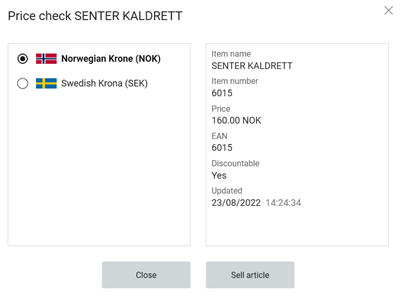
Sell in Price check
A new button Sell article has been added in the Price check popup triggered by function called 'PRICE_CHECK'. It allows to add the item without exiting the Price check view.
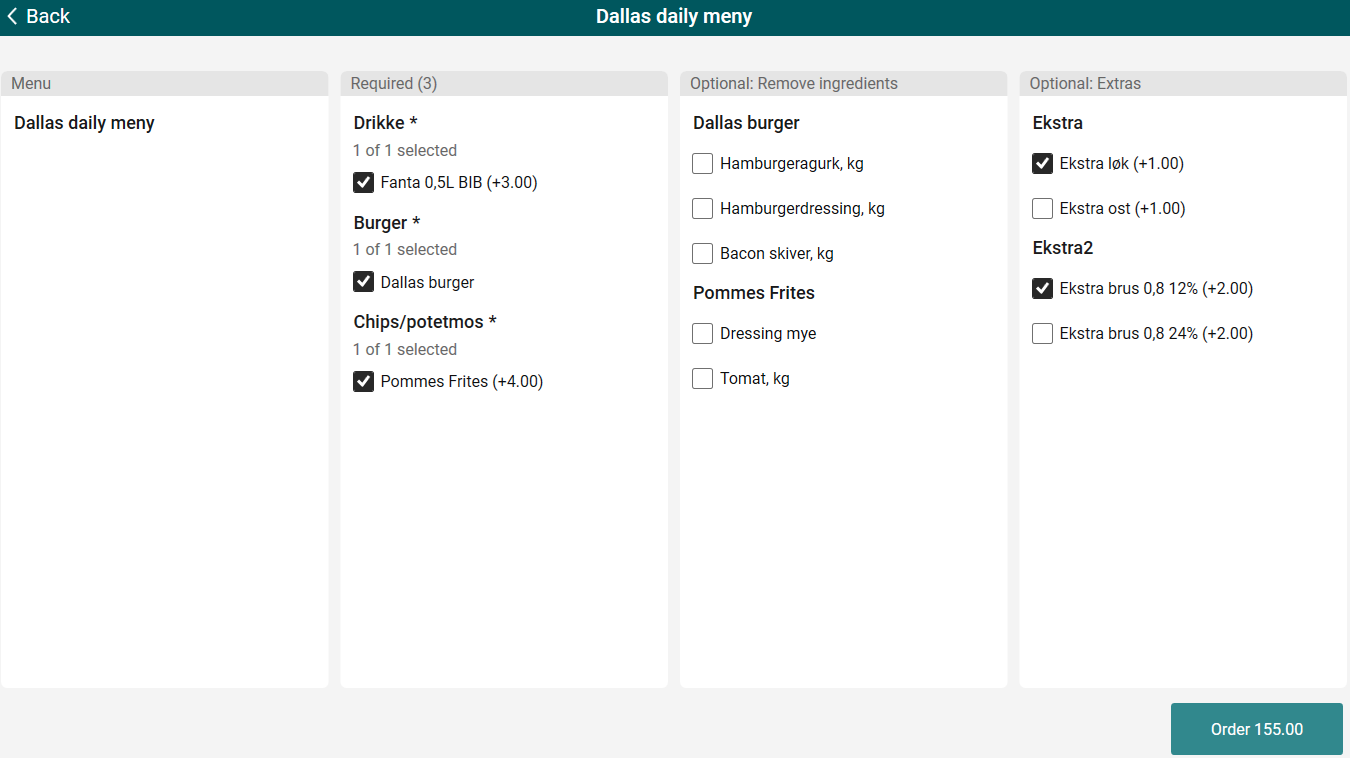
Menu selection user interface for Extras
Additional price for Extras is being displayed in Menu selection user interface in column called 'Optional: Extras'. It is also being added to the total price calculation of the menu.
Thanks to it, it's clear how the final menu price changes after Extras have been added.
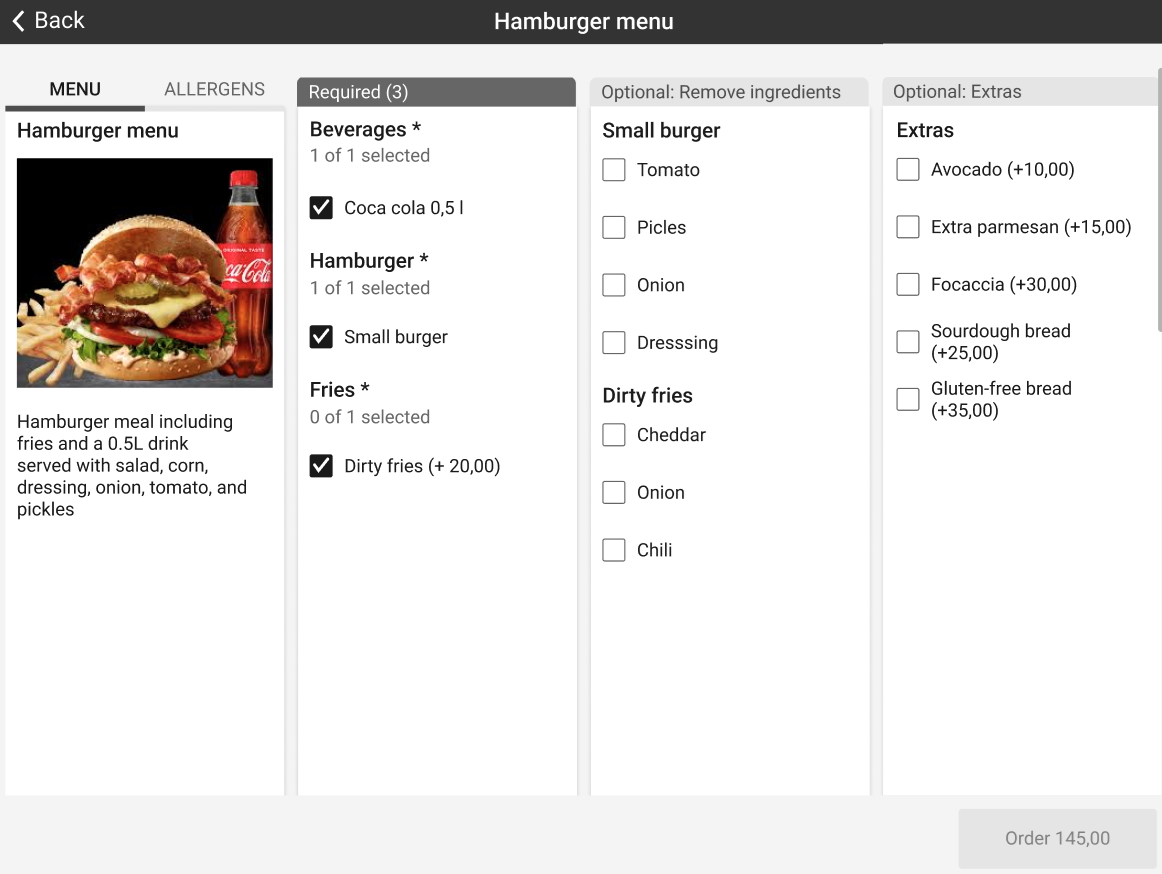
Convenience menu sales
"Remove ingredients" and "Extras" columns behavior in menu item dialog when more than 1 recipe item has non-mandatory ingredients has been changed - the names of the columns are now "Optional: Remove ingredients" and "Optional: Extras", columns are also split so that it is possible to display more than one recipe item per menu now.
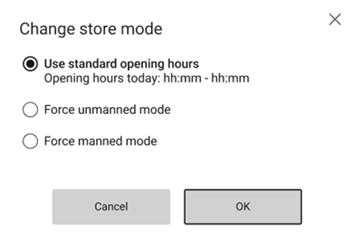
Unmanned mode control in POS
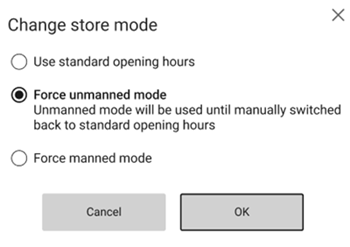
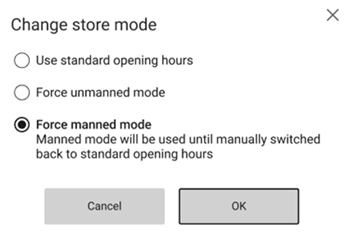
A button in the Sale view opens a dialogue for controlling Manned and Unmanned mode on the POS. The user chooses to run the POS in Manned mode, in Unmanned mode, or let the mode follow the configured opening hours. A forced mode stays active until the user changes the setting back to follow the opening hours.
POS Configuration
Relevant existing parameter:
'SnGMannedOpeningHours' - configured opening hours for each day of the week
'ButtonConfig' - New function CHANGE_STORE_MODE may be programmed on a key in Sale view (only)
Age approval when in Unmanned mode
Age approval in Unmanned mode supports two methods. Age may be approved by customer scanning the QR code with the CoopKey app, or staff approves age by scanning a cashier card on the 'DayOpenAppReminder' page. Either way, the age approval sends the customer directly to the 'Payment' page to finish the purchase.
POS Configuration
Relevant existing parameter:
'SnGUnmannedModeSettings' - Manually add new valid Key 'UseCoopayToApproveAge' - Manual value 'False' will make Coopay NOT being used for age approval while in Unmanned mode.
Gift receipt view for selected item
When entering the Gift Receipt view in Self-Service, only items belonging to the item groups configured in the '“SngGiftReceiptItemGroups” parameter will be displayed.
If the items in the cart do not match any of the item groups defined in SngGiftReceiptItemGroups, the Gift receipt page will be skipped in the page flow. If the customer explicitly taps the Gift receipt button, a dialog will appear informing them that a gift receipt cannot be generated.
If SngGiftReceiptItemGroups is left empty, the existing behavior remains unchanged: all items will be shown on the Gift receipt page.
POS Configuration
New parameter:
SngGiftReceiptItemGroups - Default value: empty.
Configures which item groups appear on the gift receipt page. If unset, all items are shown.
Different surveillance sound for items that cannot be approved externally
New sound file for items that cannot be approved externally should be called AgeControlNotExternal.wav. It should be located where the other sound files already are (path is defined in MediaBankCacheFolder parameter).
When an age-controlled item that can be approved externally is scanned, AgeControl.wav plays. If it has not been approved externally by the time the customer goes to payment, the age-control dialog appears and AssistanceNeeded.wav plays.
When an age-controlled item that cannot be approved externally is scanned, the new AgeControlNotExternal.wav plays. When the customer goes to payment, the age-control dialog is shown and AssistanceNeeded.wav plays.
Alfa numeric values for SpecialGroupCode
Support for alfa numeric values for Special Groups has been added to POS Import.
It allows for a wider range of names for it.
Import and support grocery attributes
Support for 'Quantity in pallet' field coming from Item Management has been added to POS Import.
It will allow to access these data in POS if needed.
Improvements POS
AeviXPay - handling unrelated errors after a successful transaction (RTP-43905)
EG POS ignores an unrelated error that may appear immediately after a successful AeviXPay payment. This ensures the receipt completes and allows customers in self-service to finish their purchase without interruption.
Relevant existing parameter in POS Configuration:
“PayTerminalType” = 'AeviXPay'
Bank - Header for administrative operations on pay terminal receipts (RTP-40666)
Receipts and journal entries generated from administrative actions towards the pay terminal, such as those done through BankAdminMenu, display the header “ADMINISTRATION.” This separates administrative transactions from pay terminal reports, which display the header “PAYTERMINAL REPORT.” The distinction makes it easier to identify and track the type of transaction in both printed receipts and the Receipt Journal.
Improved display and status handling for iCoupon vouchers (RTP-43172)
POS now correctly displays all coupons and vouchers linked to an iCoupon barcode.
Redeemed and expired vouchers are clearly shown with a strikethrough and cannot be selected.
Active vouchers remain selectable and can be added to the receipt.
This ensures clear visibility of voucher status and prevents accidental redemption of invalid coupons.
Single-use coupon trigger issue fixed (RTP-40323)
The issue where single-use coupons were triggered twice - once during coupon entry and again during payment - has been fixed. Coupons now apply only once per transaction, allowing payment to complete smoothly. Member and multi-use coupons continue to work as expected.
Enhanced discount calculation for weight-based item (RTP-42036)
Discount handling for weight-based items has been improved.
Now, identical discounts applied to the same item are combined into a single calculation until the maximum limit is reached.
Other discount types and regular (non-discounted) items continue to work as expected.
This ensures accurate and consistent discount calculation on receipts.
Line discount for fixed price items (RTP-43127)
Correct amount is being displayed when giving line discount in POS for fixed price items with “AllowPromotionPriceOnFixedPriceItems” parameter configured to True. Thanks to it, it's obvious what's the correct price.
Subtotal discount view improvement (RTP-43128)
Text in subtotal discount view while trying to discount a fixed price item with no basis for discount is not capped.
It allows to access the full meaning of the text.
Mixmatch type 21/22 trigger logic (RTP-42946)
Mixmatch type 21/22 activates correctly when items are part of both fixed-price and percentage discount promotions. This ensures that all valid combinations trigger as expected, even when multiple Promotion types apply to the same items.
Convenience menu sales (RTP-43330)
Improvements in user interface for Convenience menu sales have been implemented. Thanks to it when full HD resolution is used, the view to handle menu item is correct and easy to understand.
Convenience Menu Sales - editing menu items (RTP-28166)
Issues with editing and deleting menu items have been resolved. When editing an item, the view now matches what it looked like before the item was added to the receipt, and deleting items no longer produces any errors.
Automatic change of fuel mode (RTP-41647)
Automatic change of fuel modes with values "Before closing time" and "After opening time" in minutes configured in “AutomaticFuelModeChangeInMinutes” parameter has been implemented.
Improvisation when email or mobile already exists on another member (RTP-41786)
This update improves how member details work in EG POS. Earlier, when adding or editing a member, the member was added to the receipt and only a message was saved in the log file. Nothing was shown on the POS screen. The POS now shows a message if the email or mobile number is already used by another member. This helps avoid duplicate members and makes it easier for staff to update the correct details.
Problems during startup of EG POS (RTP-40405)
To make sure that errors related to database being offline are not logged during startup of POS, for the first 5min after POS started, database connection timeout is increased to 10 seconds. After 5min, it's back to 2 seconds.
Dispatch orders - delivery options (RTP-43334)
Deleted articles are being filtered out when fetching delivery options in dispatch orders now. Thanks to it items deleted from web orders are no longer incorrectly sent to DispatchService.
Age approval when in Unmanned mode (RTP-43340)
Age approval on a self-service POS can be configured to work differently in Manned and Unmanned mode.
When the POS runs in Manned mode, age approval may be done through Coopay.
When the POS runs in Unmanned mode, age approval is done through the CoopKey app by scanning its QR code.
This setup ensures that age approval works smoothly in both modes and that CoopKey handles the process as intended during Unmanned operation.
POS Configuration:
New entry in existing parameter: “SnGUnmannedModeSettings” - Manually add new valid Key 'UseCoopayToApproveAge' - Manual value 'False' will make Coopay NOT being used for age approval while in Unmanned mode.
Relevant existing parameter: “UseCoopayToApproveAge” (default 'False') - If activated, age control will be performed via Coopay.
Gift receipt printing after searching for customer order receipt (RTP-42866)
This update fixes an issue that occurred when printing a gift receipt (byttelapp) after searching for a customer order receipt in POS. Earlier, the POS showed an error and stopped the process with a divide-by-zero exception, preventing the receipt from being printed. With this update, cashiers can print gift receipts successfully after retrieving receipts from customer orders. This ensures smooth handling of exchanges and avoids delays at checkout.
Overriding price of fixed price items (RTP-43129)
Promotion price is being displayed when overriding price of fixed price items with “AllowPromotionPriceOnFixedPriceItems” parameters set to True.
Thanks to it it's obvious what's the correct price.
Receipt prints despite selecting ‘No Receipt’ or ‘Digital Receipt’ (RTP-42723)
The issue where a physical receipt prints even when choosing not to print any receipt is resolved. The system now follows the selected receipt option, ensuring that receipts are only printed when explicitly chosen.
Pant placement on receipt (RTP-43208)
The receipt layout places pant item directly below the related items. This ensures that all pant values appear consistently and clearly in the correct position, making the total calculation easier to follow for both customers and staff.
Message shown when attempting to return an item already refunded in Klarna (RTP-32179)
When returning items paid with Klarna, EG POS now shows a message if the item is already refunded in the Klarna portal. This replaces the earlier behavior where the return process failed with an error in POS. The message helps the cashier understand why the return cannot be completed and prevents incorrect refund attempts.
Customer order SMS (RTP-43238)
Customer orders created in POS no longer trigger Click and Collect type of SMS being sent out to customer. It prevents customer's confusion regarding the order.
Click and Collect type of SMS are sent only for this kind of order, not others.
SafePay Cash Changer – support for API Version 2.4.0.3 (RTP-36148)
EG POS supports SafePay API version 2.4.0.3 without configuration changes. The version introduces extended communication logging between EG POS and SafePay, stored in a separate log file. The logging supports different levels from 1 to 7 and can be adjusted when detailed communication tracking is needed by the SafePay manufacturer.
New parameters in POS Configuration:
“CashChangerLogLevel” (default '1') - Different logging levels, from 1 (low) to 7 (high). Value '0' = extended logging NOT activated.
“CashChangerLogfile” (default: c:\lpos\logs\Safepay.log) - Path and filename for extended log file. Date and computer name will be part of the actual file names.
Manual return is not added to receipt after reason code dialog is cancelled (RTP-43860)
POS stops the manual return when the reason code or action code dialog is cancelled. A message appears saying “Action Code is required”, guiding the cashier to select a valid action code before the return can be added to the receipt.
Receipt handling in Journal backup (RTP-36710)
The journal backup keeps the full receipt sequence even when the POS deletes an unfinished receipt during restart. This ensures that all receipts, including those containing only bank transaction lines, remain stored in the journal backup and that no sequence numbers disappear.
Third party Gift card payment in Self-service (RTP-43509)
Customers can pay with a third part gift card when purchasing items in Self-service (SCO). This allows easier use of gift cards directly at checkout without assistance.
Simplified log messages (RTP-43832)
Gift Card validation exceptions appear as a single warning line in the log. The log includes only the message, which gives a clearer and shorter log entry. Other exceptions continue to include full stack traces.
Multiple gift cards added in correct order (RTP-43904)
When activated gift cards are scanned in the sales window, they are added as payment tender, and the last scanned card appears on the page.
The following images shows how the gift card entries will be displayed in the sales window in manned and SCO respectively:

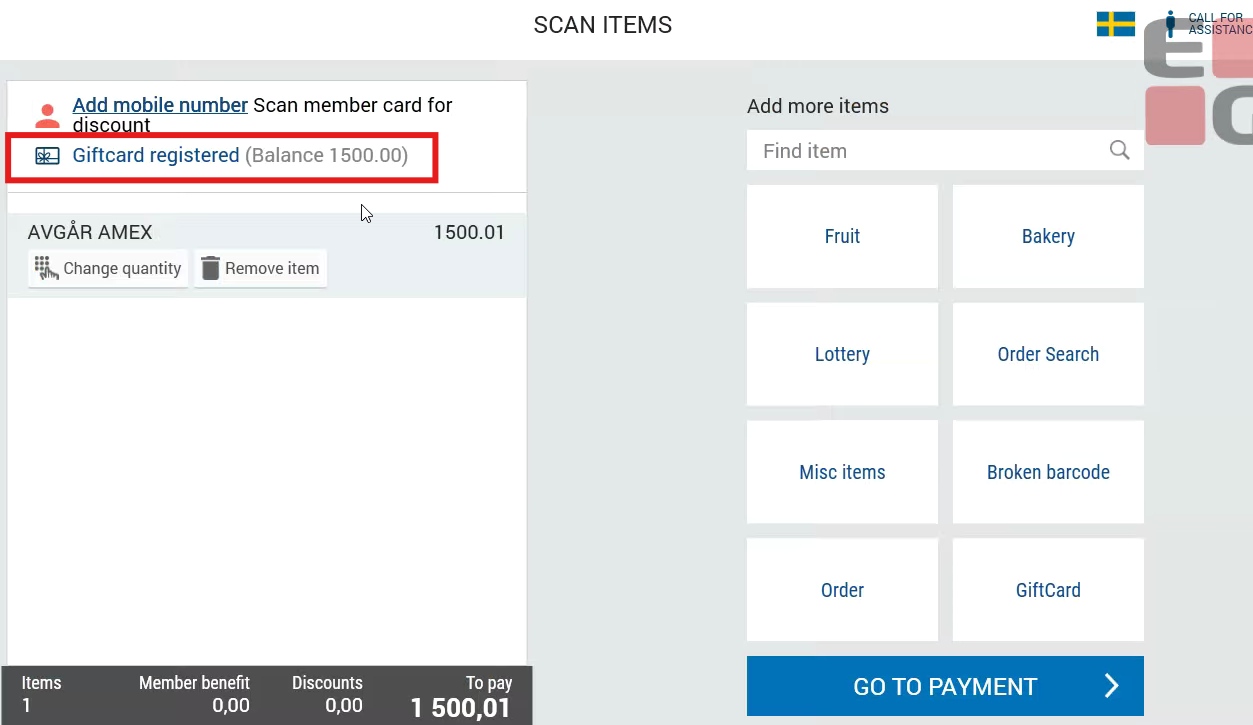
In manned POS, the cashier receives a popup for each card in the same order to enter payment amounts.
In SCO, the system deducts payment from each card one by one until the purchase is covered, and any remaining amount appears as the amount to pay.
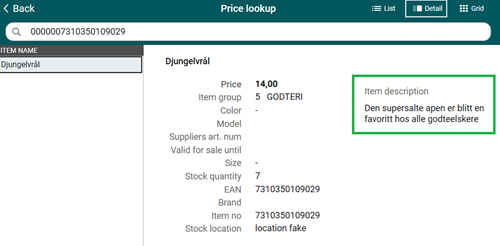
Item description in Price lookup view (RTP-43584)
When looking up a price, if an item had no image, its description would blink and shift up and down due to the view constantly refreshing.
After the improvements, the item description remains stable, making it easy to read without any distraction.
PLU List items in Self-service (RTP-43942)
The correct items are being sold from the PLU list once the popup keyboard (that appears when searching for items) is closed by clicking outside its area. This eliminates any confusion for the customer, ensuring the correct price is always shown.
Self-service - Vensafe items (RTP-43375)
The error that occurs in Self-service after a Vensafe timeout is properly handled, preventing from unhandled errors being displayed to the client.
Self-service - fix for inactivity timeout (RTP-43604)
POS no longer crashes unexpectedly in self-service due to ‘StackOverflowException’ in inactivity timer.
Improved display of long text and prices (RTP-43573)
The customer display has been improved to handle long product descriptions more clearly.
Long text is now neatly shortened with an ellipsis (…) without covering prices or other information.
Special characters are shown correctly, and the layout remains clean and easy to read on all screen types.
Translations in Convenience menu sales (RTP-28179)
Norwegian and Swedish transitions has been added in view where menu items are edited in Convenience. Supporting it allows to use this view in English, Norwegian and Swedish.
Closing “Create new member” dialog no longer registers a member (RTP-42992)
When the “Do you want to create a new member?” dialog is closed using the X button, no member is created. The dialog now closes without triggering registration or sending an SMS. This prevents unintended member creation when a cashier dismisses the dialog instead of selecting an option.
Physical keyboard does not work when using open price item in PLU list (RTP-43795)
Focus is correctly set on the price dialog in case open price item was added through PLU List in cashier view.
Thanks to it input from physical keyboard is placed in the correct field.
Also, in self-service in case any dialog is opened, for example age control, quantity, broken barcode (with PLU List in the back), input from physical keyboard is treated as input for scanner. In the dialogs input is allowed only entered by on-screen keyboard.
New PLU List improvements (RTP-43331)
Categories images are not missing when PLU Board or List are pre-selected.
It allows to present PLU List in POS as it was set on Chain Web.
Removed redundant Voyado call to improve POS responsiveness (RTP-43524)
Enhanced POS behavior by removing a redundant Voyado call when accessing member details, coupons, sales, or change member screens. This optimization ensures smoother performance and improves overall responsiveness of member-related functions.
Automatic reconnection to Bizerba scale (RTP-41148)
When EG POS loses connection to the Bizerba scale and logs the message “General scale error: Missing ACK", the system automatically reinitializes the scale. This restores the connection without requiring a restart of EG POS, ensuring continuous operation and reducing downtime.
Text alignment when sending SMS to optional number (RTP-42991)
When selecting Send SMS to optional number and pressing Shift + Enter to move to the next line, the cursor stays aligned to the left. This keeps the text format consistent and removes the need for manual realignment.
Keyboard visibility in user interface (RTP-43178)
The text box in the POS interface adjusts to show all keyboard elements, even when filled with more content. A scroll panel appears as the text box expands, preventing the keyboard from being pushed off-screen and keeping it fully visible while typing.
Customer order processing – preventing self-reference in receipt handling (RTP-43784)
The logic for linking POS logs and receipts avoids creating a reference to the same receipt. This prevents a receipt from pointing to itself when a customer order is resumed. This supports correct processing of related POS data and improves reliability in customer order handling.
Improved scanner shutdown handling (RTP-43733)
The scanner handling during POS shutdown has been improved to prevent unnecessary errors from appearing in the logs. When closing the POS from self-service mode, the scanner is now correctly checked before any enable/disable actions are performed. This ensures a smoother shutdown process and cleaner logs, without affecting how the scanner works during normal use.
ID scanning enabled in Solid insurance dialog (RTP-33330)
This update fixes the scanning field in the Solid insurance dialog. Earlier, after scanning an item with Solid insurance, the dialog opened but the ID could not be scanned, and the cashier had to enter the information manually. The issue occurred when the parameter “EnableDisablingOfScanner” was set to True, which disabled scanning in this view.
The scanner is now enabled in the “Solid insurance” dialog, and the ID fills the field in focus. This makes it easier and faster for the cashier to register Solid insurance details.
POS successfully retrieves CPU and memory usage (RTP-43662)
Handling of CPU and memory usage has been improved for situations when performance counters are not available on the system. Thanks to it the number of error messages is lower.
Include drawer money in POSLog XML when using balanceTransactionType=Shift (RTP-34834)
The DrawerMoney parameter is included in the POSLog XML for transactions with balanceTransactionType=Shift when its value is greater than 0.
It enables support for shift-based balance registrations where the same drawer amount is used at the start of each shift.
POS text display in Danish language (RTP-41621)
All texts in POS display in Danish when the language is set to “DK”. This ensures a consistent experience for users who work in Danish.
Coupon display and Promotion retrieval in POS (RTP-42800)
Coupons in test environments display with full promotion information, ensuring discounts trigger correctly in POS. The database release includes deployment of the procedure responsible for fetching promotions, preventing missing procedure errors such as 'dbo.GetAllPromotions' in Azure. This secures consistent coupon and promotion handling during testing.
POSLog rejection during Reporting (RTC-53189)
A validation issue in the POSLog processing causes some transactions to be rejected when generating reports. The error message “Executing stored procedure sp_FactRetailTransactionArticleTV failed” appears when string values are combined incorrectly during scanning. The validation logic is adjusted to ensure correct handling of these values so that all valid transactions process successfully in Reporting.
Improved handling of deserialization errors for receipts (RTP-43774)
Receipts with deserialization issues move to an Error state and are handled automatically by the clean-up job. The system sends the POSLog even when parts of the data are corrupted, so the receipt is still stored in the journal. This ensures transaction history is kept available, even if the receipt cannot be fully searched.
Improvements POS Server
Correct NetCost in POSLog when campaign is not applied (RTP-42526)
When an article is part of an active campaign, but the campaign price is higher than the normal price, the NetCost in the POSLog uses the normal price instead of the campaign price. This ensures that the POSLog reflects the correct cost when a campaign exists but is not applied in the receipt.
Cashier rights set in Chain Classic does not apply in POS (RTP-42616)
Support for cashier rights from Chain Classic has been improved when importing them to POS.
Thanks to it wanted roles apply as they should.