Released 29 June 2026
Stock report auto-send on stocktaking completion (RTC-59101)
The stock report Excel file can be automatically sent through email to certain recipients on stocktaking completion (for specific service configuration).
The "Store languages" system parameter is added. It defines the language, in which the stock report emails are sent, for each specified store. It follows a comma-separated "<storeNumber>:<languageCode>" format (e.g. "100:NO,222:EN").
Supported languages include: Norwegian (NO), Swedish (SV), Finnish (FI), Danish (DA), English (EN).
If language is not directly specified, the email will be sent in system-default language (or English if not supported or available).
Released 8 June 2026
Display localized item group hierarchy texts (RTC-57896)
Item group hierarchy texts are properly localized in the following Inventory grids - Stock status, Transactions, Count list lines, and Stocktaking results.
Item group hierarchy texts (department, area, item group, item subgroup) are displayed in user's preferred content language.
If the localized text for user's preferred content language is not available, the default group hierarchy text is displayed.
[Transactions grid] If the localized text for user's preferred content language is not available, the localized text for default system language is displayed. If none of the localized texts are available, the default group hierarchy text is displayed.
Import item group hierarchy localized texts (RTC-57895)
The localized names of item group hierarchy are imported to Inventory service.
Released 18 May 2026
Process menu/ingredients breakage POSLogs (RTC-51583)
Breakage and stock adjustment POSLogs now support recipe-level ingredient processing when the “ProcessRecipeIngredients” configuration flag is set to True. When a recipe is reported, the system automatically calculates and updates stock for each individual ingredient based on the recipe definition.
Key behaviors:
Stock quantities are calculated per ingredient using the formula: item quantity x ingredient quantity x weight factor.
Voided ingredients in the recipe are excluded from processing.
If an ingredient GTIN is not found in the database, the entire transaction is rejected with an error status and queued for automatic retry.
When GrossWeight is 0, a fallback multiplier of 1 is used.
Temporary storage - Put away and put back transaction import (RTC-55309)
The put away transaction import described by the "Inventory.Storage.PutAway.Import" contract is added. It allows adding/updating item lines in an active temporary storage identified by the external reference and store, therefore creating new put away transactions. If the storage does not exist or is already unpacked, a new storage will be created with proper data from the event.
The put back transaction import described by the "Inventory.Storage.PutBack.Import" contract is added. It allows unpacking item lines from an active temporary storage identified by the external reference and store, therefore creating new put back transactions. If no item lines remain after unpacking, the storage will be marked as "Unpacked".
API endpoint for temporary storage stock count by item and store (RTC-57081)
New endpoint GET /api/Storages/categories/lines that returns storage lines filtered by one or more storage categories, with optional store and item filters:
Query multiple categories in a single call (?categoryId=1&categoryId=5)
Filter by store (storeNo or GLN) and item (SKU, GTIN, or external item number)
Response includes StoreNo and CategoryName per line
OData paging supported (default page size 500, max 1000)
All storage categories supported
Only active storages are returned
Export modified date in API/Storages (RTC-57357)
The get all storages and get storage by id endpoints includes the modified date for each storage location.
Items and Stores should no longer be created as placeholders (RTC-55945)
The InventoryService handles transactions that reference items or stores not yet present in the system by placing them on hold. Once the missing item or store data is exported and available, held transactions are automatically retried and processed.
This prevents the creation of incomplete placeholder records and ensures inventory data stays consistent across all stores.
Refactor the process of merging stores (RTC-49628)
ExternalStoreNo is no longer considered unique in Inventory, so it is not used as when resolving store.
Multi clear-out - transport item clear-out (RTC-57337)
The stock of empty transport items (pallets and crates) included in multi clear-out API is properly cleared out. This creates a put away, put back and stock adjustment transaction in one step, effectively decreasing in stock quantity for those items.
Multi clear-out - minor improvements (RTC-57337)
Validation for multi clear-out API is improved.
InventoryService - Transport item clear out API (RTC-57105)
The TransportItemClearOut API method can be used to used dispatch a specified amount of transport items (empty pallets and crates) from a store. Dispatching transport items creates put away, put back and stock adjustment transactions, which only decrease the "In stock" quantity for those items. The created transactions are linked to a new unpacked storage of "Returns" category.
Inventory service - Item transactions grid improvements (RTC-54471)
The performance of item transactions grid is significantly improved.
Filtering by transaction type is improved.
The item texts are displayed in user's content language. If the text is not available in user's content language, the localized text for system's default language is displayed. If the text is not available in system's default language, the original item name is displayed.
The reason/action codes are displayed in user's content language. If the text for user's content language is not available or empty, the localized text for system's default language is displayed. If the text for system's default language is not available or empty, the fallback English name is displayed.
ReservationMerger SQL timeout at SearchReservations operation (RTC-55918)
Database operations in the reservation synchronization process use extended query timeouts, ensuring reliable batch processing under heavy load.
Released 25 February 2026
Temporary storage in stocktaking improvements (RTC-54653)
Only temporary storages of category "Seasonal storage" or "Display items" can be added to stocktaking’s - storages of other types are excluded.
"Seasonal storage" count lists are renamed to "Temporary storage".
"Seasonal" count list source is renamed to "Temporary storage".
Temporary storage label without Items (RTC-55766)
The print functionality for temporary storages has been improved with separate actions:
Print Label now prints only the storage header without the item list, providing a compact label for physical storage identification.
Print Item List is a new button that prints the full storage header together with the complete item list, preserving the previous "Print Label" behavior.
Both options are available from the storage detail toolbar and the list view action menu.
Goods Receipt import improvements (RTC-54143)
The Goods Receipt import process validates all incoming transaction data before processing. Invalid data is rejected with clear error messages, preventing corrupt or incomplete records from entering the system.
The Goods Receipt import resolves items using External Item Number in addition to SKU and GTIN. Items identified by their external number are correctly matched during receipt processing.
Make Location field obsolete in Inventory.StockStatus.Import event (RTC-46609)
The Location field is no longer updated when processing Inventory.StockStatus.Import events. The Location field on the import contract is now deprecated.
Service order - Reason codes in user content language (RTC-53315)
The reason codes in service orders are displayed in user's preferred content language. If the reason code text for set language is missing or empty, the English text is displayed.
Service & Action codes relation (RTC-56788)
Action codes now support an optional Service Codes field that links an action code to one or more complaint service types. The available service codes are:
New item, credit or refund
Repair item
No warranty
The Service Codes field appears as a multiselect when creating or editing an Action code with the Complaint transaction type. It is optional and can be left empty. The field is not available on Reason codes or other transaction types. The Reason Code export (Inventory.ReasonCode.Export) has been extended to include assigned Service Codes as a list in the export payload.
Fix: Goods receipt import improvements (RTC-56593)
Goods receipt transactions imported near "data merging" step are correctly processed by Inventory service.
Inventory management in Finnish and Danish (RTC-55327)
The Inventory management and Excel exports are fully translated to Finnish and Danish.
InventoryService - Reason code API improvements (RTC-53315)
The optional "code" field is added to ReasonCode API request. It can be used to filter reason code texts by given code.
The "code" response field type is changed from STRING to INT.
If "language" request field is set and the reason code text is empty or missing, the English text is returned.
Enable Swagger authentication via obtained token (RTC-38635)
Swagger user interface now supports authentication via bearer token, enabling consultants and developers to test API endpoints directly.
Reservations cleanup (RTC-55319)
Extended the data cleanup job to manage reservation data retention. Fully cancelled reservations and processed change logs are now automatically purged after a configurable number of days, reducing database growth and improving query performance.
Released 28 January 2026
Temporary storage grid improvements (RTC-51202)
The "View seasonal storages" store permission is renamed to "View temporary storages".
The "Seasonal storage" views are renamed to "Temporary storage" both in the module and navigation menu.
The "Category", "Modified by" and "Modified date" columns are added to the "Temporary storage" grid. The category describes the type of storage set during creation.'
Minor localization improvements.
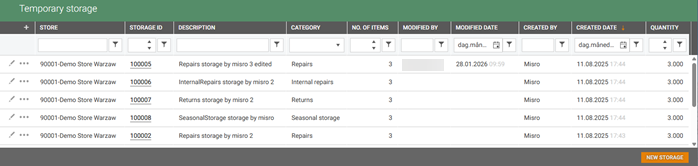
Create and edit temporary storage (RTC-51203)
The "Manage temporary storages" store permission is added. It allows creating and editing storages in Inventory management.
The New storage button is added to the "Temporary storages" view. It can be used to create a new temporary storage for specific store and category.
The "Edit storage" button is added to the "Temporary storages" grid. It can be used to modify the descriptions of temporary storages.
Sales code in temporary storage (RTC-51275)
The "Sales code" column is added to Temporary storage items grid. It presents the sales code of a contained item.
The "Sales code" column is added to the temporary storage PDF label - the column is displayed only if any of the items, contained in the storage, has a sales code.
Temporary storage label improvements (RTC-51204)
The label header now displays the storage number and category.
The "User" and "Date packed" fields are renamed to respectively "Created by" and "Created date".
The "EAN" column is renamed to "GTIN".
Rework handling of unknown items (RTC-52974)
The mechanism of handling unknown items from imported data in Inventory service is reworked.
If imported data contains SKU identifier for unknown item, a placeholder is created as before and the data is processed correctly, In other cases (only GTIN / Item number), the imported event is put-on-hold and will not be processed until required item data is provided by ItemService.
Pending imported data with unknown items is kept for 180 days, by default, before permanent deletion.
Localized item text, shelf location, and reason codes based on user preferred language (RTC-50200)
Item text, shelf locations, and reason codes now display in the language set in the user’s Preferred Content Language.
If no localized version exists for a given language, the default text is displayed.
Applies to all views in the Inventory module (except item search).
Display item text in user preferred language in the item search (RTC-54743)
Item text in item search modal is localized based on 'Preferred content language' set in 'User Management'
Reason codes in Inventory item transaction export (RTC-55098)
Reason and action code data is included in Inventory item transaction export for ARTS XML.
The reason and action code names are no longer included as structured notes for item transaction lines.
Import of localized item texts (RTC-50198)
Item text localizations are imported to Inventory service from Item service.
Item transaction processing improvements (RTC-54670)
Item reservations are handled independently from other item transactions.
The number of transaction batches processed in a single job execution is limited to 5000 by default.
Storage API improvements (RTC-53733)
The "Owner" and "Source" fields were added to all implemented Unpack/ClearOut Storage API method requests.
The values provided in the "Owner" and "Source" fields are now saved in the transactions created during unpacking/clearingout.
Process menu/ingredients sale POSLogs (RTC-51582)
The Inventory Service now processes POSLogs containing sales of ingredient items from menu/recipe transactions, enabling accurate stock tracking for ingredients consumed as part of prepared menu items.
Stock deductions are calculated using the formula: Quantity of recipe item × Quantity of ingredient × Gross weight
Voided ingredients (identified by VoidFlag) are automatically excluded from inventory deductions, ensuring only actual consumption affects stock levels.
This feature can be enabled or disabled via the POSLogProcessor's configuration settings. When disabled, ingredient items are skipped during processing, and no stock deductions occur for menu/recipe ingredient items.
POSogProcessor job improvements (RTC-54346)
The publish method in POSLog processing has been refactored to group events by blob type before publishing. This optimization significantly reduces the number of events sent to the service bus, leading to improved scalability and lower message traffic—each event now bundles transactions of the same type.
Improve Swagger docs for import/export of item transactions (RTC-54058)
Enhanced the Swagger documentation for Item transaction Import and Export endpoints, providing clearer descriptions.
Fix breadcrumbs (RTC-55337)
Breadcrumb navigation in Stock Movements and Count List views now displays correctly after refreshing the page.
Released 19 November 2025
Fill the owner of stocktaking waste transactions (RTC-53732)
The "Owner" field on stocktaking waste transactions is filled with the username of user that finished the stocktaking.
Extend support decimals in Inventory module (RTC-50622)
Quantity values in Inventory module have been extended to 3 decimal places.
Extend ItemPrice import to include ValidTo on store prices and support resolve using ValidTo (RTC-51308)
Changes to resolving prices in Inventory Module - ValidTo date exported by Item Service is now include in resolve price logic (it was not exported to Inventory until now)
Handle reservation POSLogs arriving in wrong order (RTC-53441)
Handle late POSLog reservations to ensure all order POSLogs are processed in chronological order, improving inventory accuracy and system reliability during out-of-order and late reservation scenarios.
Extend GetStorages endpoint to include CreatedDate (RTC-53761)
The GetStorages and GetStorageByStorageId methods have been extended to include the CreatedDate of each storage in their responses.
Flat batch cleanup improvements (RTC-53787)
The InventoryDataCleanup job removes old flat batches with status "In progress" - failed flat batches are only removed by StagingCleanup job.
Handle duplicate items/stores in StockBalance method with set ResolveMode (RTC-53306)
InventoryService API Update:
The StockBalance API endpoint now handles duplicated identifiers gracefully, ensuring that API calls do not fail when duplicates are present.
The Swagger documentation has been updated; the endpoint description now includes more precise conditions for the "resolve" mode.
Released 20 October 2025
Inventory - Export transactions to BatchToPosApi - improvements after full flow tests (RTC-53157)
Enhancements to the export of item transactions from Inventory Management to POS API include:
The item identifier is consistently set to the MainGTIN.
Each transaction's quantity is exported with the correct direction and value.
The owner or creator of the transaction is now exported in the operator field.
Inventory - Export item transactions to BatchToPosApi improvements (RTC-52478)
The export functionality for item transactions in BatchToPosApi has been enhanced:
Return to Supplier (Complaint): These transactions are now exported as ReturnDefectItem transactions.
Stocktaking Waste: These transactions are now exported as InventoryStockAdjustment transactions.
These changes ensure more accurate mapping and processing of transaction types when exporting to BatchToPosApi.
Released 27 August 2025
Export inventory item transactions to POS (RTC-48476)
Inventory item transactions, which were not created by POS (indicated by the source system), are automatically exported to BatchToPosApi.
The following transaction types are exported:
Breakage,
Internal use,
Internal transfer,
Stock adjustment,
Put away storage - as PutAwayItems transaction with positive items quantity,
Put back storage - as PutAwayItems transaction with negative items quantity,
Transaction types not supported yet
Return to supplier (complaint) - will be exported as ReturnDefectItem transaction,
Stocktaking waste - will be exported as InventoryStockAdjustment transaction.
Get storage by ID API improvements (RTC-51817)
The "Get storage by ID" API method returns correct response and status code if the storage does not exist.
The response schema for "Get storage by ID" API method in Swagger displays correct information.
Inventory module (RTC-52509)
The field “LastReplenishedDateUtc” has been added to the full stock export triggered from Inventory Management.
Released 6 August 2025
Storage - Multi clear-out (RTC-50804)
The multi clear-out request has been implemented in Inventory Service:

The multi clear-out logic enables efficient unpacking and stock management across multiple storages:
You can unpack selected items or all items from several storages in a single operation.
During this process, the system automatically clears the associated stock for each item.
For every clear-out action, two transactions are created simultaneously: a put-back transaction and a stock adjustment transaction.
The requested quantity is deducted from both the put-away and in-stock records, ensuring accurate inventory tracking.
If crates and/or pallets are specified in the request, they are included exclusively in the put-back transaction.
"Empty pallet SKU" and "Empty crate SKU" parameters are not set by default. They can be set up in "System parameters" view in Inventory module.
If "emptyCratesQuantity" or "emptyPalletsQuantity" fields are going to be used in multi clear-out request, then these parameters must be set with the corresponding SKU of the existing non-stock item.
Released 28 July 2025
Reason and action code names in user interface (RTC-50793)
Reason/Action code name columns have been added to transactions and stock movements grids (including export to Excel).
Save and Export LastReplenishedDateUtc (RTC-48992)
The LastReplenishedDateUtc field records the date and time when stock received last goods receipt transaction in the Inventory module.
When exporting stock data, the Inventory.StockStatus.Export files include the LastReplenishedDateUtc value for any stock items that have this field populated.
InventoryService - Get reason codes API (RTC-50525)
The "Get reason codes" API method can be used to retrieve information about active reason codes in Inventory service. The reason codes can be filtered by language, reason code type and item transaction type.
Released 30 June 2025
Shelf based count groups (RTC-49680)
The Cyclic stocktaking type can be based on shelf locations. Key functionalities:
It can be created for all shelf areas or for a selected shelf area;
the range of shelf locations can be defined for the selected shelf area;
the user can limit the number of count groups to be included in the stocktaking- by default this is limited to 100 count groups;
items counted after the option ‘Exclude items counted after’ has been selected can be excluded from such a stocktaking;
each count group contains items from one shelf location;
an item will only be included in one count group - the group with the shelf location that is the main shelf location for that item;
the names of the count groups are equal to: ‘<shelf area> <shelf number>, <shelf type>’ - shelf area and shelf type are localized to a language that is based on the default country from the system parameter ‘Specify countries available in the system (e.g. available in the reason code register)’.
Inventory Service - Storage categories (RTC-46132)
Inventory service has been extended with two requests:
Create new storage in a given store (only empty header).

Add lines to active storage - creates put away transaction for each item line contained in the request.

This method is limited to 100 lines in a single request.
Inventory Service - Storages (RTC-49918)
Inventory service has been extended with one request:
Get storage by id

API for unpacking storage with clear-out (RTC-43203)
Storage unpack with clear-out:
to fully unpack all lines from a single storage - the stock of an item is then reduced by the same amount in the storage's store.

to partially unpack lines from a single storage. User can enter quantity for each item line, which will be unpacked from the storage. The unpacked quantity is then reduced from the stock of items in the storage's store.

Put back transactions are created for unpacked storage lines, and corresponding stocks are also updated accordingly.
Fully unpacked lines are automatically removed from the system.
API improvements:
Quantity inputted in lines unpack/clearOut requests is first checked in the service - if an incorrect quantity appears in the request, the request will fail with error code 422 with the corresponding error message.
Temporary storage - Storage unpack API (RTC-46129)
The "Storage/Unpack" API method can be used to fully unpack all lines from a single storage.
The "Storage/UnpackLines" API can be used to partially unpack lines from a single storage. User can enter quantity for each item line, which will be unpacked from the storage.
Put back transactions are created for unpacked storage lines, and corresponding stocks are also updated accordingly.
Fully unpacked lines are automatically removed from the system. The "Items count" and "Quantity" aggregates on storage are automatically updated with each unpack action.
Seasonal storage API improvements
The "SeasonalStorage/Unpack" method can only be used to fully unpack lines from storages of category "SeasonalStorage".
The "SeasonalStorage/GetWithLines" method only returns data for storages of category "SeasonalStorage".
Released 27th of May 2025
Move Seasonal storage info to line level (RTC-49321)
The StorageID and StorageCategory columns have been moved from item transaction level to item transaction line level.
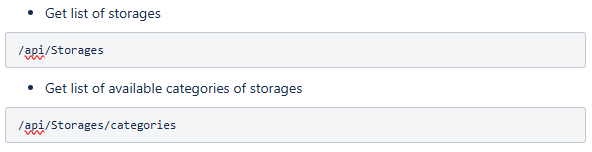
Inventory Service - Storage categories (RTC-49456)
Inventory service has been extended with two requests:
Released 12th of May 2025
Inventory module (RTC-48095)
Two new parameters have been added to the configuration of the PosLogProcessor job:
Inventory cash register number
This parameter specifies the cash register number to be used when generating POSLogs for item transactions created within the Inventory Module.The POSLogs created in cash register "Inventory cash register number" are skipped in the POSLog processing.
If POSLogs are not generated for Inventory module's item transactions, this parameter should be left empty.
Default value: ""
Local store number
This is a boolean parameter that determines which store identifier is used for item transactions.When set to True, the local store number is used.
When set to False, the retail store number is used.
Default value: False
Additionally for each item transaction created through POSLog processing the SourceSystem value is set to "POSLog";
Seasonal storage print improvements (RTC-49239)
Item lists in seasonal storage prints are correctly displayed on different browser page zooms.
Seasonal storage categories (RTC-48385)
The category attribute is added to seasonal storages. It can have one of five values: "SeasonalStorage", "Repairs", "InternalRepairs", "Returns" or "DisplayItems". The default value for existing storages is "SeasonalStorage".
The optional "storageCategory" field is added to the "Inventory.SeasonalStorageImport" contract. The default value for the field is "SeasonalStorage".
The "storageCategory" field is added to the "Inventory.ItemTransaction.Export" contract. It is filled with category of affected seasonal storage for put away and put back transactions.
Note: This is an initial version of the seasonal storage category data model, and is subject to change.
Released 2nd of April 2025
Serial number - changes in handling different events (RTC-48514)
Return transactions set serial number's sale data such as receipt number (POSLog), order number, sale date to blank.
For customer orders (reservations) the serial number's sale data is filled when the item is delivered.
Delete old events that are stuck or failed (RTC-48049)
InventoryDataCleanup job has been extended with "Days till events creation" parameter and it deletes events from "Flatbatch" and "FlatbatchJson" tables older than configured value.
Released 27th of March 2025
Serial number - History tab improvements (RTC-46382)
4 audit columns added to the serial number grid: CreatedDate, CreatedBy, ModifiedDate, ModifiedBy.
GoodsReceiptDate added to overview tab.
TransactionType picker in transactions/history tab extended with return goods transaction (sale with positive value).
Translations added.
Extract serial numbers for Reservations (RTC-47156)
Serial numbers are extracted for reservations. Each transaction created from reservations, like sale or return, contains proper serial number of an item (if sold item had any serial number).
When serial number is sold in customer order then proper order number is assigned to the serial number in Inventory module.
All details about serial numbers can found here Serial numbers documentation.
Stock movements (RTC-47082)
When reservations are made, the In stock quantity is displayed correctly in stock movements view.
InventoryService improvements
Seasonal storage cleanup performance (RTC-46841)
The performance of removing old seasonal storages from the system is improved.
Item search modal improvements (RTC-47286)
Localization for "Assortment code" column is added.
Changing input text during item search results in correct grid data.
Released 26th of February 2025
Serial number import ((RTC-44546)
Serial numbers are imported from goods receipt transactions.
Serial number - extended POSLog extractor (RTC-43593)
Serial numbers are extracted from POSLogs with TransactionType="Normal" to the Inventory.SerialNumber.Import event.
If "Serial number" was not registered yet in Inventory, then the new entry is created with data from Inventory.SerialNumber.Import event.
If "Serial number" was already registered in Inventory, then:
SoldDate and InStock = 0 are properly set for Sale transaction;
InStock = 1 is properly set for Return transaction.
The audit fields have been added to the "Serial numbers" grid.
Serial number is properly saved for each Sale/Return transaction on item transaction level - this is not supported for Reservations.
Stock movements - Expand the list if more than 5 shelf locations (RTC-45859)
When item is assigned to more than 5 shelf locations then user is able to expand the list in stock movements view by clicking "View all shelf locations".
Fix: Shelf locations (RTC-47429)
The correct shelf locations are available in the stocktaking results and in the export files. Only one main shelf location from proper store can be displayed for each item in the results view.
Shelf locations cleanup (RTC-44517)
Discarded shelf location data is automatically removed from the system.
InventoryService - Count group API improvements (RTC-46736)
The "stocktakingId" field, containing the ID of stocktaking to which a count group was assigned, is added to the response of GetCountGroups and PatchCountGroupStatus API.
Released 23 th of January 2025
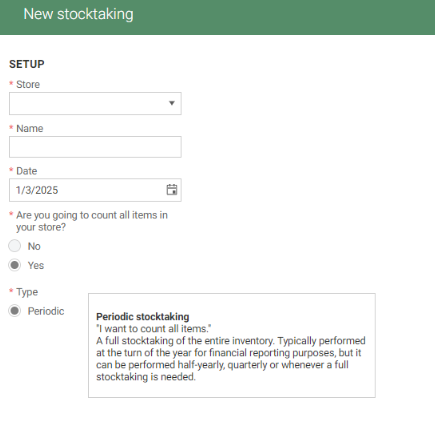
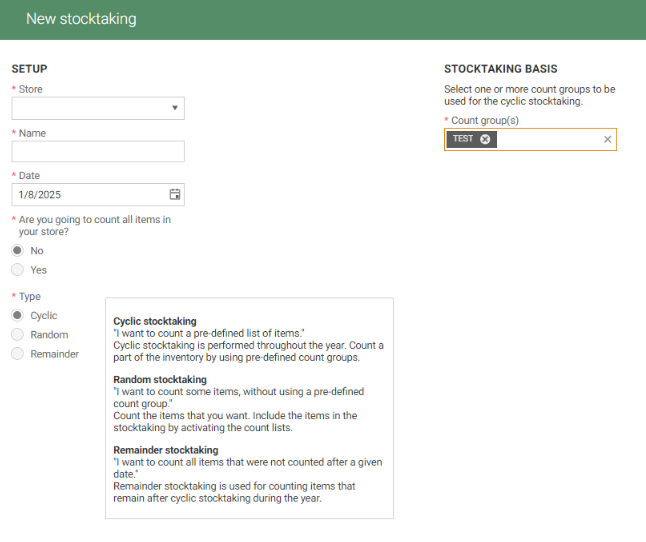
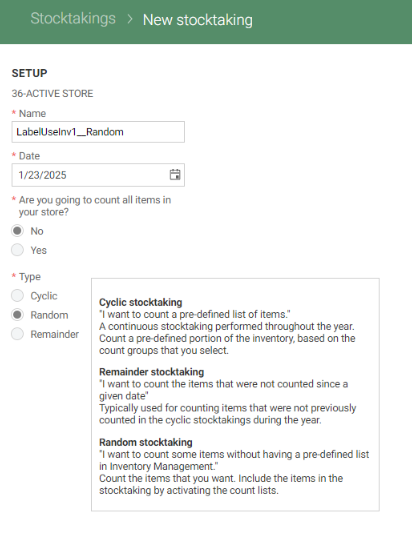
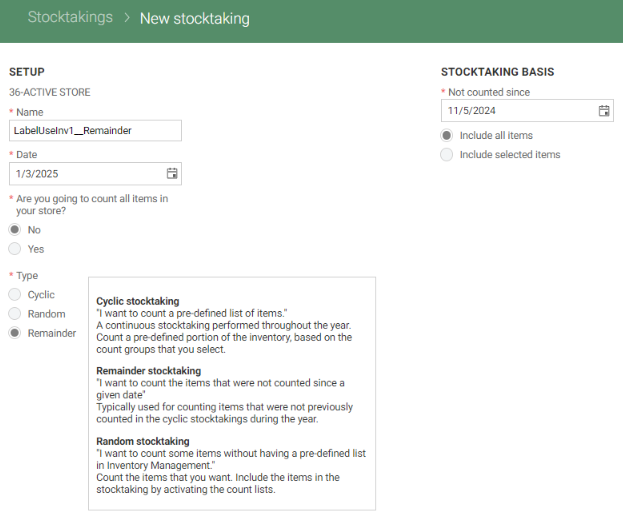
Stocktaking creation - help texts
When creating a new stocktaking, help texts will guide the user to select the correct stocktaking type.
The stocktaking types available for selecting is based on the answer to "Are you going to count all items in the store?"
When selecting "Yes", only the Periodic stocktaking is available.
When selecting "No", Cyclic, Random and Remainder are available.
Reason code Complaint with Return to stock option (RTC-43036)
Complaint reason codes (not action codes) have "Return to stock" as an option. When this option is checked on the reason code in Inventory, returns made from POS with this reason code will return the item to stock. A complaint transaction with positive quantity will be visible in Transactions for the item.
Complaint reason codes with "Return to stock" option cannot be selected in the Inventory Management during complaint transactions creation. It can be used only in POS.
Reason codes with this option should have a very clear name, so the cashier can select the correct Reason code without confusion.
Shelf locations in Stocktaking (RTC-44512)
A column for shelf locations can be enabled in the Stocktaking result view. By default it is hidden. This column displays the main shelf location, from Item management, for the item in the given store.
It is displayed in this format: Shelf location = Shelf type + shelf number + shelf area. For example: Pallet 115, Electronics.
If the shelf location column is hidden from the grid, the column is not included in the stock and waste reports.
Shelf locations in Stock status (RTC-43076)
Shelf locations of an item is presented in the Stock status - Stock movements page. It shows the top 5 shelf locations for the item.
It is displayed in this format: Shelf location = Shelf type + shelf number + shelf area. For example: Pallet 115, Electronics
Serial Number (RTC-43595)
Serial number grid has been created. It displays details of serial number, item and related store. The view is read-only.
Import of last counted date (RTC-45469)
The last counted date can be imported with the Inventory.StockStatus.Import file.
The last counted date will be saved for the item when the stock import is new, or when the item does not have any existing last counted date.
It will not be updated/overwritten if a last counted date already exists.
Seasonal storage unpack in the background (RTC-42001)
The "unpacked" field is removed from the seasonal storage API response. The "status" field is added to the seasonal storage API response - it indicates the current state of unpacking process and can take the following values:
Active - default status; storage hasn't been unpacked and can be added to stocktakings;
UnpackInProgress - unpacking of items has been scheduled and is not yet finished;
Unpacked - storage has been unpacked.
The seasonal storage unpack API schedules the process of storage unpacking to the background and sets its status to "UnpackInProgress". After the unpacking is finished, the seasonal storage status is set to "Unpacked".
Seasonal storages, which were unpacked more than 90 days (by default) from the current date, are automatically removed from the system.
Transaction identifier in export (RTC-45846)
A "transactionId" field, containing a unique identifier of each item transaction, is added to the Inventory.ItemTransaction.Export contract.