Release 18.12.19
Module | Description |
|---|---|
Export | Expired prices are exported for 72 hours Expired prices are exported for 3 days after expiration. This should be enough for subscribing systems if error situations should occur at 3rd party side. |
Import | Planning attributes are copied from newest planning code When new items are added to a variant (model-color) which has a planning code, it will copy planning attributes from the newest planning code. The same business logic is used both when adding items manually or importing. |
Item details | Fix when saving item subgroup Item subgroup can be saved and modified without problems. Package code shows TU/CU in model-color grid Information message when deactivating item that is linked to another item
Then you are not allowed to deactivate this item and a message is shown in deactivation popup. |
Item search | Start search in grid by pressing Enter or clicking on filter icon When filtering/searching in grid columns the search will be performed after leaving field/pressing Enter key or clicking on filter/search icon. |
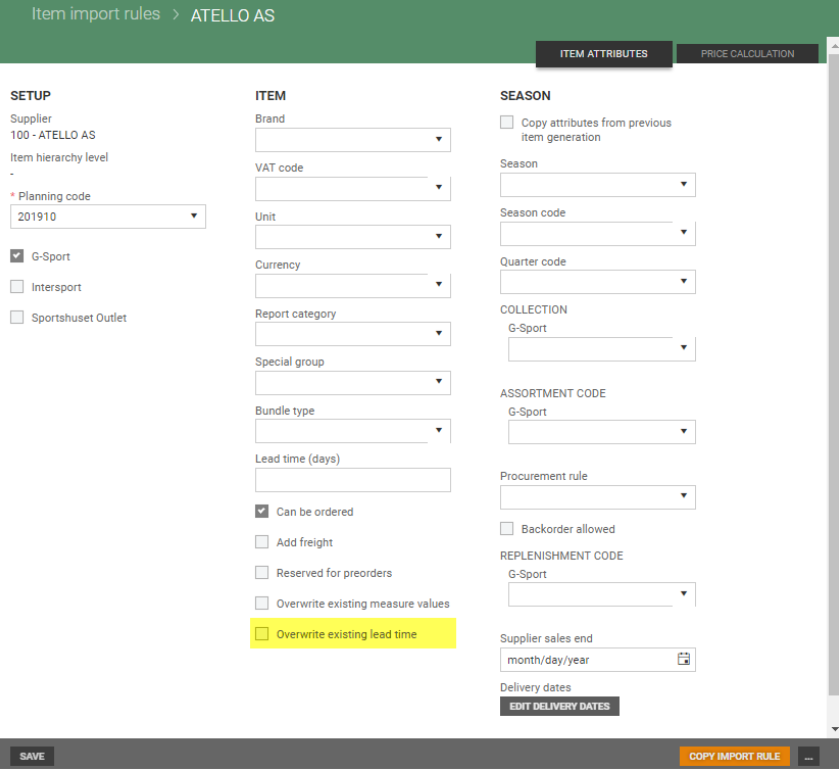
Import rule with checkbox for ‘Overwrite existing lead time’
Checkbox 'Overwrite existing lead time' is available in Import rule details. If it is checked, value in 'Lead time' field in item register is overwritten by value in import rule or import file (if Import rule is empty) if such is given when updating item using approval import. If it is unchecked, value in item register is never overwritten.
Release 16.12.19
Module | Description |
|---|---|
Item details | Improved performance when opening item Opening item/model from item grid is much faster, especially when scrolling down before opening a selected item. Manage item generations Improved performance when searching in drop-down fields Validation of external item number When models have duplicated items due to migration of data (same size & color), it is possible to update them, change size etc. Adding new items is still impossible, and will create error situations in import of PRICAT that must be handled by support. |
Import | Import of item relations Import of item relations is re-implemented to optimize further maintenance of the code. All of add/edit/remove related items works the same way. It is possible to remove related items reference with empty list, and the same for bundle content. For Excel import user needs to add parent item with empty value for content or add NULL value. It is not possible to add a related item which are in the same model, nor duplicates within same type or the same item. It is possible to add the same item for different relation types. 'Update items from file' in Import Error handling for items without GTIN |
Released 11.12.19
Module | Description |
|---|---|
Export to Excel | Inactive status and inactive date |
Item search | Improved performance when filtering on item number |
Import | Improved error handling |
System | Date in UTC-format |
Released 09.12.19
Module | Description |
|---|---|
Import | PRICAT import: Fix item identifier when new items and update for same supplier model number When importing new items and in the same import there are updates for existing items as well as same supplier model number and this files get 'item identifier' error, then from now all items get error. Until all 'item identifier' errors are fixed, it is not possible to import new items. They get error: Item identifier error. Supplier deviation for other variant. Temalogic - compare price values in import. Compare price values for Temalogic import |
Released 05.12.19
Module | Description |
|---|---|
Item details | Saving models with many items We have fixed performance issues related to item plannings and supplier details, and verified that models with 500 items can be modified and saved without problems. |
Item search | Scrolling in item grid Scrolling in item grid is improved to handle filtering with locked columns. |
System | New design for Item Management The Lindbak logo is replaced by the EG logo. Design is modified to use EG green color in the top bar. |
Released 04.12.19
Decimals in currency rate
Currency rates are exported with 4 decimals (not rounded to 2 decimals).
Released 03.12.19
Module | Description |
|---|---|
Item search | Cost carrier column in item grid Cost carrier columns added to item grid, directly after brand column and by default hidden. Filter on this column with default sorting can be done with good performance. |
Item details | The first supplier on item is automatically set as main supplier When adding supplier for the first time, it will be common and added as main supplier. When user goes back from 'item suppliers' (3rd level) grid, we have removed loading of item again, so it moves much quicker back to item details grid. |
Released 29.11.19
Module | Description |
|---|---|
Import | Validation for currency in imports Currency is validated in item imports preventing imports of currencies that are not existing in currency register. If a user imports an item that has a currency that does not exist, the validation will fail with the message "Unknown currency". Import: All sizes are updated with new color even if they are not in the import file When updating color in import, but not for all items, there will be displayed a warning 'Color for variant will be updated' and after the import the whole variant's color will be updated. For size validation still works as before. |
Price calculation | Validation of price calculation fields Validation has been added to the following fields:
If invalid values are added to these two fields (0) the box will turn red. If a user still attempts to create a price with invalid values, a warning will be displayed at the top of the price calculation and the price will not be created. |
Released 26.11.19
Module | Description |
|---|---|
Item details | Validation message if reaching highest value for external item number when adding new items When creating new items and external item number is reaching it’s highest value, a validation message will be displayed both in “New item” and item import. Error messages:
Show cost carrier Timeout when saving large models |
Released 22.11.19
Module | Description |
|---|---|
System | Change in database model: Attributes moved from model to item level Attributes 'Can be ordered', 'Country of Origin', 'Manufacturer' are saved on item-level. The user must now select to save these attributes to all items within the model. |
Import | Handling of size issue between variants in same model When there are colors or sizes which have for different colors/sizes same color/size number parts (Parts of external item number - 7-9 for color and 10-12 for size), item will be added with next possible value. |
Released 21.11.19
Module | Description |
|---|---|
Mass update | Fix for mass update from Excel |
Price calculation | Time zone When working with prices, the user will see dates in the configured timezone, and be able to see the prices as they will be effective in stores, without the users local time zone interfering. Validation of mandatory price fields |
Released 20.11.19
Module | Description |
|---|---|
Mass update | Preventing new planning codes for items being created from mass update If planning code in Excel file for mass update does not exists for given item, the validation will result in an Error, preventing the item planning from being created. |
Price calculation | Create price: Warning when planning code deviation within model When creating a new price the user will see which colors that do not contain the planning code, so the user will know beforehand which items will not contain the price. |
Released 14.11.19
Module | Description |
|---|---|
Mass update | Preventing new items from being created from mass update
|
Import | Color can be removed in PRICAT file |
Item search | Better performance when opening item grid Performance tuning. |
Item details | Item subgroup can be added to item |
Price calculation | Copy price triggers export of item Copying a price triggers export of the targeted item and it's new prices. |
System | Simultaneously import and export of the same items Problem fixed: Ordering of items will be correct when doing mass update of the same items that is being exported (due to a previous mass update). |