Released 23 June 2026
Adopt user interface change awareness in ItemService Chain Web module
Three new features are now available in the Item Management module:
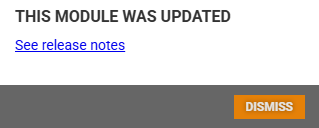
Version notice: After each new release of the module, a subtle indicator appears between the header and the content area.

Clicking it opens a dialog with a link to the product release notes, so you can always see what has changed since your last visit. The notice disappears once you have dismissed it and will not return until the next release.
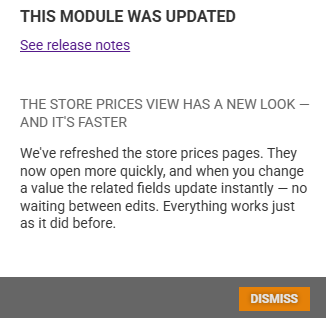
What's new on store prices: The first time you open the store prices view after this release, a short announcement is shown inside the version notice dialog. It explains that the store prices pages have been refreshed - they open more quickly, and price-related fields now update instantly as you edit values. The announcement is shown once per user and will not reappear after 1 August 2026.
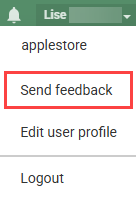
Send feedback: A 'Send feedback' option is now available in the user menu.
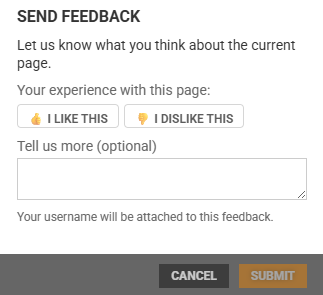
You can rate your experience with a thumbs up or thumbs down and add a short comment. Feedback helps the team improve the product.
Store price management
The store price calculations overview has been extended with additional cost columns. Supplier discount, freight, margin, and VAT are now available as optional columns (both as percentage and amount) in the store price grid. These columns are hidden by default and can be enabled through the column picker.
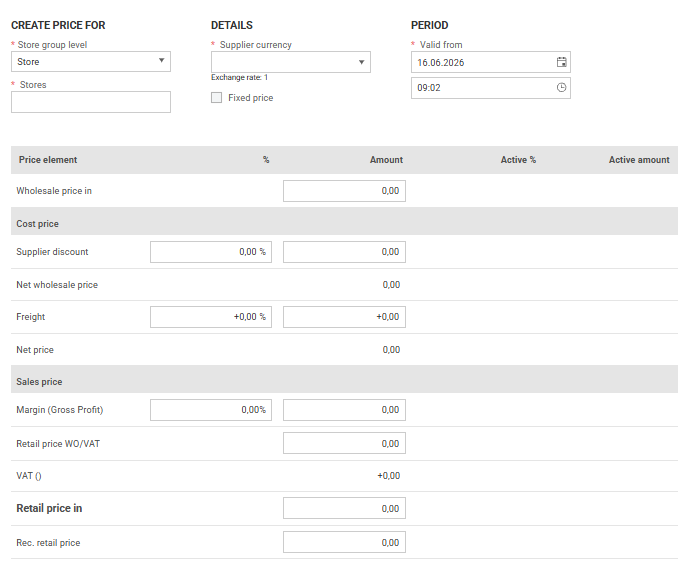
The screens for creating and editing prices have been substantially modernized. The interface is now noticeably more responsive, and day-to-day price work feels markedly faster and smoother.
All existing functionality remains in place. In this release the underlying engine for saving store prices has been significantly simplified. When a price is saved - whether a single price or a bulk update - the change is committed faster and the downstream effects (export to POS, shelf label generation, and price suggestions for franchise stores) now propagate more reliably.
Item origin tracking in new item creation
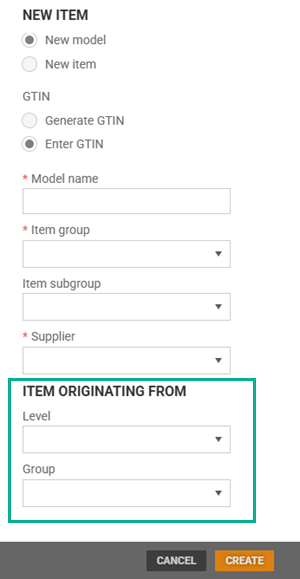
When the “Item Originating From” system parameter is enabled, users creating a local item can optionally select a store group level (Profile or Price zone) and a corresponding group as the item's origin. Available options reflect the user's access rights. The selected origin is stored permanently and remains read-only for the lifetime of the item. For local items with a defined origin, the “Originating From” field is visible in item details as a read-only value. The “Item Originating From” system parameter controls the visibility of this functionality - when disabled, the origin fields are hidden throughout the system.
Highlighted text on item (RTC-58336)
A “Highlighted text” field is available on items, allowing a short configurable label drawn from a predefined register to be assigned. The field can be overridden per store group via local attributes, without affecting the base item setup.
Multiple suppliers/sub-suppliers(RTC-58951)
An item has a main supplier and an optional list of alternative suppliers, with the same structure applied to sub-suppliers. The main and alternative suppliers are defined at the chain (common) level and at the profile, price zone and store group level.
Note: This release introduces the API contract only!
End-to-end behavior - including Item Management user interface, imports and exports - will be delivered in subsequent releases.
Enable EAN7388 Conversion (RTC-58918)
A new “Enable EAN7388 conversion” parameter is available under System Parameters → Item Identifiers (disabled by default).
When enabled, EAN7388 GTINs are automatically mapped to their base GTIN during import the item is stored under the base GTIN, with the EAN7388 retained as an additional GTIN on the same item. No duplicate items are created. Searching by EAN7388 resolves to the correct item.
If a manually entered EAN7388 maps to a base GTIN already in use by another item, the system blocks the action and displays a uniqueness validation error.
Price deletion – Automatic assortment code assignment (RTC-57461)
One assortment code in the Assortment Code register can be designated as the price deletion code using a dedicated flag. Only one code can hold this designation at a time.
When a price is deleted at profile or price-zone level, the system automatically applies the designated assortment code to the affected item or store group - including deletions scheduled for a future date. If an item has no active prices remaining at any level, the assortment code is also set at the item level.
Price deletion at the store level does not affect the assortment code on the parent profile or price zone.
If no price deletion code is configured, price deletion behaves without automatic assortment code assignment
Net price component cascade (RTC-57521)
Changes to supplier discount, freight on Profile and Price Zone prices automatically cascade to related store prices in the same way as wholesale price changes. Store retail prices remain unchanged, margins are recalculated automatically, and new store prices are created when required for already active prices.
Price Calculation (RTC-59937)
A defect in a previous database migration caused price calculation details - including wholesale price, supplier discount, freight, net price, and retail price - to remain incomplete for some tenants. This has been corrected: all affected prices have now been recalculated and populated using the same logic as the original migration, ensuring the pricing data is consistent and complete across the system.
Store prices: 'Delete price' menu now shows the correct text. (RTC-60169)
The menu shows 'Delete price' in user selected language, and the text updates correctly if user switch language while staying on the page.
Faster price end-date processing (RTC-60241)
Setting end dates for store prices is now noticeably faster. When a user defines when prices should stop being valid, the system processes the change more quickly — especially when large numbers of prices are involved. No change to the workflow is required; the improvement applies automatically.
Label type Price sign A5-5 (RTC-48001)
A Price Sign A5-5 label type is available for printing labels with up to 5 products on a single A5 half-page, mirrored onto A4 paper in portrait orientation. Items added via the label list appear in the order they were added.
Each slot displays the item name (with dual-language support where applicable), sales code, and price - promotion prices in red, regular prices in black.
Mix offers and club/member pricing are fully supported.
When fewer than 5 items are selected, empty slots are left blank; larger batches are automatically split into multiple sheets.
The standard label assignment flow is also supported — assigning the label type to an item will trigger automatic label generation.
Printing from “Item details” is additionally available, accompanied by an informational message directing to the label list as the recommended workflow.
Myhrvold and Strongpoint label types (RTC-57462)
Myhrvold and Strongpoint were added as new independent label types that can be managed through the Label Type Register like other label types in the system. They can be assigned to individual stores or chain-wide, managed in both the register and item details.
Existing Scale functionality remains unchanged and continues to work independently.
Automatic Myhrvold and Strongpoint labels for EAN-20 items (RTC-43317)
Myhrvold and Strongpoint labels are automatically generated for items with EAN-20 GTIN’s when these label types are configured for a store in the Label type register.
Labels are created only for items that are active in the store assortment and have a valid store price, and they are processed through the standard label export flow without requiring manual assignment on the item.
Ecological flag on labels (RTC-56780)
For organic-certified stores, the ecological flag set on an item is applied as-is to label exports - ecological items are marked accordingly, and non-ecological items are not. For stores without organic certification, the ecological flag is never displayed on labels, regardless of how individual items are configured.
This behavior applies to all label exports and is the new standard for how ecological information is represented on labels going forward.
Ecological flag in labels (RTC-58623)
A tooltip has been added to the Ecological flag to inform users that organic certification from the store level is used in labels.
Quantity validation in recipe items (RTC-59096)
Improved validation for the ingredient “Quantity” field in Item Management. The system enforces whole -number input on the client side, preventing decimal values from being entered or submitted. Users will receive a clear validation message if a non-integer value is provided, eliminating backend errors and improving the overall user experience during ingredient creation and editing.
Fix for: Recipe cost price suggested calculation (RTC-60276)
For recipe items, the cost price is derived from the prices of the underlying ingredients. When a user created the first store price for a recipe item, this calculation was not performed and the cost field showed 0 - even when every ingredient had a valid, active price in the selected store and profile. As a result, users had to look up and enter the cost manually, with the risk of inaccurate values.
This has been fixed. The cost price is now pre-filled automatically with the total calculated from the ingredient prices, so the correct value is available as soon as the store price is created.
Fix for: Ingredients are not removed from recipe item (RTC-59931)
The export process correctly reflects the current state of the recipe, ensuring that only active ingredients are included after any deletions.
Fix: Item import failure for items with ingredient data (RTC-60184)
Importing items with ingredient data no longer fails when the exported data contains a null value in the {{isDeleted}} field. The import process handles this case correctly and completes successfully.
Store routines Application windows (RTC-58275)
Enhanced Store Routines window management to improve usability and consistency. Open windows are reused instead of duplicated, with dynamic titles reflecting the selected item(s). Navigation arrows allow seamless movement between grid items, updating all open windows simultaneously. Introduced improved docking behavior where maximized windows snap to the right and share space intelligently, while still supporting independent movement, resizing, and closing of all windows. These improvements provide a more intuitive workflow while preserving user context and efficiency.
Export excel file from Store routines grid (RTC-49346)
Store Routines supports exporting the current grid view to Excel. The exported file reflects the user’s current view, including visible columns, column order and active filters, and is generated as a .xlsx file.
Column names are exported using the user’s selected language, and empty results export as an empty file.
Complaint handling recommendations export (RTC-59955)
Recommended complaint handling values configured at the store group profile level — including service code, action code, service location, technician, and FAQ recommendation — are included in the store group override export.
Export items to Excel (RTC-58580)
When exporting items to Excel user can choose either 'Values per store' or 'Values per store group', but not both at the same time. Picking one will automatically clear and grey out the other. This prevents the confusing Excel file that previously mixed store columns and store-group columns together in the same row.
Everything else on the export screen works as before - including the existing rule that 'Export store prices' turns off the two store-level options when selected.
ItemPrice export (RTC-56916)
The “Deleted” status is assigned only when a price record is explicitly deleted from the database. Expired prices are not marked as Deleted.
Ecological label re-export on Organic certification change (RTC-59239)
When a store's Organic certification status changes, the system automatically re-exports shelf labels for all ecological items in that store. The _Originating From_ field on labels reflects the current certification status, ensuring only certified stores display organic designation. No manual intervention is required.
Cleanup expired Promotions in Item management (RTC-49316)
Item Service janitor allows deleting old promotions. Promotions that expired at least a month ago will be deleted by the job.
Shelf Area register (RTC-59479)
Default Shelf Number and Department Name columns are added to the Shelf Area register, with sorting and filtering support for Default Shelf Number.
Local attributes contract (RTC-57772)
Extended the StoreGroupLocalAttributes contract to include all store-level local attribute fields currently available in StoreLocalAttributes, enabling a unified payload structure for ItemStoreGroupOverride exports and Fast Lane API responses.
The change is fully additive, preserves existing functionality, and prepares the platform for future local attribute migration.
Fix default filtering in Item list (RTC-55384)
Fixed inconsistent filtering behavior in the Item List grid for code and identifier fields such as Item No, Supplier No, and Group No.
The default filter operator is aligned with the main Items grid by using 'Is equal to' instead of 'Starts with’. This ensures more accurate and expected filtering results for users while maintaining consistency across the application, with changes applied purely on the frontend.
Fix for Store group values are not editable. (RTC-59432)
Store-group local values in Item Management can be edited directly. The following fields in the edit window are fully editable: Assortment Code, Warranty Type, ID Requirement, Sales Purpose, Highlighted Text, Special Group, Is being phased out, and Bonus.
Fix for: Registers data activation/deactivation. (RTC-59356)
When editing a register entry in the Registers section of Item Management — such as Highlighted Text or Allergens - clicking Save after using the “Activate” or “Deactivate” action saves the change and closes the edit window.
Fix for: Hide Item attributes translations in system parameters page (RTC-60226)
The translations have been corrected to include the correct text.
Fix for: Group Selection – Select All Children (RTC-60161)
When a parent group is selected, all child items beneath it are automatically selected.
Fix for: Finish and Danish missing in 'Edit user profile' language list (RTC-59606)
User can select from all five languages — English, Norwegian, Swedish, Finnish, and Danish — right inside Item Management and change the interface language.
Fix for: Finish and Danish missing in 'Edit user profile' language list' (RTC-60220)
User can select from all five languages - English, Norwegian, Swedish, Finnish, and Danish - right inside Item Management and change the interface language.