EG POS v. 4.1099.2636.2
Released 15 September 2026
New POS version numbering
From this release the POS version number has a new format:
4.1099.2636.1
4 — major version, unchanged.
1099 — POSLog version (99), offset by 1000.
2636 — year and week the release was built.
.1 — build number; changes if a fix is applied to the same version.
This is a normal release. The only thing that looks different is the version number — content, process and upgrade path are as before.
Why
The new number is the first step toward a fixed monthly release cadence (last Monday of the month) and fewer POS versions running in parallel. Each monthly release contains all changes for all customers. The POSLog version is now visible in the version number itself, so it is clear which releases belong together. The goal is better quality and more predictability.
What does NOT change:
Rollout rhythm. You decide which version to roll out, and when.
Newer version = higher number. This holds across the transition (1099 is greater than today's 4.16x) and going forward, so automated version comparison if that is used in your deployment systems works unchanged:
4.160.2612 < 4.1099.2636 < 4.1100.2641Backport: Critical fixes are still backported without question. Feature backports can still be done by exception. In both cases only the last digit changes:
4.1099.2636.1 → 4.1099.2636.2
Everything that was possible before this change is also possible after it.
In the longer term we may move toward more continuous deployment, but that is something we would do together with our customers.
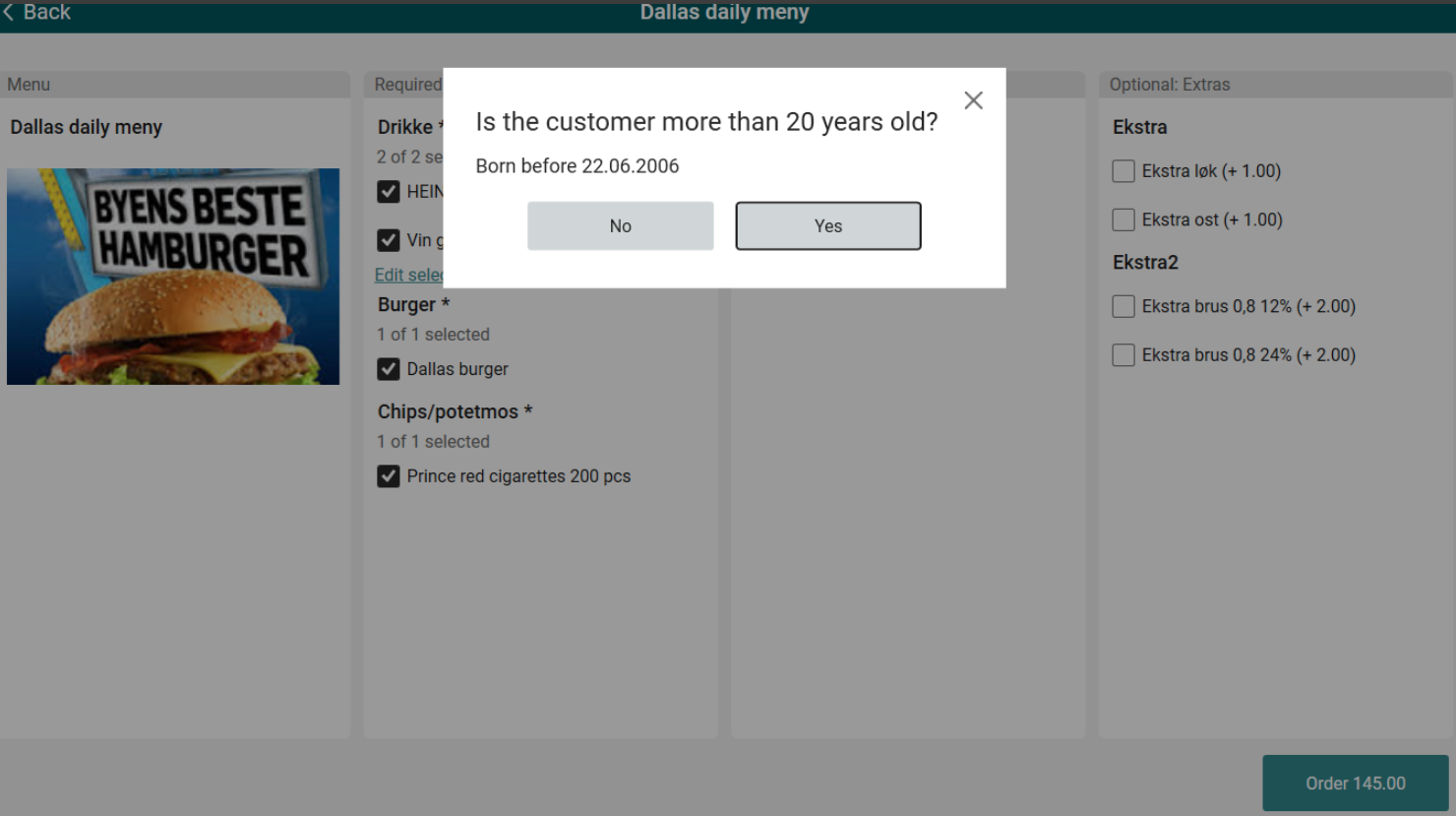
Age verification on menu items
It was not previously possible to enforce age verification when adding restricted items directly through the menu — the confirmation popup was not triggered.
Users can now add age-restricted items to the menu, and the system will require age confirmation before the item can be added.
Print gift receipt for large sales
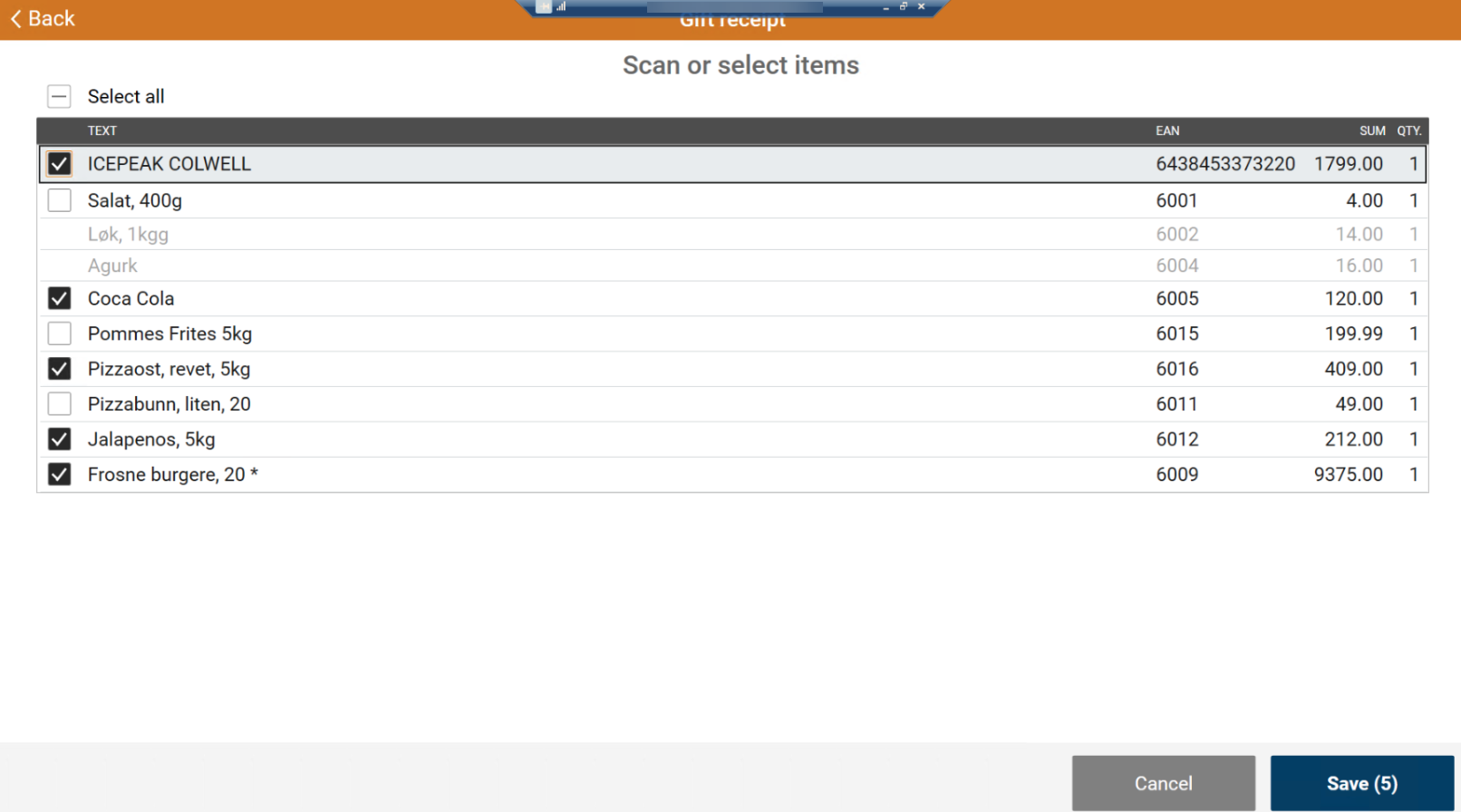
Previously, the gift receipt function (ADD_BYTTELAPP) only allowed marking a single item on the receipt for a gift receipt at a time.
Store employees can now mark multiple items at once through a new dialog listing all items on the receipt. Items that require age verification are shown greyed out and cannot be selected. A "Select all" option is available to quickly select all eligible items, and the action can be cancelled at any time without marking any items.
Multiple order selection and picking for Click & Collect
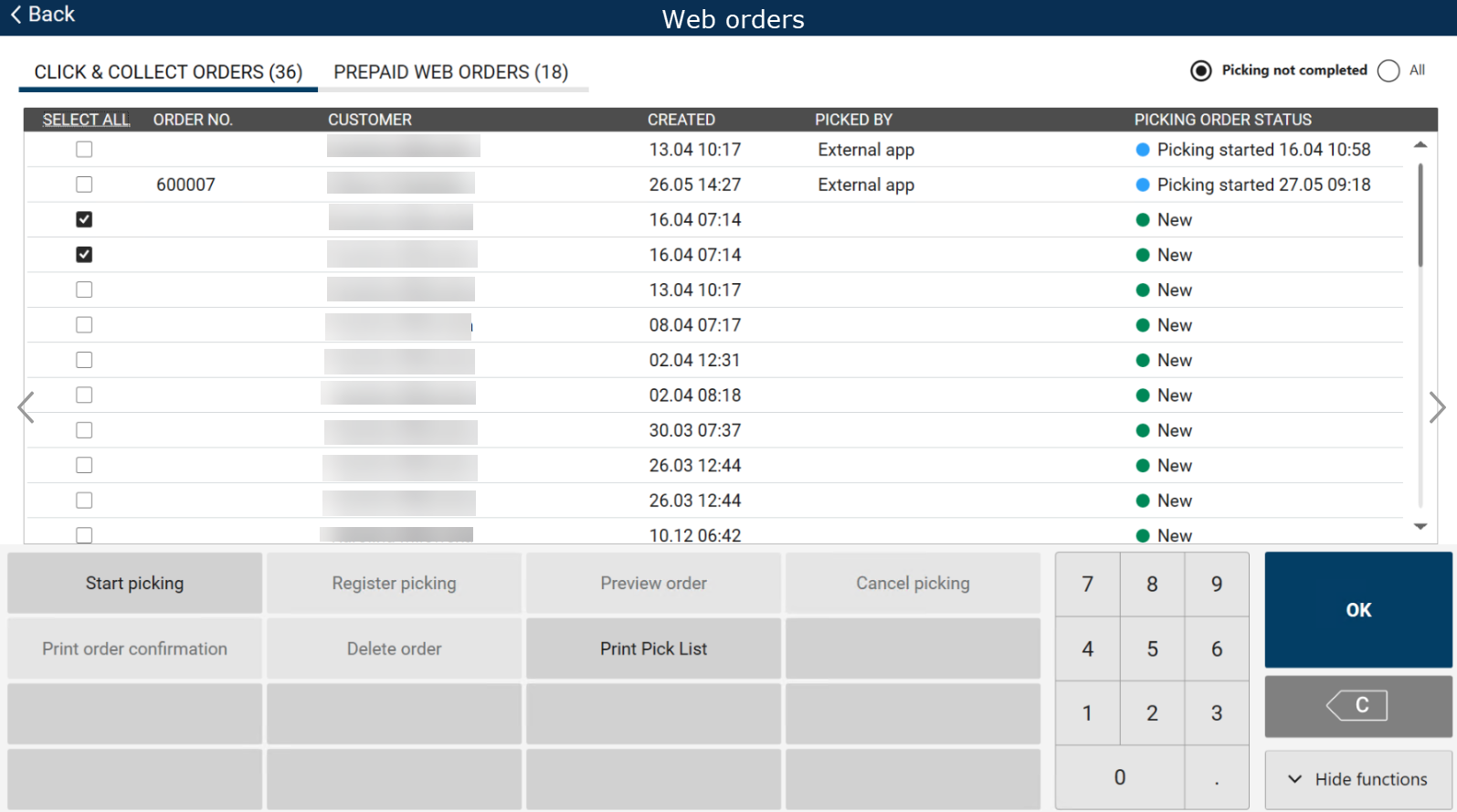
Store employees can now select multiple Click & Collect orders at once from the order list, using checkboxes or a "SELECT ALL" / "DESELECT ALL" option in the column header. When multiple orders with the same status are selected, employees can start picking, register picking, cancel picking, and print order confirmations or pick lists for all of them in a single action, speeding up the picking process. Registering picking for multiple orders at once creates the picking records and updates order status without opening each order individually.
Print service labels from POS
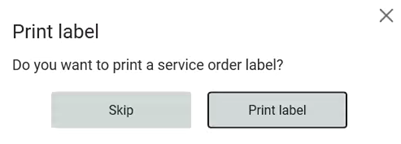
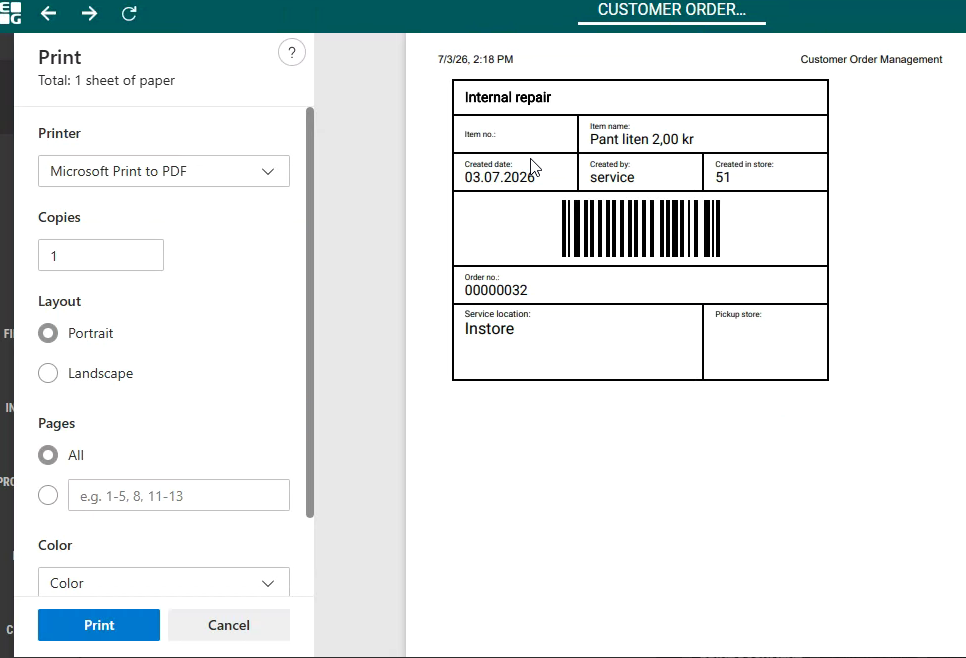
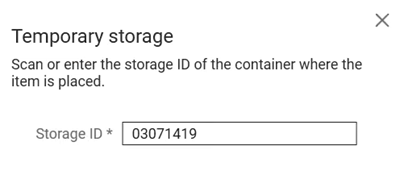
It is now possible to print a service label directly from POS during the service order process. After completing the relevant steps, a Print label dialog appears. Once the label is printed, a temporary storage dialog is shown, allowing the user to enter a storage location which is then saved in the POSLog (StorageLocationNumber).

POS Configuration
Two new parameters have been implemented - InventoryServiceUrl and RelayApiUrl.
InventoryServiceUrl
Default value: blank
URL for the Inventory Service API
RelayApiUrl
Default value: blank
URL for the Relay API
Customer language in orders
When enabled, EG POS can now capture a customer's language on customer orders. If the customer is a member with a language set in Voyado, that language is used automatically. Otherwise, a popup lets the cashier choose the customer's language from Norwegian, Swedish, Finnish, Danish or English, defaulting to the store's country language if no choice is made. The cashier can change this language at any point before the order is completed.
POS Configuration
SetCustomerOrderLanguages (default value: False)
Determines whether CustomerLanguage and ProductLanguage fields in POSLog should be set for customer orders.
Complaint flow dynamic configuration
It was not previously possible to configure complaint flow behavior - recommended service codes, action codes, FAQ entries, and mandatory field rules were hardcoded in the application.
Users can now manage these settings through the database, so the complaint flow reflects the configuration defined in the system without requiring a code change.
Discount on discount for mix 10/13/39
POS applies the ‘discountOnDiscount’ setting for mix types 10, 13 and 39:
with the option enabled the mix discount is granted on top of an already-discounted item;
with it disabled or absent the established behavior is kept. The behavior is covered by new regression tests.
Time limitation for item group sales
Time limitation for item group sales has been implemented: items from item groups defined in “ItemGroupRequirementConfig” parameter can only be sold during the time window defined in that parameter, both in manned POS and self checkout.
Moreover, if “DelayItemRequirementVerificationUntilPayment” parameter is set to True, the additional check while entering the tender view has been implemented, so even if item was added to sale inside the time window, but not paid, it is no longer possible.
Separate return reason codes for online and manual Return
Online Return and Manual Return in POS can now show separate, flow-specific reason codes instead of the same shared list if the new “SeparateReturnReasonCodes” parameter is configured to True.
POS Configuration
SeparateReturnReasonCodes (default value: False)
When True, return reason codes are separated by TransactionType, using reason codes that match parameter:
TransactionReturnItemCode for Online ReturnTransactionReturnDefectItemCode for Manual Return.
Vipps refunds via AeraV2, with per-store MerchantID mapping
Card refunds for selected card issuers can now be routed to the Aera V2 (Aera UC) endpoint instead of the existing Glt/Aera V1 path, used for Vipps refunds. Routing is per card issuer; other issuers keep using the existing Glt path.
AeraV2 refunds use a per-store MerchantID, mapped from the store's existing service identifier through a configurable list. This supports stores needing a separate MerchantID for Vipps alongside their existing identifier for other payment methods. When a store's identifier is not in the mapping, the refund proceeds with the identifier from POS and a warning is logged.
POS Services Configuration
POS Services Configuration (no config in EG POS):
<add key="AeraV2_Enabled" value="False" />
<add key="AeraV2_CardIssuerIds" value="" />
<add key="AeraV2_BaseUrl" value="" />
<add key="AeraV2_AuthBaseUrl" value="" />
<add key="AeraV2_Username" value="" />
<add key="AeraV2_Password" value="" />
<add key="AeraV2_ApiKey" value="" />
<add key="AeraV2_TimeoutInSeconds" value="30" />
<add key="AeraV2_MerchantIdMap" value="" />
AeraV2_Enabled: Master switch. 'False' (default) keeps all refunds on the existing Glt path.
AeraV2_CardIssuerIds: Comma separated card issuer IDs and / or low - high ranges to route to AeraV2. Example: 33 for Vipps.
AeraV2_BaseUrl, AeraV2_AuthBaseUrl, AeraV2_Username, AeraV2_Password, AeraV2_ApiKey: AeraV2 connection and auth details.
AeraV2_TimeoutInSeconds: Request timeout, default 30 seconds.
AeraV2_MerchantIdMap: Comma separated oldServiceId:newServiceId pairs. Example: 123:S234,234:S345. Set to Disabled once every issuer holds new ServiceIDs directly, to pass values through without logging a mapping miss.
Smart Scale Configuration Options
A new parameter, “AutoPredictItemOnStableScale”, has been added to control whether item predictions are shown automatically once a stable weight is detected on the scale.
A new value, SmartScale, has also been added to the existing “ShopAndGoCheckoutType” parameter, allowing stores to enable the new Smart Scale checkout mode.
POS Configuration
New parameter:
AutoPredictItemOnStableScale - Default value: True.
If True, item predictions are presented automatically once a stable weight is detected.
If False, PLU List opens and predictions are not displayed. Loss-prevention/check is performed in both cases.
Existing parameter:
ShopAndGoCheckoutType
New value: SmartScale
Scanning a Trumf loyalty QR code registers the Trumf ID on the receipt
Scanning a Trumf member's QR code from the Trumf app registers the Trumf ID on the receipt. Only one Trumf ID can be used per transaction, and the purchase can then count toward Trumf bonus.
Since Trumf only provides a loyalty number, the loyalty header shows only the ‘Loyalty Number’ and Delete options for Trumf members, keeping unrelated fields hidden.
POS Configuration
LoyaltyHeaderInSaleView and ShowMemberButtonsInLoyaltyHeader should be set to show only the Loyalty Number and Delete options for Trumf members.
Price/promotion history
Price and promotion history form Cloud Management is being shown in POS now, if “ItemServiceUrl2 and “PromotionServiceUrl” parameters are configured.
POS Configuration
New parameter:
PromotionServiceUrl - default value: blank. Endpoint for service with item promotion details.
Loyalty membership message on receipt
The receipt footer prints a configured text message on sales where a loyalty membership number, such as a Trumf ID, is registered. Sales without a registered loyalty membership number do not show this message.
POS Configuration
PrinterFooterLoyaltyText should be set to the required footer text.
Mix 33 Multiple items
When setting up a Mix 33 promotion, two item groups need to be selected: one group with the item that triggers the mix when added to the sale, and one group with the items that receive the discount.
In Chain Classic only one item could be used in the discounted group. In Promotion Management users can now select multiple items for this group, allowing several products to be discounted together within the same mix promotion.
Allergen filtering for Convenience menu sales
When selling a Convenience Menu item, store employees can now filter out ingredients containing specific allergens. In the Menu tab, the known allergens for the menu's ingredients are shown up front. In the new Allergens tab, the employee can select which allergens the customer wants removed and save the selection using the Save Filter button. Once saved, any ingredients or products linked to the selected allergens are automatically disabled in the required and optional ingredient lists, so they can no longer be added to the menu.
POS reads GS1 Digital Link QR codes on item labels
POS scans GS1 Digital Link QR codes in addition to GS1-128 barcodes, reading the product identifier, batch and serial numbers, production, best-before, sell-by, and expiry dates, and weight, length, and price data encoded in the code. Stores can label items with QR codes instead of GS1-128 barcodes, and cashiers scan them the same way as before.
Customer receipt history
It was not previously possible to view a customer's historical receipts directly from the customer header, an option that already existed for members.
Users can now select the new "Sales" button in the customer header to view a customer's past receipts, when cloud receipt service is enabled (ReceiptServiceUrl parameter is set), and a new function (SEARCH_RECEIPTS_BY_CUSTOMER) is now available in the ButtonConfig parameter for assigning to the buttons as needed.
Customer group mixmatch indicator
Previously, the mixmatch indicator ("M") was displayed on item lines in POS for customer group promotions even when no customer was linked to the receipt, causing the symbol to appear on virtually all items and creating unnecessary noise for cashiers.
This has been corrected so that the indicator is now only shown when a customer belonging to the relevant customer group is present on the receipt, and the dotted/solid line behavior works consistently across both item-level and item-group-level promotions.
Epsilon Express automatic upgrade
It was not previously possible for Epsilon Express to be updated automatically when a new version became available.
Users with admin rights can now restart EG POS after receiving an Epsilon update notification, and the upgrade will be triggered automatically.
Fuel product name from item database
Previously, the fuel product name displayed in the pump dialog was sourced from the fuel provider, which could result in generic placeholders such as "Product 1" for providers that do not supply this field.
The pump dialog now shows the item name configured in the item database. Customers are advised to verify that fuel item names are correctly configured in the database, as this is also the name printed on the receipt.
Fuel pre-payment underfilling handling
When a customer pre-pays for fuel but does not use the full amount (underfilling), the system now automatically registers this on the receipt, including storing the underfilling details in a new database table. If the customer returns to process a return, the correct amount (the difference between the pre-paid amount and the fuel actually dispensed) is calculated and refunded. Once a return has been processed for an underfilled pre-payment receipt, that same receipt can no longer be returned again.
Service order creation based on configuration
POS now creates service orders with a status determined by the “ActionCodeServiceOrder” parameter. Depending on the action code used, the resulting service order will be created as either Active or Done.
Improvements POS
Payment recovery for AeraNexo pay terminal (RTP-50271)
If the connection between POS and AIC service is interrupted during a payment, the POS reconnects and retrieves the transaction result from the AeraNexo pay terminal. This ensures the correct payment status is confirmed in the POS, reducing the risk of unclear outcomes or duplicate charges.
Relevant exiting parameters in POS Configuration:
'PayTerminalType' = 'AeraNexo'
IgnoreCouponCommitErrors with AeraNexo terminals (RTP-50929)
Previously, when paying with AeraNexo terminals, a duplicate coupon commit error could cause the receipt to get stuck in an unfinished state even though the IgnoreCouponCommitErrors setting was enabled.
This has been corrected so that coupon errors are properly ignored and the receipt is completed as expected.
Aborting AeraNexo pay terminal transactions (RTP-53395)
A cashier can abort an ongoing transaction also in the state where the AeraNexo pay terminal waits for the customer to enter their PIN. This allows the transaction to be cancelled as expected, without waiting for the terminal to time out.
Relevant existing parameter in POS Configuration:
'PayTerminalType' = 'AeraNexo'
AeraNexo pay terminal payment attempts (RTP-52655)
When a CardAcquisition is aborted by the cashier in POS or by the customer on the payment terminal, a new payment attempt must be triggered manually. This prevents the terminal from entering an unnecessary Busy state and provides a smoother payment process.
Relevant existing parameter in POS Configuration:
'PayTerminalType' = 'AeraNexo'
Convenience Menu sales - Allergens tab visual fixes (RTP-52963)
Several visual details on the Allergens tab of the menu view have been corrected to match the intended design: the top margin above the "Allergens" heading now aligns with the menu title on the Menu tab, the vertical spacing between allergen checkboxes has been adjusted, and non-excluded allergens in the allergen list are now displayed in black instead of grey, making excluded (crossed-out) allergens easier to distinguish.
Line notes for manual line discounts (RTP-49751)
When the Add line note to manual line discount setting is enabled, cashiers enter a line note only for discounts they enter manually. Preconfigured line discounts, such as percentage-based discounts with a reason code or price guarantee discounts, are applied without prompting for a line note. This creates a smoother checkout process while still capturing additional information for manually entered discounts.
Line note not deleted when cleared (RTP-53410)
When editing a line note, clearing the text and pressing Enter now correctly deletes the note from the item line, instead of leaving the old note showing.
Handling SafePay cash changer internal errors (RTP-45514)
Internal I/O errors in the Safepay cash changer, such as errors with the coin or note units, do not cause EG POS to become unresponsive. If Safepay does not respond, the cashier can disconnect it from the cash changer menu. This keeps EG POS available for other payment types while Safepay is unavailable.
After the Safepay issue is resolved, EG POS can reconnect to the cash changer through the menu or by restarting the application.
Relevant existing parameter in POS Configuration:
“CashChangerType” = 'SafePay'
Company Card reference information (RTP-50445)
When a configured Company Card is used in the pay terminal and prompts for a reference number and reference text, the entered values are stored and printed only on the current receipt. This ensures that the reference information is linked to the correct transaction and does not appear on other receipts.
Relevant existing parameters in POS Configuration:
"UseCompanyCard” (default 'False') - when activated, configured card type will trigger input dialogue for ref.number / -text.
“CompanyCardIssuer” (default empty) - card issuer number that will trigger input dialogue for ref.number / -text.
Boarding pass error handling (RTP-50317))
Previously, when the boarding pass service encountered an error during a multi-passenger scan, the failure was not logged and no error message was displayed to the cashier, making it difficult to identify and troubleshoot the issue.
The system now logs the error details and displays a clear error message at the POS terminal, allowing staff to take immediate corrective action when a boarding pass scan fails.
Return and sale quota validation (RTP-50927)
Previously, combining an online return with an age-restricted item sale in the same transaction caused the age/quota check to keep failing and reopen the confirmation dialog repeatedly, forcing the cashier to manually override the boarding-pass count before payment could go through.
This has been corrected so that the quota for returned items and the quota for newly sold items are now validated separately, letting the transaction complete normally without any manual workaround.
Access links with authToken after logging in with cashier card (RTP-50682)
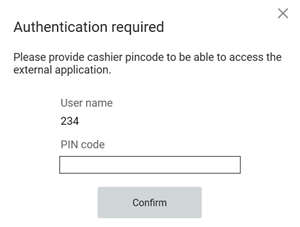
Before, when cashier logged in with cashier cards, he couldn't access links with authTokens (for example receipt journal), because keypad was not shown when permission popup opened. The permission popup was shown correctly for security reason in case the card was lost.
Now, the only difference is that the keypad is shown when cashier logged in using cashier card, wants to access a link with authToken and “TouchScreenPrimaryInput” is set to True.
Bonus check refund on previously parked receipts (RTP-50335)
Returning a receipt that includes a redeemed bonus check processes the refund against the receipt where the redemption took place, even when that receipt was originally parked before being finalized. This avoids a refund error caused by referencing the wrong receipt number.
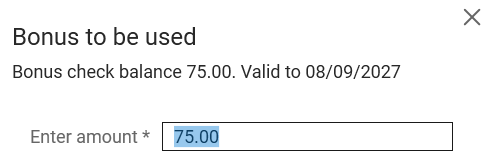
Updated wording in bonus usage dialog (RTP-22235)
The dialog shown when using bonus in POS has been updated with clearer wording, making it easier for store employees to understand.
Complaint flow improvements (RTP-50447)
Complaint flow improvements after acceptance tests have been implemented: complaint view has been adjusted to HD resolution, reason code is being filled when creating service order and "Repair item" functionality fills the form with more data (service location, technician, purchase receipt no., purchase date) now.
Online return complaint handling (RTP-50876)
Previously, performing an online return for an item with a configured complaint option automatically created a service order, preventing a plain return without initiating the complaint process.
This has been corrected so that a regular return can be completed without triggering the complaint flow, which now only activates when the operator explicitly uses the Handle complaint function.
Pump header button improvement (RTP-42446)
Pump number is shown fully when there is an icon in the pump header button.
Thanks to it, pump number is not cut and it's easy to understand the state of each pumps.

"Please Wait" pop-up (RTP-39953)
The “Please wait” pop-up follows the same layout as other pop-ups in the application. This creates a more consistent user experience and keeps the application in focus during processing.
Item selection in the online return list (RTP-52643)
Clicking a row or pressing the space bar in the online return item list marks the
selected item for return. When no row is selected — for example while the list
refreshes after an item is marked, or after a row is deselected — the action is
ignored and the return continues without interruption.
Service code name display (RTP-51124)
Previously, when returning an item with a recommended complaint action in POS, the numeric service code was displayed instead of the service code name.
This has been corrected so that the service code name is shown correctly during the complaint flow.
Member coupons and bonus checks (RTP-48417)
Adding a member manually or by searching displays the member’s available coupons and bonus checks. This ensures the cashier has access to the member’s available offers regardless of how the member is added to the sale.
Resend member registration SMS (RTP-50416)
Staff resend the registration SMS to a member who has not yet accepted the loyalty terms directly from POS. The system correctly identifies the member and sends the message, regardless of the member's term-acceptance status.
Removed unnecessary info icon from customer/member header (RTP-49263)
The 'i' icon has been removed from the customer and member headers during sales in cashier view, simplifying the header display.
For customer header it was doing nothing when clicked, so it never should be displayed there.
For member header it was doing the same thing as the 'Details' button, possible to set up in the “ShowMemberButtonsInLoyaltyHeader” parameter.
In both cases the 'i' icon was not needed, having no purpose.
The gift-card details button and balance view remain unchanged and continue to work as before.
Customer card from Cloud (RTP-50458)
Previously, scanning a customer card did not always show the correct contact person information, and some private customer records were missing contact reference data.
This has been corrected so that contact person details now display correctly for both private and business customers, regardless of customer card type.
Required: POS Master v. 3.0.0.273 or higher!
Organization's name displayed for business customers (RTP-51079)
In case cloud business customer doesn't have a name set, organization's name is displayed instead.
Thanks to it we prevent from displaying an empty field for searched/added business customer.
On-screen keyboard in CustomerServiceRegistrationView (RTP-50935)
Previously, the on-screen keyboard did not appear when tapping text fields in the Register Service screen on the POS, making it impossible to enter service order details without an external physical keyboard.
This regression has been corrected so that the on-screen keyboard now appears as expected when tapping into text fields in the Register Service screen.
Card payments now wait for member lookup to finish before sending the amount to pay (RTP-50813)
Looking up a member right as payment started could send the wrong (undiscounted) amount to the card terminal, followed by an unexpected cash refund. POS now waits for the member lookup to finish first, so the correct discounted amount is always charged.
Correct picture shown at the top of the customer screen after logout/login (RTP-51568)
The correct picture (from the “CustomerViewMedia” parameter) is now shown instead of doubling the picture from “CustomerViewMedia2” parameter at the top of the customer screen after logging out and back in.
Thanks to it correct images are displayed and customer is not confused.
Refusal of customer's chosen items (RTP-39998)
Items that are refused when a customer selects them on the customer screen are registered as warning log entries when the refusal is expected, for example when an item is blocked, too many identical medicine items are selected, or the cash drawer is open. This prevents expected refusals from being treated as POS errors.
Deposit refund line price protection (RTP-52344)
Deposit refund lines keep the price determined by the article's EAN and are not affected by the price-change function.
This prevents the refund amount from being edited on the receipt, regardless of user permissions or manager override.
Item group time restriction (RTP-53392)
Previously, time restrictions on item groups (such as for lottery/flax sales) checked the wrong internal identifier instead of the item group reference number shown in Item Management, so the restriction did not work as expected.
This has been corrected so that the correct item group reference is now used, and the time restriction is enforced properly.
Member search retrigger (RTP-51232)
When a new member's registration had been sent to the customer screen for approval and was left unresolved, pressing OK on the register would reopen the "Search for member" popup and restart the search from scratch. The register now shows a "waiting for customer" message instead, so cashiers no longer need to worry about accidentally restarting a member search while a registration is still awaiting the customer's action.
Split payment rounding error (RTP-50939)
Previously, completing a card payment before all items were scanned could cause the receipt's rounding adjustment to incorrectly show the value of items added afterward, instead of a normal small correction.
This has been corrected so that receipts now always show the correct rounding adjustment, regardless of when payments are processed during the transaction.
Price history draft filtering (RTP-53400)
Previously, Price History could show promotion prices that were still in draft, pending approval, or planned status, even though they were not yet active in any store.
This has been corrected so that Price History now only displays finished and active promotion prices.
Correct member price when adding a second item to the receipt (RTP-47950)
The POS discount-group calculation has been improved so that a member mix with no quantity limit is correctly applied when more than one item is on the receipt. Previously a competing quantity-based mix (for example "2 for X") could take precedence over an overlapping member mix, resulting in the wrong member price. POS now evaluates overlapping promotions and applies the one that gives the customer the best price.
Log output when adding member to receipt (RTP-40067)
Adding a member to a receipt limits log entries during coupon retrieval by excluding duplicate and unnecessary information. This removes entries such as PaymentServiceUrl and credentials, making the log easier to read and helping important information stand out. During payments, entries regarding PaymentServiceUrl are logged when relevant, but not for tenders where it is not, such as for Cash and Coupon tenders.
Full reference number and reference text render correctly on credit sale receipts (RTP-50907)
The receipt print engine renders the full reference number and reference text on credit sale receipts. Content that fits within the line width prints unchanged. Content exceeding the line width continues on the next line, breaking at the nearest preceding space, comma, or period; if no such break point exists, the word breaks at the line boundary.
This applies to POS print, receipts in Cloud, and the Chain Web receipt journal.
Menu items without recipe items (RTP-49576)
Previously, menu items without recipe items were displayed as bundles, preventing users from opening the menu view to edit their selections or see the correct edit options.
This has been corrected so that menu items without recipe items are now handled properly, allowing users to edit their choices as expected.
Resumed on-hold receipts now stay closed and cannot be fetched again (RTP-52120)
An on-hold receipt that has been resumed and paid is marked as completed and does not reappear when searching on-hold receipts. This prevents the same items from being added to a new sale when the same loyalty reference or hold code is scanned again shortly after payment.
Receipt cleanup error handling (RTP-48365)
Previously, if the system found a single corrupted receipt while cleaning up and sending receipts, the whole process could stop, delaying all other receipts waiting to be sent.
This has been corrected so that a corrupted receipt no longer blocks the process, and remaining receipts continue to be sent as expected.
Fix for error when dismissing printer-choice dialog during receipt copy/reprint (RTP-52150)
Previously, dismissing the printer-choice dialog (via the X button) while copying or reprinting a receipt on a till with multiple configured print destinations could result in an unexpected application error.
This has been fixed — dismissing the dialog without selecting a printer now cancels the copy/reprint cleanly, and if no printer is configured, the cashier sees a clear message: "Copying receipt is not possible because no printer is configured."
Gate receipt on manned register (RTP-50217)
Previously, the gate receipt was not printed on manned cash registers after completing a sale, even when the feature was enabled in the configuration.
This has been corrected so that the gate receipt is now printed automatically when the customer selects a digital receipt option, consistent with the expected behavior.
Self-service Gift card payment error (RTP-44126)
Previously, if a gift card was already used to complete a payment on another till, attempting to finish the payment with that same card on a self-checkout (SCO) till showed an error message meant for staff-assisted tills.
This has been corrected so that self-checkout now displays a proper self-checkout-specific error message in this situation.
Self-service POS checkout completion (RTP-52661)
The self-service POS displays the Welcome or Goodbye page only when the payment terminal transaction is complete and the receipt has status FINISHED. This ensures the POS is ready before the next customer starts a purchase.
If the payment is complete but the receipt does not reach FINISHED, the signal light turns on and a surveillance message asks staff for assistance. The customer is also asked to wait for assistance. Staff can finish the receipt while the customer is still present by adding a 0 + Cash tender.
Additional logging helps identify why a receipt does not reach FINISHED, supporting further improvements.
Age approval after a cancelled Coopay payment (RTP-51096)
If a customer's age is confirmed through the Coopay app and the payment is changed to another payment method, such as a bank card, the surveillance screen displays the Yes and No buttons for the age approval request. This allows the cashier to approve or reject the request and continue the sale without requiring a manual workaround.
Offline member registration in Self-Service (RTP-49993)
Scanning a loyalty member QR code in Self-Service (SCO) registers the member on the receipt when the POS operates offline and offline member registration is enabled. If member validation is unavailable, the POS continues the registration process using offline handling, ensuring that member benefits such as bonus earnings and member discounts are applied to the transaction.
The club membership sign-up text is no longer specific to one retailer (RTP-50970)
When customers signed up for club membership, the text they saw sometimes mentioned one of the customers by name, even for other unrelated customers. This text has been made generic, so it works for everyone. Customers now see wording that matches their own store instead of another retailer's.
Price check terminal member price (RTP-50814)
Previously, when scanning an item on a price check terminal, the terminal could display a member campaign price that had not started yet, alongside the current price.
This has been corrected so that price check terminals now only show currently active member campaign prices.
Automatic receipt printing (RTP-49075)
Previously, several receipts — for deleted sales, invoice payments, employee purchases, and returns — did not always print automatically together with the store receipt.
This has been corrected so that deleting a sale receipt prints a receipt automatically again; paying with an invoice prints both the store receipt and the delivery note automatically, with the delivery note correctly shown as the original; an employee purchase prints both the store receipt and the customer receipt automatically, with the customer receipt correctly shown as the original; and processing a return prints both the store receipt and the customer receipt automatically, with the customer receipt correctly shown as the original.
Clearer message when searching for customer order receipts with no matching stores (RTP-52603)
When searching for receipts from a customer order and no stores match the configured settings, a clear message is now shown explaining that the search is unavailable, instead of an unexpected error.
Fetching unfinished receipt (RTP-47992)
Self-service is no longer becoming unresponsive, as fetching unfinished receipt is now being skipped while in this view even with “NotifyOfUnfinishedReceipt” parameter set to True.
Printed receipts and the Chain Web receipt journal no longer show a blank discount reason label (RTP-50408)
When a campaign or member price discount had no reason text assigned, receipts and Chain Web's receipt journal showed a "Rabattårsak:" label with nothing after it. This blank label is now hidden on both the printed receipt and the receipt journal, while discount reasons that do have text still display as before. Customers and cashiers no longer see a confusing empty line on the receipt.
Receipt completion after voided items (RTP-49924)
Previously, when the last item on a receipt was voided during a self-service session with a coupon discount, the system could fail to finalize the receipt after a successful card payment, leaving the register stuck in an unresponsive loop.
This has been corrected so that receipts with payments now settle and close correctly regardless of whether the last item line was removed or voided before payment.
On hold receipt duplication (RTP-53422)
Previously, placing a receipt on hold without entering a reference text caused the hold indicator to be increased by two instead of one. Orders were duplicated in receipt on hold view as well.
This has been corrected, so that placing a receipt on hold now always increases the hold indicator correctly by one.
Customer receipt search (RTP-53341)
In a result of a regression, it was not possible to look up a customer's earlier receipts in POS, as the search returned no results even when purchases had been registered on the customer.
Users can now search for a customer and see all their previous receipts directly in POS.
Required POS configuration:
“ReceiptServiceUrl” parameter set
“ButtonConfig” parameter - Button with ‘SEARCH_RECEIPTS_BY_CUSTOMER’ function.
Loyalty member data validation and card payment safety (RTP-51514)
POS validates loyalty member contact details before adding the member to a receipt. If the details contain characters that cannot be processed, POS displays a message and the sale continues without registering the member, keeping the receipt valid. Card payment does not start when the receipt is in a state that cannot be saved, so a customer is never charged without a matching sales receipt.
Online returns on receipts with a coupon/discount line (RTP-49691)
When a cashier tried to return items from a receipt that included a coupon or discount, the POS showed an unexpected error and the return failed.
This is now fixed — online returns work correctly regardless of whether the original receipt had a coupon or discount applied.
Online return store attribution (RTP-38785)
Previously, when a return was processed at a different store than the original sale, the store number and cashier from the original sale could still show up on the return receipt and in reports, instead of the store and cashier actually handling the return.
This has been corrected so that returns now correctly show the store and cashier that processed the return.
Manual return member price (RTP-51227)
Previously, if a member card was scanned after a returned item had already been added to the receipt, the return kept the item's normal price instead of the member discounted price.
This has been corrected so that the member price is now applied consistently to returns, regardless of whether the member card is scanned before or after the item.
Return handling for Vensafe items (RTP-43576)
Returning a Vensafe ticket where item is already delivered, or where ticket is already cancelled, shows a clear message explaining that the operation is already completed. This prevents duplicate actions and ensures the event is recorded in the log without errors.
Returning and reselling the same item in one transaction now balances the receipt to zero (RTP-51786)
When a customer returned an item and bought the same item back in one transaction with a discount campaign, the receipt was left with a one cent difference instead of balancing to zero. Both lines now round the same way, so the receipt totals 0.00 and the item keeps its correct price. Cashiers no longer need to clear a stray cent to finish the sale.
Invoice payment scanner input (RTP-50150)
Previously, the invoice payment screen stopped accepting barcode scanner input for stores using the additional credit payment fields setup, so cashiers could not scan a customer's ID during an invoice payment.
This has been corrected so that scanner input works again in the invoice payment screen for these stores.
Serial number entry bypass (RTP-53403)
Previously, closing the serial number entry window with the X button allowed an item requiring a serial number to be added to the transaction without one being entered.
This has been corrected so that the item is not added to the transaction unless a required serial number is provided.
POS now respects per-loyalty-program external address lookup settings (RTP-49718)
The POS was always using loyalty program 0 settings when looking up member addresses, ignoring the actual loyalty program configuration. The POS now uses the correct loyalty program settings, so tenants with the external address lookup disabled no longer see unwanted lookup calls.
Customer order item lines (RTP-47440)
Previously, fetching a customer order caused all item lines to display fully expanded, taking up extra space on the screen.
This has been corrected so that item lines are shown collapsed by default, as before, with details still available by selecting a line.
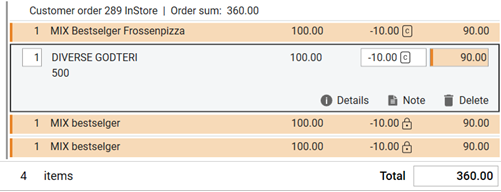
Deleting a customer order assigns a valid receipt number (RTP-50754)
Deleting a customer order from an idle POS could send a receipt to the journal without a proper receipt number, breaking the digital signature chain for that store's receipts. Deleting a customer order now always assigns a valid, sequential receipt number, so the receipt journal and digital signature chain stay intact and no manual correction is needed.
Batch picking SMS notification (RTP-53644)
Previously, when completing picking for several orders at the same time, the SMS notifying the customer that their order was ready to collect was not sent.
Users can now expect this SMS notification to be sent correctly, whether picking is completed for a single order or for multiple orders at once.
Click & Collect picking confirmation dialog improvements (RTP-37121)
The confirmation dialog shown when starting picking for a Click & Collect order has been improved for clarity, and the extra dialog that used to appear afterwards has been removed. When starting picking for multiple orders at once, any orders that already have picking started are now shown grayed out with an annotation, and are listed after the orders that have not yet been picked.
Click & Collect order list improvements (RTP-37119)
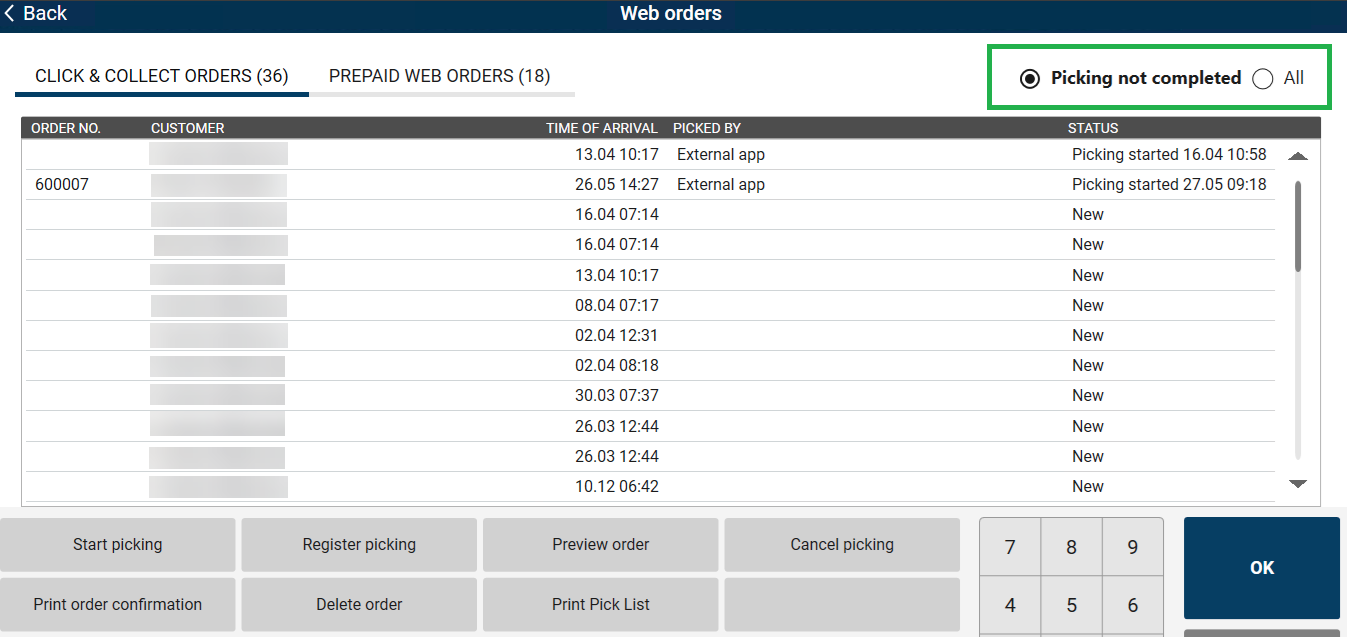
The Click & Collect order list has been updated for better clarity. The "Time of arrival" column is now labeled "Created", and the "Status" column is now labeled "Picking order status". The "Completed" status has been renamed to "Ready for pickup", and all statuses now include a colored circle indicator so they can be recognized more quickly. The "Not collected" status has also received a visual update, and all statuses now display correctly across every supported screen resolution.
Correct refund amount on online return of prepaid Click & Collect orders (RTP-45634)
When an online return is processed for a prepaid Click & Collect order whose original receipt line has no ExtendedAmount (a characteristic of prepaid web orders), the returned line amount is now calculated as unit price multiplied by the returned quantity.
The customer is refunded the full value of all returned items instead of a single unit's value.
Click & Collect order filtering improvements (RTP-37122)
The Click & Collect order list now includes improved filtering options. Store employees can filter orders using radio buttons, choosing between "Picking not completed" (showing only New and Picking Started orders) and "All". The "Picking not completed" filter is selected by default for a more focused picking workflow. Filter visibility adapts based on the “SortOrderAfter” configuration — the new filters are shown when “SortOrderAfter” is not set or set to Time of arrival, while the existing filter from the Pickup time configuration is preserved as before.
Dispatch order initial status (RTP-53518)
Previously, a newly created dispatch order could show status "In Progress" in Chain Web even though picking had not yet started.
This has been corrected so that new dispatch orders now correctly show status "New" until picking begins.
Web order selection highlight (RTP-53519)
Previously, the selected web order was no longer visually highlighted in the list, even though it was still correctly selected, which could be confusing.
This has been corrected so that the selected web order is now clearly highlighted again.
Corrected pricing when multiple promotion offers apply (RTP-50182)
Fixed an issue where, in cases where more than one promotion offer could apply to the same items, the POS did not always select the combination that gave the customer the lowest total price. The POS now correctly compares all eligible offers, including cases where a repeatable offer can be applied more than once, and applies whichever combination results in the lowest price for the customer.
PLU List categories translations (RTP-50417)
All PLU List categories and labels are being displayed correctly with proper translations when opened via the sales view button.
Thanks to it there is no problem with using POS in different languages.
PLU List - Translation for Vensafe (RTP-50413)
Vensafe2 board title in PLU List is being correctly displayed as "Articles from automat" in English.
Thanks to it when customer is using POS in a different language, everything is understandable.
Cost+ price dialog fixed price (RTP-49635)
Previously, when opening the price change dialog on an item with an active fixed promotion, the original price was displayed instead of the promotion price.
This has been corrected so that the dialog now shows the correct fixed price.
Abandoned receipts now transmit with the correct cancellation code in ArtsXML (RTP-49675)
When a receipt was left incomplete due to a POS restart or unexpected close, the cleanup job was transmitting it with the wrong transaction code (1001 instead of Z001), causing missing payment classification on their end. The cleanup job now correctly sets the cancellation code before transmitting, so the right classification is being received without manual correction.
Cleanup job logging details (RTP-47755)
Cleanup job logs display the store, cash register, and cleanup criteria used during receipt cleanup, such as retention periods and cleanup limits. This provides clearer visibility into the cleanup scope and helps support teams identify why on-hold receipts remain available.
Receipt Service URL Logging (RTP-50869)
Previously, when the Receipt Service URL parameter was left empty, the system logged this as an error, resulting in unnecessary error messages.
This has been corrected so that such messages are now logged as information instead of errors.
Receipt recovery for finished receipts (RTP-52842)
When the POS retrieves an unfinished receipt for recovery and finds it has already been finalized, the retrieval stops without generating repeated database errors. This reduces unnecessary system load and log noise while keeping receipt data accurate.
Voyado bonus check calculation in POS Reporting (RTP-49879)
When a customer uses a Voyado bonus check, the bonus amount affects the customer payment only. The article net cost in POS Reporting remains unchanged, providing correct margin figures.
Multi capture Walley/Adyen customer order refunds refund (RTP-49973)
Returning a customer order paid using the Walley payment provider across several captures previously refunded only one capture at a time, and the leftover could be mistaken for a cash tender-back — blocking the tender and leaving the receipt unfinished. These refunds are now pooled by their shared order reference and processed as one refund for the full returned amount, so the return completes in a single step and matches the provider record.
Service order receipt strikethrough (RTP-50906)
Previously, creating a service order for one item from a receipt containing multiple units of the same item caused all units to be stricken from the receipt.
This has been corrected so that only the item included in the service order is stricken from the receipt.
Discount calculation diagnostics (RTP-47061)
Previously, it was difficult to detect when discount calculations were taking unusually long or being interrupted, which could contribute to slower checkouts.
This has been corrected so that the system now measures and logs slow or interrupted discount calculations, making it easier to identify and resolve performance issues going forward.
Weight entry handles a repeated item lookup key press (RTP-52296)
Pressing the item lookup key (F10 / PLU) again while the weight-entry popup is open has no effect. The sale completes normally once the weight is confirmed.
Sales statistics accuracy (RTP-49626)
Previously, sales statistics in POS frequently displayed 0 for sales amounts, net sales, and margins despite actual sales being completed.
This has been corrected so that sales statistics now show accurate per-cashier figures and remain consistent after login across multiple registers.
Eliminated eSale provider initialization error after reboot (RTP-51245)
Previously, an error message related to eSale provider initialization could appear in the log the first time a store employee logged on to the POS after a reboot. This has now been resolved, so the error no longer occurs.
EG POS stability improvement (RTP-49965)
EG POS remains stable during the trading day by preventing memory leaks in PLU board, receipt, and payment screen buttons. Threading and customer-screen errors are handled safely to prevent the till from freezing or crashing.
HTTP error logs in log file (RTP-52480)
Before, when HTTP requests to Surveillance or EG Cloud failed, it was logged as an error in POS log file, making it hard to filter actually important logs, since a lot of additional error-level logs were produced.
Now, when HTTP requests to Surveillance or EG Cloud fails, it's logged as Warning.
Shutdown log noise reduction (RTP-47002)
Previously, EG POS logged a series of harmless errors during the automatic nightly shutdown sequence on self-service terminals, creating unnecessary noise in the log files.
This has been corrected so that the shutdown process no longer generates these misleading log entries.
Finnish culture translations (RTP-37600)
Previously, translations for the Finnish culture were incomplete, with some new functionality not translated.
Users can now use the POS application with fully translated content for the Finnish culture.
Improvements POS Server
Subtotal discount doubling (RTP-50692)
Previously, when a campaign-priced item was delivered and paid for separately, the subtotal discount was fully re-applied to the remaining items in the cart, causing customers to be given a doubled discount.
This has been corrected so that the subtotal discount is now calculated correctly and only applied once across the delivered and remaining items.
Configuration in scope:
“IncludeCustomerOrderInPriceCalculation” and “AllowSubtotalDiscountWhenPayingCustomerOrder”should be set to False.
Credit sale correction price channel (RTP-50800)
Previously, when correcting a credit sale, the price channel from the original sale was not carried over to the new correction — it always reverted to the store default channel instead.
This has been corrected so that the original price channel is now preserved when creating a credit sale correction.
Ecom bong journal routing (RTP-49688)
Previously, after upgrading the multi-store E-handel WCF, all Ecom bongs were incorrectly routed to the same Journal database instead of each store's dedicated one.
This has been corrected so that each store's Ecom bongs are now sent to the correct Journal database.
Prevent price recalculation during GetCart (RTP-44641)
Previously, calling UndoCartExt (with CreateNewCartWithOriginalCartItems=True) followed by GetCart could return updated back-office prices instead of the original sale prices on the correction receipt for articles with PriceSource=Database.
This issue has been resolved so that correction receipts now correctly display the original sale prices for these articles.
Gift receipt support in GetPrintableReceiptExt (RTP-50389)
The GetPrintableReceiptExt API now includes support for gift receipts. When a receipt contains gift receipt data, the API returns the corresponding printable gift receipt strings along with the standard receipt output.
System info company details (RTP-50218)
Previously, the System Info screen displayed outdated company name, email, and phone details from a former company name.
This has been corrected so that System Info now shows the current EG company details by default.
POS Master - Automatic weekly full-text catalog rebuild to reclaim disk space on cash registers (RTP-51326)
EG POS now performs a periodic (weekly) rebuild of the SQL Server full-text catalogs on cash registers, in addition to the existing daily reorganize. The daily reorganize only merges index fragments and cannot release disk space, so over time the full-text catalog could grow very large and consume significant disk on the register (including its backups). A new database procedure (usp_RebuildFT) rebuilds every full-text catalog, which reclaims the accumulated space, and it is scheduled automatically at an off-peak time (configurable day of week, default Sunday). This keeps full-text catalog size under control without any manual intervention.
POS Master database: v. 3.0.0.274 or higher!