EG POS v. 4.162.3
Released 11 August 2026
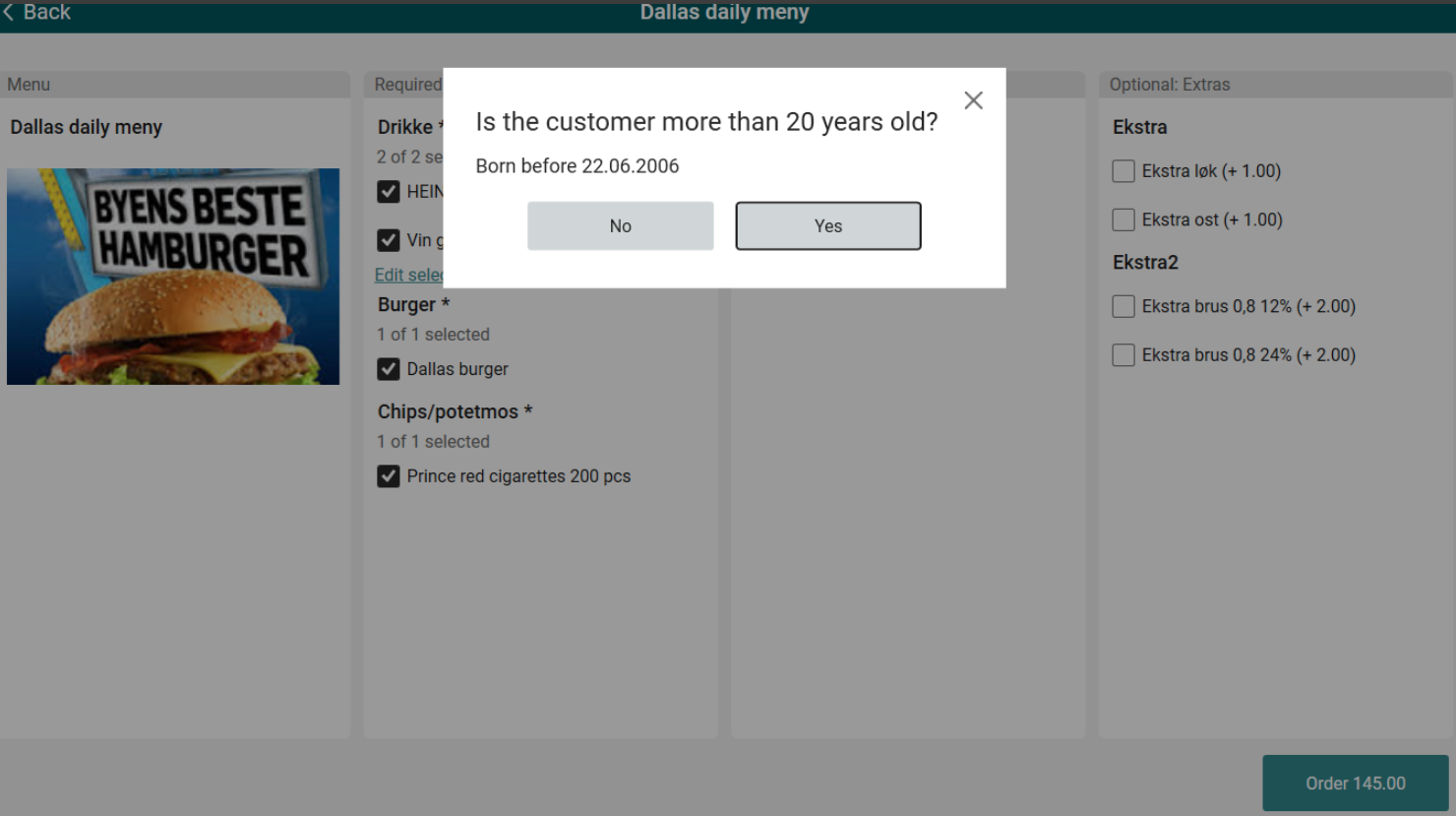
Age verification on menu items
It was not previously possible to enforce age verification when adding restricted items directly through the menu — the confirmation popup was not triggered.
Users can now add age-restricted items to the menu, and the system will require age confirmation before the item can be added.
Service order creation based on configuration
POS now creates service orders with a status determined by the “ActionCodeServiceOrder” parameter. Depending on the action code used, the resulting service order will be created as either Active or Done.
Improvements POS
Company Card reference information (RTP-50445)
When a configured Company Card is used in the pay terminal and prompts for a reference number and reference text, the entered values are stored and printed only on the current receipt. This ensures that the reference information is linked to the correct transaction and does not appear on other receipts.
Relevant existing parameters in POS Configuration:
"UseCompanyCard” (default 'False') - when activated, configured card type will trigger input dialogue for ref.number / -text.
“CompanyCardIssuer” (default empty) - card issuer number that will trigger input dialogue for ref.number / -text.
Complaint flow improvements (RTP-50447)
Complaint flow improvements after acceptance tests have been implemented: complaint view has been adjusted to HD resolution, reason code is being filled when creating service order and "Repair item" functionality fills the form with more data (service location, technician, purchase receipt no., purchase date) now.
Online return complaint handling (RTP-50876)
Previously, performing an online return for an item with a configured complaint option automatically created a service order, preventing a plain return without initiating the complaint process.
This has been corrected so that a regular return can be completed without triggering the complaint flow, which now only activates when the operator explicitly uses the Handle complaint function.
Card payments now wait for member lookup to finish before sending the amount to pay (RTP-50813)
Looking up a member right as payment started could send the wrong (undiscounted) amount to the card terminal, followed by an unexpected cash refund. POS now waits for the member lookup to finish first, so the correct discounted amount is always charged.
Service code name display (RTP-51124)
Previously, when returning an item with a recommended complaint action in POS, the numeric service code was displayed instead of the service code name.
This has been corrected so that the service code name is shown correctly during the complaint flow.
Service order receipt strikethrough (RTP-50906)
Previously, creating a service order for one item from a receipt containing multiple units of the same item caused all units to be stricken from the receipt.
This has been corrected so that only the item included in the service order is stricken from the receipt.
EG POS v. 4.162.2
Released 17 June 2026
Return of receipts
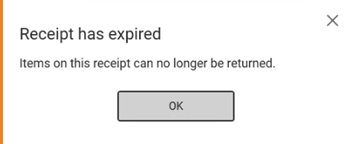
Return of a receipt is not allowed after time set in the new “ReceiptValidForDays” parameter.
A new popup informs cashier that return operation is not allowed.
POS Configuration
ReceiptValidForDays (default value: 0)
Specifies how many days a receipt is valid for online returns. When set to 0, returns are always accepted regardless of the receipt date.
Cloud customers
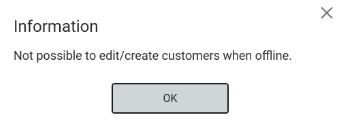
Support for having multiple contact persons for a B2B customer has been implemented.
Thanks to it we display which contact person of business customer was supposed to be added.
Offline Cloud customer edit block
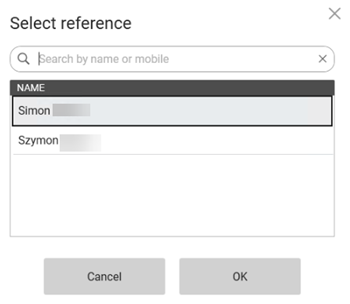
It was not previously possible to prevent users from adding or editing cloud customers while the POS was offline, which could lead to data inconsistencies since offline changes are not synced back to the online solution.
Users can now no longer add or edit Cloud customers while offline — the actions are blocked and popup is shown to the cashier.
Gift receipt age restriction
It was not previously possible to restrict age-restricted items from being selected for gift receipts.
Users can now configure a minimum age threshold, above which age-restricted items are automatically excluded from gift receipt selection, with a "Select All" option available for eligible items.
POS Configuration
New parameter:
GiftReceiptAgeRequirement (default value: 0)
Minimum age at which age-restricted items are excluded from gift receipt selection. Set 0 to allow gift receipts for all items.
Automatic Walley refund on return
It was not previously possible to have the original Walley payment method
pre-selected automatically when processing an online return.
Users can now navigate to the tender view during a Walley-paid return and have
Walley automatically set as the default refund method, streamlining the return process.
Member and employee customer on same receipt
It was not previously possible to have a member and an employee customer present on the same receipt in a controlled, configurable way.
Users can now configure whether employee customers can be combined with members in a single transaction, with options to restrict this to specific customer groups or disallow it entirely.
POS Configuration
EmployeeCustomerGroups
Specifies which customer groups can be added together with a member in the same transaction.
Default value: empty, so it doesn't affect customers who don't want to use this feature.
Items in Complaint view
Items that already have a complaint processed are now crossed out from the complaint view.
Thanks to it cashier knows that they cannot register return/repair for the second time.
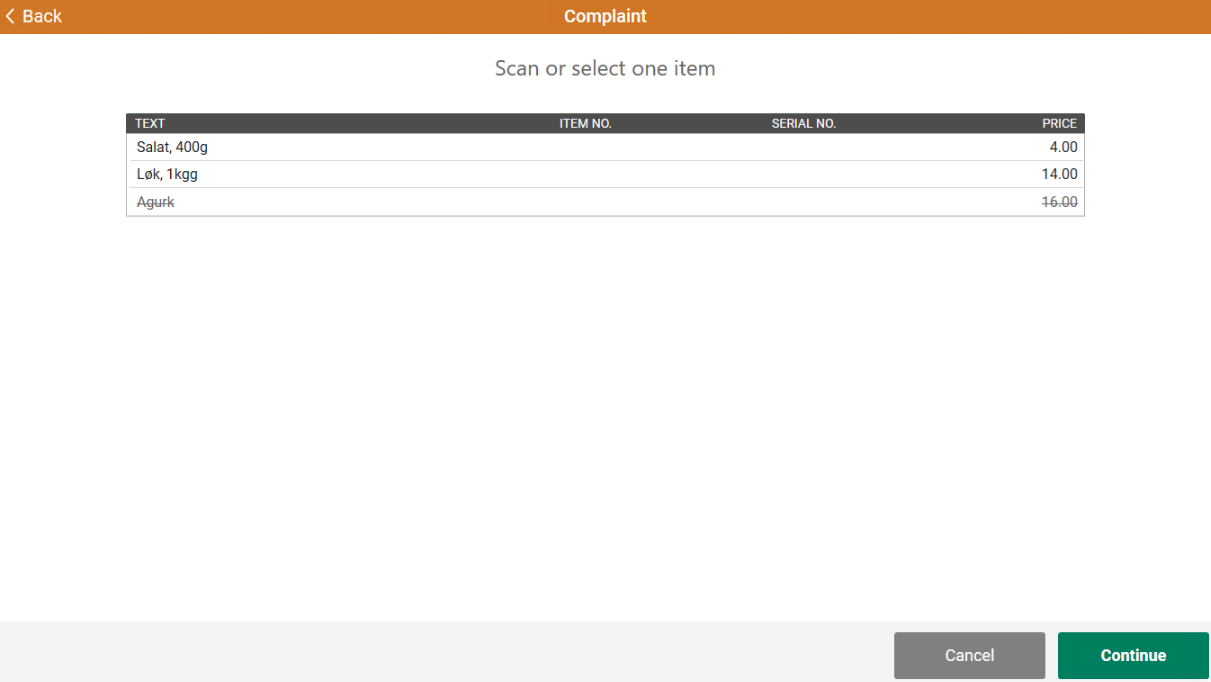
Complaint flow
Improvements in Complaint flow have been implemented. New options are now shown in the Select service dialog: choosing "See FAQ" option redirects to the url configured in ‘ProductCatalogBaseUrl’ parameter; selecting "Repair item" option redirects to the url configured in ‘CreateServiceOrderBaseUrl’ parameter; and selecting "New item, credit or refund" option causes a new "Item details" dialog to be shown.
Complaint flow dynamic configuration
It was not previously possible to configure complaint flow behavior - recommended service codes, action codes, FAQ entries, and mandatory field rules were hardcoded in the application.
Users can now manage these settings through the database, so the complaint flow reflects the configuration defined in the system without requiring a code change.
Required:
POS Master 3.0.0.270 or higher!
Cloud customer search and POSLog data
It was not previously possible to search for cloud customers with correct business data displayed, or to have cloud customer details saved in POSLogs.
Users can now search for B2B and private cloud customers seeing accurate information (organization details, address, contact data, customer numbers), view the business customer name correctly in customer header after it was added to the sale, and have all cloud customer data correctly saved into the POSLog during transaction processing.
Confirm quantity if it exceeds max qty for campaign or member price
If a cashier or Shop and Go customer tries to add more of an item than allowed at the campaign or member price, the POS now asks for confirmation before continuing. The dialog appears only once per item per receipt.
If a weight item is already above the limit on the first weighing, a warning is shown instead.
Per-store iCoupon Service Reference Provider
EG POS now supports a store-specific Service Reference Provider for iCoupon. The new parameter "CouponServiceProviderRef" can be set per store with the value provided by iCoupon. This allows franchise stores to manage their own iCoupons independently. If left empty, the POS falls back to the existing shared configuration.
POS Configuration
CouponServiceProviderRef - default value: empty.
Description: Service Reference that will override existing ServiceReference in POSCouponService when coupons are fetched. If the value is omitted, the current configuration is used.
Membership and coupon scans applied to the transaction
Scanning membership QR codes and coupons now registers the information on the transaction throughout the checkout process, including during payment. This ensures that loyalty information and coupons are consistently applied to the sale and reduces the risk of scans being missed when moving between the sales and payment screens.
Coupon status and last change date shown at checkout
When EG POS fetches available coupons for a scanned barcode, it now also retrieves the date of the last status change for each coupon. The cashier can see the coupon status (Active, Redeemed or Expired), the current value, and when the status last changed — all displayed in the coupon list at the register.
POS identification details included in iCoupon requests
EG POS now populates the "TillRef" (Till Reference) field on every request to the iCoupon API. This field includes the Receipt ID, POS system name (EG POS), POS version, and store name — making it easier to identify and trace requests on the iCoupon side.
Pre-approval of Coopay payment
Customers can approve a Coopay payment in the member app before reaching the payment step. When the member QR code is scanned in the sales view, the app shows a request to approve the ongoing purchase. The customer can accept, decline, or ignore the request.
In self-service:
If accepted, payment completes automatically when entering the payment page, reducing wait time.
If declined, the customer selects a payment method manually.
If ignored, payment starts on the payment page and requires confirmation in the app.
In cashier mode:
If accepted, payment completes automatically when the cashier opens the payment view, speeding up checkout.
If declined, the cashier selects the payment method using the standard payment options.
If ignored, payment starts in the payment view and requires confirmation in the app.
(POS Configuration: No configuration in EG POS)
Cost+ markup calculation now uses the supplier's normal net cost price
Cost+ pricing used to calculate markup based on the weighted average cost, which sometimes did not match the supplier's actual price and led to incorrect Cost+ prices. It now uses the normal net cost price from the supplier, making Cost+ prices more accurate and transparent for both cashiers and customers.
The feature is controlled by the new “UseNormalCostPriceInCostPlusCalculation” parameter, which is turned off by default so existing behavior is unchanged. When enabled, the Cost+ dialog also hides the net price field since it is no longer relevant to the calculation, keeping the interface clean and focused.
Entra ID configuration simplification
The Entra ID configuration for POS login requires fewer setup steps, reducing complexity and simplifying setup and maintenance for identity integration.
POS Configuration
POSEntraIdConfigParameter
TokenExpirationInHours (keyvalue) = The “TokenExpirationInHours” setting defines how many hours a user can stay signed in to POS before signing in again.
Authority (keyvalue) =
The “Authority” setting defines the URL used for Entra ID sign-in in POS.
Improvements POS
Loyalty ID handling for AeraNexo pay terminal (RTP-48897)
When the AeraNexo pay terminal returns multiple loyalty IDs, based on customers payment card, the POS uses the “ExternalLoyaltyNumber” to identify the member. The member is then linked to the transaction and shown on the receipt, ensuring the correct loyalty information is applied.
Relevant exiting parameters in POS Configuration:
'PayTerminalType' = 'AeraNexo'
'UseBonusCardFromPayTerminal' (default 'False') - when activated, EG POS will look for / handle ID received from terminal
AeraNexo pay terminal reconciliation timing (RTP-48355)
A short delay is applied when a ConnectionRecovery occurs just before a reconciliation with the AeraNexo pay terminal. This ensures the terminal is ready, helping the reconciliation process run correctly without starting too early.
Relevant exiting parameters in POS Configuration:
'PayTerminalType' = 'AeraNexo'
AeraNexo pay terminal status message during POS startup (RTP-47451)
A message appears at startup and when the cashier signs on if the AeraNexo pay terminal is offline during the POS restart. The message informs that the pay terminal is not ready, helping the user understand that payments cannot be processed until the terminal is available.
Relevant exiting parameters in POS Configuration:
'PayTerminalType' = 'AeraNexo'
Baxi.Net pay terminal connection handling via ethernet (RTP-44142)
Baxi.Net pay terminals connected to POS via ethernet automatically attempt to reconnect if the connection is lost before or during a transaction.
If the connection drops, the cashier restarts the payment by pressing the Bank button in the POS. This may require more than one attempt to complete the transaction.
In rare cases, the terminal requires a restart to restore the network connection. A message in the POS informs when this may be needed. After restarting the terminal, pressing the Bank button should complete the transaction. The POS connection to the terminal is restored without requiring a POS restart.
Relevant exiting parameters in POS Configuration:
'PayTerminalType' = 'BaxiDotNet'
Handling of missing card number (PAN) from Baxi.Agent pay terminal (RTP-48968)
Transactions from Baxi.Agent payment terminals continue even when the card number (PAN) is not included in the card data. The POS handles this automatically without errors, ensuring a stable and uninterrupted payment flow.
Relevant exiting parameters in POS Configuration:
'BaxiAgentInUse' = 'True'
'PayTerminalType' = 'BaxiDotNet'
Handling of interrupted transactions from Baxi.Agent payment terminal (RTP-47311)
Transactions that stop unexpectedly in the Baxi.Agent payment terminal continue to be handled safely by the POS. The POS prevents errors or system freezes, supporting a stable checkout flow even when interruptions occur.
Relevant exiting parameters in POS Configuration:
'BaxiAgentInUse' = 'True'
'PayTerminalType' = 'BaxiDotNet'
Baxi.Net pay terminal transaction cancellation (RTP-48519)
A transaction started on a Baxi.Net pay terminal can be cancelled directly on the terminal, both before and after the customer presents the card. The POS can send the amount again to restart the transaction, supporting a flexible and uninterrupted payment flow.
Baxi.Net pay terminal transaction handling (RTP-48589)
Transactions processed through Baxi.Net pay terminals complete with a correctly finished receipt when the payment is successful. This ensures a smooth checkout flow and removes delays or unclear behavior in the POS.
Handling of late error messages in pay terminal transactions (RTP-46447)
Error messages received after a payment is reported as successful are ignored during the transaction process. This ensures the receipt completes correctly and allows customers in self-service to finish their purchase without interruption.
Pay and Dintero payment service registration (RTP-48541)
EPay and Dintero payment service registration starts when an EPay or Dintero payment is initiated. This avoids unnecessary payment service calls and log file creation on cash registers that do not use these payment methods, improving POS startup performance.
Convenience Menu item selection limit (RTP-49337)
Previously, when a menu group was configured with an "X of 1" requirement, it was possible to select more items than allowed (e.g. 3 of 1), and the visual layout had a large gap between rows when only 2 rows were displayed. Additionally, extras could become detached from a bundle after editing, and were not displayed correctly when “ShowHeaderOnlyForPredefinedBundlesInSale” was enabled.
This has been corrected so that item selection is now properly capped at the required maximum, the two-row layout displays consistently, extras remain attached to their bundle after editing, and extras are correctly shown regardless of the header setting.
Menu items without recipe items (RTP-49576)
Previously, menu items without recipe items were displayed as bundles, preventing users from opening the menu view to edit their selections or see the correct edit options.
This has been corrected so that menu items without recipe items are now handled properly, allowing users to edit their choices as expected.
Customer country filter in search (RTP-49274)
Previously, searching for a customer in a POS terminal from a different country could return results for customers belonging to other countries, causing confusion.
The customer search now filters results by country, so only customers matching the terminal's country are shown — and a "Customer not found" message is displayed when no local match is found.
Line-item discount applies reliably immediately after a loyalty scan (RTP-48644)
Applying a percentage line-item discount immediately after scanning a loyalty QR code now works correctly, even when a coupon background fetch is still in progress. Cashiers no longer need to retry the discount in this scenario.
Line notes for manual line discounts (RTP-49751)
When the Add line note to manual line discount setting is enabled, cashiers enter a line note only for discounts they enter manually. Preconfigured line discounts, such as percentage-based discounts with a reason code or price guarantee discounts, are applied without prompting for a line note. This creates a smoother checkout process while still capturing additional information for manually entered discounts.
Line display logging for Epson devices (RTP-49799)
When a configured Epson line display is not ready or not enabled during requests from EG POS, the log shows that the display is not enabled. This provides clear information and avoids misleading exception messages, making it easier to understand and handle display status.
Tokheim Fuel Integration - auto approval (RTP-41683)
Auto approval in Tokheim Fuel Integration is being handled and the default filling limitation is 10000 instead of 100 now.
Thanks to it more fuel can be sold.
Member identification with Nets StoreBox (RTP-47955)
The integration with Nets StoreBox has been altered to secure better handling of the link process between member and the payment card.
A payment card connects to it's linked member during payment and adds the member to the receipt. This ensures that member benefits, such as discounts, apply automatically without extra steps.
If the payment card is not linked to the member on the receipt, the payment terminal asks if the card should be connected. Accepting this links the card to the member with a single tap, without interrupting the payment flow. Future payments with the same card include the member and related benefits automatically.
Member identification with Nets StoreBox (RTP-47955)
The integration with Nets StoreBox has been altered to secure better handling of the link process between member and the payment card.
A payment card connects to it's linked member during payment and adds the member to the receipt. This ensures that member benefits, such as discounts, apply automatically without extra steps.
If the payment card is not linked to the member on the receipt, the payment terminal asks if the card should be connected. Accepting this links the card to the member with a single tap, without interrupting the payment flow. Future payments with the same card include the member and related benefits automatically.
Logic to activate / deactivate monitors compatible with Windows 11 (RTP-47199)
The method used by the EG POS to wake up monitors has been altered to make it compatible with Windows 11. Where the previous method simulated pressing a key on the keyboard, which in Windows 11 does not work, the new method uses a proper Windows system call to request the display(s) to turn on. This secure the functionality still works after upgrading the OS.
Relevant exiting parameters in POS Configuration:
'ActivateMonitorTime'
'DeactivateMonitorTime'
'MonitorTimeoutDay'
'MonitorTimeoutNight'
Promotion barcode discount not applied (RTP-48516)
Previously, scanning certain promotion barcodes caused the discount to be silently skipped — the barcode was misrouted to the wrong coupon handler, no discount was applied, and an incorrect price was shown at checkout.
This has been corrected so that promotion barcodes are now handled by the correct service and discounts are applied as expected.
Subtotal coupon discount (RTP-49393)
Subtotal discount is calculated based on total that does not include prices of fixed price items.
Thanks to it customer does not receive a bigger discount than he should.
Fixed price Special Price Offer promotion price display (RTP-49392)
Previously, when a Special Price Offer (SPO) with a fixed price was imported via the Promotion Module, the item search displayed the original price instead of the promotion price, even when the “AllowPromotionPriceOnFixedPriceItem” setting was enabled.
This has been corrected so that the promotion price is now consistently shown in the item search, matching the behavior already present in the sales view.
Handling of electronic gift cards via pay terminal (RTP-47387)
Electronic gift cards that are charged/loaded through a physical pay terminal remain on the receipt and cannot be removed. This ensures that any amount loaded onto a gift card is always accounted for. If the customer cannot complete the payment, the same gift card has to be used as payment within the same receipt for the amount that was charged.
Age verification reset on Coopay cancel (RTP-45279)
Previously, cancelling a Coopay payment in self-checkout would reset the age verification for age-restricted items, even if the age had been approved through a different method — causing the customer to go through age control a second time in the same sale.
This has been corrected so that the age verification is only reset when the approval was originally performed as part of a Coopay payment flow.
Assisted random control for items with quantity above 1 (RTP-49545)
During assisted random control, items with unit of measure "piece" and a quantity above 1 on a single item line are counted correctly as each item is controlled. This applies whether items are confirmed using the OK button or selected from the PLU list.
The Confirm button is available when all items are controlled, allowing the receipt to be completed and preventing staff from getting stuck during the control process.
Item search performance fix (RTP-48249)
Previously, searching for items in POS caused a significant delay (up to 20 seconds) when the database contained duplicate price entries for an item, resulting in a constraint error in the background.
This has been corrected so that item searches now return results at normal speed without errors, regardless of duplicate price data in the database.
Member search default identifier (RTP-48033)
Previously, the member search popup shown automatically when entering the tender view did not respect the configured search identifier order, always defaulting to mobile phone number.
This has been corrected so that the popup now pre-selects the identifier matching the configured order - ensuring SSN (or whichever identifier is configured first) is shown by default, consistent with the member search button in the sales view.
Member registration validation (RTP-48653)
Member registration handles duplicate member validation more reliably. If a member already exists with the same unique identifier, the registration process prevents duplicate member creation and ensures only one member registration request is processed. This reduces the risk of incomplete member records and helps maintain accurate member information.
Member search validation for mobile numbers (RTP-48080)
Searching for a member by mobile number validates the entered phone number before sending a request.
Invalid values, such as empty entries or entries containing only spaces, are rejected during validation, preventing unnecessary service requests and reducing search errors.
Click & Collect order cancellation with coupons (RTP-49373)
Previously, cancelling a Click & Collect order that contained coupons in POS did not update the order status in Chain Web, leaving it active and requiring store staff to manually cancel it there as well.
This has been corrected so that cancelling such orders in POS now properly reflects the cancellation in Chain Web, eliminating the need for manual intervention.
Customer orders – discount code coupons (RTP-49275)
Previously, coupons could be added but the associated promotion discount was not triggered, while manual subtotal discounts continued to work.
Discount code coupon promotions now apply correctly to Customer Orders and Click & Collect orders in POS.
Returns of customer orders with campaign discounts now refund the original purchase price (RTP-48377)
When returning items from a customer order that was sold with a campaign discount, the POS used the item's current price instead of the price the customer originally paid, producing an incorrect refund amount. Returns now correctly use the original purchase price, so refunds match what the customer paid at the time of sale and cashiers no longer need to verify or manually adjust the refund amount.
Web order receipts and daily reports now show the correct amounts when a payment is retried (RTP-48471)
When a cashier retries a failed payment on a web order, the receipt and the day's reports - POS Reporting, Chain Classic and the Samlerapport - now show the correct amounts. Stores and accounting will no longer see unexpected differences on these orders and don't need to investigate them.
Web order item search by SKU (RTP-43033)
Previously, adding a second or subsequent item to a Web order from POS using a SKU/Item number in the search field caused an error, preventing the item from being added.
This has been corrected so that both SKU/Item numbers and GTINs are now accepted, and the system correctly maps the identifier to the required format when communicating with the dispatch service.
Order return receipt (RTP-48025)
Previously, when processing an order return combined with payment for another order retrieved from on hold, the printed receipt was missing information about the returned order.
This has been corrected so that the printed receipt now includes the full details of the returned order as expected.
Click & Collect order cancellation (RTP-47899)
Previously, cancelling a Click & Collect order in EG POS could fail with an error when the order contained coupons missing ID-tag and ‘IsCommitted’ check is applied, forcing store staff to cancel the order manually in Chain Web instead.
This has been corrected so that Click & Collect orders with coupons can be cancelled directly in EG POS without errors.
Picking order cleanup for external stores (RTP-41079)
Previously, completed orders originating from a different store were never removed from the picking orders view, causing the list to grow indefinitely.
This has been corrected so that completed orders are now cleaned up regardless of which store originally created them.
Reserve and collect orders notifications (RTP-28614)
Opening hours tag works when added to the reserve and collect notification templates.
Thanks to it when special opening hours are set, it's being correctly sent in the SMS under {#sender.OpeningHoursForReservation} tag.
Fixed price Special Price Offer item in order total (RTP-49797)
Previously, when a customer order contained a fixed-price item that also had an active promotional campaign price, the item's price was incorrectly excluded from the order total, causing the displayed amount to be too low.
This has been corrected so that fixed-price items with a campaign price are now included in the sales total correctly.
Validation of membership numbers scanned from QR codes in Self-service checkout (RTP-40130)
Self-service checkout validates membership numbers scanned from QR codes before adding them to the transaction. If the membership number is not found, the checkout displays a message indicating that the member is unknown. This prevents invalid membership numbers from being added and provides clear feedback during member identification.
Receipt completion after card payment (RTP-48479)
Previously, after a successful card payment, receipts sometimes remained unfinished, causing cashiers to become stuck and unable to continue using the cash register.
This has been corrected so that receipts are now properly completed after a successful payment, allowing cashiers to continue their work without interruption.
PLU lists display correctly on main screen (RTP-48905)
PLU lists open with content on the main screen, ensuring items are visible and ready for selection. This supports correct item handling and aligns the view with what is shown on the customer screen.
Customer screen PLU Lists (RTP-48465)
English titles of PLU Lists are being handled also on customer screen.
Thanks to it PLU Lists will adjust depending on the culture set in POS.
Mobile payment with Walley (RTP-48170)
Translation for Private customer in Finnish is no longer missing and spelling mistakes on the receipts with Walley payment have been fixed.
Thanks to it POS can be used by Finish customers without translation issues.
Fixed price undiscounted total display (RTP-49877)
Previously, when a sale included a fixed-price item and a coupon discount exceeding the value of other items, the total undiscounted amount shown in the payment view was incorrect.
This has been corrected so that the undiscounted total in the payment view now accurately reflects the actual pre-discount price.
Scanner active during unknown EAN error dialog (RTP-48769)
Previously, when a cashier scanned an unknown barcode, the scanner remained active while the error dialog was displayed, allowing additional scans to be registered before the error was acknowledged.
This has been corrected so that the scanner is now properly disabled when the error dialog appears and re-enabled once the cashier dismisses it.
Putting receipt on hold (RTP-46749)
Receipts put on hold in StoreCentral are being found in other cash registers now.
Thanks to it there is no problem with syncing the receipts between cash registers.
Bundle display in sale view (RTP-48075)
Previously, when the setting “ShowHeaderOnlyForPredefinedBundlesInSale” was enabled, adding a bundle to a sale left the item information area completely blank, making it unclear to the cashier what had been added.
This has been corrected so that bundle details are correctly displayed in the sale view when the setting is active.
Virtual keyboard now stays correctly aligned with the main window on high-DPI monitors (RTP-49546)
On monitors set to 125% DPI scaling, the virtual keyboard drifted away from the main POS window when the window was moved across the screen. The keyboard now stays correctly positioned at all screen positions. Cashiers using high-DPI monitors no longer experience a misaligned or missing keyboard during normal operation.
Employee tag in Sale header (RTP-49190)
POS Chain Web configuration includes the “LoyaltyHeaderInSaleView” parameter with the Tags field. This allows the Employee tag to appear in the sale header through configuration, making customer group management easier.
In POS, the sales header displays the Employee tag when an identified customer is eligible for employee discount pricing. This helps cashiers verify discount eligibility during the sale. Empty or missing customer group values do not display blank or incorrect labels.
Employee tag in Sale header (RTP-46741)
The sales header displays the Employee tag when an identified customer is eligible for employee discount pricing. This helps cashiers verify discount eligibility during the sale. Empty or missing customer group values do not display blank or incorrect labels.
POS item search performance (RTP-47780)
Previously, searching for items in POS could take up to 20 seconds under higher
load, causing delays at the checkout and frustration for staff.
This has been corrected so that item search now responds quickly.
Reliable Ruter ticket sales after a POS restart (RTP-44623)
Selling a Ruter ticket through the Plus integration now works reliably even after the cash register has been restarted. A single ticket sale adds one line to the receipt and prints the Ruter slip exactly once, giving the cashier a smoother and more predictable checkout experience.
Vensafe ticket printing for multiple items (RTP-46675)
Receipts with several Vensafe items print all related Vensafe tickets after payment is completed and the transaction is finalized. This ensures each paid item can be collected using the correct ticket.
Vensafe ticket printing across unmanned and manned modes (RTP-44012)
Purchases of Vensafe items that start while the POS is in unmanned mode and finish after it returns to manned mode print a Vensafe ticket on the connected printer. The ticket is used to collect the items from the Vensafe machine.
Return handling for Vensafe items (RTP-43576)
Returning a Vensafe ticket where item is already delivered, or where ticket is already cancelled, shows a clear message explaining that the operation is already completed. This prevents duplicate actions and ensures the event is recorded in the log without errors.
EG POS - Startup log identifies missing DB objects (RTP-22105)
When EG POS failed to start due to incomplete database replication, the log only showed a generic warning with no detail on what was missing. The log now includes the name of the specific table or stored procedure causing the failure, so technicians can pinpoint and resolve the issue immediately.
POS crash on out of memory (RTP-48524)
Previously, the application could run out of memory during normal use — such as completing a card payment — causing EG POS to crash and requiring a manual restart.
This has been corrected by fixing memory leaks in the dialog handling so that the application now completes transactions without unexpected shutdowns.
Deposit refund reservation logging (RTP-49016)
Previously, when a deposit refund reservation failed in POS WCF, the logged error was too generic to identify the root cause of the problem.
This has been corrected so that detailed diagnostic information is now recorded, making it easier to investigate and resolve deposit refund issues in stores.
Shutdown log noise reduction (RTP-47002)
Previously, EG POS logged a series of harmless errors during the automatic nightly shutdown sequence on self-service terminals, creating unnecessary noise in the log files.
This has been corrected so that the shutdown process no longer generates these misleading log entries.
Log output when adding member to receipt (RTP-40067)
Adding a member to a receipt limits log entries during coupon retrieval by excluding duplicate and unnecessary information. This removes entries such as PaymentServiceUrl and credentials, making the log easier to read and helping important information stand out. During payments, entries regarding PaymentServiceUrl are logged when relevant, but not for tenders where it is not, such as for Cash and Coupon tenders.
Improvements POS Server
Order payment job startup failure (RTP-48233)
Previously, the order payment job failed to start due to a missing dependency registration in the application container.
This has been corrected so that the job now starts as expected and processes order payments without interruption.
Receipt output difference between printed and cloud receipt from Mobile POS (RTP-46396)
Receipts show the same information in both digital and printed formats for the same sale. Receipt data follows a shared configuration, which ensures consistent content regardless of how the receipt is delivered.
Cashier information displays the configured identifier, such as cashier number instead of name. This supports anonymous identification of store employees and reduces confusion when comparing receipts.
Dummy customer data overwrite protection (RTP-49261)
Previously, receipts could display real customer names and phone numbers in the ItemSale customer fields because the system did not consistently block all types of customer update operations from overwriting dummy customer data.
This has been corrected so that both insert and update operations are now properly guarded, ensuring receipts always display the configured dummy customer information instead of real customer data.
POS Services - Return validation for price-adjusted items (RTP-47647)
Previously, attempting to return items that had received a partial price-adjustment refund was incorrectly blocked by the system, even when the return was valid.
This has been corrected so that the return validation now accurately evaluates each item individually, allowing legitimate returns to proceed as expected.
Required:
POS Services 7.98.132.0