EG POS v. 4.158.8
Released 21 August 2026
EG POS stability improvement (RTP-49965)
EG POS remains stable during the trading day by preventing memory leaks in PLU board, receipt, and payment screen buttons. Threading and customer-screen errors are handled safely to prevent the till from freezing or crashing.
EG POS v. 4.158.7
Released 18 August 2026
Correct member price when adding a second item to the receipt (RTP-47950)
The POS discount-group calculation has been improved so that a member mix with no quantity limit is correctly applied when more than one item is on the receipt. Previously a competing quantity-based mix (for example "2 for X") could take precedence over an overlapping member mix, resulting in the wrong member price. POS now evaluates overlapping promotions and applies the one that gives the customer the best price.
Automatic receipt printing (RTP-49075)
Previously, several receipts — for deleted sales, invoice payments, employee purchases, and returns — did not always print automatically together with the store receipt.
This has been corrected so that deleting a sale receipt prints a receipt automatically again; paying with an invoice prints both the store receipt and the delivery note automatically, with the delivery note correctly shown as the original; an employee purchase prints both the store receipt and the customer receipt automatically, with the customer receipt correctly shown as the original; and processing a return prints both the store receipt and the customer receipt automatically, with the customer receipt correctly shown as the original.
EG POS stability improvement (RTP-49965)
EG POS remains stable during the trading day by preventing memory leaks in PLU board, receipt, and payment screen buttons. Threading and customer-screen errors are handled safely to prevent the till from freezing or crashing.
EG POS v. 4.158.6
Released 26 May 2026
Automatic Walley refund on return
It was not previously possible to have the original Walley payment method
pre-selected automatically when processing an online return.
Users can now navigate to the tender view during a Walley-paid return and have
Walley automatically set as the default refund method, streamlining the return process.
Improvements POS
Baxi.Net pay terminal connection handling via ethernet (RTP-44142)
Baxi.Net pay terminals connected to POS via ethernet automatically attempt to reconnect if the connection is lost before or during a transaction.
If the connection drops, the cashier restarts the payment by pressing the Bank button in the POS. This may require more than one attempt to complete the transaction.
In rare cases, the terminal requires a restart to restore the network connection. A message in the POS informs when this may be needed. After restarting the terminal, pressing the Bank button should complete the transaction. The POS connection to the terminal is restored without requiring a POS restart.
Relevant exiting parameters in POS Configuration:
'PayTerminalType' = 'BaxiDotNet'
Handling of missing card number (PAN) from Baxi.Agent pay terminal (RTP-48968)
Transactions from Baxi.Agent payment terminals continue even when the card number (PAN) is not included in the card data. The POS handles this automatically without errors, ensuring a stable and uninterrupted payment flow.
Relevant exiting parameters in POS Configuration:
'BaxiAgentInUse' = 'True'
'PayTerminalType' = 'BaxiDotNet'
Handling of interrupted transactions from Baxi.Agent payment terminal (RTP-47311)
Transactions that stop unexpectedly in the Baxi.Agent payment terminal continue to be handled safely by the POS. The POS prevents errors or system freezes, supporting a stable checkout flow even when interruptions occur.
Relevant exiting parameters in POS Configuration:
'BaxiAgentInUse' = 'True'
'PayTerminalType' = 'BaxiDotNet'
Item search performance fix (RTP-48249)
Previously, searching for items in POS caused a significant delay (up to 20 seconds) when the database contained duplicate price entries for an item, resulting in a constraint error in the background.
This has been corrected so that item searches now return results at normal speed without errors, regardless of duplicate price data in the database.
Credit note receipt ID format for redemption (RTP-47742)
The “Receipt ID” column shows the full receipt number (Store number – Cashier number – Sequence number) for both issued and redeemed credit notes. This makes it easier to recognize, track, and check credit notes across transactions.
Click & Collect order cancellation (RTP-47899)
Previously, cancelling a Click & Collect order in EG POS could fail with an error when the order contained coupons missing ID-tag and ‘IsCommitted’ check is applied, forcing store staff to cancel the order manually in Chain Web instead.
This has been corrected so that Click & Collect orders with coupons can be cancelled directly in EG POS without errors.
POS crash on out of memory (RTP-48524)
Previously, the application could run out of memory during normal use — such as completing a card payment — causing EG POS to crash and requiring a manual restart.
This has been corrected by fixing memory leaks in the dialog handling so that the application now completes transactions without unexpected shutdowns.
Improvement POS Server
POS Services - Return validation for price-adjusted items (RTP-47647)
Previously, attempting to return items that had received a partial price-adjustment refund was incorrectly blocked by the system, even when the return was valid.
This has been corrected so that the return validation now accurately evaluates each item individually, allowing legitimate returns to proceed as expected.
Required:
POS Services 7.98.132.0
EG POS v. 4.158.5
Released 20 April 2026
Improvements POS
ClearOn coupon handling (RTP-46302)
Each scanned ClearOn coupon sends a request with a unique sequence number, even when coupons are scanned in quick succession. This ensures each coupon is processed correctly after payment, so the correct discounts are applied to the purchase.
Relevant existing parameters in POS Configuration:
'CouponProvider' = 'KI'
Cloud Credit note information (RTP-46552)
Cloud credit notes show the Receipt ID instead of the credit note number. The transactions also displays the cashier number and source fields. This ensures the credit note contains the correct reference and complete transaction information for customers.
Epsilon fuel voucher printing (RTP-47638)
Previously, purchasing a fuel voucher caused the system to print a car wash voucher instead of the correct fuel voucher receipt.
This has been corrected so that the proper fuel voucher is now printed when a fuel voucher is sold.
Store receipts printing (RTP-47211)
Store sample receipts are being printed out now when choosing "No receipt" option in "Choose printer" dialog while return in POS with SEK as Main currency.
Thanks to it there is no difference in receipt printing depending on currency set.
Receipt gets stuck in POS when coupon redemption fails (RTP-47591)
Coupon redemptions could be silently lost when the coupon service timed out, even with offline retry enabled. Timed-out redemptions are now queued for retry, ensuring no coupon usage is lost.
Missing translation on receipt (RTP-46898)
Improvements related to missing Finnish and Estonian translations for the receipt.
Scanning already used deposit refund tickets in POS (RTP-42981)
Scanning a deposit refund ticket that is already used registers as an informational log entry. This shows that the situation is valid and helps avoid treating it as an error in the POS system.
Improvement POS Server
Gift card capture on partial delivery (RTP-45854)
Previously, when an order was paid with a gift card and Klarna and then partially delivered, the payment job attempted to capture the full gift card amount regardless of the delivered lines, causing the job to fail.
This has been corrected so that the gift card capture amount is correctly calculated based on the delivered lines only, allowing partial deliveries to complete successfully.
EG POS v. 4.158.4
Released 20 March 2026
Klarna refund with replacement item (RTP-47135)
Previously, performing a return with a replacement item for a web order paid with Klarna caused the refund to fail with an "item already refunded" error, even though no refund had been processed.
This has been corrected so that Klarna refunds and returns from Chain Web now complete successfully, with the correct net amount sent to Klarna.
Updated Klarna API connection for Kustom partner support (RTP-46000)
The Klarna payment integration has been updated to support Klarna’s new Kustom partner API connection. A new parameter “KlarnaKustomPartnerId” has been added and related configuration updates have been made in POS, POS Services, POS Master database, and Chain Web Backoffice.
These improvements ensure the POS continues to connect correctly with Klarna and process Klarna payments without interruption.
Any Store using the integration with Klarna must be upgraded by the end of March 2026. If not, Klarna won't work from the month of April !
New POS Services version 7.97.130 is a needed!
EG POS v. 4.158.3
Released 11 March 2026
Improvements POS
Printing out Epsilon vouchers (RTP-46429)
Multiple vouchers are no longer being printed out after Epsilon is being reinitialized.
Thanks to it printer doesn't have to stopped manually.
Item's lowest price feature issues (RTP-45305)
TotalDiscountAmount field on cart and line levels from POSWCF does reflect LowestPrice now also when item quantity is more than 1.
Thanks to it lowest price from last 30 days is correct.
Member search and add to sale – Sweden and Estonia (RTP-45419)
Searching for members in Sweden and Estonia works without errors. Member details display correctly, and the member can be added to the sale. This supports a smooth checkout process and ensures purchases link to the correct member account.
Scanner events (RTP-46493)
POS no longer freezes when scanning while switching focus to other application.
Thanks to it POS doesn't have to be restarted so often.
Improvement POS Server
Crediting invoices in Chain Web (RTP-46038)
Fix the issue in POS WCF / API that prevents customers from creating a credit invoice in Chain Web when the original receipt includes a coupon tender with a zero amount. Thanks to it creating invoices is not causing an error and they can be smoothly created.
EG POS v. 4.158.2
Released 19 February 2026
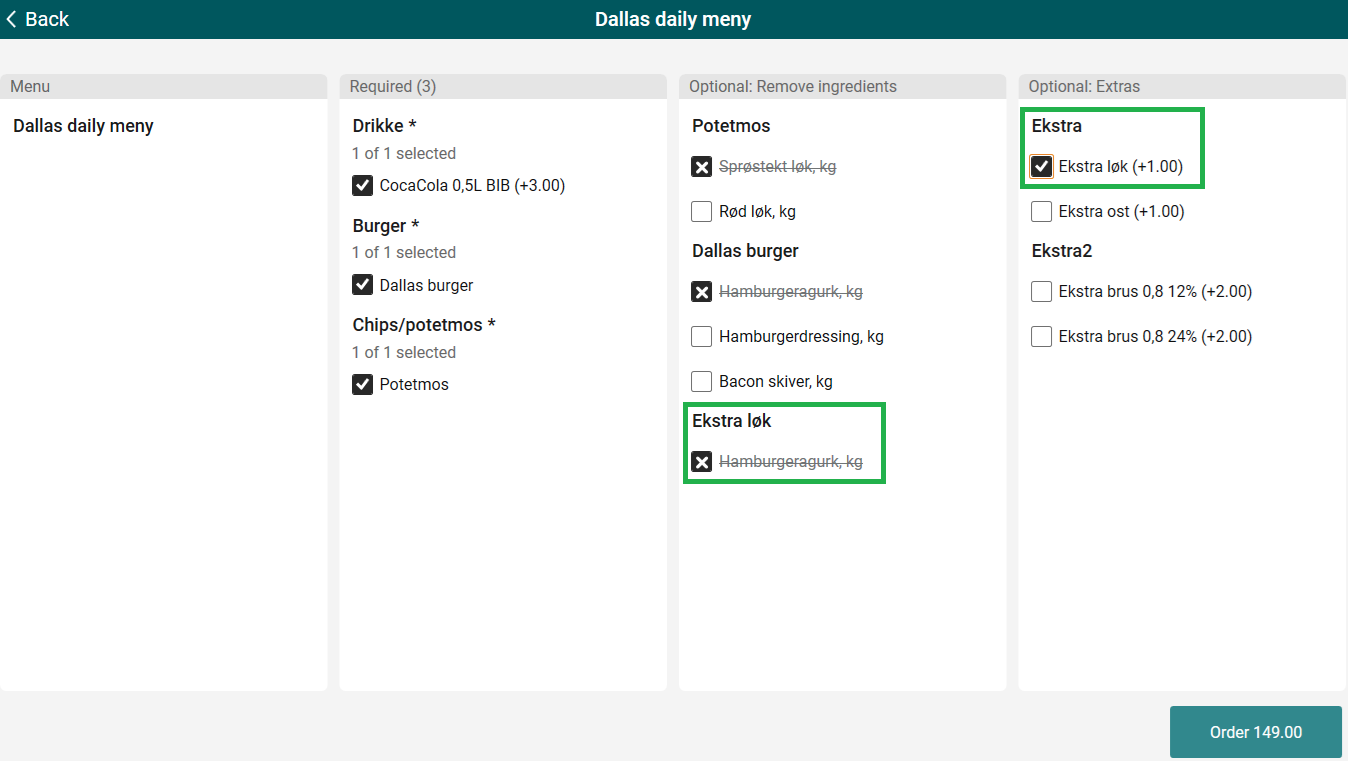
Convenience Menu Sales - handling of Extras
Handling of extras that can have ingredients removed has been added. Moreover, only the optional ingredients that were selected to be removed are being displayed after adding the menu sales item now.
Improvements POS
Mobile payments with automatic member discount (RTP-35499)
When a customer enters their phone number during mobile payment (Swish, Vipps, Walley), member discount, if any, is added to the receipt and the reduced total is sent to the payment provider. The customer is charged the correct discounted amount, and the receipt completes without creating a cash payout for the discount.
Epsilon offline payments (RTP-44595)
Epsilon issues with offline payments have been resolved: Epsilon is no longer called ‘Epsilot’ in dialogs with Swedish language. Moreover, messages in payment view when Epsilon is offline and the amount to pay back are correct now.
Deposit refund (PANT) calculation on receipts with coupon discounts (RTP-44808)
When a coupon discount applies to items that include a deposit refund (PANT), the receipt calculates the deposit refund based on the full item quantity. The deposit refund amount reflects the total deposit value for all applicable items, coupon discounts do not affect this calculation, and all deposit refund lines are visible on the receipt. The sum of the printed lines matches the subtotal and provides correct receipt information.
Store can not do order picking (RTP-45577)
The logic for setting order lines discount when editing active customer orders has been improved.
Thank to it picking orders is possible and not causing any problems.
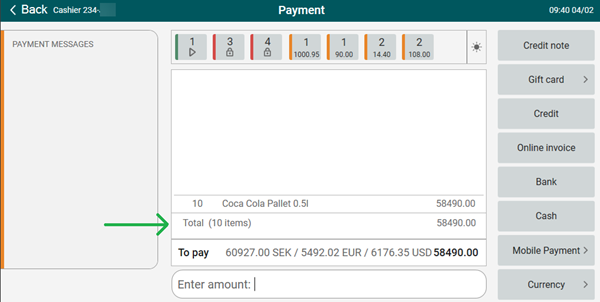
Payment view - item count (RTP-44889)
Value is being shown correctly in payment mode now: text (XX items) has been moved from the bottom row to the total row.
Receipt is not printed out (RTP-45483)
Fix in EG POS assures that receipts are printed automatically and triggering receipt copy is not needed every time sale is finished.
Duplicate receipts in Receipt Journal (RTP-45663)
Before, unfinished receipt was being sent twice to Receipt Journal - once on logout and again on the subsequent login when fetching unfinished receipts. Now, an unfinished receipt is sent on login only if it has not been previously sent.
Additionally, before the change, fetched unfinished receipt was no longer being marked as DELETED, which allowed the same unfinished receipt to be loaded repeatedly. This has been corrected to ensure proper receipt handling - unfinished receipt can be fetched only once.
Different logos on printed receipts (RTP-39188)
A completed transaction prints two receipts: a normal receipt and a voucher receipt. Each receipt shows its own logo. The normal receipt shows the Printer logo, and the voucher receipt shows the Voucher Logo for Epsilon. This makes it easy to see the difference between the two receipts.
Missing approval buttons in Surveillance screen (RTP-45213)
Approval buttons in Surveillance screen are available and can be used to confirm or decline customer's age.
Thanks to it, cashier doesn't have to go to the cash register to approve what customer is doing.
Missing translations (RTP-45183)
Fixed missing Finnish and Estonian translations for the Login screen and System details screen.
Improvements POS Server
Refunding member bonuses after cart cancellation (RTP-41672)
Bonuses are correctly refunded, even when the bonus point balance on the order is 0.
Thanks to it bonus refunds trigger reliably for all deleted customer orders, regardless of the bonus point amount.
Returning online orders in POS (RTP-45760)
Fixing the bug that preventing the cart getting FINISHED when line discount applied on line item with override price.
Thanks to it returns for online orders are possible from POS level.
EG POS v. 4.158.1
Released 2 February 2026
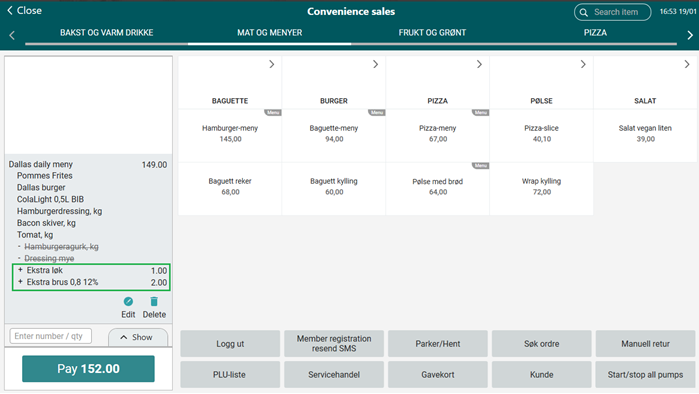
Convenience Menu sales
Extras for Convenience Menu sales item are being displayed inside of the menu while adding the item to the receipt.
Thanks to it it's obvious that extras were added as a part of a menu.
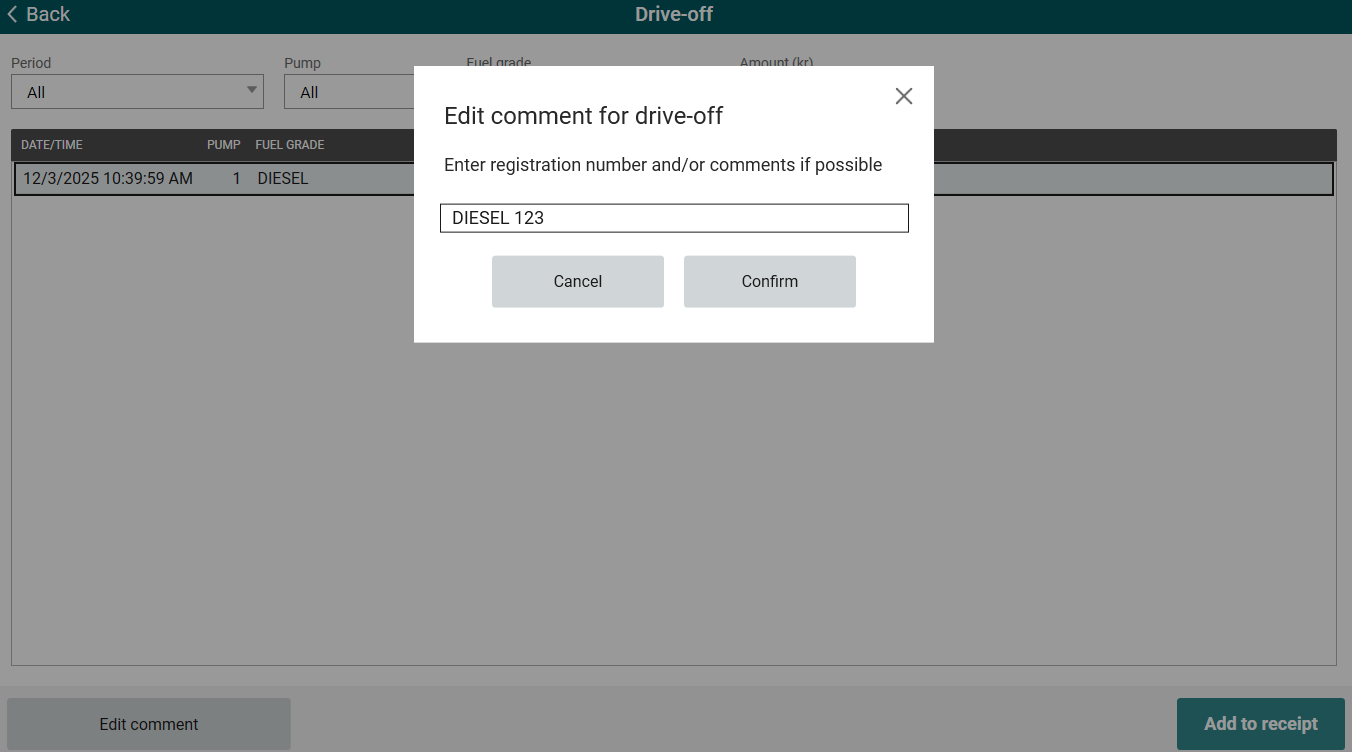
Fuel integration - Drive off comments
Updating comments on drive off functionality has been implemented.
Thanks to it the comment added earlier can be edited by the cashier.
Required: POS Master database - New dbo.usp_UpdateDriveOffComments procedure has been created.
Improvements POS
Delete selected ICoupon handling (RTP-44971)
The Delete selected function removes an ICoupon fully from the receipt. After deletion, the coupon is no longer treated as active or selected and can be searched for, selected, and added again without issues. This ensures that ICoupons behave consistently when they are removed from a receipt and allows normal reuse during the same transaction.
Clear message when a coupon is already used (RTP-42728)
EG POS now shows a clear message when a coupon is already used and cannot be redeemed. Earlier, the POS returned an “Unexpected error” when CouponService responded with code 422 for a coupon with no remaining uses. The POS now returns the specific reason from CouponService, helping staff understand why the coupon cannot be applied and improving the customer experience.
Returning receipts with iCoupon vouchers (RTP-43430)
Receipts that include iCoupon vouchers can be returned using the standard receipt return flow. When a finished receipt is collected and completed as a return, the system reverses items and tenders and voids all iCoupon vouchers used on the original sale.
Loyalty coupons not redeeming (RTP-45135)
Coupons from the Loyalty integration work correctly in EG POS during sales. The sale completes successfully after payment, and the coupon is redeemed as expected.
Creating a new customer in POS (RTP-44292)
When creating a new customer in POS, the ‘ShowPricesExclusiveVAT’ field is set by default based on the value configured in the “CustomerViewSetupWhenCustomer” parameter.
This ensures that the customer is created in accordance with the predefined configuration requirements.
Fuel Integration - Adding drive-off to active receipt (RTP-43963)
Active receipt is no longer being deleted after adding a drive-off.
Thanks to it cashier can proceed with the sale, without the need to re-add everything.
Fuel Panel improvements (RTP-44963)
Improvements for Fuel Panel have been implemented:
"Not available" text on pump tiles is being hidden when Tokheim fuel configuration is used. Fusion fuel configuration still has this text displayed.
Pump status is being refreshed in the pump dialog, making the status of the pump clear for the cashier.
Crediting invoice in Chain Web (RTP-44611)
Invoices could not be credited because of an invalid Price Type ENUM value in the POSLog.xml.
To prevent this issue from happening again, any unknown value will be replaced with the default value, allowing invoices to be credited correctly in Chain Web.
Improved handling of member search requests in POS (RTP-45101)
Member search in POS has been improved to handle multiple search attempts more smoothly.
Previously, POS could trigger multiple member lookup requests and log warning or exception messages even when the member was successfully found and added to the receipt. This has now been improved so that member searches no longer generate unnecessary exceptions in the logs, while the existing search behavior remains unchanged for the cashier.
Scanning member QR code (RTP-43415)
Scanning member QR code in item search dialog no longer causes database offline errors.
Thanks to it no error is confusing cashiers anymore and scanning member QR codes is allowed in item search dialog.
Customer order view shows only active orders (RTP-31633)
The POS customer order view shows only active orders. Orders that are delivered and completed are removed from the list. This gives a clear and accurate overview of orders that still require action and helps staff focus on current work without confusion.
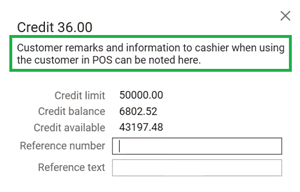
Customer information - remarks (RTP-45075)
Remarks are shown when paying with invoice for a customer order.
Thanks to it cashier is not missing an important information.
Vipps payment works when buying gift cards (RTP-43548)
EG POS updates the Vipps flow so gift cards can be paid with Vipps without failing. Earlier, the payment stopped with a “payment failed” message when Vipps was used for gift cards, while other purchases worked as expected. The Vipps process now completes normally, allowing gift cards to be paid the same way as other items.
Price check not allowed dialog (RTP-45351)
Norwegian translations for “PriceCheckNotAllowed “dialog have been added back.
Thanks to it message is easy to understand.
Item prices fields (RTP-45162)
Search item (ItemInfoBoxConfig parameter) and Item information (ItemInfoFullscreenConfig parameter) views contain all item prices fields possible to configure now - NormalPrice, CampaignPrice, PredefinedCampaignPrice and MemberPrice.
Online return of discounted item (RTP-42143)
Discounted return items reflect the actual paid price on online return receipts.
Customers receive a refund for the exact amount paid at purchase, rather than the item’s current or regular price.
Online return of web orders (RTP-43192)
Exception in POS no longer occurs while doing online return of web orders.
Thanks to it no misleading information is shown.
Online return - fixed price item (RTP-43132)
Original price is no longer displayed when searching for receipt with discounted fixed price item. Thanks to it when receipt with fixed price item was fetched, no discount is displayed and fixed price replaces the original price.
Online return - fixed price item (RTP-43237)
Discount is no longer shown in customer display during online return of fixed price item.
Thanks to it customer is not confused about the actual price and the total he needs to pay.
Stable behavior when opening PLU-board (RTP-38755)
EG POS improves handling of the PLU-board to prevent the POS from becoming unresponsive.
Earlier, clicking the PLU-board could cause the POS to stop responding, blocking all input and requiring support or a restart. The PLU-board now opens and closes correctly, ensuring the POS remains responsive and usable during normal operation.
PLU Lists sorting when 'Category' appearance is used (RTP-44169)
The order of PLU lists displayed in the POS - when using the “Category” appearance - should follow the order defined in POS Configuration. This behavior also applies to the Vensafe PLU list.
Item's lowest price feature issues (RTP-42405)
Issues with CartResponse when campaign price is being applied and lowest price is set on DiscountGroup have been resolved. Thanks to it, these are the correct discount rules:
Item's lowest price equals original price (within last 30 days):
Discount = OriginalPrice − CampaignPriceNormalPrice > LowestPrice > CampaignPrice:
Discount = LowestPrice − CampaignPriceNormalPrice > CampaignPrice > LowestPrice:
The campaign price becomes the selling price, and no discount is shown.
Receipts' sequence numbers (RTP-44306)
Receipts with sequence number '-1' are no longer created when delivering prepaid web orders from POS.
Thanks to it the printed receipt doesn't create confusion about the order and the Receipt Journal reflects the delivery of the items to the customer.
Receipt printing (RTP-44347)
A receipt that includes an item return prints automatically. This behavior overrules any configuration that disables automatic receipt printing. A store copy also prints automatically, so the customer can sign it as a part of the return process.
Signature handling with SignoTec signature pad (RTP-44313)
When a SignoTec signature pad is configured, customers sign digitally whenever the POS requires a signature. If the connection to the signature pad is temporarily lost, EG POS automatically restores the connection. During the connection loss, a message informs the user that the receipt requires a manual signature on the paper receipt. This ensures that the sale can continue without interruption and that the required signature is still collected.
NorwegianTollQuotaGroups parameter changes (RTP-45215)
“NorwegianTollQuotaGroups” parameter in POS accepts both ‘dot’ and ‘comma’ as a decimal separator, so that quota in POS is correctly calculated. This decimal separator change only affects this one parameter. Other are unchanged.
Full HD resolution - Convenience mode (RTP-44633)
Fixes to Full HD resolution have been implemented: text on buttons is correctly adjusted to the button's length. Text is wrapped to the second line only when text is actually long enough.
Thanks to it texts is displayed in one line when there is enough space and it's easier for cashier to use Full HD Convenience mode.
Number of reconnection attempts in Surveillance screen (RTP-45107)
After Internet connection is lost in Surveillance screen every 5min POS has 3 attempts to re-connect. If the 3rd attempt fails, it's logged as an Error (first two attempts are logged as Information).
Thanks to it number of Errors logged is not overwhelming.
Sending messages from Self-service to Surveillance POS after earlier connection problem (RTP-44632)
Before, when cash register lost connection with Internet, Surveillance screen stopped receiving messages and only restart could help to solve the issue.
Now, a health check is triggered every minute to initialize reconnection automatically, without the need to close and re-open Surveillance screen.
Handling items not part of the original receipt during Visual Control (RTP-44483)
During Visual Control in self check-out, the system handles scanned items that are not part of the original receipt without causing an application error.
If a cashier scans an item with an invalid or unwanted barcode, a message appears explaining that the item does not belong to the original transaction and must be removed before confirming the control.
This prevents system exceptions and guides the cashier to complete the control in a correct and safe way.
Cash settlement receipt (RTP-42962)
The cash-settlement process prints only one receipt and stores this receipt in the journal. This keeps the flow clear and prevents unnecessary paper use.
Shift settlement "big difference" message (RTP-42779)
The logic for checking the balance has been changed so that only tender types configured in the BalanceTenderTypes parameter are taken into account.
Thanks to it shift settlement "big difference" message does not appear on differences less than 50 even though the parameter "Balance Variance" is set to over 50.
Automatic shift close/start configuration (RTP-44543)
New parameter “AutomaticShiftCloseTimeSettings” for automatic shift close/start has been implemented. Configuration for automatic shift closing. Configure the time when closing should happen as well as how many minutes before and after the automatic shift close should manual closing be disabled.
Default value:

Thanks to it customer will be able to customize when automatic shift close/start is happening.
Protection of social security numbers in LRSLog (RTP-44704)
The LRSLog records social security numbers as (REDACTED) instead of plain text. This protects highly sensitive personal data and supports GDPR and data protection requirements.
POSLog records were being rejected during reporting (RTP-44697)
POSLog records were being rejected during reporting processing due to failures in the stored procedure, caused by changes to the store number and cash register number. This issue has been resolved by locking the store number and adding validation to ensure that the selected cash register is active for the corresponding store.
POS Configuration - PayTerminalType options (RTP-45153)
"AeroNexo" has been added as an option to configure in parameters using “PayTerminalType” as parameter type.
Thanks to it a new bank terminal integration will be possible to use in POS.
Improvements POS Server
Handling of exception when EAN was not found (RTP-45083)
Fixed an issue where an exception was thrown when an EAN was not found. Invalid items are returned in the response instead of causing an error.
Improved receipt flow to Journal Service (RTP-44037)
Finished receipts now will be processed journal service quickly.
EG POS v. 4.158.0
Released 15 December 2025
Automatic application restart in EG POS
The 'PayTerminalUpdateTime' parameter defines a time when EG POS performs an automatic restart of the application. Restart by this parameter is triggered only if a restart hasn't already been performed earlier the same date. The restart lets EG POS reconnect to the integrated pay terminal, which can be required if the terminal has been restarted by the external provider at an earlier time.
The restart triggers at the defined time when EG POS is idle. When running in self-service mode, EG POS switches to cashier mode automatically before the restart takes place.
POS Configuration
New parameter:
PayTerminalUpdateTime - (default value 'disabled') - specify a time on format 'HH:MM' for when to restart EG POS automatically every day (if not already restarted earlier the same date).
Improvements POS
Bank - Handling unrelated errors after a successful pay terminal transaction (RTP-43366)
During a pay terminal transaction EG POS processes error messages related to the ongoing transaction. Late error callbacks that may appear immediately after the payment was successful are ignored. This ensures the receipt completes and allows customers in self-service to finish their purchase without interruption.
Bonus coupons are not being applied twice (RTP-40341)
In case member with bonus coupons was added and then removed, coupons are also removed from the sale, so when member is re-added, the coupons are not applied twice.
Thanks to it the correct discount applies.
Convenience Menu Sales - editing menu items (RTP-28166)
Issues with editing and deleting menu items have been resolved. When editing an item, the view now matches what it looked like before the item was added to the receipt, and deleting items no longer produces any errors.
Coupon scanning (RTP-44348)
Scanning a coupon barcode triggers a check against the values in the “CouponPrefixes” parameter. If the prefix matches, the system identifies the correct coupon type and handles it according to that type.
Fuel Integration - Pre-payment dialog (RTP-42444)
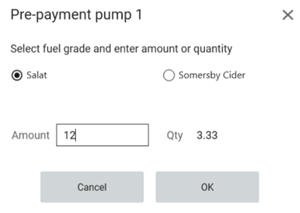
Pump pre-payment dialog has been changed: alignments have been fixed and quantity field is read-only.
Amount field can be edited and quantity is calculated and displayed based on it.
Click & Collect orders SMS (RTP-42993)
SMS are now always sent from POS when completing order.
Thanks to it is easy to notify customer about order being completed.
Versions required (minimum)
Chain Web versions: 2.10.420, 2.10.383.
POS Services version: 7.97.126.0.
Click & Collect orders with coupons (RTP-42871)
When coupon was added to the Click & Collect order, during picking order it is present as well.
It prevents from price becoming higher than expected during pickup.
Before deploying to production, the parameter must be reverted to its original value:
“AllowSubtotalDiscountWhenPayingCustomerOrder” = True.
This change must be performed by a consultant!
Once the parameter has been updated, all POS terminals must be restarted for the change to take effect.
Item description in Price lookup view (RTP-43584)
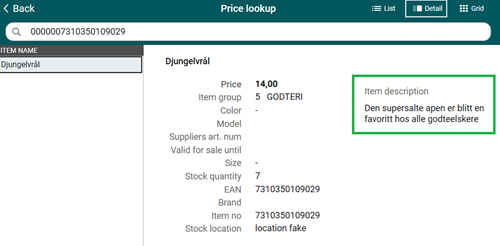
When looking up a price, if an item had no image, its description would blink and shift up and down due to the view constantly refreshing.
After the improvements, the item description remains stable, making it easy to read without any distraction.
Manual return is not added to receipt after reason code dialog is cancelled (RTP-43860)
POS stops the manual return when the reason code or action code dialog is cancelled. A message appears saying “Action Code is required”, guiding the cashier to select a valid action code before the return can be added to the receipt.
The price shown in "Specify quantity" dialog in self-service (RTP-44055)
The logic of displaying prices in the “Specify quantity” dialog has been improved.
Thanks to it customer sees the actual price he is going to pay for the item, not the price from the planned campaign (not yet active).
Scanning during random control (RTP-43992)
Both the main scanner and the handheld scanner use the same validation rules during control that apply during normal sales scanning. This ensures that items already added to the receipt during sale are not marked as deviations during random control, no matter which scanner is used.
Improved visibility for used Voyado coupons (RTP-37420)
Enhanced the Voyado coupon flow so the POS can now identify where a coupon was previously redeemed, such as the receipt ID or customer order number. This helps users understand why a coupon cannot be used again and reduces checkout errors, without affecting the normal cashier workflow.
Automatic shift close in POS (RTP-43758)
The logic that handles retrying the shift-closing process when an error occurs has been improved, ensuring that POS consistently performs additional retries and automatically closes the shift when needed.