EG POS v. 4.160.10
Released 23 October 2026
Improvement POS
Support for Baxi.Net version 1.14.3.1790 in EG POS (RTP-50343)
EG POS supports Baxi.Net version 1.14.3.1790 without requiring changes in EG POS. No change in configuration is necessary for this version compared to previous approved version 1.14.0.1762.
Relevant existing parameter in POS Configuration:
'PayTerminalType' = 'BaxiDotNet'
Improvement POS Server
Zero-value order lines complete customer orders paid with Klarna (RTP-53873)
When a customer order contains a zero-value line, such as a free shipping line, and that line is delivered after the other items are paid, the line is marked as paid without an additional charge. The order is captured in Kustom once all lines are delivered.
Payment jobs keep each order separate (RTP-55724)
Payment jobs for customer orders, such as Klarna captures, work only on the cart and payment of their own order, also when many jobs wait at the same time. A payment job that has completed or permanently failed is not started again, and the payment updater does not start a new run while the previous run is still working, so each order receives one capture for its own items and amount.
EG POS v. 4.160.9
Released 25 August 2026
Invoice payment scanner input (RTP-50150)
Previously, the invoice payment screen stopped accepting barcode scanner input for stores using the additional credit payment fields setup, so cashiers could not scan a customer's ID during an invoice payment.
This has been corrected so that scanner input works again in the invoice payment screen for these stores.
Split payment rounding error (RTP-50939)
Previously, completing a card payment before all items were scanned could cause the receipt's rounding adjustment to incorrectly show the value of items added afterward, instead of a normal small correction.
This has been corrected so that receipts now always show the correct rounding adjustment, regardless of when payments are processed during the transaction.
EG POS stability improvement (RTP-49965)
EG POS remains stable during the trading day by preventing memory leaks in PLU board, receipt, and payment screen buttons. Threading and customer-screen errors are handled safely to prevent the till from freezing or crashing.
EG POS v. 4.160.8
Released 12 August 2026
Deleting a customer order assigns a valid receipt number (RTP-50754)
Deleting a customer order from an idle POS could send a receipt to the journal without a proper receipt number, breaking the digital signature chain for that store's receipts. Deleting a customer order now always assigns a valid, sequential receipt number, so the receipt journal and digital signature chain stay intact and no manual correction is needed.
Correct picture shown at the top of the customer screen after logout/login (RTP-51568)
The correct picture (from the “CustomerViewMedia” parameter) is now shown instead of doubling the picture from “CustomerViewMedia2” parameter at the top of the customer screen after logging out and back in.
Thanks to it correct images are displayed and customer is not confused.
Price check terminal member price (RTP-50814)
Previously, when scanning an item on a price check terminal, the terminal could display a member campaign price that had not started yet, alongside the current price.
This has been corrected so that price check terminals now only show currently active member campaign prices.
Card payments now wait for member lookup to finish before sending the amount to pay (RTP-50813)
Looking up a member right as payment started could send the wrong (undiscounted) amount to the card terminal, followed by an unexpected cash refund. POS now waits for the member lookup to finish first, so the correct discounted amount is always charged.
Sales statistics accuracy (RTP-49626)
Previously, sales statistics in POS frequently displayed 0 for sales amounts, net sales, and margins despite actual sales being completed.
This has been corrected so that sales statistics now show accurate per-cashier figures and remain consistent after login across multiple registers.
POS crash on out of memory (RTP-48524)
Previously, the application could run out of memory during normal use — such as completing a card payment — causing EG POS to crash and requiring a manual restart.
This has been corrected by fixing memory leaks in the dialog handling so that the application now completes transactions without unexpected shutdowns.
EG POS v. 4.160.7
Released 9 June 2026
Automatic Walley refund on return
It was not previously possible to have the original Walley payment method
pre-selected automatically when processing an online return.
Users can now navigate to the tender view during a Walley-paid return and have
Walley automatically set as the default refund method, streamlining the return process.
Improvements POS
Baxi.Net pay terminal connection handling via ethernet (RTP-44142)
Baxi.Net pay terminals connected to POS via ethernet automatically attempt to reconnect if the connection is lost before or during a transaction.
If the connection drops, the cashier restarts the payment by pressing the Bank button in the POS. This may require more than one attempt to complete the transaction.
In rare cases, the terminal requires a restart to restore the network connection. A message in the POS informs when this may be needed. After restarting the terminal, pressing the Bank button should complete the transaction. The POS connection to the terminal is restored without requiring a POS restart.
Relevant exiting parameters in POS Configuration:
'PayTerminalType' = 'BaxiDotNet'
Receipt gets stuck in POS when coupon redemption fails (RTP-47591)
Coupon redemptions could be silently lost when the coupon service timed out, even with offline retry enabled. Timed-out redemptions are now queued for retry, ensuring no coupon usage is lost.
Credit note receipt ID format for redemption (RTP-47742)
The “Receipt ID” column shows the full receipt number (Store number – Cashier number – Sequence number) for both issued and redeemed credit notes. This makes it easier to recognize, track, and check credit notes across transactions.
Scanning already used deposit refund tickets in POS (RTP-42981)
Scanning a deposit refund ticket that is already used registers as an informational log entry. This shows that the situation is valid and helps avoid treating it as an error in the POS system.
Click & Collect order cancellation with coupons (RTP-49373)
Previously, cancelling a Click & Collect order that contained coupons in POS did not update the order status in Chain Web, leaving it active and requiring store staff to manually cancel it there as well.
This has been corrected so that cancelling such orders in POS now properly reflects the cancellation in Chain Web, eliminating the need for manual intervention.
Click & Collect order cancellation (RTP-47899)
Previously, cancelling a Click & Collect order in EG POS could fail with an error when the order contained coupons missing ID-tag and ‘IsCommitted’ check is applied, forcing store staff to cancel the order manually in Chain Web instead.
This has been corrected so that Click & Collect orders with coupons can be cancelled directly in EG POS without errors.
Returns of customer orders with campaign discounts now refund the original purchase price (RTP-48377)
When returning items from a customer order that was sold with a campaign discount, the POS used the item's current price instead of the price the customer originally paid, producing an incorrect refund amount. Returns now correctly use the original purchase price, so refunds match what the customer paid at the time of sale and cashiers no longer need to verify or manually adjust the refund amount.
Scheduled restart or shutdown of POS (RTP-40367)
A scheduled restart or shutdown of the POS, such as during night time, registers as an informational log entry. This indicates that the activity is expected and prevents it from being treated as an error in the POS system.
Improvements POS Server
Dummy customer data overwrite protection (RTP-49261)
Previously, receipts could display real customer names and phone numbers in the ItemSale customer fields because the system did not consistently block all types of customer update operations from overwriting dummy customer data.
This has been corrected so that both insert and update operations are now properly guarded, ensuring receipts always display the configured dummy customer information instead of real customer data.
POS Services - Return validation for price-adjusted items (RTP-47647)
Previously, attempting to return items that had received a partial price-adjustment refund was incorrectly blocked by the system, even when the return was valid.
This has been corrected so that the return validation now accurately evaluates each item individually, allowing legitimate returns to proceed as expected.
Required:
POS Services 7.98.132.0
EG POS v. 4.160.6
Released 10 April 2026
Improvements POS
Click & Collect order confirmation missing price (RTP-44400)
Previously, Click & Collect order confirmations could not be printed when an order contained items missing a Normal price in EG POS, causing the order to get stuck and repeatedly prompt for printing.
This has been corrected so that order confirmations now can be generated successfully even when Normal price data is absent, provided the ‘IncludeCustomerOrderInPriceCalculation’ setting is enabled.
Expired dispatch order blocking cashier (RTP-47650)
Previously, when a delivered web order was automatically removed from the prepaid order view due to expiration, it was incorrectly retrieved into the sale window as an active receipt, blocking the cashier from logging out or voiding the transaction.
This has been corrected so that expired and already-delivered web orders are no longer loaded into the sale window, allowing cashiers to proceed normally.
Dispatch order delivery method (RTP-47678)
Previously, orders could lose their delivery method after being processed by a second workstation, making it impossible to pick and fulfill those orders in the InStore App.
This has been corrected so that the delivery method is now preserved correctly throughout the order lifecycle.
Improvement POS Server
Gift card capture on partial delivery (RTP-45854)
Previously, when an order was paid with a gift card and Klarna and then partially delivered, the payment job attempted to capture the full gift card amount regardless of the delivered lines, causing the job to fail.
This has been corrected so that the gift card capture amount is correctly calculated based on the delivered lines only, allowing partial deliveries to complete successfully.
EG POS v. 4.160.5
Released 1 April 2026
Dispatch orders - delivery suggestions (RTP-47513)
Previously, when creating a Web Order in POS with items out of stock locally, the ordering store was missing from the list of fulfilment candidates sent to the dispatch service, preventing it from being selected for PAC.CW orders.
This has been corrected so that the ordering store is now correctly included in the delivery candidates list and appears as a selectable fulfilment option.
Cashier login performance (RTP-42984)
Recent cashier logins are not shown. This avoids unnecessary requests, reduces delays, and keeps the log clear by preventing unnecessary error entries.
Fix EG POS user interface hang caused by processing expired picking orders from all stores (RTP-47547)
The POS terminal was blocking its user interface thread for extended periods during idle cleanup of expired picking orders.
A missing store number filter caused each terminal to process and delete expired orders for all stores in the chain instead of only its own, resulting in hundreds of sequential database calls.
The fix restores the local store filter, so cleanup only runs for orders belonging to the terminal's own store.
EG POS v. 4.160.4
Released 27 March 2026
Improvements POS
ClearOn coupon handling (RTP-46302)
Each scanned ClearOn coupon sends a request with a unique sequence number, even when coupons are scanned in quick succession. This ensures each coupon is processed correctly after payment, so the correct discounts are applied to the purchase.
Relevant existing parameters in POS Configuration:
'CouponProvider' = 'KI'
Cloud Credit note information (RTP-46552)
Cloud credit notes show the Receipt ID instead of the credit note number. The transactions also displays the cashier number and source fields. This ensures the credit note contains the correct reference and complete transaction information for customers.
Missing translation on receipt (RTP-46898)
Improvements related to missing Finnish and Estonian translations for the receipt.
Improvement POS Server
Dispatch Order return via POS WCF now completes correctly with consistent user interface and backend state (RTP-47395)
When processing a return for a Dispatch Order through POS WCF, the return now completes successfully and the user interface correctly reflects the updated return status. Previously, users would see an error
message even though the refund was already processed in Klarna and a Credit Note email was sent to the customer - causing confusion and risk of duplicate returns. This has now been resolved and the system
behaves consistently end to end.
EG POS v. 4.160.3
Released 20 March 2026
Klarna refund with replacement item (RTP-47135)
Previously, performing a return with a replacement item for a web order paid with Klarna caused the refund to fail with an "item already refunded" error, even though no refund had been processed.
This has been corrected so that Klarna refunds and returns from Chain Web now complete successfully, with the correct net amount sent to Klarna.
Updated Klarna API connection for Kustom partner support (RTP-46000)
The Klarna payment integration has been updated to support Klarna’s new Kustom partner API connection. A new parameter ““KlarnaKustomPartnerId has been added and related configuration updates have been made in POS, POS Services, POS Master database, and Chain Web Backoffice.
These improvements ensure the POS continues to connect correctly with Klarna and process Klarna payments without interruption.
Any Store using the integration with Klarna must be upgraded by the end of March 2026. If not, Klarna won't work from the month of April !
New POS Services version 7.97.130 is a needed!
Reminder SMS sent before order pickup (RTP-46688)
Customers with a Reserve in Store order were receiving a pickup reminder SMS before their order had actually been picked, causing them to arrive at the store before it was ready.
The issue has been fixed so that the reminder SMS is only sent once the picking status is set to "Completed".
EG POS v. 4.160.2
Released 11 March 2026
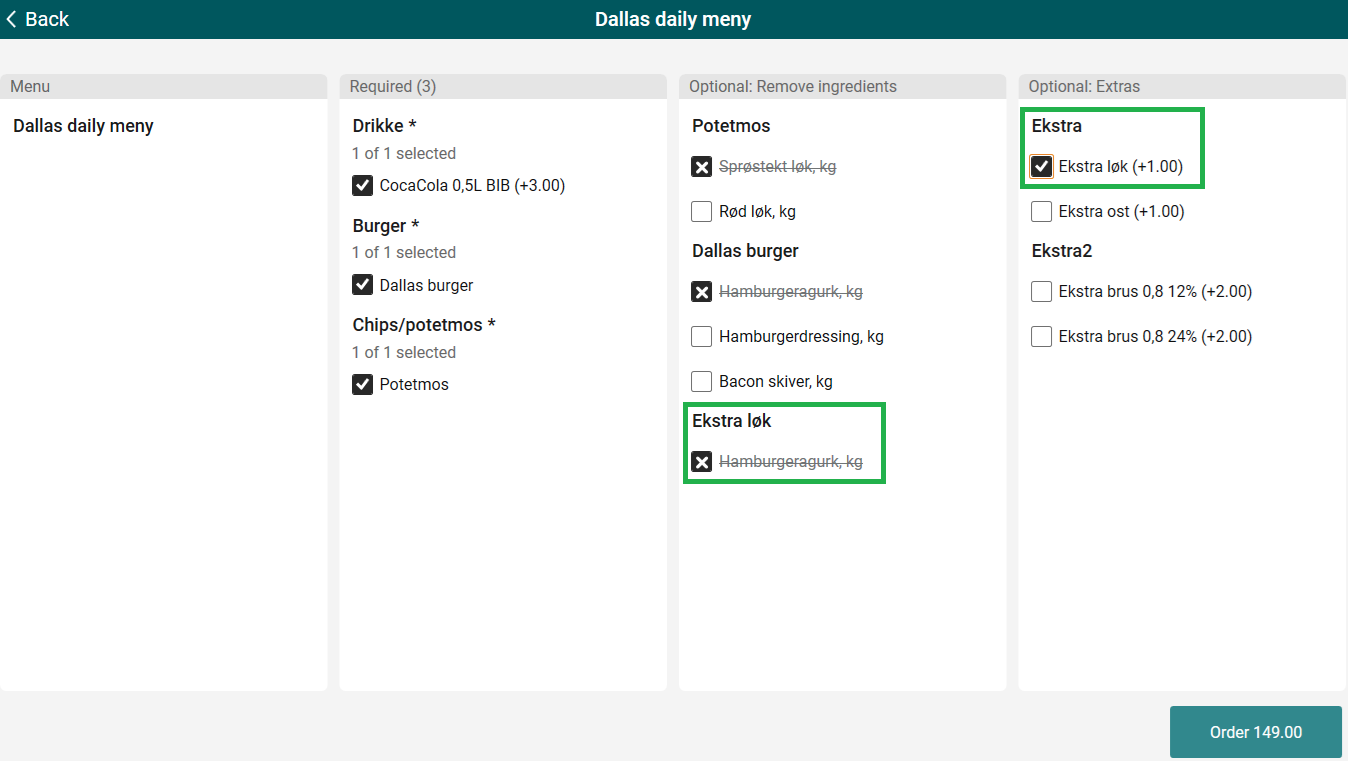
Convenience menu sales - handling of Extras
Handling of extras that can have ingredients removed has been added. Moreover, only the optional ingredients that were selected to be removed are being displayed after adding the menu sales item now.
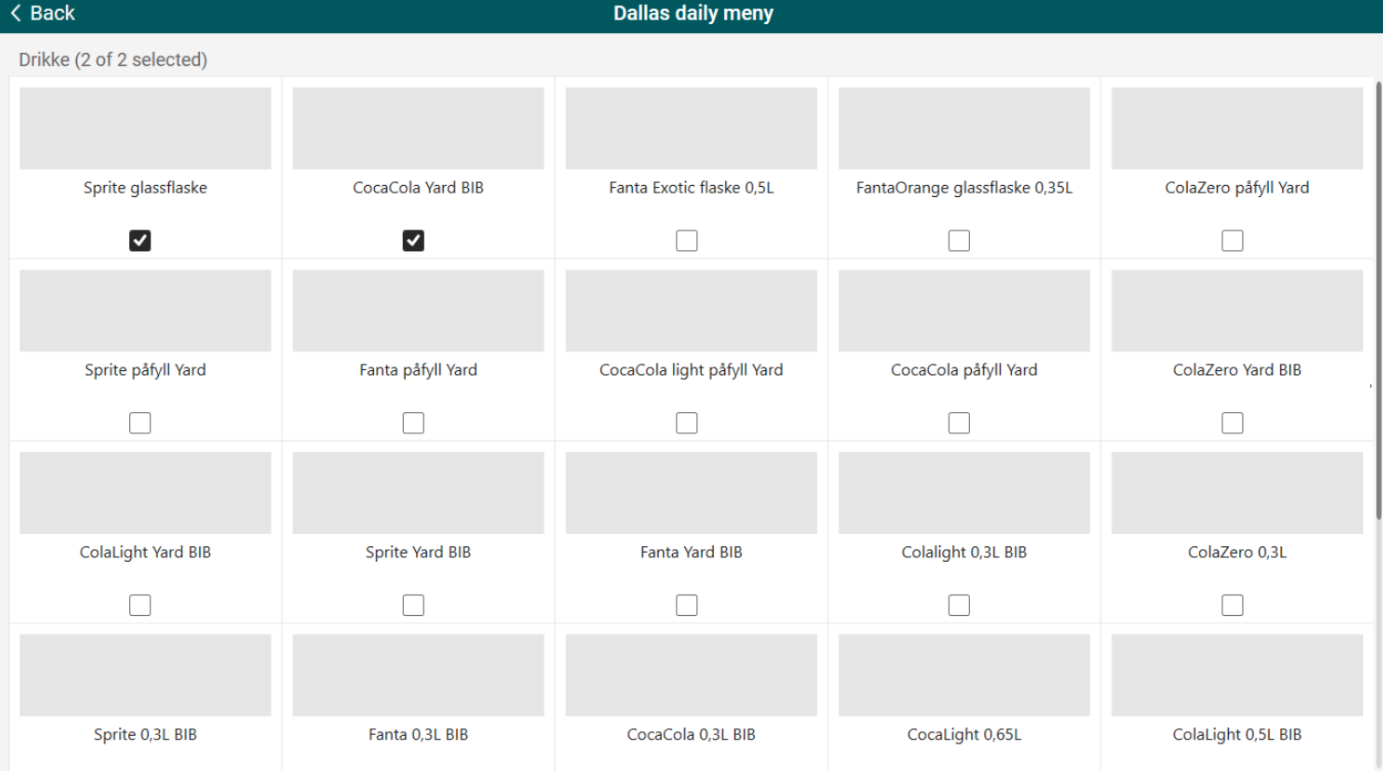
Convenience menu sales - multi-select in view all dialog
Multi‑select in the "View all" dialog is supported. Pre‑selected items appear first, and the counter updates as you make changes. Once all required items are chosen, the button becomes "Edit selection" to reopen the dialog with your current choices. Removing an item reverts the button to "View all." Items without images display with proper alignment and text truncation.
Integration with AeraNexo pay terminal solution from Aera
EG POS supports the AeraNexo pay terminal solution from Aera. The solution works with pay terminals such as Ingenico RX-5000 and allows the terminal to connect to the POS using Ethernet, Wi-Fi, or USB.
The terminal connection is configured directly on the terminal and works together with the Aera Integration Component (AIC), which runs as a separate service and handles communication between the POS and the terminal.
When using a USB connection, the POS shares its network connection with the terminal. This allows the terminal to communicate correctly through the AIC service and ensures stable payment processing.
Configuration of the terminal communication follows Aera’s own documentation.
POS Configuration
Affected exiting parameter:
'PayTerminalType' must be set to 'AeraNexo'
Coopay QR registration notification in EG POS
When a customer scans the member app QR code in EG POS, and has activated Coopay as payment method, the system may send a confirmation notification to the customer’s app (configurable). The notification assures the customer that the QR code is registered for the transaction. The POS screen does not display this confirmation, but log files in both POS and POS Services show that the notification is sent to GiantLeap.
Configuration
POS Configuration:
New parameter:
'CoopayMemberNotificationEnabled' (default 'False') - when activated, a notification is sent to GiantLeap when Coop member app QR is scanned AND is activated for payment.
POS Services Configuration:
New entries needed:
<add key="CoopayAppMiddleware_Url" value="" />
<add key="CoopayAppMiddleware_Username" value="" />
<add key="CoopayAppMiddleware_Password" value="" />
Improvements POS
Clearer payment messages in EG POS (AeraNexo terminal) (RTP-45456)
Payment messages from the AeraNexo pay terminal, shown in EG POS, use clearer and more user-friendly language in Norwegian. Technical terms such as “Host” are replaced with text that is easier to understand.
This makes the payment process easier to follow and helps users understand what happens during the transaction.
Relevant existing parameter in POS Configuration:
'PayTerminalType' = 'AeraNexo'
Clearer payment messages in EG POS (AeraNexo terminal) (RTP-46345)
EG POS cancels a reconciliation attempt if the payment terminal refuses the request. This keeps the POS available for a new reconciliation attempt or for other operations.
The existing parameter 'BankReceiveTimeOutInSeconds' applies to the AeraNexo payment terminal integration. This aligns the timeout handling with other supported payment terminal solutions and provides consistent behavior when waiting for responses from the terminal.
The integration handles situations where the AeraNexo WebSocket connection drops between terminal login and the first payment attempt. Improved communication between the POS and the terminal helps ensure a stable payment flow.
Relevant exiting parameters in POS Configuration:
'PayTerminalType' = 'AeraNexo'
'BankReceiveTimeoutInSeconds' (default 120) - the number of seconds before POS will cancel an operation in case the terminal never responds.
Bonus check amount mapping and display (RTP-37603)
Bonus check details populate in the member header details and in the coupon tab.
By design, the bonus amount shown in the member header is always set to 0, as the integration does not support tracking a bonus balance.
In the member view, the bonus check is calculated by summing the value amounts returned from Voyado responses.
Convenience menu sales - Ingredients in POSLog (RTP-45919)
Ingredients from Convenience menu sales items are being saved in POSLog now.
Thanks to it these details can be used in Inventory.
Coupons used in a canceled purchase remain active in the loyalty app (RTP-45570)
When a customer uses a coupon in the loyalty app and cancels the purchase, the coupon stays active and available for later use. This applies to coupons that give free items and other coupon types. This ensures that customers do not lose coupons when a transaction is not completed.
Coupon redemption via retry shows complete information (RTP-43197)
When a coupon is redeemed after a temporary connection issue with the coupon service, the system registers the coupon with complete information in Coupon Management.
The fields “Redeemed by” and “Receipt ID” display the correct member and receipt details, even when the coupon is committed through the automatic retry process.
This ensures accurate documentation of who redeems the coupon and links the coupon to the correct receipt. It supports correct follow-up, reporting, and audit of coupon usage.
Member and discount handling improved during return and sale (RTP-45248)
Earlier, when doing a return and sale on the same receipt, entering a phone number could replace the existing member and remove the discounts. This also caused the receipt to show the discount as rounding instead of the correct discount.
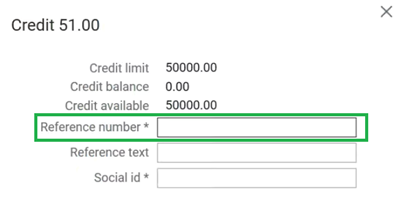
Credit payment dialog (RTP-44382)
Customer with ‘forcerefnum’ flag in database triggers reference number field to be required in credit payment dialog now.
Thanks to it cashier cannot press Enter until all required information is filled.
Mobile payments with automatic member discount (RTP-35499)
When a customer enters their phone number during mobile payment (Swish, Vipps, Walley), member discount, if any, is added to the receipt and the reduced total is sent to the payment provider. The customer is charged the correct discounted amount, and the receipt completes without creating a cash payout for the discount.
This has now been improved. The POS keeps the same member and loyalty information, updates only the phone number when needed, and shows the correct discount on the receipt.
Printing out Epsilon vouchers (RTP-46429)
Multiple vouchers are no longer being printed out after Epsilon is being reinitialized.
Thanks to it printer doesn't have to stopped manually.
Epsilon offline payments (RTP-44595)
Epsilon issues with offline payments have been resolved: Epsilon is no longer called ‘Epsilot’ in dialogs with Swedish language. Moreover, messages in payment view when Epsilon is offline and the amount to pay back are correct now.
Electronic gift cards (eSale) – MBXP (RTP-44720)
Electronic gift cards (eSale) validated by MBXP are added automatically as a tender line when moving from the Sale page to the Payment page in self-service mode.
The tender line cannot be deleted after it is added. MBXP does not support cancellation of redeemed gift cards, which means the redeemed amount must remain on the receipt.
Improved logging for gift card transactions (RTP-44401)
The POS provides more detailed logging for successful gift card transactions. This makes it easier to follow each step of the gift card process and supports troubleshooting if questions arise later.
The log connects the gift card scan, authorization, and capture. It includes the gift card ID and the related amounts, giving a clear overview of the full transaction flow from scan to completed payment.
Clear Message for scanning an already registered Gift card (RTP-44404)
When a gift card is scanned more than once in the same sale, the POS [SCO] shows a clear message that the gift card is already added.
The system checks internally if the gift card is already registered in the sale. This avoids an incorrect “insufficient funds” message and gives the customer a clear explanation.
If the existing gift card line is voided, the same gift card can be scanned again.
Member search and add to sale – Sweden and Estonia (RTP-45419)
Searching for members in Sweden and Estonia works without errors. Member details display correctly, and the member can be added to the sale. This supports a smooth checkout process and ensures purchases link to the correct member account.
Click & Collect orders - customer info (RTP-46372)
The option to overwrite dummy customer data has been disabled.
This prevents customer information from being accidentally modified, which could lead to data inconsistencies and information being sent to the wrong people.
Store can not do order picking (RTP-45577)
The logic for setting order lines discount when editing active customer orders has been improved.
Thank to it picking orders is possible and not causing any problems.
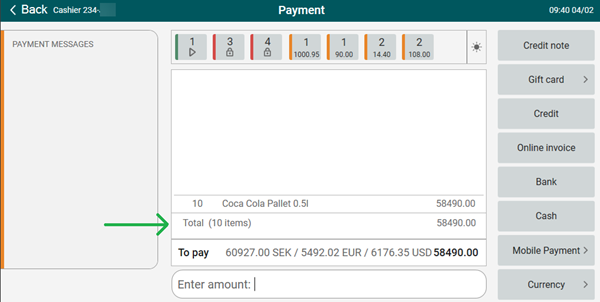
Payment view - item count (RTP-44889)
Value is being shown correctly in payment mode now: text (XX items) has been moved from the bottom row to the total row.
PLU List member price sync (RTP-45778)
PLU List pricing now stays fully in sync with the current member status across both cashier and customer views, ensuring accurate and consistent price presentation.
Thanks to it, member price is displayed only when member is actually added to the receipt.
Adding items from PLU Lists (RTP-46763)
Previously, it was impossible to add items with a quantity of 1 from the PLU List in Self-service - now this is possible again.
Previously, the action button displayed "Change" when adding a new item from the PLU List in Self-service - now it correctly shows "Add", as "Change" should only appear when modifying the quantity of an already added item.
Receipt is not printed out (RTP-45483)
Fix in EG POS assures that receipts are printed automatically and triggering receipt copy is not needed every time sale is finished.
Select Item from Receipt for Complaint (RTP-45479)
After a cashier scans a receipt or searches for a receipt number, all items from that purchase appear in a clear list. The cashier selects the item the customer wants to complain about.
This makes it easy to find the correct item and ensures the complaint is linked to the right purchase.
Duplicate receipts in Receipt Journal (RTP-45663)
Before, unfinished receipt was being sent twice to Receipt Journal - once on logout and again on the subsequent login when fetching unfinished receipts. Now, an unfinished receipt is sent on login only if it has not been previously sent.
Additionally, before the change, fetched unfinished receipt was no longer being marked as DELETED, which allowed the same unfinished receipt to be loaded repeatedly. This has been corrected to ensure proper receipt handling - unfinished receipt can be fetched only once.
Putting receipt on hold (RTP-46056)
AppWide error no longer occurs when trying to put an empty receipt on hold.
Thanks to it confusing error doesn't appear.
Missing approval buttons in Surveillance screen (RTP-45213)
Approval buttons in Surveillance screen are available and can be used to confirm or decline customer's age.
Thanks to it, cashier doesn't have to go to the cash register to approve what customer is doing.
Handling of rounding on web orders receipts (RTP-42266)
Receipts created from web orders display consistent totals and reflect the actual payment amount. This prevents confusion in accounting and ensures that sales and settlement reports show accurate figures without artificial rounding values.
Coop Loyalty Card Registration in ARTS POSLog (RTP-45434)
When a Coop loyalty card is scanned at checkout, the loyalty card number is stored in the ARTS POSLog (POSLog.XML).
This ensures that the transaction includes the correct loyalty information and that the customer receives the expected discount.
Improvisation in adding member to the web order (RTP-44557)
Earlier, while creating a web order in POS, adding a member to the receipt could result in errors and exceptions during payment, impacting the transaction flow.
This behavior has been improved. Members can now be added to web orders smoothly, the payment process continues without errors, and the transaction completes successfully with the receipt generated as expected.
Member QR Scan with unknown company in logs (RTP-42982)
Scanning a member QR code with an unknown company adds a warning in the log. This keeps the log clear by avoiding unnecessary error entries
Improved Logging for printer problems (RTP-40048)
The system logs printer issues such as “out of paper” as warning or information messages instead of exceptions. The log clearly states the reason why the printer is not working.
This reduces unnecessary exception entries in the POS log and makes it easier to read and identify real errors across stores.
Scanner events (RTP-46493)
POS no longer freezes when scanning while switching focus to other application.
Thanks to it POS doesn't have to be restarted so often.
LRS Log improvement for partial payments (RTP-43064)
The LRS log handles partially paid transactions correctly. This provides a more accurate log overview and supports easier system monitoring and troubleshooting.
Improvements POS Server
Returning orders with "Group" discounts (RTP-45792)
Before, when resuming a partially captured order that had a "Group" subtotal discount applied, the discount was dropped from the new receipt on BeginCartEditing, causing a payment amount mismatch and blocking further captures or returns.
Now, "Group" subtotal discounts are now correctly preserved when resuming a partial cart, allowing the order to complete normally.
Stable API Key Loading in POS WCF (RTP-45791)
The POS WCF service reliably loads the API key during startup.
This ensures that REST API calls work as expected after a service restart.
Removal of unnecessary warning logs during WCF startup (RTP-38627)
Previously, when the POS WCF service was restarted, unnecessary warning messages were logged during startup.
This has now been improved, and these warning logs are no longer written during service startup.
Crediting invoices in Chain Web (RTP-46038)
Fix the issue in POS WCF / API that prevents customers from creating a credit invoice in Chain Web when the original receipt includes a coupon tender with a zero amount. Thanks to it creating invoices is not causing an error and they can be smoothly created.
Mix calculation in non-normal transactions (RTP-21589)
Item transactions in non-Normal and non-Inventory transaction types use campaign prices only.
Thanks to it mix and mix-match offers are not applied in these transaction types.
Item's lowest price feature issues (RTP-45305)
TotalDiscountAmount field on cart and line levels from POSWCF does reflect LowestPrice now also when item quantity is more than 1.
Thanks to it lowest price from last 30 days is correct.