The layout of the cash registers depend on the selected setup. There are two types of layout: Static layout and Non static layout.
It is configured by an administrator see Monitor App Configuration for more details.
Static layout
It shows the cash registers in the store. Typically the grouping of the cash registers in a static layout is configured in such a way to match the exact location of each cash register in the physical store. Where each area is a different self checkout lane. When nothing is going on the cash registers are shown as Active. Static layout on a mobile screen serves little purpose. Its main usecase is for bigger screens such as tablets.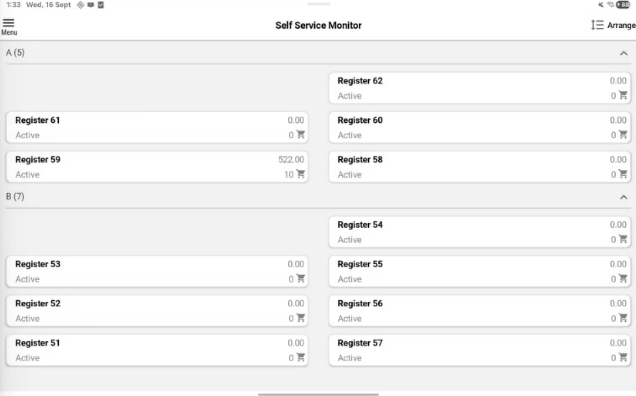
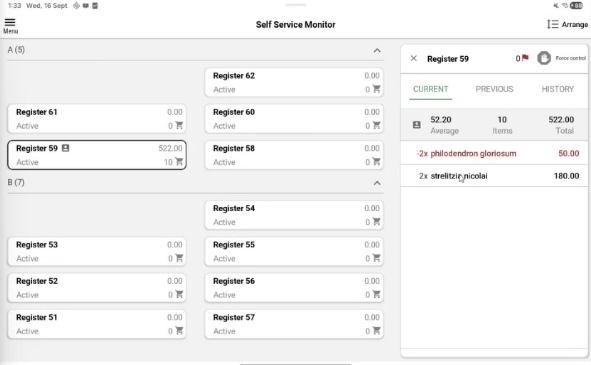
You can click on one of register to get more details, then more details for the selected cash register is shown to the right:
Non static layout
Non static layout have 2 sections Action required and Active. Non static layout have more options to arrange the view than the Static view.
Only registers configured in the “POSUnitLayout” parameter is visible in Non static layout.
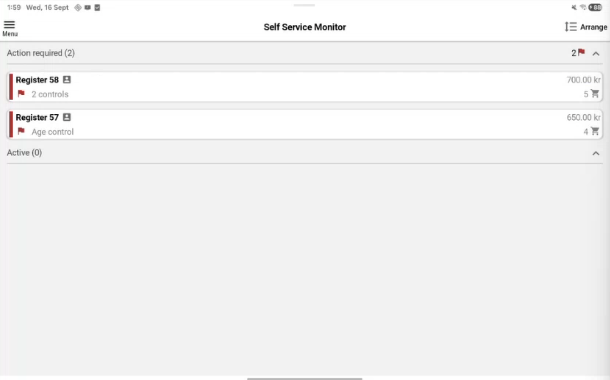
Action required - section displays the cash registers where action are required.
Active section - displays the cash registers with active sales.
View sales history
You can tap on the ongoing sale to show moere details, for example items and the total amount to pay.
Sales history can be shown if it is configured.
Sales history: Current, Previous and History tabs
Selecting a cash register and view the sale shows the three most recent sales for that register, across three tabs:
Current sale - Display the ongoing sale.
Previous - Display the sale finished most recently. Payment method is shown at the bottom.
History - Display the sale before Previous sale. Payment method is shown at the bottom.