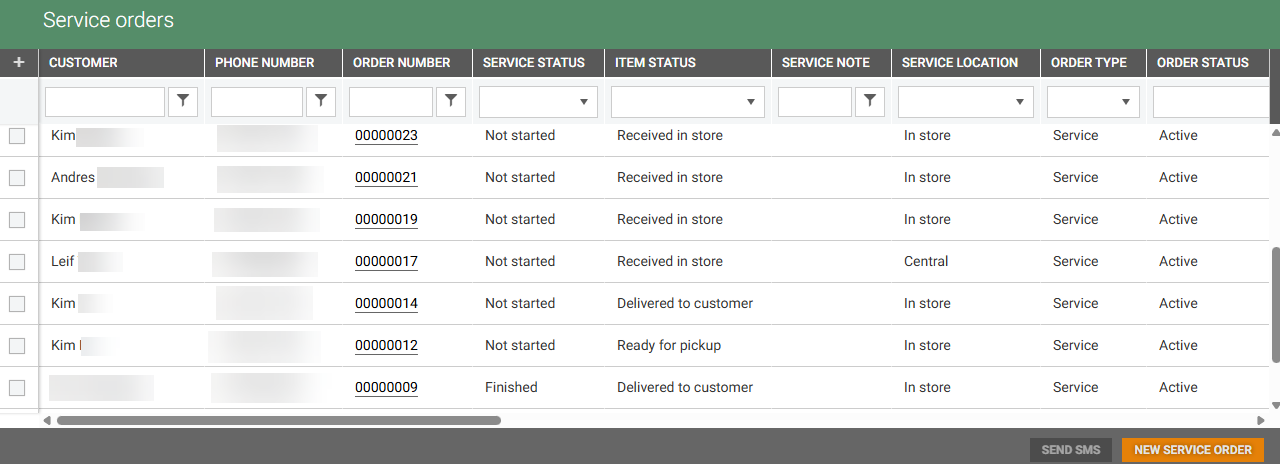
The Service orders provides an overview of Service orders available in the system, for the stores you have access to and their status. It can be found in the Customer menu, in the Sale section.
You can filter and search within the columns to find desired service order. By clicking the Order number you can open the “Service order details” to see service order details and edit service order.
Additionally you can create a New service order.
Service order permissions:
View service orders - Allows viewing the Service order overview, and Service order details (without ability to edit).
Manage service orders - Allows creating service orders and managing service order information.
Distribution - Allows distributing service orders (sending SMS / emails).
View action log - Allows viewing the action log for service orders.
View service locations - Allows viewing the service locations.
Manage service locations - Allows managing service locations.
Users store access affects accessibility of certain service orders - either the “Created in” store or the pickup store must be accessible to display the order, and the stores visible in general store picker in “New service order details” view.