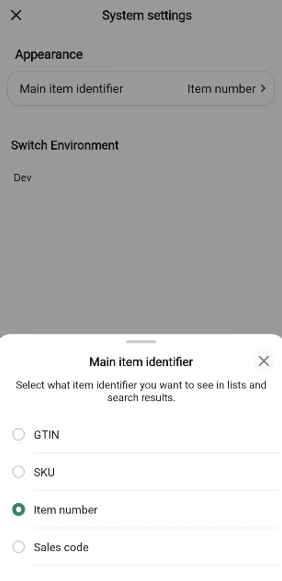
System settings let you change how the InStore App behaves on this device. You open them from the gear icon in the top-right corner of the Home screen.
Opening System settings
On the Home screen, tap the settings gear in the top-right corner.
The System settings page opens.
To return to the Home screen, tap the back arrow in the top-left corner.
Appearance - Main item identifier
The Main item identifier decides which number the app shows as the primary identifier for an item in lists and search results. Choosing Item number, for example, will show the item number directly under each product in the Search items list; choosing GTIN will show the GTIN instead.
On the System settings page, under Appearance, tap the Main item identifier row. The current value is shown on the right of the row (for example, Item number).
The Main item identifier bottom sheet opens with four options:
GTIN
SKU
Item number
Sales Code
The option currently in use is marked with a filled radio button.
Tap the identifier you want to use. The bottom sheet closes and the new value is saved and shown on the Main item identifier row.
To close the bottom sheet without changing anything, tap the X in the top-right corner of the sheet, or tap outside the sheet.