Profile and Preferences
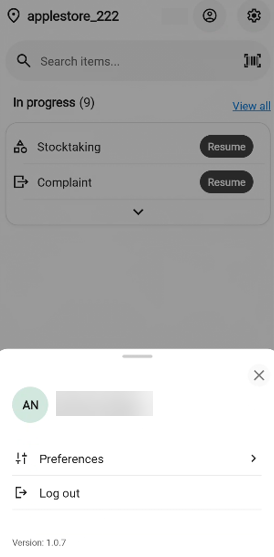
Your profile bottom sheet is where you open your personal Preferences and log out of the app. It also shows your name, your cashier number and the current app version.
Opening your profile
On the Home screen, tap the profile icon in the top-right corner (a circle with your initials).
The profile bottom sheet opens, showing:
Your name and cashier number.
Preferences - opens the Preferences page (see below).
Log out — signs you out of the app. See Logging out.
The version of the app is at the bottom (for example, Version: 2.10.340).
To close the sheet without doing anything, tap the X in the top-right corner of the sheet, or tap outside the sheet.
Changing your language
You can choose which language the app displays in. The change takes effect immediately - all menus, buttons and labels switch to the selected language.
Open the profile bottom sheet (see Opening your profile above) and tap Preferences.
The Preferences page opens. Below Language, you see four options:
Norwegian
English
Swedish
Finnish
The language currently in use is marked with a filled radio button.
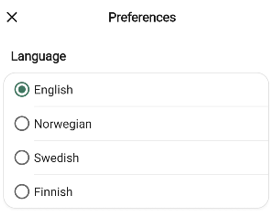
Tap the language you want to use. The selection is saved automatically, and the app text updates straight away.
To return to the previous screen, tap the back arrow in the top-left corner of the Preferences page.